
PopAi
PopAi is a versatile AI workspace for creating presentations, analyzing documents, generating content, and getting AI-assisted answers. Users can create editable slide decks from prompts or files, chat with PDFs, summarize information, brainstorm ideas, and export presentations as PPTX or PDF. It combines several productivity-focused AI capabilities in one workspace.
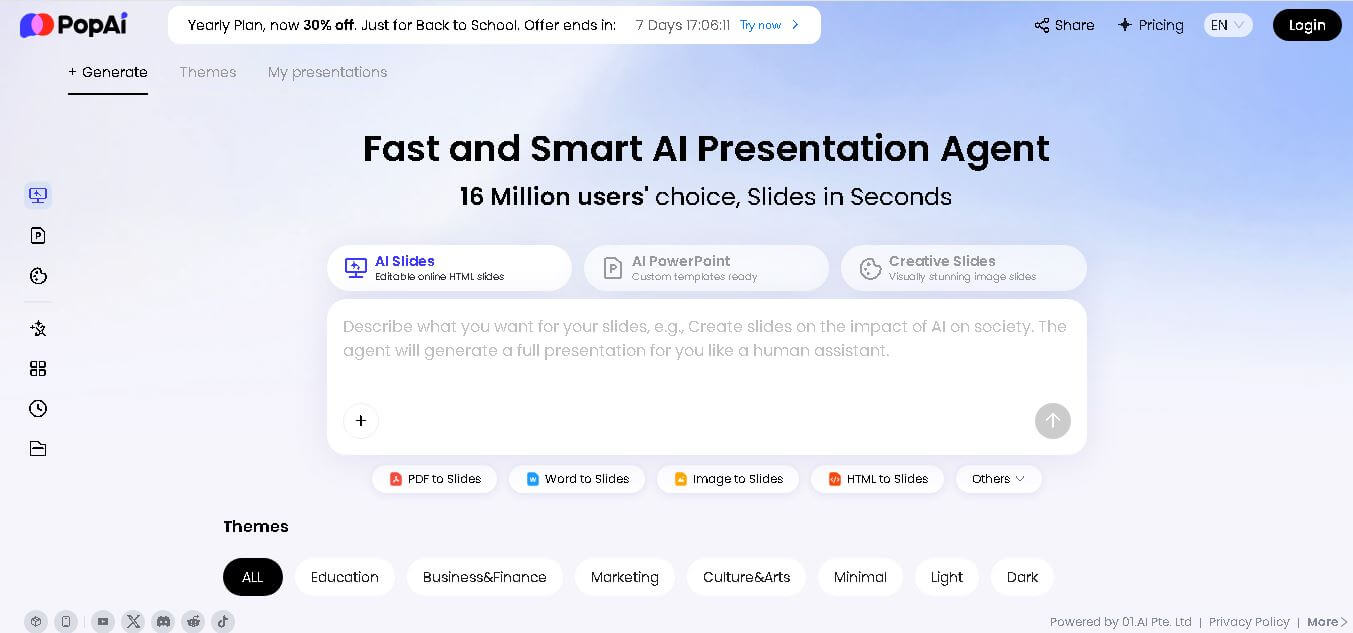
What is PopAi?
PopAi is a personal AI workspace designed to help users create presentations, understand documents, generate content, and solve problems. It can turn prompts or source files such as PDFs, Word documents, PPTX files, and webpages into structured presentations. PopAI also provides AI ChatPDF for reading and questioning documents, AI Chat for research and writing, and tools for image generation, data analysis, and other creative tasks.
PopAI supports AI presentations, AI ChatPDF, AI Chat, AI Sheets, image generation, writing, and document-related workflows. Its AI Reader supports documents up to 5,000 pages, while its PDF-to-PPT tool supports files up to 100 pages and 50 MB. Image-to-PPT conversion also supports files up to 50MB. Presentations can be exported as PPTX or PDF, with online editing and link sharing available.
- Platform Role: AI Presentation Maker, ChatPDF Document Analyzer & Visual Productivity Workspace
- Developer & Organization: PopAi Team
- Cross-Platform Access: Web Browser (zero-install cloud application), accessible across desktop and mobile devices
Use Cases:
- Converting complex PDFs, research papers, and strategic briefs into fully editable presentation decks and outlines
- Interacting with long-form documents via AI ChatPDF to extract summaries, key metrics, and structured Q&A insights
- Generating visual mind maps, flowcharts, and organizational diagrams from text prompts or document summaries
- Drafting business proposals, educational lesson plans, sales decks, and marketing presentations with automated visual themes
- Analyzing data tables, image inputs, and financial charts directly within an interactive AI chat interface
Technology:
- Multi-model AI integration providing access to top-tier LLMs, including GPT-5, Claude 4.5 Haiku, Gemini 3 Flash, Grok-4, and DeepSeek-V3.1
- Document-to-presentation engine with automatic structure parsing, slide layout generation, and theme customization
- High-capacity optical character recognition (OCR) and PDF parsing capable of reading multi-file batches and multi-page documents
- Seamless export compatibility allowing users to download finished presentations directly as Microsoft PowerPoint (.pptx) or PDF files
Target Users:
- Students and researchers analyzing academic literature and creating study slides or summaries
- Educators and trainers building interactive lesson plans, lecture slides, and visual course materials
- Business executives, marketers, and consultants requiring rapid pitch deck generation and document-driven presentations
- Knowledge workers looking for a unified document reader, image creator, and presentation drafting assistant
Acquisition: Native SaaS platform accessible online (popai.pro)

What are the key features of PopAi?
PopAi's key platform features are
- AI Presentation Maker: Instantly converts text prompts, uploaded PDFs, or web links into fully editable PowerPoint (.pptx) and PDF slide decks.
- AI ChatPDF & Document Reader: Summarizes long files, answers specific document queries, and cross-references multi-document uploads.
- Multi-Model AI Switcher: Allows users to harness leading models, including Claude, GPT-5, DeepSeek, and Gemini, for tailored output quality.
- Automated Mind Maps & Charts: Visualizes complex textual workflows and datasets as interactive diagrams, flowcharts, and mind maps.
- Custom Theme & Branding Controls: Enables users to apply professional slide themes, upload corporate logos, and remove watermarks on paid plans.
- AI Image Generation & Editing: Generates contextual images and visual aids directly within the presentation and document editing canvas.
How much does PopAi cost?
PopAi operates on a freemium model with a free credit allowance, alongside monthly or annual subscription plans for high-frequency presentation creators and power users.
Pricing Plans:
- Free Tier ($0 / Free): Includes a baseline total credit allowance (approx. 500 total credits) for trial presentation generation, basic AI chat, and limited ChatPDF uploads.
- Plus Plan ($12/month or discounted annually): Provides 10,000 monthly credits, 15–20 AI presentation generations, watermark removal, full PPTX/PDF exports, custom logo uploads, and expanded ChatPDF limits.
- Pro Plan (approx. $20–$40/month): Unlocks 50,000 monthly credits, 75–100 presentation generations per month, priority processing, and high-volume document analysis.
Disclaimer: Free allowances are designed for testing basic features. Watermark-free exports, full PPTX downloads, and advanced multi-model access require a paid subscription.
Who should use PopAi?
PopAi is designed for students, professionals, and creators, including
- Students & Academics: Users needing to digest dense research papers, generate mind maps, and create presentation slides for class.
- Sales & Business Consultants: Professionals who need to rapidly convert client documents, briefs, or meeting notes into structured pitch decks.
- Teachers & Instructional Designers: Educators converting curriculum guides and textbooks into engaging visual teaching slides.
What are the best alternatives to PopAi?
Some of the strongest PopAi alternatives include
- Gamma App
- Beautiful.ai
- Tome
- ChatPDF
- Slidesgo AI Presentation Maker
- Canva AI Presentation Generator
What are the pros and cons of PopAi?
What are the pros of PopAI?
- Direct document-to-presentation workflow turns long PDFs into structured slides in minutes
- Access to multiple top-tier AI models (GPT-5, Claude, Gemini, DeepSeek) within one platform
- Exports cleanly to native Microsoft PowerPoint (.pptx) format for post-generation editing
- Versatile feature set spanning ChatPDF, mind mapping, text writing, and presentation design
What are the cons of PopAi?
- The free tier offers limited initial credits and includes watermarks on generated slide decks
- Complex presentation layouts may require manual fine-tuning inside PowerPoint after export
- Advanced custom branding features are restricted to paid subscription tiers
Why should you choose PopAi?
Designing presentation slides from scratch often takes hours of manual outlining, copy tweaking, and layout formatting. PopAi bridges the gap between raw information and polished visual delivery by combining AI chat document reading directly with an automated presentation builder. Whether you start with a single prompt or a 50-page PDF report, PopAi turns static content into editable, presentation-ready slides effortlessly.
How does PopAi compare to competitors?
The primary distinction between PopAi, Gamma App, Beautiful.ai, and ChatPDF lies in scope and integration. While ChatPDF focuses strictly on document Q&A and Beautiful.ai focuses on pure template design, PopAi unifies document reading, multi-model AI access, and automated PPTX slide generation in a single workspace.
| Feature / Platform | PopAi | Gamma App | Beautiful.ai | ChatPDF |
|---|---|---|---|---|
| Core Focus | AI Presentation Maker & Document Reader Workspace | AI Web Decks, Documents & Presentation Cards | Automated Smart Slide Design | Document Summarization & PDF Chat |
| Document to Deck Input | Direct PDF/Doc upload conversion to PPTX | Import text/documents into web cards. | Template-first content import | Text chat only (no slide export) |
| PowerPoint (.pptx) Export | Native PPTX & PDF Download | PPTX & PDF Export | PPTX & PDF Export | Text / Data Export Only |
| Multi-Model Access | Yes (GPT-5, Claude, Gemini, DeepSeek) | Proprietary / Integrated Models | Design-focused Proprietary AI | Standard LLM Chat |
| Best For | Users wanting an all-in-one workspace for document chat, mind maps, and slide decks | Modern web presentation decks and interactive cards | Corporate teams prioritizing automated design layout alignment | Quick Q&A and summarization on standalone PDF files |
How do we rate PopAI?
| Parameter | Rating (out of 5) |
|---|---|
| Presentation Generation & Slide Quality | 4.7 |
| Document Analysis & ChatPDF Accuracy | 4.8 |
| Multi-Model AI Flexibility | 4.9 |
| Ease of Use & User Interface | 4.8 |
| Value for Money | 4.6 |
| Overall Score | 4.76 |
What is our review and verdict on PopAi?
PopAi is a versatile AI productivity platform that excels at turning raw content into actionable visual presentations. By seamlessly integrating document parsing, mind mapping, multi-model AI capabilities, and native PowerPoint exports, PopAi removes major friction points in research and deck creation workflows.
Conclusion
PopAi brings presentation creation, document analysis, AI chat, writing, and creative workflows into one workspace. Its ability to transform prompts and existing files into editable presentations makes it particularly useful for students, professionals, educators, marketers, and researchers. Features such as ChatPDF, AI presentations, document conversion, online editing, and PPTX or PDF export can reduce repetitive work while keeping users involved in the final output.
FAQ
What is PopAi used for?
PopAi is useful when you need help with presentations, documents, research, writing, or creative tasks. You can start with a topic or upload files such as PDFs, Word documents, PPTX files, or webpages. It can organize information, generate presentation drafts, summarize content, answer questions, and help turn complex material into more manageable outputs.
Can PopAi create PowerPoint presentations?
Yes, PopAi can create editable PowerPoint-style presentations from a topic, prompt, or existing source material. You can upload documents or provide a subject, review the suggested outline, choose a visual style, and generate slides. Afterward, you can edit the content and visuals before exporting the presentation as a PPTX or PDF file.
Can I use PopAi to summarize PDF documents?
Yes. PopAi includes an AI ChatPDF and AI Reader experience that helps users understand lengthy documents. You can interact with the document, ask questions, create summaries, take notes, and generate mindmaps. PopAi states that its AI Reader supports documents of up to 5,000 pages, making it useful for substantial reading and research tasks.
Can PopAi convert PDF files into presentations?
Yes. PopAi can transform PDF reports, research papers, manuals, financial documents, and other files into editable presentation slides. Its PDF-to-PPT tool analyzes document structure, extracts important information, and organizes it into a presentation flow. The tool supports PDFs up to 100 pages and 50 MB, with PPTX and PDF export options.
Is PopAi free to use?
PopAi offers a free version that allows users to access several AI capabilities. However, certain advanced functions, higher usage limits, exports, models, and presentation features may depend on the user's plan or available credits. The official website also describes membership benefits that include increased usage and access to additional presentation capabilities.
Can PopAi create presentations from images?
Yes. PopAi provides an image-to-slides tool that can transform JPG, JPEG, and PNG images into organized presentations. It can extract text and identify visual elements before arranging the information into a logical slide sequence. Images can be reviewed and edited afterward, with output available as PPTX or PDF.
User Reviews
No reviews yet for PopAi.
Featured Tools
Featured AI tools from TechShark

Melody Genie
MelodyGenie is an AI-powered music generator that creates original songs from simple text prompts. Users can choose styles, moods, and genres, then instantly generate melodies and full tracks, making it easy for creators, marketers, and hobbyists to produce custom music without musical expertise.
Freemium

Kimi AI
Kimi AI is an advanced AI assistant developed by Moonshot AI that helps you chat, research, write, code, and automate tasks in one place. It supports web search, file analysis, and multimodal inputs, and can even run autonomous “agent” workflows to complete complex tasks end-to-end.
Freemium

Fashion Diffusion AI
Fashion Diffusion is an AI-powered fashion design platform that helps brands and designers create clothing designs, virtual try-ons, AI models, product photos, and marketing visuals faster and cost-effectively.
Paid

Veo 4
Veo 4 AI is an AI video creation platform that generates dramatic videos from text, images, audio, and video prompts using realistic motion and synchronized sound.
Paid
Alternatives
Alternatives to PopAi
The best PopAi alternatives include Gamma App, Beautiful.ai, Tome, and ChatPDF. While PopAi offers an all-in-one workspace combining document parsing, multi-model AI chat, mind mapping, and native PowerPoint (.pptx) export, alternatives like Gamma App specialize in modern web-based card presentations and Beautiful.ai focuses on automated smart template layouts.
 4.7
4.7Quinvio AI
Productivity
Quinvio AI helps you turn ideas, scripts, blogs, or web content into polished video presentations. You can refine messaging, choose branded templates, add AI avatars and voiceovers, and produce shareable visual content without traditional recording or editing workflows. It is especially useful for marketers, educators, trainers, creators, and business teams.
 4.9
4.9HubSpot
Marketing
HubSpot is an AI-powered customer platform that helps businesses manage marketing, sales, customer service, and content in one place. It offers a free CRM, automation tools, analytics, and AI features, enabling teams to attract leads, close deals, and deliver better customer experiences at scale.
 4.9
4.9TestSprite
Testing
TestSprite is an AI-powered software testing agent that helps developers automatically generate, run, and fix end-to-end tests for web apps. It simulates real user behavior, detects issues, and provides root-cause insights with suggested fixes, enabling faster releases and more reliable software without manual QA effort.
 4.8
4.8Microsoft Copilot
Productivity
Microsoft Copilot is an AI-powered assistant that helps users write, research, analyze data, and automate tasks across apps like Word, Excel, Outlook, and Teams. It combines large language models with real-time data to generate content, answer questions, and improve productivity across personal and professional workflows.
 4.9
4.9Casablanca AI
Productivity
Casablanca AI is an AI-powered virtual camera that corrects your gaze in real time during video calls, making it appear like you’re maintaining natural eye contact. It works with tools like Zoom and Teams, improving trust, engagement, and communication without needing extra hardware.
 4.9
4.9Granola
Productivity
Granola is an AI-powered meeting assistant that helps you capture, organize, and act on conversations without losing focus. It listens to meetings, turns notes into structured summaries, and generates action items and follow-ups automatically—so you stay present while everything important is documented and ready to use.
 4.8
4.8AI Submit
Productivity
AI Submit is an automated directory submission and SEO distribution platform that allows AI startup founders and developers to submit their artificial intelligence tools to dozens of top AI directories simultaneously for backlink building and traffic growth.
 4.8
4.8AI Perfect Assistant
Productivity
AI Perfect Assistant brings AI assistance directly into everyday work applications. It helps users write emails, improve documents, summarize content, translate text, create presentations, generate SEO content, explain Excel formulas, and handle repetitive tasks through 60+ specialized tools and multiple integrations for everyday professional and business workflows with less effort.
 4.9
4.9Kroolo
Project Management
Kroolo is an AI-powered productivity and project management platform that helps teams plan tasks, track progress, and collaborate in one place. It combines project tracking, document management, and AI assistance to streamline workflows, automate routine work, and improve team efficiency across projects.