
Kuse AI
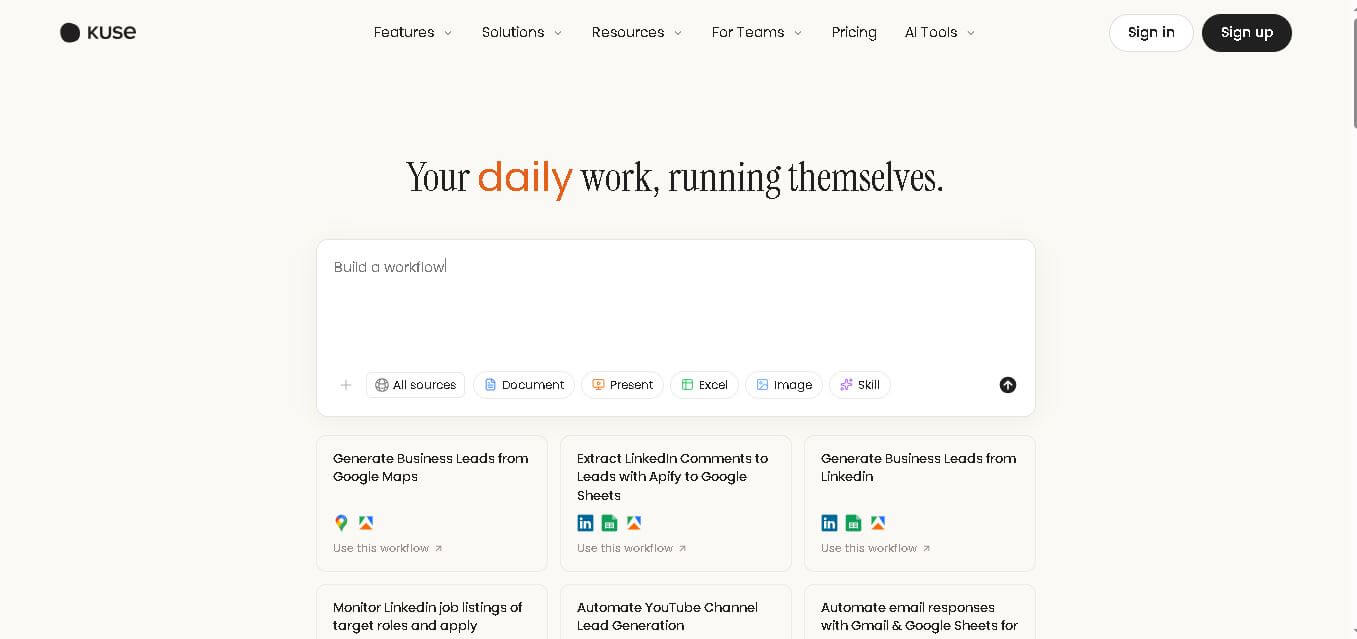
Kuse is an AI workspace for organizing files, creating professional documents, spreadsheets, presentations, and web pages, while automating recurring workflows. It lets users work with their existing information, templates, and connected applications through natural-language instructions. Kuse is designed for research, content creation, business operations, reporting, and repetitive knowledge-work tasks.
What is Kuse AI?
Kuse is a unified AI workspace designed to help individuals and teams manage files, create content, research information, and automate recurring work. It combines persistent file storage, AI-assisted document and spreadsheet creation, presentations, web pages, and scheduled workflows in one environment. Users can provide instructions in natural language, upload reference files, and connect supported applications to turn repetitive tasks into structured outputs.
Kuse combines 3 core capabilities: an AI file system, AI content creation, and AI workflow automation. New accounts currently receive 1,800 signup credits, while the personal plans shown on Kuse include 18,000, 38,000, and 198,000 monthly credits. Kuse supports PDFs, Word documents, Excel/CSV files, images, and text files. Its team plans start at $200/month, with pooled credits rather than seat-based pricing.
- Platform Role: Autonomous AI Workspace, AI Workflow Automation Engine & Digital Content Generator
- Developer & Organization: Kuse Inc.
- Cross-Platform Access: Web Browser (Cloud Workspace) with third-party app integrations (Gmail, Google Sheets, LinkedIn, Apify)
Use Cases:
- Automating local lead extraction and business enrichment directly from Google Maps and LinkedIn into structured spreadsheets
- Monitoring targeted LinkedIn job listings and company profiles to trigger automated outreach and application workflows
- Generating multi-format business deliverables—including landing page copy, pitch decks, client proposals, and data dashboards
- Automating incoming lead qualification and email responses by connecting Gmail with Google Sheets and CRM databases
- Extracting structured research summaries, meeting action items, and market intelligence reports automatically on schedule
Technology:
- Multi-model routing engine incorporating frontier AI models, including Claude (Opus/Sonnet), GPT series, and Gemini Pro/Flash
- Visual workflow engine with natural language workflow builder, scheduled cron-like triggers, and web scraping utilities
- Integrated cloud file workspace supporting dynamic generation and editing of documents, spreadsheets, presentations, and web pages
- API integration layer connecting third-party automation tools (Apify, Google Workspace, social media endpoints)
Target Users:
- Growth marketers and sales operations teams looking to automate lead enrichment and outreach pipelines
- Consultants, agencies, and freelancers generating client-facing proposals, slide decks, and research briefs on tight deadlines
- Startup Founders and Operations Managers needing low-code automation to handle routine operational tasks without extra hires
- Business development professionals requiring continuous market monitoring and automated intelligence gathering
Acquisition: Cloud SaaS platform owned and operated by Kuse Inc. (kuse.ai)

What are the key features of Kuse AI?
Kuse AI's key platform features are
- Natural Language Workflow Builder: Describe operational workflows in plain English, connect required app endpoints, and run them on demand or on a recurring schedule.
- Multi-Format AI Asset Generation: Create websites, structured documents, presentations, and organized spreadsheets instantly without starting from a blank canvas.
- Lead Generation & Scraping Blueprints: Pre-built automation templates for scraping business leads from Google Maps, LinkedIn comments, and social channels.
- Frontier AI Model Selection: Access top-tier AI models, including Claude 3.5 Sonnet, GPT-4o/GPT-5 class models, and Gemini Pro, within a single workspace interface.
- Cloud File Management & Canvas: An intuitive cloud-based file canvas to upload inputs, organize generated assets, and collaborate with team members.
- App & API Integrations: Direct synchronization with Gmail, Google Sheets, Apify, Facebook Lead Ads, and external webhook pipelines.
How much does Kuse AI cost?
Kuse AI operates on a freemium credit-based SaaS model, offering free credits upon signup alongside premium tiers for higher automation workloads.
Pricing Overview:
- Free Tier ($0 / Free Trial): Includes 1,800 free credits upon signup to explore AI workflows, document generation, and pre-built templates.
- Paid / Team Subscription Plans: Monthly and annual tiers that scale total monthly credit allowances, access to advanced AI models (Claude Opus/GPT-5 class), background scheduling, and expanded app integrations.
- Enterprise Plan: Custom high-volume credit allocation, dedicated API integrations, priority processing, and bespoke onboarding support.
Disclaimer: Free credits allow users to test workflows and document creation. Ongoing background automations, high-frequency web scrapers, and premium model access require paid subscription plans.
Who should use Kuse AI?
Kuse AI is designed for teams, agencies, and operators, including
- Sales & Business Development Teams: Teams that need continuous, automated pipeline generation from Google Maps and social media channels directly into Google Sheets.
- Marketing & Content Agencies: Creators requiring rapid conversion of rough meeting notes into polished client decks, launch landing pages, and proposals.
- Operations & Support Managers: Professionals looking to automate email triage, customer intake forms, and repetitive data entry workflows.
What are the best alternatives to Kuse AI?
Some of the strongest Kuse AI alternatives include
- Zapier Central
- Make.com
- N8n
- Relay.app
- Bardeen.ai
- Copy.ai Workflows
What are the pros and cons of Kuse AI?
What are the pros of Kuse AI?
- Combines task automation, web scraping, and multi-format document creation in one single workspace
- Zero-code setup allowing users to describe workflows in plain natural language
- Pre-built lead generation blueprints significantly accelerate sales and marketing outreach setup
- Flexible model access allows choosing the best AI engine for each specific task
What are the cons of Kuse AI?
- The credit-based usage model can consume credits quickly during heavy web scraping or continuous tasks
- Fewer native app integrations compared to established automation giant Zapier
- Advanced custom API workflows may require fine-tuning for edge-case error handling
Why should you choose Kuse AI?
Managing daily work across multiple fragmented tools—using search engines for research, spreadsheets for tracking, and standalone AI chats for drafting—wastes valuable hours every week. Kuse AI simplifies this by combining execution, automation, and asset creation into one central hub. Instead of manually copying data between tabs, Kuse allows you to build a single natural language workflow that handles research, updates spreadsheets, and drafts documents automatically in the background.
How does Kuse AI compare to competitors?
The primary distinction between Kuse AI, Zapier, Make.com, and Bardeen lies in focus and execution style. While Zapier and Make.com excel as traditional logic-based API connectors, Kuse AI combines AI-native document creation (web pages, decks, and sheets) with natural language workflow building and built-in web scraping templates.
| Feature / Platform | Kuse AI | Zapier | Make.com | Bardeen.ai |
|---|---|---|---|---|
| Core Focus | AI Workspace, Asset Creation & Workflows | Enterprise API & SaaS App Integration | Visual Data Pipeline & Scenario Automation | Browser Automation & Web Scraping |
| Workflow Creation | Natural Language Prompts & Templates | Trigger/Action Step Builder | Visual Node-Based Canvas | Browser Extension & Shortcut Builder |
| Built-in Asset Generation | Docs, Slides, Sheets & Web Pages | Limited (Requires connected apps) | Limited (Requires connected apps) | Mainly Table & CRM Exports |
| Web Scraping Templates | Native (Google Maps, LinkedIn, YouTube) | Requires Partner Apps / Webhooks | Built-in HTTP/Web Scraping Nodes | Native In-Browser Scraper |
| Best For | Teams wanting AI-first automation and asset drafting in one tool | Connecting thousands of business SaaS applications easily | Complex multi-step data transformations and developer flows | In-browser scraping and contextual web page actions |
How do we rate Kuse AI?
| Parameter | Rating (out of 5) |
|---|---|
| Natural Language Workflow Automation | 4.8 |
| Content & Document Generation Quality | 4.7 |
| Pre-built Templates & Lead Scraping | 4.8 |
| UI / UX Workspace Design | 4.7 |
| Value for Money & Credit Pricing | 4.5 |
| Overall Score | 4.70 |
What is our review and verdict on Kuse AI?
Kuse AI is a powerful next-generation workspace for teams seeking to automate repetitive tasks without building complex software architectures. By combining plain-language automation triggers with direct asset generation (slides, docs, websites) and out-of-the-box scraping templates, Kuse AI eliminates friction for sales development, research, and operations teams alike.
Conclusion
Kuse brings file management, AI content creation, research, and workflow automation into one workspace. Its natural-language approach can help turn repetitive knowledge work into reusable processes while keeping generated files organized within the same environment. With support for documents, spreadsheets, presentations, web pages, connected applications, and scheduled workflows, Kuse can fit a variety of professional use cases. Current limitations include the absence of dedicated mobile apps and real-time collaboration, so users should consider these factors alongside their specific workflow requirements.
FAQ
What can I use Kuse for?
Kuse can help you handle research, document creation, spreadsheet preparation, presentations, web pages, file organization, and recurring workflows. You can describe what you need in natural language and provide relevant files or references. It is particularly useful when your work involves repeated research, formatting, reporting, data processing, or content production.
What file types does Kuse support?
Kuse currently supports several common formats, including PDF, Word documents, Excel and CSV files, images such as PNG and JPEG, and text files. This makes it practical for working with business documents, datasets, research material, and visual references. Kuse states that additional formats are planned based on user feedback.
Can Kuse create documents and presentations?
Yes. Kuse can create structured documents, spreadsheets, presentations, and web pages from instructions, uploaded information, templates, or existing files. You can describe the required output, provide references, and let Kuse generate a formatted result. Generated content can then be reviewed and edited before being saved in your workspace.
Does Kuse support workflow automation?
Yes. Kuse includes AI workflow automation for recurring tasks. You can describe a process in natural language, specify when it should run, connect relevant applications, and have Kuse produce structured results. Workflows can research information, process data, create documents, interact with connected tools, and save outputs to your workspace automatically.
Is Kuse free to use?
Kuse offers a free option with unlimited projects and limited credits. New accounts currently receive 1,800 signup credits, while paid subscriptions provide larger monthly credit allowances and additional capabilities. Because pricing and plan details can change, checking Kuse's current pricing page before subscribing is recommended.
How much does Kuse cost?
Kuse's current personal pricing page shows plans at $19.90, $39.90, and $199.90 per month, with 18,000, 38,000, and 198,000 credits respectively. Yearly billing is displayed with a 20% saving. Kuse also offers team plans based on shared credit capacity rather than individual seats.
User Reviews
No reviews yet for Kuse AI.
Featured Tools
Featured AI tools from TechShark

Melody Genie
MelodyGenie is an AI-powered music generator that creates original songs from simple text prompts. Users can choose styles, moods, and genres, then instantly generate melodies and full tracks, making it easy for creators, marketers, and hobbyists to produce custom music without musical expertise.
Freemium

Kimi AI
Kimi AI is an advanced AI assistant developed by Moonshot AI that helps you chat, research, write, code, and automate tasks in one place. It supports web search, file analysis, and multimodal inputs, and can even run autonomous “agent” workflows to complete complex tasks end-to-end.
Freemium

Fashion Diffusion AI
Fashion Diffusion is an AI-powered fashion design platform that helps brands and designers create clothing designs, virtual try-ons, AI models, product photos, and marketing visuals faster and cost-effectively.
Paid

Veo 4
Veo 4 AI is an AI video creation platform that generates dramatic videos from text, images, audio, and video prompts using realistic motion and synchronized sound.
Paid
Alternatives
Alternatives to Kuse AI
The best Kuse AI alternatives include Zapier, Make.com, Bardeen.ai, and Relay.app. While Kuse AI provides a combined AI workspace for natural language workflows and direct generation of websites, presentations, and documents, alternatives like Zapier offer broader SaaS app ecosystems and Make.com provides advanced visual data processing scenarios.
 4.7
4.7Quinvio AI
Productivity
Quinvio AI helps you turn ideas, scripts, blogs, or web content into polished video presentations. You can refine messaging, choose branded templates, add AI avatars and voiceovers, and produce shareable visual content without traditional recording or editing workflows. It is especially useful for marketers, educators, trainers, creators, and business teams.
 4.9
4.9HubSpot
Marketing
HubSpot is an AI-powered customer platform that helps businesses manage marketing, sales, customer service, and content in one place. It offers a free CRM, automation tools, analytics, and AI features, enabling teams to attract leads, close deals, and deliver better customer experiences at scale.
 4.9
4.9TestSprite
Testing
TestSprite is an AI-powered software testing agent that helps developers automatically generate, run, and fix end-to-end tests for web apps. It simulates real user behavior, detects issues, and provides root-cause insights with suggested fixes, enabling faster releases and more reliable software without manual QA effort.
 4.8
4.8Microsoft Copilot
Productivity
Microsoft Copilot is an AI-powered assistant that helps users write, research, analyze data, and automate tasks across apps like Word, Excel, Outlook, and Teams. It combines large language models with real-time data to generate content, answer questions, and improve productivity across personal and professional workflows.
 4.9
4.9Casablanca AI
Productivity
Casablanca AI is an AI-powered virtual camera that corrects your gaze in real time during video calls, making it appear like you’re maintaining natural eye contact. It works with tools like Zoom and Teams, improving trust, engagement, and communication without needing extra hardware.
 4.9
4.9Granola
Productivity
Granola is an AI-powered meeting assistant that helps you capture, organize, and act on conversations without losing focus. It listens to meetings, turns notes into structured summaries, and generates action items and follow-ups automatically—so you stay present while everything important is documented and ready to use.
 4.8
4.8AI Submit
Productivity
AI Submit is an automated directory submission and SEO distribution platform that allows AI startup founders and developers to submit their artificial intelligence tools to dozens of top AI directories simultaneously for backlink building and traffic growth.
 4.8
4.8AI Perfect Assistant
Productivity
AI Perfect Assistant brings AI assistance directly into everyday work applications. It helps users write emails, improve documents, summarize content, translate text, create presentations, generate SEO content, explain Excel formulas, and handle repetitive tasks through 60+ specialized tools and multiple integrations for everyday professional and business workflows with less effort.
 4.9
4.9Kroolo
Project Management
Kroolo is an AI-powered productivity and project management platform that helps teams plan tasks, track progress, and collaborate in one place. It combines project tracking, document management, and AI assistance to streamline workflows, automate routine work, and improve team efficiency across projects.