
jpgRM
jpgRM is an AI image cleanup tool for removing unwanted objects, people, backgrounds, and visual distractions. Users can brush over an area they want removed, and its AI inpainting technology reconstructs the surrounding details. It also supports background removal, mobile browsers, and higher-resolution downloads through its VIP plans.
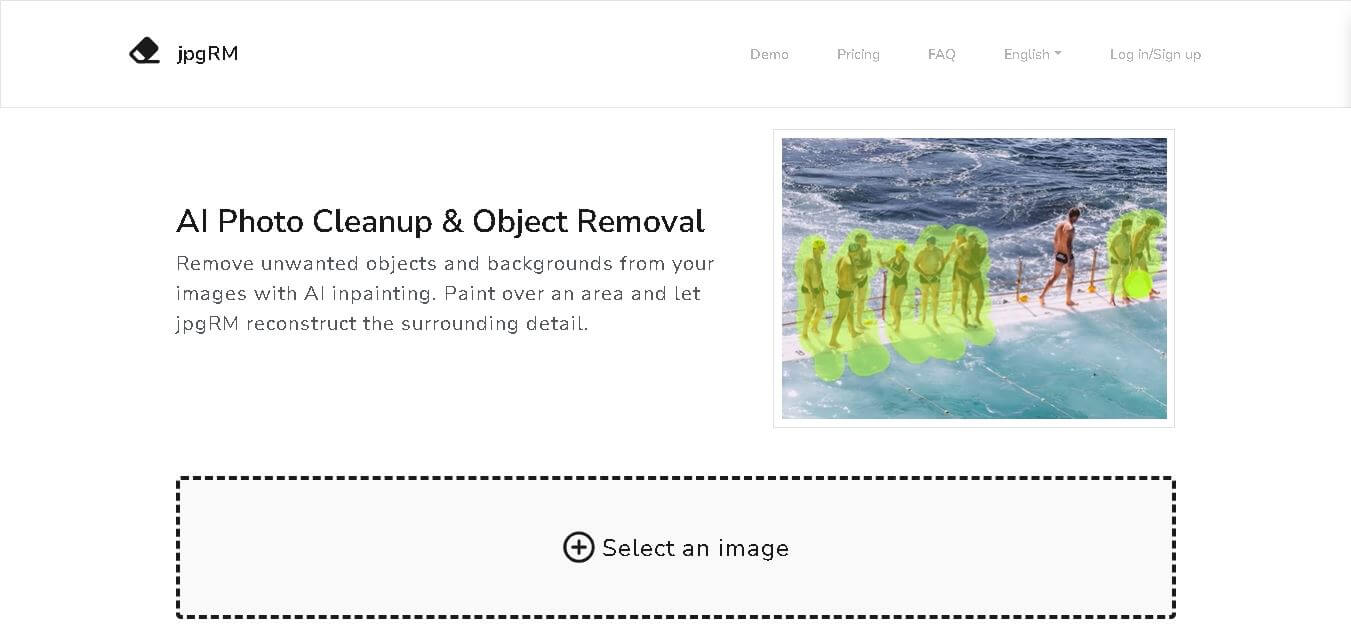
What is jpgRM?
jpgRM is an online image cleanup and object removal tool designed to help users erase unwanted elements, people, backgrounds, and imperfections from photos. The tool uses AI inpainting to analyze surrounding image details and reconstruct areas after users remove selected objects. Users simply upload an image, paint over the unwanted area, review the generated result, and download the edited image. jpgRM also supports background removal and works through modern mobile browsers.
jpgRM provides AI-based image cleanup with several practical capabilities and measurable limits. The service supports image processing up to 4K or 4000px for VIP users, while free downloads are limited to 720px. Its 1-month VIP plan costs $5, while 6-month and 1-year plans are currently listed at $15 and $20 respectively. Processing time depends on image size and server load, with smaller images generally completing faster. The service supports mobile browsers and deletes processed images after processing.
- Platform Role: AI Photo Cleanup, Object Eraser & Background Removal Tool
- Developer & Organization: jpgRM
- Cross-Platform Access: Web Browser (Desktop and Touch-optimized Mobile Browsers)
Use Cases:
- Removing tourists, passersby, or random pedestrians from travel and landscape photographs
- Cleaning up product photography for e-commerce by erasing dust, glare, wires, and unwanted background clutter
- Erasing text overlays, date stamps, watermarks, and logos from stock photos or web images
- Touch-up portrait photography by removing facial blemishes, stray hairs, skin spots, or temporary imperfections
- Isolating product subjects by removing entire image backgrounds in a single click
Technology:
- Deep generative AI inpainting models trained for context-aware texture synthesis and structure restoration
- High-performance GPU cloud processing pipeline optimized for rapid image rendering
- Browser-side interactive canvas supporting customizable brush sizes, undo/redo history, and live zoom comparison
- Privacy-centric processing architecture that discards uploaded files after user editing sessions
Target Users:
- E-commerce sellers, Amazon merchants, and shop owners creating clean product listings
- Social media managers, influencers, and content creators needing quick visual retouching
- Photographers and graphic designers seeking fast pre-retouching before heavy post-processing
- Everyday mobile and desktop users wanting to clean up personal vacation or family photos
Acquisition: Online web application operated by jpgRM (jpgrm.com)

What are the key features of jpgRM?
jpgRM's key platform features are
- AI Inpainting Object Removal: Simply brush over any unwanted object, shadow, or person to let AI automatically reconstruct the underlying background.
- Background Removal Engine: One-click background isolation designed for e-commerce products and portrait cutouts.
- Customizable Brush Tools: Adjustable brush size, interactive zoom, pan controls, and instant undo/redo capabilities for fine-grained selection.
- Live Before/After Comparison: Side-by-side toggle button allowing users to review edits against the original source photo in real time.
- Touch-Friendly Mobile Experience: Fully responsive web canvas designed for touch brushing on smartphones and tablets.
- High-Resolution HD/4K Export: VIP option to process and download high-definition images at up to 4000 px resolution without quality loss.
How much does jpgRM cost?
jpgRM offers a freemium pricing structure, providing unlimited low-resolution edits and affordable VIP subscription tiers for high-definition 4K exports.
Pricing Tiers:
- Free Plan ($0): Unlimited object removal and edits with downloads limited to 720px resolution.
- VIP 1 Month ($5 / month): Unlocks HD downloads up to 4000 px resolution (4K) with unlimited images and priority server processing.
- VIP 6 Months ($15 / one-time): Provides 6 months of full VIP access, including 4K downloads and unlimited edits ($2.50/mo equivalent).
- VIP 1 Year ($20 / year): Best-value annual plan featuring full 4K HD output and unlimited processing ($1.67/mo equivalent).
Disclaimer: The free version allows unlimited edits and testing, but restricts output resolution to 720px. High-definition (up to 4K) image downloads require a paid VIP subscription.
Who should use jpgRM?
jpgRM is designed for online sellers, creators, and everyday web users, including
- E-Commerce Retailers: Merchants needing to clean up background noise, wires, shadows, or blemishes from product shots.
- Social Media Content Creators: Influencers looking to quickly remove unwanted tourists or distractions from lifestyle photos before posting.
- Casual Photographers: Anyone wanting an effortless, software-free way to restore photobombed travel or family pictures.
- Graphic Designers: Professionals needing quick initial object erasures without opening Photoshop or complex desktop suites.
What are the best alternatives to jpgRM?
Some of the strongest jpgRM alternatives include
What are the pros and cons of jpgRM?
What are the pros of jpgRM?
- Extremely fast AI inpainting processing with minimal waiting time
- Generous free tier allowing unlimited test edits and 720px downloads
- Zero software installation needed; runs smoothly across desktop and mobile web browsers
- Highly competitive and low-cost VIP plans for full 4K resolution exports
- Simple, distraction-free interface with intuitive brush and compare tools
What are the cons of jpgRM?
- Free downloads are capped at 720px, which may be too low for print or large displays
- Complex high-detail backgrounds (e.g., dense repetitive lattice or geometric patterns) may occasionally require multiple brush passes
- Lacks advanced layer-based photo editing features found in full creative suites
Why should you choose jpgRM?
Manually removing unwanted objects using traditional Photoshop tools like the clone stamp or lasso tool takes time and technical expertise. jpgRM eliminates this hurdle by leveraging specialized AI inpainting that automatically fills in missing space with contextually accurate textures. jpgRM delivers an affordable and fast solution for anyone who wants to quickly clean up photos, prepare product images, or remove photobombers without any learning curve.
How does jpgRM compare to competitors?
The primary distinction between jpgRM, Cleanup.pictures, Photoroom, and Clipdrop lies in simplicity, resolution pricing, and ecosystem focus. While Photoroom focuses on full mobile e-commerce design suites and Clipdrop provides advanced generative tools, jpgRM offers a lightweight, high-value web editor specialized in fast AI object removal and affordable 4K output.
| Feature / Platform | jpgRM | Cleanup.pictures | Magic Studio (Magic Eraser) | Photoroom |
|---|---|---|---|---|
| Core Focus | AI Photo Cleanup & Object Removal | AI Object & Defect Removal | Photo Object & Background Eraser | E-Commerce Design & Background Studio |
| Free Output Quality | 720px Resolution (Unlimited) | 720px Resolution (Unlimited) | Low Resolution with Watermark Options | Standard Quality with Watermark |
| Max HD Download Resolution | Up to 4000px (4K) | Original High-Res (Pro Tier) | High Resolution (PRO Tier) | Full High Resolution Export |
| Pricing Value | Very Low ($20/year for 4K) | Moderate ($48/year Pro) | Moderate ($11.99/month) | Moderate ($12.99/month) |
| Best For | Users wanting fast, budget-friendly 4K photo object cleanup | Designers needing quick high-quality inpainting edits | Quick web edits and product photo cleanup | E-commerce sellers wanting full studio template designs |
How do we rate jpgRM?
| Parameter | Rating (out of 5) |
|---|---|
| Object Removal & Inpainting Quality | 4.7 |
| Processing Speed & Performance | 4.8 |
| User Interface & Brush Ease-of-Use | 4.9 |
| Mobile Responsiveness | 4.6 |
| Value for Money & VIP Pricing | 4.9 |
| Overall Score | 4.78 |
What is our review and verdict on jpgRM?
jpgRM is an exceptionally efficient and user-friendly AI tool for photo cleanup. By eliminating the technical complexities of traditional photo editors, it allows anyone to remove unwanted objects, watermarks, and people with a simple brush gesture. With its generous free editing tier and highly affordable 4K VIP upgrades, jpgRM is a top choice for e-commerce sellers, social media managers, and casual users alike.
Conclusion
jpgRM offers a focused approach to photo cleanup, combining AI inpainting with object and background removal in a simple brush-based workflow. Its free plan offers basic editing with a 720px download limit, while VIP plans provide up to 4K downloads and unlimited images. Mobile browser support adds flexibility for users working away from a desktop. For people who regularly need to remove distractions, clean product images, or isolate subjects, jpgRM offers a practical image-editing workflow.
FAQ
What can I use jpgRM for?
jpgRM can help you clean up photos by removing unwanted objects, people, backgrounds, and other distracting elements. You select an image, brush over the area you want removed, and process it. The tool reconstructs the selected region using surrounding image information. It can be useful for product photos, landscapes, and crowded scenes.
How does jpgRM remove unwanted objects?
jpgRM uses AI inpainting technology to reconstruct image areas after an unwanted object has been selected and removed. The system analyzes surrounding pixels and generates replacement content that fits the existing image context. You control the removal area using the brush, making the process suitable for targeted photo cleanup without manually editing every individual pixel.
Is jpgRM easy to use for beginners?
Yes, jpgRM is designed around a straightforward brush-based workflow. You upload an image, paint over the unwanted object or area, process it, review the result, and download it. For complicated sections, the official website recommends working in smaller areas and making additional passes until the result looks satisfactory.
Can jpgRM remove backgrounds from images?
Yes, background removal is one of jpgRM's supported functions. The website provides a dedicated background-removal option alongside object cleanup. This can help users isolate subjects from their original surroundings. jpgRM focuses on processing existing images rather than generating completely new images from text prompts or creating synthetic visual content from scratch.
Does jpgRM work on mobile devices?
Yes, jpgRM works through modern mobile browsers and supports touch-based interaction. This means you can upload images and use the brushing workflow from a smartphone or other compatible mobile device. The mobile experience can be useful when you need to quickly remove an unwanted person, object, or background element without opening desktop photo-editing software.
How quickly does jpgRM process images?
Processing speed depends mainly on image dimensions and current server load. According to jpgRM, smaller images generally process faster, while larger files can require additional time. Its website notes that images below 1000px commonly take around one or two seconds, although actual processing time can vary depending on circumstances.
User Reviews
No reviews yet for jpgRM.
Featured Tools
Featured AI tools from TechShark

Melody Genie
MelodyGenie is an AI-powered music generator that creates original songs from simple text prompts. Users can choose styles, moods, and genres, then instantly generate melodies and full tracks, making it easy for creators, marketers, and hobbyists to produce custom music without musical expertise.
Freemium

Kimi AI
Kimi AI is an advanced AI assistant developed by Moonshot AI that helps you chat, research, write, code, and automate tasks in one place. It supports web search, file analysis, and multimodal inputs, and can even run autonomous “agent” workflows to complete complex tasks end-to-end.
Freemium

Fashion Diffusion AI
Fashion Diffusion is an AI-powered fashion design platform that helps brands and designers create clothing designs, virtual try-ons, AI models, product photos, and marketing visuals faster and cost-effectively.
Paid

Veo 4
Veo 4 AI is an AI video creation platform that generates dramatic videos from text, images, audio, and video prompts using realistic motion and synchronized sound.
Paid
Alternatives
Alternatives to jpgRM
The best jpgRM alternatives include Cleanup.pictures, Magic Studio (Magic Eraser), Photoroom, and Clipdrop by Stability AI. While jpgRM offers fast web-based AI object inpainting with affordable 4K HD export plans, alternatives like Cleanup.pictures provide high-end developer APIs and Photoroom provides complete e-commerce design templates.
 4.7
4.7ImgCreator AI
Image
ImgCreator AI is an AI-powered image generation tool that helps users create visuals from text prompts and reference images. It supports creative artwork, realistic portraits, product visuals, and image editing, making it useful for designers, marketers, content creators, and businesses seeking faster visual content production.
Neural.love
AI Image Enhancer
Neural.love is an AI-powered creative platform for generating images, editing photos, enhancing videos, restoring old media, and animating pictures. It combines multiple AI tools in a browser-based workspace, helping content creators, marketers, photographers, designers, and businesses improve visual content without relying entirely on traditional editing software.
 4.8
4.8Prisma AI
Image
Prisma AI turns everyday photos into artistic images with stylized filters and creative effects. It offers hundreds of art and portrait styles inspired by famous artists, allowing beginners to create distinctive visuals quickly. Users can capture or upload photos, apply a chosen style, and save or share the finished result.
 4.9
4.9Bria AI
Image
Bria helps businesses and teams generate and edit visual content using controllable generative AI. Its capabilities cover image generation, product visuals, background editing, video workflows, and developer integrations. With licensed training data, attribution, provenance, and enterprise deployment options, Bria is positioned for businesses that need scalable, commercially focused visual AI.
 4.7
4.7Unwatermark
Image
Unwatermark.ai helps creators, marketers, photographers, and businesses remove watermarks, logos, text, people, and unwanted objects from images and videos. Its automatic detection handles quick edits, while the manual brush provides precise control over difficult areas. With browser-based processing, format support, previews, and free usage, it simplifies everyday visual cleanup.
 4.9
4.9invideo Nano Banana
Image
Nano Banana is an AI image generation and editing model by Google (Gemini family) that helps users create, modify, and refine visuals using natural language prompts. It supports 4K outputs, consistent characters, accurate text rendering, and real-time editing, enabling fast, production-ready creative workflows.
 4.8
4.8Banana Nano
Image
BananaNano (Nano Banana AI) is an AI-powered image generation and editing platform that lets users create visuals from text or edit photos using natural language. It supports multi-image fusion, character consistency, and up to 4K output, enabling fast, flexible visual creation without complex design tools.
 4.8
4.8Vheer
Image
Vheer is a free AI image and video generator that helps users create visuals from text or photos instantly. It includes tools for image editing, background removal, and image-to-video conversion, offering unlimited generations without signup, making it ideal for quick, creative content production.
 4.9
4.9QOVES
Image
QOVES is an AI-powered facial analysis and beauty consulting platform that helps users understand their facial features and improve appearance through personalized, science-backed recommendations. It analyzes hundreds of facial markers and provides a non-surgical transformation plan, enabling informed decisions about aesthetics, skincare, and overall self-improvement.