Zoom Workplace
Zoom Workplace is an enterprise-grade, AI-first collaboration platform combining HD video meetings, team chat, cloud VoIP phone, whiteboard, and digital spaces with native AI tools like Zoom AI Companion, My Notes, and ZoomMate at no extra cost for paid users.
What is Zoom Workplace?
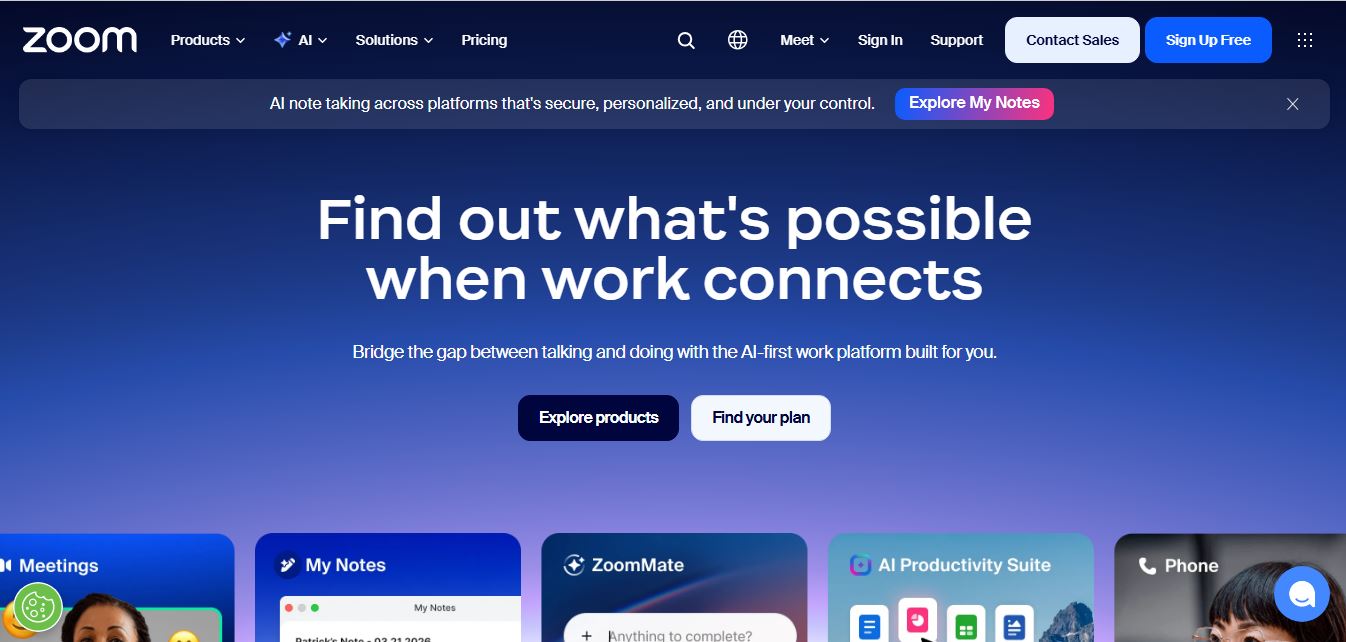
Zoom Workplace is an open, unified collaboration platform and Unified Communications as a Service (UCaaS) suite developed by Zoom Video Communications, Inc. Founded by Eric Yuan, Zoom has expanded beyond its pioneering video conferencing roots to deliver a full-spectrum workplace ecosystem that integrates video meetings, team chat, cloud telephony, email & calendar, digital whiteboards, and intelligent workspaces into a unified interface.
Built around the mission to “Bridge the gap between talking and doing with an AI-first work platform,” Zoom Workplace embeds generative intelligence directly into daily collaboration workflows. Powered by the Zoom AI Companion, My Notes, and ZoomMate, Zoom enables organizations to automate meeting summaries, extract action items, generate documents, and streamline business operations without paying extra per-seat generative AI licensing fees.
- Platform Role: Unified Communications Platform (UCaaS), Video Conferencing Ecosystem & Enterprise AI Workspace
- Developer & Leadership: Eric Yuan (Zoom Video Communications, Inc., San Jose, California)
- Cross-Platform Access: Native desktop clients (macOS, Windows, Linux), mobile apps (iOS, Android), web clients, Zoom Rooms appliances, and web browser extensions
Use Cases:
- Hosting interactive high-definition video meetings, virtual all-hands sessions, and global webinars with real-time translation and closed captioning
- Automatically capturing, summarizing, and assigning action items from live meetings using Zoom AI Companion and My Notes
- Consolidating global enterprise telephony and messaging through cloud-native Zoom Phone and persistent team chat channels
- Co-authoring visual brainstorms, wireframes, and project roadmaps using interactive Zoom Whiteboards and the AI Productivity Suite (Canvas, Docs)
- Optimizing hybrid office setups with workspace reservation, conference room scheduling (Zoom Rooms), and digital signage
Technology:
- Proprietary ultra-low-latency real-time video/audio transmission engine with dynamic bandwidth adaptation and noise suppression
- Federated AI architecture orchestrating multi-LLM routing (including OpenAI, Anthropic, and Zoom's proprietary models) to maximize speed and cost efficiency
- Enterprise-grade security infrastructure featuring End-to-End Encryption (E2EE), SOC 2 Type II, ISO 27001, and HIPAA compliance
- Extensive developer ecosystem featuring Video SDK, Meeting SDK, REST APIs, webhooks, and Model Context Protocol (MCP) integrations
Target Users:
- Global enterprises and distributed remote workforces requiring resilient, high-capacity video communication and unified team messaging
- Sales and revenue teams utilizing Zoom Revenue Accelerator to analyze sales calls, assess pipeline velocity, and coach reps
- Customer experience (CX) and support organizations deploying Zoom Contact Center and conversational Virtual Agents
- Higher education institutions and healthcare providers delivering remote learning and telehealth consultations
Acquisition: Publicly traded global communications enterprise headquartered in San Jose, California (NASDAQ: ZM / zoom.com)

What are the key features of Zoom Workplace?
Zoom Workplace's key platform features are
- Zoom Meetings & Webinars: High-definition video and audio conferencing supporting up to 1,000 interactive participants and large-scale broadcast sessions.
- Zoom AI Companion: Built-in generative AI assistant included at no additional cost for paid plans that drafts chat messages, recaps missed meeting minutes, and generates smart chapters.
- My Notes & ZoomMate: Automated AI note-taking suite that captures, summarizes, and extracts action items across in-person and digital discussions to produce deliverables.
- Zoom Team Chat: Persistent real-time messaging, channels, file sharing, and third-party app integrations connecting internal and external teams.
- Cloud VoIP Zoom Phone: Enterprise-grade cloud PBX system delivering global calling, inbound routing, SMS, and seamless call-to-meeting handoffs.
- Interactive Whiteboard & Canvas: Digital visual collaboration canvases allowing distributed teams to brainstorm, sketch, and map out workflows asynchronously.
- Zoom Rooms & Workspace Reservation: Smart conference room hardware integration with automated desk booking, visitor management, and digital signage.
- Extensive App Marketplace: Connects natively with Microsoft 365, Google Workspace, Salesforce, ServiceNow, Jira, and Slack.
How much does Zoom Workplace cost?
Zoom Workplace operates on a freemium pricing structure, offering free basic conferencing alongside tiered commercial subscriptions tailored to growing teams and enterprises.
Basic / Free Tier:
- Zoom Basic ($0 / Free): Up to 100 participants per meeting, 40-minute limit on group meetings, 3 editable whiteboards, and Team Chat messaging.
Paid Business & Enterprise Tiers:
- Pro (Approx. $13.32 - $15.99/user/month): Increases meeting duration up to 30 hours, includes cloud recording (5GB), and unlocks full access to Zoom AI Companion at no extra cost.
- Business (Approx. $18.32 - $21.99/user/month): Up to 300 participants, company branding, managed domains, and admin portal controls (min. 10 licenses).
- Business Plus & Enterprise: Custom bundles including Zoom Phone unlimited regional calling, workspace reservation, SSO, and dedicated customer success managers.
Disclaimer: Zoom provides a free tier for short meetings. Advanced cloud storage, extended durations, and the Zoom AI Companion are unlocked across paid Zoom Workplace tiers. Pricing details are available at zoom.com/pricing.
Who should use Zoom Workplace?
Zoom Workplace is designed for distributed businesses, educational institutions, and enterprises, including
- Hybrid & Remote Workforces: Companies needing a dependable, low-latency video and messaging platform that works reliably on any connection.
- Corporate Operations & HR Teams: Organizations streamlining conference room scheduling, company-wide announcements, and internal communications via Workvivo.
- Sales & Customer Success Teams: Reps conducting interactive client demonstrations, recording customer calls, and reviewing AI deal coaching metrics.
- Educators & Trainers: Instructors hosting interactive classes with breakout rooms, digital polls, virtual whiteboards, and attendance tracking.
What are the best alternatives to Zoom Workplace?
Some of the strongest Zoom Workplace alternatives include
- Microsoft Teams
- Google Meet
- Cisco Webex
- Slack (Huddles & Canvas)
- GoTo Meeting
- RingCentral
What are the pros and cons of Zoom Workplace?
What are the pros of Zoom Workplace?
- Industry-leading video and audio stability, maintaining clear connections even under low-bandwidth network conditions
- Zoom AI Companion is included at no extra per-seat cost on paid plans, unlike competitors who charge $20-$30/user/mo for AI add-ons
- Exceptional cross-platform accessibility, allowing friction-free meeting joins via desktop, mobile, and web browsers with zero installation
- Unified single-app ecosystem combining Meetings, Phone, Team Chat, Whiteboards, and Mail & Calendar
- Huge marketplace offering thousands of pre-built integrations for CRM, project management, and developer tools
What are the cons of Zoom Workplace?
- The 40-minute limit on the free tier can be restrictive for longer collaborative sessions
- Can introduce software overlap for organizations already paying for bundled suites like Microsoft 365 or Google Workspace
- Advanced enterprise telephony, contact center features, and large event broadcasting require specialized add-on licensing
Why should you choose Zoom Workplace?
Many legacy communication platforms require disparate tools for video calls, office phones, chat channels, and whiteboard sketches—while charging steep add-on fees for artificial intelligence features. Zoom Workplace brings all of these capabilities into a single, intuitive interface. By bundling the generative Zoom AI Companion into standard paid plans at no additional charge, Zoom allows teams to summarize meetings, automate follow-up action items, and maintain uninterrupted productivity without inflating software budgets.
- Connect effortlessly with world-renowned video and audio transmission reliability
- Automate meeting summaries and task extraction for free with the included Zoom AI Companion
- Consolidate phone, chat, video, and whiteboards into a single unified client
- Equip hybrid offices with desk booking and smart conference room integrations
How does Zoom Workplace compare to competitors?
The primary distinctions between Zoom Workplace, Microsoft Teams, Google Meet, and Cisco Webex lie in standalone video performance, user experience simplicity, and AI pricing models. While Microsoft Teams and Google Meet are bundled tightly inside larger office productivity ecosystems and charge hefty premiums for enterprise AI add-ons (such as Microsoft Copilot or Gemini Workspace), Zoom Workplace delivers superior independent call reliability and provides its generative AI companion at no additional cost on paid plans.
| Feature / Platform | Zoom Workplace | Microsoft Teams | Google Meet | Cisco Webex |
|---|---|---|---|---|
| Core Focus | Dedicated Video UCaaS & AI Workplace | Office 365 Collaboration & Team Chat | Browser-First Video Meetings | Enterprise Hardware & Secure Collaboration |
| AI Assistant Pricing | Included at no extra charge (Paid plans) | Paid add-on (Copilot at $30/user/mo) | Paid add-on (Gemini for Workspace) | Cisco AI Assistant included in select tiers |
| Meeting Time Limit (Free) | 40 Minutes | 60 Minutes | 60 Minutes | 40 Minutes |
| Max Participants (Standard) | 100 to 1,000 (Based on plan) | Up to 300 (Standard tiers) | Up to 500 (Enterprise tiers) | Up to 200 to 1,000 |
| Ecosystem Integration | Broad agnostic marketplace (2,500+ apps) | Deep Microsoft 365 stack | Deep Google Workspace stack | Cisco hardware & enterprise suites |
| Best For | Best-in-class video stability, external client calls, and cost-effective AI | Organizations standardized on Microsoft 365 and SharePoint | Teams preferring fast, zero-install browser video meetings | Enterprises requiring specialized physical boardroom hardware |
How do we rate Zoom Workplace?
| Parameter | Rating (out of 5) |
|---|---|
| Video Reliability & Audio Quality | 5.0 |
| AI Companion & Productivity Features | 4.9 |
| Platform Breadth (Phone, Chat, Rooms) | 4.8 |
| Ease of Use & Guest Accessibility | 5.0 |
| Value for Money | 4.8 |
| Overall Score | 4.90 |
What is our review and verdict on Zoom Workplace?
Zoom Workplace continues to set the gold standard for enterprise video collaboration and modern hybrid work. By pairing its legendary video compression algorithms and intuitive interface with the AI Companion provided at no additional cost, Zoom avoids the predatory add-on pricing seen across competing suites. For organizations seeking dependable, friction-free communications with rich team messaging, VoIP calling, and automated AI assistance, Zoom Workplace remains an unmatched leader.
Conclusion
Zoom Workplace successfully evolves beyond standard video conferencing into an intelligent, comprehensive collaboration hub. With its rock-solid connectivity, cross-device ease of use, extensive integration ecosystem, and included AI Companion, Zoom Workplace is the premier communication platform for modern teams worldwide.
FAQ
What is Zoom and what does it actually do?
Zoom is an AI-powered collaboration platform that enables video meetings, voice calls, chat, webinars, and team collaboration from a single app. It’s designed to help people connect and work together remotely or in hybrid environments using high-quality video, audio, and real-time communication tools.
How is Zoom different from other video conferencing tools?
Zoom stands out because it combines multiple tools—meetings, chat, phone, whiteboards, and AI features—into one unified platform instead of requiring separate apps. It also focuses heavily on ease of use, reliability, and scalability, making it suitable for both small teams and large enterprises.
What features does Zoom offer for meetings and collaboration?
Zoom includes HD video and audio meetings, screen sharing, live chat, whiteboards, recording, and AI-powered summaries. It also offers real-time captions, scheduling integrations, and collaboration tools that allow teams to work on documents and ideas during meetings.
Does Zoom include AI features?
Yes, Zoom includes built-in AI capabilities like automatic meeting summaries, note-taking, content generation, and task suggestions through its AI Companion. These features help teams save time, stay aligned, and extract actionable insights from meetings.
Is Zoom free or paid?
Zoom offers a free plan that allows meetings with basic limits, such as participant caps and time restrictions. Paid plans unlock longer meetings, more participants, cloud storage, advanced AI features, and enterprise-level collaboration tools for businesses.
Can Zoom be used across devices and locations?
Yes, Zoom works across desktops, laptops, mobile devices, and dedicated meeting room systems. It allows users to switch between devices seamlessly and collaborate from anywhere, making it ideal for remote and hybrid work setups.
Who should use Zoom?
Zoom is ideal for businesses, remote teams, educators, freelancers, and individuals who need reliable communication tools. It’s especially useful for organizations running virtual meetings, webinars, online classes, or global team collaboration.
User Reviews
No reviews yet for Zoom Workplace.
Featured Tools
Featured AI tools from TechShark

Melody Genie
MelodyGenie is an AI-powered music generator that creates original songs from simple text prompts. Users can choose styles, moods, and genres, then instantly generate melodies and full tracks, making it easy for creators, marketers, and hobbyists to produce custom music without musical expertise.
Freemium

Kimi AI
Kimi AI is an advanced AI assistant developed by Moonshot AI that helps you chat, research, write, code, and automate tasks in one place. It supports web search, file analysis, and multimodal inputs, and can even run autonomous “agent” workflows to complete complex tasks end-to-end.
Freemium

Fashion Diffusion AI
Fashion Diffusion is an AI-powered fashion design platform that helps brands and designers create clothing designs, virtual try-ons, AI models, product photos, and marketing visuals faster and cost-effectively.
Paid

Veo 4
Veo 4 AI is an AI video creation platform that generates dramatic videos from text, images, audio, and video prompts using realistic motion and synchronized sound.
Paid
Alternatives
Alternatives to Zoom Workplace
The best Zoom Workplace alternatives include Microsoft Teams, Google Meet, Cisco Webex, and Slack. While Zoom Workplace delivers superior standalone video transmission reliability, friction-free guest joining, and includes its Zoom AI Companion at no extra cost on paid plans, alternatives like Microsoft Teams and Google Meet integrate deeply with existing Office 365 and Google Workspace document suites.
 4.7
4.7Quinvio AI
Productivity
Quinvio AI helps you turn ideas, scripts, blogs, or web content into polished video presentations. You can refine messaging, choose branded templates, add AI avatars and voiceovers, and produce shareable visual content without traditional recording or editing workflows. It is especially useful for marketers, educators, trainers, creators, and business teams.
 4.9
4.9HubSpot
Marketing
HubSpot is an AI-powered customer platform that helps businesses manage marketing, sales, customer service, and content in one place. It offers a free CRM, automation tools, analytics, and AI features, enabling teams to attract leads, close deals, and deliver better customer experiences at scale.
 4.9
4.9TestSprite
Testing
TestSprite is an AI-powered software testing agent that helps developers automatically generate, run, and fix end-to-end tests for web apps. It simulates real user behavior, detects issues, and provides root-cause insights with suggested fixes, enabling faster releases and more reliable software without manual QA effort.
 4.8
4.8Microsoft Copilot
Productivity
Microsoft Copilot is an AI-powered assistant that helps users write, research, analyze data, and automate tasks across apps like Word, Excel, Outlook, and Teams. It combines large language models with real-time data to generate content, answer questions, and improve productivity across personal and professional workflows.
 4.9
4.9Casablanca AI
Productivity
Casablanca AI is an AI-powered virtual camera that corrects your gaze in real time during video calls, making it appear like you’re maintaining natural eye contact. It works with tools like Zoom and Teams, improving trust, engagement, and communication without needing extra hardware.
 4.9
4.9Granola
Productivity
Granola is an AI-powered meeting assistant that helps you capture, organize, and act on conversations without losing focus. It listens to meetings, turns notes into structured summaries, and generates action items and follow-ups automatically—so you stay present while everything important is documented and ready to use.
 4.8
4.8AI Submit
Productivity
AI Submit is an automated directory submission and SEO distribution platform that allows AI startup founders and developers to submit their artificial intelligence tools to dozens of top AI directories simultaneously for backlink building and traffic growth.
 4.8
4.8AI Perfect Assistant
Productivity
AI Perfect Assistant brings AI assistance directly into everyday work applications. It helps users write emails, improve documents, summarize content, translate text, create presentations, generate SEO content, explain Excel formulas, and handle repetitive tasks through 60+ specialized tools and multiple integrations for everyday professional and business workflows with less effort.
 4.9
4.9Kroolo
Project Management
Kroolo is an AI-powered productivity and project management platform that helps teams plan tasks, track progress, and collaborate in one place. It combines project tracking, document management, and AI assistance to streamline workflows, automate routine work, and improve team efficiency across projects.