Things Translate
Thing Translator is a free Google AI experiment that recognizes objects using your camera and instantly translates their names into another language.
What is Thing Translator?
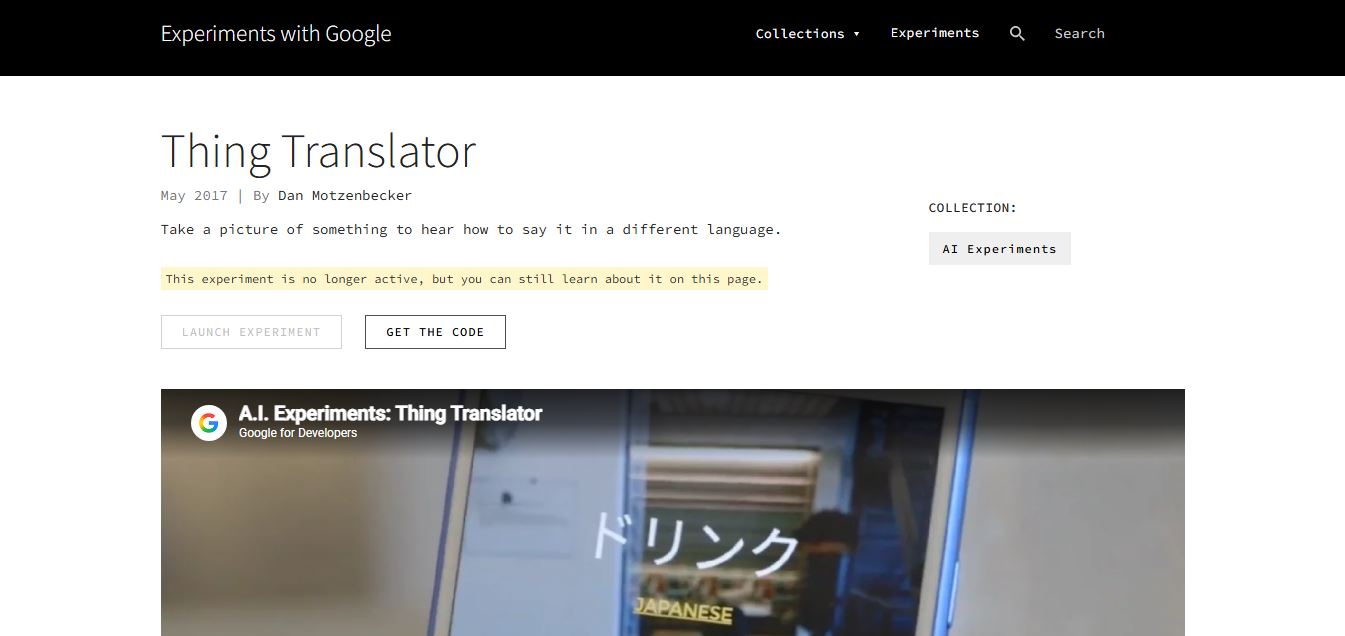
Thing Translator is a free AI experiment created by Google Creative Lab that demonstrates how computer vision and machine translation can work together. Users simply point their smartphone camera at a physical object, and the AI identifies what it is using the Google Cloud Vision API. It then translates the object's name into the selected language using Google Translate technology and speaks the translated word aloud. Although the original experiment is no longer active, it remains an excellent example of AI-powered object recognition and multilingual translation. It was designed to showcase Google's machine learning capabilities in a simple and interactive way.
Thing Translator is an experimental AI tool developed by Google Creative Lab that allows users to take a photo of an object and instantly hear its name translated into another language. Launched in 2017, it combines 2 core AI technologies—Google Cloud Vision API (image recognition) and Google Translate API (language translation)—to deliver real-time results. The tool demonstrates multimodal AI (image + text + speech) in a simple interface and works in dozens of languages supported by Google Translate. While now inactive, it remains a key example of early AI-powered visual translation prototypes, showcasing how machine learning can simplify cross-language communication.
- Founder: Dan Motzenbecker with Google Creative Lab
- Launch: May 2017
- Use Cases: Object translation, language learning, AI demonstrations, education, travel
- Technology: Google Cloud Vision API, Google Translate API, Machine Learning, Computer Vision
- Target Users: Students, travelers, educators, AI enthusiasts, developers
- Acquisition: No acquisition has been announced because it is a Google AI experiment.

Thing Translator at a Glance
| Attribute | Details |
|---|---|
| Product Name | Thing Translator |
| Developer | |
| Category | AI Vision + Translation Tool |
| Platform | Web (Experimental) |
| Image Recognition | Yes |
| Translation | Yes |
| Voice Output | Yes |
| Best For | Learning & AI demos |
Thing Translator is designed as a simple yet powerful demonstration of AI capabilities.
- It removes the need for typing
- It combines vision and language in one workflow
- It delivers instant results
- It makes AI accessible to beginners
While the feature set is basic, the underlying concept is highly impactful and forms the foundation of many modern AI tools.
Thing Translator Key Features
Thing Translator key features are
- Object Recognition: Detects physical objects using your smartphone camera.
- Instant Translation: Translates detected object names into another language.
- Voice Pronunciation: Speaks the translated word aloud.
- AI Vision Technology: Uses Google Cloud Vision API for object detection.
- Multi-Language Support: Supports numerous languages through Google Translate.
- Camera Integration: Scan real-world objects directly from your phone.
- Educational Learning: Helps users learn vocabulary visually.
- Free Access: Available as a free AI experiment.
- Open Source Code: Developers can explore the project code.
Thing Translator Pricing
Thing Translator offers a free plan for all users
Is Thing Translator Worth Using?
As a production tool, it is limited. However, as a learning and demonstration tool, it is extremely valuable. It helps users understand how modern AI systems combine multiple technologies.
Disclaimer: For the latest and most accurate pricing information, please visit the official Thing Translator website.
Who is using Thing Translator?
A diverse range of users and organizations utilize Thing Translator
- Students
- Language Learners
- Travelers
- Teachers
- Developers
- AI Researchers
- Technology Enthusiasts
- Google AI Experiment Users
What are the best Thing Translator Alternatives?
Some Thing Translator alternatives are
- Google Lens
- Google Translate
- Microsoft Translator
- Apple Translate
- DeepL Translator
- iTranslate
- Naver Papago
- Yandex Translate
Pros and Cons
Pros
- Completely free
- Easy to use
- AI-powered object recognition
- Instant translations
- Voice pronunciation
- Educational tool
- Built using Google's AI technologies
Cons
- Original experiment is no longer active
- Limited compared to Google Lens
- Requires camera access
- Demonstration project rather than a full product
Why Choose Thing Translator?
Thing Translator demonstrates how AI can combine image recognition and translation in a simple, interactive experience. It is ideal for learning languages, understanding AI technology, and exploring computer vision concepts.
- Free AI experiment
- Object recognition
- Instant multilingual translation
- Beginner-friendly
- Educational use
- Powered by Google AI
Thing Translator vs Competitors
The main difference between Thing Translator, Google Lens, Google Translate, and Microsoft Translator is that Thing Translator was designed as an AI experiment that recognizes physical objects and translates their names, whereas Google Lens offers complete visual search capabilities, Google Translate focuses on text and speech translation, and Microsoft Translator provides multilingual communication tools. Thing Translator mainly demonstrates AI technology rather than serving as a complete translation application.
| Tool | Best For | Object Recognition | Translation | Free |
|---|---|---|---|---|
| Thing Translator | AI Experiment | Yes | Yes | Yes |
| Google Lens | Visual Search | Yes | Yes | Yes |
| Google Translate | Text Translation | Limited | Yes | Yes |
| Microsoft Translator | Language Translation | No | Yes | Yes |
How Do We Rate Thing Translator?
| Category | Rating (/5) |
|---|---|
| Features | 4.3 |
| Ease of Use | 4.8 |
| AI Technology | 4.7 |
| Pricing | 5.0 |
| Overall Rating | 4.5 |
Thing Translator Review
Thing Translator is an impressive demonstration of Google's AI capabilities, combining computer vision with machine translation in an easy-to-use interface. Although the original experiment is no longer active, it successfully showcased how AI can identify real-world objects and translate them instantly into different languages. For developers, educators, and students, it remains an inspiring example of practical AI implementation. Users looking for a production-ready tool may prefer Google Lens, but Thing Translator remains an important milestone in AI experimentation.
Conclusion
Thing Translator introduced an innovative way to combine computer vision and language translation using AI. By simply pointing a camera at an object, users could instantly learn its name in another language. Although Google has retired the live experiment, its concepts continue to influence modern AI products such as Google Lens and Google Translate. For anyone interested in machine learning, computer vision, or multilingual technology, Thing Translator remains a valuable example of how artificial intelligence can simplify everyday communication.
FAQ
What is Thing Translator?
Thing Translator is a Google AI experiment that identifies objects with a camera and translates their names into another language.
Is Thing Translator free?
Yes. Thing Translator was released as a completely free AI experiment.
Is Thing Translator still available?
The original interactive experiment is no longer active, but information and source code remain available.
What technology does Thing Translator use?
It uses Google Cloud Vision API for object recognition and Google Translate API for translation.
What are the best Thing Translator alternatives?
Google Lens, Google Translate, Microsoft Translator, DeepL Translator, Apple Translate, Naver Papago, iTranslate, and Yandex Translate.
User Reviews
No reviews yet for Things Translate.
Featured Tools
Featured AI tools from TechShark

Melody Genie
MelodyGenie is an AI-powered music generator that creates original songs from simple text prompts. Users can choose styles, moods, and genres, then instantly generate melodies and full tracks, making it easy for creators, marketers, and hobbyists to produce custom music without musical expertise.
Freemium

Kimi AI
Kimi AI is an advanced AI assistant developed by Moonshot AI that helps you chat, research, write, code, and automate tasks in one place. It supports web search, file analysis, and multimodal inputs, and can even run autonomous “agent” workflows to complete complex tasks end-to-end.
Freemium

Fashion Diffusion AI
Fashion Diffusion is an AI-powered fashion design platform that helps brands and designers create clothing designs, virtual try-ons, AI models, product photos, and marketing visuals faster and cost-effectively.
Paid

Veo 4
Veo 4 AI is an AI video creation platform that generates dramatic videos from text, images, audio, and video prompts using realistic motion and synchronized sound.
Paid
Alternatives
Alternatives to Things Translate
The best Thing Translator alternatives include Google Lens, Google Translate, Microsoft Translator, DeepL Translator, Apple Translate, Naver Papago, iTranslate, and Yandex Translate. These tools provide AI-powered image recognition, multilingual translation, OCR, real-time camera translation, and voice translation features. While Thing Translator was primarily created as an AI experiment to demonstrate object recognition and translation, its alternatives deliver more advanced capabilities for travel, education, business, and everyday communication.
 4.7
4.7Quinvio AI
Productivity
Quinvio AI helps you turn ideas, scripts, blogs, or web content into polished video presentations. You can refine messaging, choose branded templates, add AI avatars and voiceovers, and produce shareable visual content without traditional recording or editing workflows. It is especially useful for marketers, educators, trainers, creators, and business teams.
 4.9
4.9HubSpot
Marketing
HubSpot is an AI-powered customer platform that helps businesses manage marketing, sales, customer service, and content in one place. It offers a free CRM, automation tools, analytics, and AI features, enabling teams to attract leads, close deals, and deliver better customer experiences at scale.
 4.9
4.9TestSprite
Testing
TestSprite is an AI-powered software testing agent that helps developers automatically generate, run, and fix end-to-end tests for web apps. It simulates real user behavior, detects issues, and provides root-cause insights with suggested fixes, enabling faster releases and more reliable software without manual QA effort.
 4.8
4.8Microsoft Copilot
Productivity
Microsoft Copilot is an AI-powered assistant that helps users write, research, analyze data, and automate tasks across apps like Word, Excel, Outlook, and Teams. It combines large language models with real-time data to generate content, answer questions, and improve productivity across personal and professional workflows.
 4.9
4.9Casablanca AI
Productivity
Casablanca AI is an AI-powered virtual camera that corrects your gaze in real time during video calls, making it appear like you’re maintaining natural eye contact. It works with tools like Zoom and Teams, improving trust, engagement, and communication without needing extra hardware.
 4.9
4.9Granola
Productivity
Granola is an AI-powered meeting assistant that helps you capture, organize, and act on conversations without losing focus. It listens to meetings, turns notes into structured summaries, and generates action items and follow-ups automatically—so you stay present while everything important is documented and ready to use.
 4.8
4.8AI Submit
Productivity
AI Submit is an automated directory submission and SEO distribution platform that allows AI startup founders and developers to submit their artificial intelligence tools to dozens of top AI directories simultaneously for backlink building and traffic growth.
 4.8
4.8AI Perfect Assistant
Productivity
AI Perfect Assistant brings AI assistance directly into everyday work applications. It helps users write emails, improve documents, summarize content, translate text, create presentations, generate SEO content, explain Excel formulas, and handle repetitive tasks through 60+ specialized tools and multiple integrations for everyday professional and business workflows with less effort.
 4.9
4.9Kroolo
Project Management
Kroolo is an AI-powered productivity and project management platform that helps teams plan tasks, track progress, and collaborate in one place. It combines project tracking, document management, and AI assistance to streamline workflows, automate routine work, and improve team efficiency across projects.