
EditBuddy
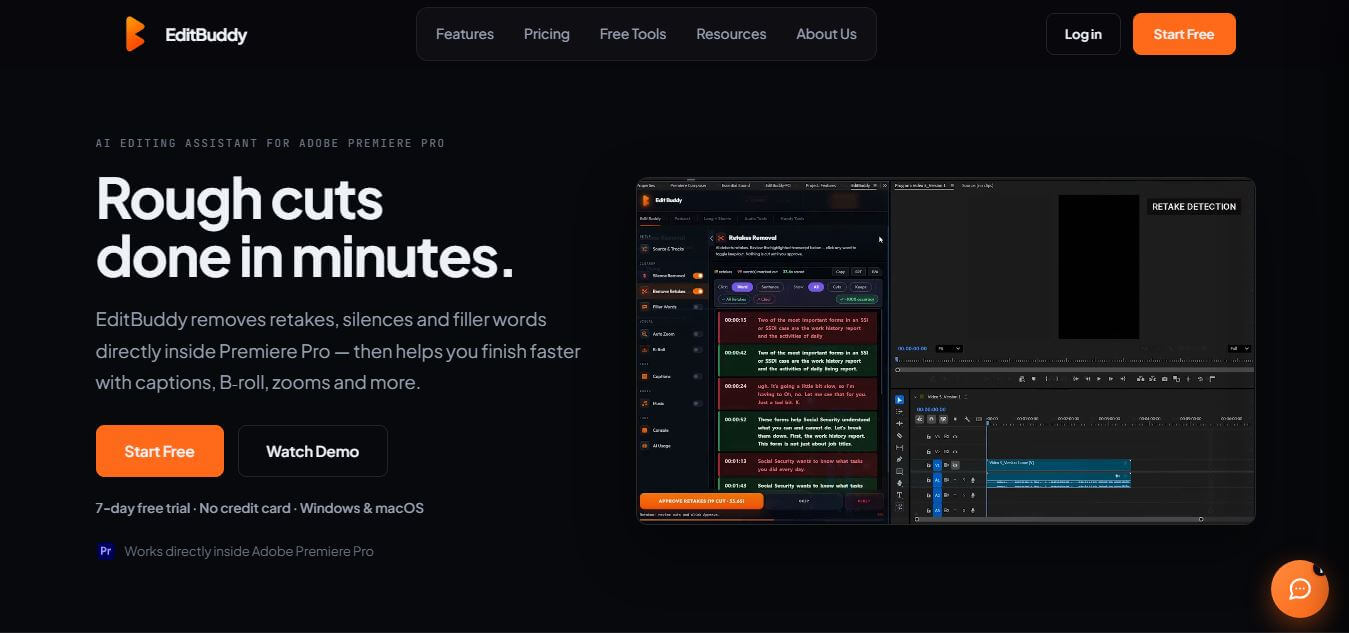
EditBuddy is an AI-powered video editing assistant that works directly inside Adobe Premiere Pro, helping creators speed up their workflow. It automates repetitive tasks like removing silences, detecting retakes, adding captions, and generating short clips, making video editing faster and more efficient.
What is EditBuddy?
EditBuddy is a smart video editing assistant designed to simplify and speed up the editing process for creators and professionals. Built to work directly inside Adobe Premiere Pro, it helps automate time-consuming tasks that usually slow down production. From removing silent gaps and identifying retakes to generating captions and creating short clips, EditBuddy takes care of repetitive work so editors can focus on creativity. Its intuitive workflow fits naturally into existing editing setups, making it easy to adopt without a steep learning curve. Whether you are a content creator, marketer, or video editor, EditBuddy helps improve efficiency and consistency.
EditBuddy helps creators reduce video editing time by up to 80 percent through text-based editing and one-click silence removal. The platform automatically detects and eliminates silent gaps with millisecond accuracy across video files in under 2 minutes. Transcribing speech in over 50 languages, EditBuddy boosts viewer retention on social media platforms by up to 85 percent using dynamic, animated subtitle templates. Creators repurposing podcasts and webinars generate up to 10 viral short-form clips from a single recording session effortlessly.
- Founder: Developed by the EditBuddy engineering and product team
- Launch Year: 2024
- Use Cases:
- Text-based video trimming and talking-head editing
- Automated dead silence and awkward pause removal
- Filler word detection and speech cleanup
- Animated social media caption generation and clip repurposing
- Technology:
- Automatic Speech Recognition (ASR) neural models
- Natural language processing text-to-timeline synchronization
- Cloud-based automated video rendering and audio filtering
- Target Users:
- Video creators, vloggers, and YouTubers
- Podcasters and interview show hosts
- Social media managers and digital marketing teams
- Online educators, course creators, and coaches
- Acquisition: Operates as an independent SaaS video creation company

Key features of EditBuddy
EditBuddy's key features are
- Edit videos like a document: Instead of complicated timelines, you can simply edit your video by changing the text transcript—cut, delete, or rearrange sentences with ease.
- Automatic silence removal: It quickly detects and removes awkward pauses and dead air, so your videos feel smooth and engaging.
- Cleaner speech, instantly: Filler words like “um,” “uh,” or “like” are automatically highlighted and removed to make your content more polished.
- Eye-catching captions: Create animated, word-by-word subtitles with custom styles, colors, and even emojis—perfect for social media.
- Smart clip creation: It scans long videos and pulls out the most engaging moments, turning them into ready-to-share short clips.
- Resize for every platform: Easily convert your videos into vertical, square, or widescreen formats for TikTok, Reels, and YouTube Shorts.
- Better audio quality: Reduce background noise, balance voice levels, and improve clarity with built-in audio enhancements.
- Easy exports: Download your transcripts and subtitles in formats like SRT, VTT, or TXT for use anywhere.
EditBuddy Pricing
EditBuddy offers flexible freemium access alongside scalable subscription plans designed for solo creators and production teams.
Free Plan:
- $0/month
- Basic monthly video processing minutes
- Text-based transcript editing and standard watermarked exports
Creator Plan:
- Starts at approximately $19/month
- 1080p watermark-free video exports
- Extended processing minutes, automatic silence removal, and animated captions
Pro / Agency Plan:
- Approximately $49/month
- 4K video exports, priority cloud rendering queues, and higher upload limits
- Multi-clip batch generation and advanced subtitle styling
Enterprise Tier:
- Custom pricing
- Custom branding, multi-user collaboration workspaces, and API access
Disclaimer: For the latest and most accurate pricing information, please visit the official EditBuddy website.
Who is using EditBuddy?
EditBuddy is designed for a broad range of digital video creators and marketers, including
- YouTubers & Vloggers: Editing talking-head videos, tutorials, and interviews in record time
- Podcasters: Transforming full-length audio and video episodes into engaging social media snippets
- Social Media Managers: Producing short-form video reels for TikTok, Instagram, and YouTube Shorts
- Online Educators & Course Creators: Building clean, accessible instructional video lessons
- Content Marketers: Using writing tools to convert video transcripts into blogs and social posts
- Remote Teams & Founders: Editing product demos, customer testimonials, and webinar replays
Best EditBuddy Alternatives
Some of the strongest EditBuddy alternatives include
Pros and Cons of EditBuddy
Pros
- Intuitive text-based editing makes cutting video as easy as editing a text document
- Automated silence and filler word removal saves hours of manual timeline trimming
- High-quality animated caption templates boost social media engagement
- Runs entirely in the browser with no heavy desktop software installation required
- Generates multiple short-form clips from a single long-form video automatically
Cons
- Free plan includes export watermarks and limited monthly processing time
- Advanced multi-track video transitions and special visual effects are limited
- Requires a stable internet connection for uploading large raw video files
- Rendering multi-hour 4K video projects may take additional processing time
Why Choose EditBuddy?
EditBuddy is the ideal choice for creators and marketers who want to publish clean, captioned videos quickly without learning complex non-linear editing software. It focuses on speed, simplicity, and social media engagement.
- Eliminates tedious manual timeline scrubbing with intuitive text-based cuts
- Cleans up awkward silences and filler words in a single click
- Generates viral-style animated captions that increase viewer watch time
- Repurposes long-form videos into multiple short clips for social platforms
- Cost-effective subscription plans that replace multiple single-purpose video utilities
EditBuddy vs. Competitors
The main difference between EditBuddy, Descript, Opus Clip, and Deciphr AI is that EditBuddy combines text-based video editing, automated silence removal, and animated social caption templates in a lightweight browser app, while Descript offers a complex desktop studio for multi-track audio, Opus Clip focuses on AI clip curation, and Deciphr AI specializes in podcast transcription and written show notes. EditBuddy stands out for its fast, simple, and visual talking-head video editing workflow.
| Feature / Tool | EditBuddy | Descript | Opus Clip | Deciphr AI |
|---|---|---|---|---|
| Core Focus | Text-Based Video Editor | Multi-Track Media Studio | AI Short-Form Clipping | Podcast Notes & Text |
| Text-Based Editing | Yes | Yes | Limited | No |
| Auto Silence Removal | Yes | Yes | Automated | No |
| Animated Social Captions | Yes | Yes | Yes | No |
| Interface Platform | Browser | Desktop App | Browser | Browser |
| Best For | Fast Talking-Head Videos | Complex Podcast Edits | Automated Viral Shorts | Audio Summarization |
How do we rate EditBuddy?
| Parameter | Rating (out of 5) |
|---|---|
| Text-Based Editing Precision | 4.8 |
| Silence & Filler Removal | 4.9 |
| Caption & Subtitle Styling | 4.8 |
| Ease of Use | 4.9 |
| Value for Money | 4.7 |
| Overall Score | 4.82 |
EditBuddy Review
EditBuddy is a highly practical tool for video editors who want to speed up their workflow inside Premiere Pro. It does an excellent job automating repetitive tasks like removing silences, detecting retakes, and adding captions, which can save hours of manual effort. While it’s best suited for creators and professionals familiar with editing tools, its seamless integration and time-saving features make it a strong productivity booster. Overall, EditBuddy is a smart solution for faster, more efficient video production.
Conclusion
EditBuddy is a valuable addition to any video editor’s toolkit, especially for those working within Adobe Premiere Pro. By automating repetitive and time-consuming tasks, it allows creators to focus more on storytelling and creative decisions rather than manual editing work. Its seamless integration and intuitive workflow make it easy to adopt without disrupting existing processes. While it may be more beneficial for users with some editing experience, the time-saving benefits are clear. EditBuddy enhances productivity, improves efficiency, and helps deliver high-quality video content faster, making it a smart choice for modern content creators and professionals.
FAQ
What exactly is EditBuddy, and how can EditBuddy help me?
EditBuddy is an AI-powered video editing assistant built directly inside Adobe Premiere Pro. EditBuddy helps you automate repetitive editing tasks like cutting silences, removing retakes, adding captions, and placing B-roll. EditBuddy speeds up your workflow so you can focus more on creative storytelling instead of manual editing.
Does EditBuddy work inside Premiere Pro or as a separate tool?
EditBuddy works inside Adobe Premiere Pro as a native panel, not as a separate app. EditBuddy reads your current timeline and applies edits directly to your project, so you don’t need to export or switch platforms. This makes EditBuddy faster and more efficient compared to cloud-based editors.
Do I need to upload my videos to use EditBuddy?
No, EditBuddy keeps your original footage on your device. EditBuddy processes lightweight data like transcripts or compressed audio when needed, but your full video files stay local. This approach helps maintain privacy and speeds up editing workflows.
Can EditBuddy really save time in video editing?
Yes, EditBuddy can dramatically reduce editing time. A long video that normally takes several hours to edit manually can be processed in a much shorter time using EditBuddy’s automation features. EditBuddy focuses on the “first pass” editing stage, where most repetitive work happens.
Can EditBuddy create short-form content automatically?
Yes, EditBuddy includes a “Long → Shorts” feature. EditBuddy analyzes your timeline, finds engaging moments, and converts them into vertical short videos ready for platforms like TikTok, Instagram Reels, or YouTube Shorts.
Why is EditBuddy useful for modern creators?
EditBuddy solves a major problem in content creation—time-consuming editing. EditBuddy automates repetitive tasks while keeping full creative control inside Premiere Pro. As short-form content demand grows, EditBuddy helps creators produce more videos faster without burning out.
User Reviews
No reviews yet for EditBuddy.
Featured Tools
Featured AI tools from TechShark

Melody Genie
MelodyGenie is an AI-powered music generator that creates original songs from simple text prompts. Users can choose styles, moods, and genres, then instantly generate melodies and full tracks, making it easy for creators, marketers, and hobbyists to produce custom music without musical expertise.
Freemium

Kimi AI
Kimi AI is an advanced AI assistant developed by Moonshot AI that helps you chat, research, write, code, and automate tasks in one place. It supports web search, file analysis, and multimodal inputs, and can even run autonomous “agent” workflows to complete complex tasks end-to-end.
Freemium

Fashion Diffusion AI
Fashion Diffusion is an AI-powered fashion design platform that helps brands and designers create clothing designs, virtual try-ons, AI models, product photos, and marketing visuals faster and cost-effectively.
Paid

Veo 4
Veo 4 AI is an AI video creation platform that generates dramatic videos from text, images, audio, and video prompts using realistic motion and synchronized sound.
Paid
Alternatives
Alternatives to EditBuddy
The best EditBuddy alternatives includes Deciphr AI, Descript, Opus Clip, Veed.io, CapCut, and Riverside.fm. These tools offer automated video editing, speech transcription, and content repurposing features. While EditBuddy excels at fast browser-based text editing, silence cleanup, and animated social captions, alternatives like Descript provide advanced multi-track studio workflows, and Deciphr AI focuses on podcast show notes. Choosing the right tool depends on whether you need quick text-based video trimming or deep audio-visual production.
Neural.love
AI Image Enhancer
Neural.love is an AI-powered creative platform for generating images, editing photos, enhancing videos, restoring old media, and animating pictures. It combines multiple AI tools in a browser-based workspace, helping content creators, marketers, photographers, designers, and businesses improve visual content without relying entirely on traditional editing software.
 4.8
4.8Shuffll
Video Editing
Shuffll goes beyond traditional video creation by connecting personalized video directly to enterprise data and workflows. Its API-first infrastructure, 40+ AI models, automated production, and built-in brand governance make it suitable for organizations that need video at scale. For businesses seeking higher engagement without building large production teams, Shuffll offers a practical way to turn existing data into personalized, on-brand video experiences.
 4.8
4.8Opus Clip (Opus Pro)
Video Editing
OpusClip helps creators transform long-form videos into short, social-ready clips. It can identify engaging moments, generate captions, reframe footage, add B-roll, enhance audio, and support publishing across major social platforms. It is designed for creators, marketers, podcasters, businesses, and teams that want to scale video content production.
 4.8
4.8Dubbah
Video Editing
Dubbah helps Mac users translate and dub videos into 14 languages while preserving a familiar speaker voice. The app processes media locally, supports editing translated lines, and works offline after setup. With no account, subscription, or per-minute fee, it offers a simple, straightforward option for creators producing multilingual video content.
 4.9
4.9Clipchamp
Video Generator
Clipchamp is an AI-powered online video editor by Microsoft that helps users record, edit, and share videos directly from the browser. It offers templates, stock media, and AI tools like subtitles, voiceovers, and noise removal, enabling fast, professional video creation without advanced editing skills.
 4.9
4.9CapCut
Video Editing
CapCut is a popular video editing tool that helps creators produce engaging videos with effects, transitions, filters, templates, subtitles, and AI-powered features. Available on multiple platforms, CapCut makes it easy to edit videos for TikTok, Instagram Reels, YouTube Shorts, and other social media channels.
 4.9
4.9Media.io
Video Editing
Media.io is an AI-powered creative platform that helps users generate, edit, and enhance videos, images, audio, and ads from simple prompts or assets. It combines AI generation, editing, and workflows in one place, enabling creators to turn ideas into polished content quickly without switching tools.
 4.9
4.9Video Candy
Video Editing
Video Candy is a free online video editing platform that helps users trim, merge, compress, convert, and enhance videos directly in the browser. It offers 70+ tools with a simple drag-and-drop interface, making video editing fast, accessible, and efficient without installing complex software.
 4.8
4.8Vheer
Image
Vheer is a free AI image and video generator that helps users create visuals from text or photos instantly. It includes tools for image editing, background removal, and image-to-video conversion, offering unlimited generations without signup, making it ideal for quick, creative content production.