Cursor vs Claude Code: Which AI Coding Tool Is Better?
Confused between Cursor and Claude Code? See a complete comparison of features, performance, pricing, and use cases to choose the right AI coding assistant.
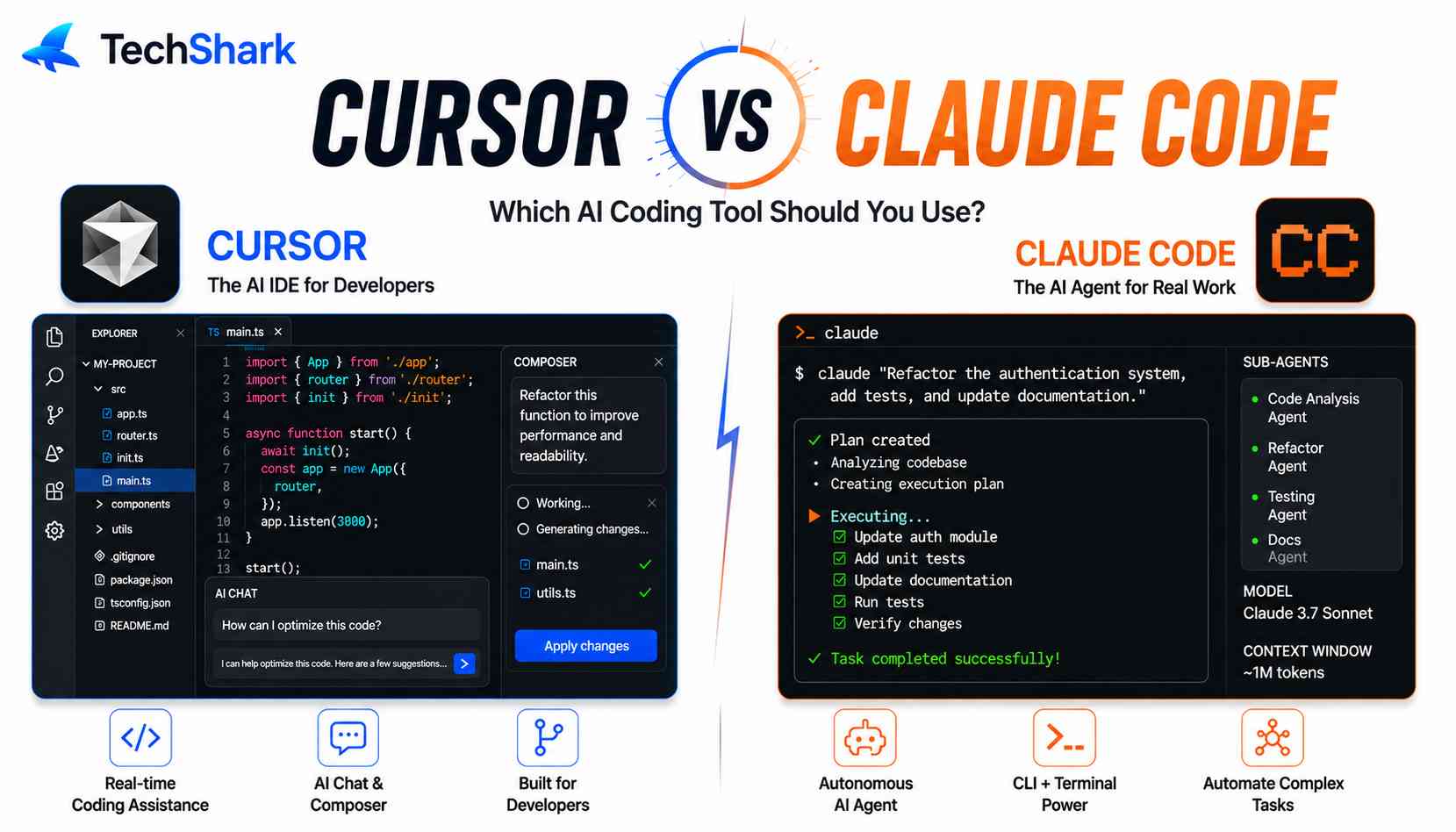
Explore moreCursor and Claude Code are both AI coding tools, but they serve different workflows. Cursor is an AI-first code editor built for real-time coding, debugging, and project navigation inside your IDE. Claude Code, powered by Anthropic’s Claude models, excels at reasoning-heavy tasks like code explanation, large refactoring, and documentation. Cursor is better for fast, hands-on development, while Claude Code is stronger for complex logic and deep analysis. Choosing between them depends on whether you prioritize speed in coding or depth in understanding.
If you've searched "Claude Code vs Cursor" or "Cursor vs Claude Code" recently, you've probably noticed the answer keeps changing. Six months ago, the situation was an easy comparison: Cursor was the polished IDE, and Claude Code was the terminal-only agent for people who liked living dangerously. That distinction barely holds anymore. Both tools now ship background agents, CLI access, and IDE integrations, and the overlap between them has grown considerably faster than the differences have shrunk.
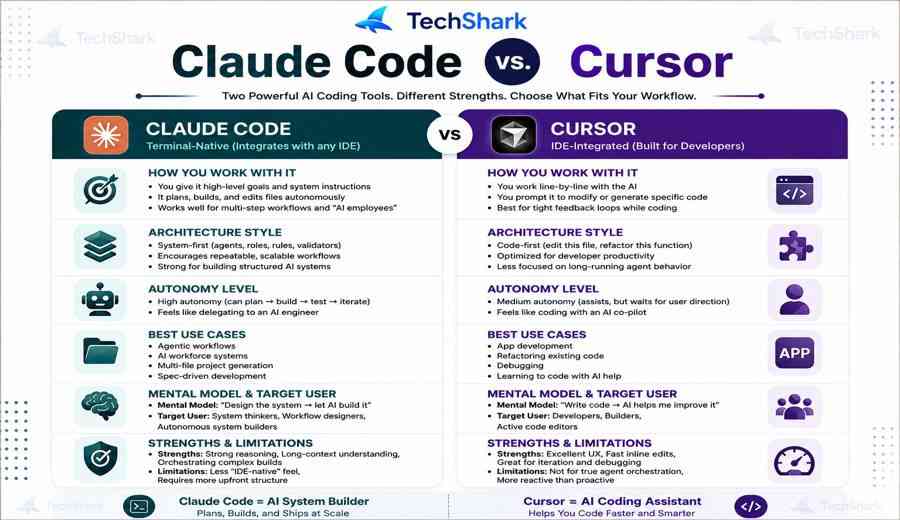
So here's the short version, up front: Cursor is an AI-native code editor you actively drive, built for visual diff review, tab completion, and multi-model flexibility. Claude Code is an autonomous coding agent, terminal-first, built for handing off large, multi-step tasks and letting it work with minimal supervision. Neither one "wins" outright—and a growing number of developers are using both for different jobs in the same week.
Which one should I use?
The answer isn’t as simple as just saying “this one is better.” Cursor and Claude Code solve similar problems from different angles. Cursor wraps AI inside a familiar VS Code-based editor. Claude Code brings Anthropic’s Claude models directly into your terminal as an autonomous agent. Both can write, refactor, debug, and explain code. But their workflows, pricing, and ideal use cases differ significantly.
The rest of this guide breaks down their differences, costs, performance data, and how to choose which one (or both) fits your workflow.
Cursor vs Claude Code Quick Comparison Table
| Feature | Claude Code | Cursor |
|---|---|---|
| Core Model | Terminal-native autonomous agent | AI-native VS Code fork |
| Interface | Terminal, VS Code/JetBrains extension, desktop app | Full IDE (editor, sidebar, embedded browser) |
| Entry Price | Pro from ~$17–20/month | Pro $20/month (Hobby tier is free) |
| Top Individual Tier | Max 20x, ~$200/month (reported) | Ultra, $200/month |
| Team Pricing | Team Standard ~$20–25/seat, Team Premium ~$100–125/seat | Teams $40/user/month |
| Billing Model | Token/compute-hour pools, 5-hour rolling window + 7-day ceiling | Dollar-based credit pool tied to model cost |
| Model Choice | Claude family only (Sonnet, Opus) | Multi-model (Claude, GPT, Gemini, Composer, and more) |
| Best At | Large refactors, unfamiliar codebases, documentation, multi-file autonomy | Fast inline edits, bug fixes, visual diff control |
| Governance | MCP integrations, spend/usage controls | SSO, privacy mode, hooks, prompt alignment |
Cursor's paid plans in 2026 include Hobby (free), Pro at $20/month, Pro+ at $60/month, Ultra at $200/month, and Teams at $40 per user per month, with Enterprise priced individually. Claude Code, by contrast, is bundled into Claude's own plans—roughly $20 for Pro, $100 or $200 for Max tiers, and around $100 per seat for Team Premium, with pay-per-token API access also available.
What Is Claude Code?
Claude Code is Anthropic's autonomous coding agent that runs directly in the terminal, with no graphical editor or sidebar. When launched inside a project directory, it indexes the full repository, builds an internal map of the codebase, and then reads, plans, edits, and executes multi-step tasks on its own. It also runs as an extension inside VS Code and JetBrains, plus a standalone desktop app, for developers who want the same agent without leaving their usual editor.
The core idea is delegation. You describe a task in plain language—"migrate this service from REST to GraphQL," "find and fix the memory leak in the worker process" — and Claude Code goes off and does the multi-step work: reading files, writing code, running tests, and iterating, largely without needing you to approve every keystroke.
It can:
- Read and edit files across your repository.
- Run shell commands, tests, and git operations.
- Launch multi-step autonomous workflows (e.g., “locate all API endpoints, add rate limiting, write tests, and run them”).
- Integrate with scripts, hooks, and CI/CD pipelines.
- Use Claude’s long context window to understand entire codebases.
Claude Code shines in autonomy and scriptability. Because it lives in the terminal, you can chain it with other command-line tools. It’s also popular among developers who dislike switching between editor and terminal — you can stay in your flow without lifting your hands off the keyboard.
Key Claude Code facts:
- Runs entirely in the terminal; no GUI required.
- Powered by Anthropic’s Claude models, known for strong coding and reasoning.
- Supports custom system prompts, MCP (Model Context Protocol) tools, and project-specific instructions.
- Usage is often metered via the Anthropic API or included in Claude subscription plans with limits.
- Especially popular for automation, monorepos, and agentic workflows.
What Is Cursor?
Cursor reimagines the IDE around agents while still looking like VS Code. It centers everything on AI-driven development, with a sidebar for agents, diffs, and plans. Recent versions added multi-agent workflows, an in-house coding model called Composer, an in-editor code review, a plan mode, and an embedded browser the agent can use directly. A newer addition, Cursor Router, automatically sends a task to whichever model makes the most sense for cost, intelligence, or balance
Where Claude Code hands you an agent and steps back, Cursor keeps you closer to the wheel. You see every change as a diff, can isolate risky edits, and can roll out consistent workflows across a team. For developers who want AI assistance without giving up visual control, that's a meaningfully different experience. Cursor supports multiple models, including GPT-4o, Claude 3.5/4, and custom API keys. Many developers choose Cursor because it feels like VS Code but “supercharged.” You keep your extensions, keyboard shortcuts, and debugging tools while gaining AI assistance at every step.
Key Cursor facts:
- Built on a VS Code fork, so VS Code users feel at home.
- Available on macOS, Windows, and Linux.
- Offers a free tier with limited AI requests.
- Paid plans start around $20/month for Pro.
- Raised significant venture funding, reaching a reported valuation of $2.5 billion in late 2024, signaling strong market traction.
Head-to-Head: What is the Difference Between Claude Code and Cursor?
Interface: IDE vs Terminal
The most significant difference is where you work.
Cursor gives you a full graphical editor. You see syntax highlighting, file trees, inline diffs, and a sidebar chat. It feels familiar if you come from VS Code. Autocomplete appears as ghost text. You can accept suggestions with Tab. Inline edits let you rewrite a function by typing instructions above it.
Claude Code lives in your terminal. You type a command, and it responds in plain text. There’s no syntax highlighting, no file explorer, and no visual diff unless you configure one. The upside? It’s fast, keyboard-driven, and works over SSH or inside Docker containers. If you already live in the terminal, Claude Code feels natural.
Which is better?
- Choose Cursor if you prefer visual feedback and mouse-assisted navigation.
- Choose Claude Code if you want a lightweight, terminal-first workflow.
AI Autonomy and Agent Mode
Both tools offer agentic capabilities, but Claude Code is more autonomous by design.
Cursor has an “Agent” mode that can plan multi-file edits, run commands, and iterate. You can ask it to “fix all TypeScript errors in this folder” and it will search, edit, and report. However, Cursor often asks for confirmation before running terminal commands, which some users find slower.
Claude Code acts as an autonomous agent from the start. You give it a high-level goal, and it decides which files to read, edit, or run. It can execute shell commands, run tests, and fix failures without asking each time — though you can set guardrails. This makes it excellent for tasks like
- Migrating legacy codebases.
- Generating tests across hundreds of files.
- Refactoring monorepos.
- Running CI/CD scripts locally.
Key difference: If you want supervised AI assistance, Cursor feels safer. If you want agentic autonomy, Claude Code is the winner.
Codebase Understanding and Context
Both tools excel at understanding your code, but they do it differently.
Cursor uses retrieval-augmented generation (RAG). You can explicitly reference files, folders, or symbols. It also indexes your workspace for semantic search. This makes answers precise and reduces token waste.
Claude Code relies on Claude’s long context window—up to 1 million tokens in some models. It can ingest entire repositories in one go. It also supports project memory, where you can define rules, architecture notes, and conventions in a CLAUDE.md file. The agent reads these instructions on every run.
Which has better context?
For very large codebases, Cursor’s selective retrieval can be more efficient. For deep reasoning across many files, Claude Code’s long context is powerful. In practice, both are top-tier.
Model Flexibility
Cursor supports multiple AI models. You can switch between GPT-4o, Claude 3.5 Sonnet, Claude 4, Gemini, or bring your own API key. This flexibility is useful if you want to compare outputs or avoid vendor lock-in.
Claude Code is Anthropic-only. It uses Claude models exclusively. That’s not a weakness — Claude models consistently score near the top of coding benchmarks — but it does limit your options. If Anthropic has an outage, you have no fallback within the tool.
Context Handling
Claude Code's large context capacity, without extra surcharges, is especially useful when you need to reason across a big project. Cursor's multi-model approach is generally the better fit for shorter, more focused tasks where trying different models matters more than raw context size. (Reported maximum context figures vary by source and plan tier—treat any specific number you see as a snapshot, not a permanent spec, and check each product's current documentation.)
Model Choice
Cursor is model-agnostic—Claude, GPT, Gemini, and its Composer model are all available inside the same editor, and Cursor Router will pick one for you automatically. Claude Code is Claude-only. If model diversity matters to your workflow, that's a real point in Cursor's favor. On the other hand, if you want Anthropic's models with the deepest possible integration, that's the opposite.
Git and PR Workflows
Both tools handle commits, branches, and pull requests, but the philosophy differs. Cursor surfaces every change as a reviewable diff before it lands. Claude Code is more comfortable running a longer sequence of edits, tests, and fixes autonomously before presenting you with a finished result.
Team and Enterprise Controls
Cursor supports privacy mode, SSO, hooks, usage tracking, and prompt alignment across a team—features that matter a lot for remote or fast-growing engineering orgs wanting consistency. Claude Code leans on MCP (Model Context Protocol) integrations and its usage/spend controls for team governance.
Key Facts and Statistics
Here are some data points to ground your decision:
- 76% of developers are using or planning to use AI coding tools, according to Stack Overflow’s 2024 Developer Survey.
- A 2022 GitHub study found that developers using AI pair programmers completed a coding task 55% faster than those without AI.
- Cursor’s parent company Anysphere was valued at $2.5 billion in late 2024, reflecting rapid adoption among developers.
- Claude models have consistently scored above 90% on the HumanEval coding benchmark, with Claude 3.5 Sonnet and later versions topping public leaderboards.
- JetBrains’ 2024 State of Developer Ecosystem reported that over two-thirds of developers now use AI assistants at least weekly.
- Community benchmarks and user reports suggest Cursor’s tab autocomplete can save 1–2 hours per day for active coders, though results vary by language and codebase.
- Claude Code’s terminal-native agent approach reduces context switching by keeping developers in the shell, which internal Anthropic user studies indicate improves focus—exact figures are not public.
How Much Do Claude Code and Cursor Cost in 2026?
Claude Code and Cursor differ mainly in how they charge for usage. Claude Code follows a predictable subscription model with fixed monthly tiers and defined usage limits, making it easier to control costs but sometimes restrictive for heavy users. Cursor, in contrast, blends subscriptions with a credit-based system where usage depends on the AI models and tasks you run. This makes Cursor more flexible and scalable, especially for teams experimenting with multiple models, but costs can vary depending on how intensively you use it.
Cursor pricing (as of 2026):
- Free — limited autocompletes and chats.
- Pro — around $20/month for 2,000+ autocompletes and unlimited slow requests.
- Business — $40/user/month with team features and SSO.
- Usage-based for heavy users can add API costs.
Claude Code pricing:
- Available through Anthropic API, billed per token.
- Included in Claude Pro ($20/month) and Max ($100/month) with monthly usage limits.
- For heavy agentic use, API costs can add up quickly, but you only pay for what you use.
- Some teams self-host or use it with AWS Bedrock for enterprise pricing.
Which is cheaper?
For individual developers, Cursor Pro is predictable. Claude Code can be cheaper for light use but more expensive for heavy autonomous runs.
| Plan | Cursor | Claude Code |
|---|---|---|
| Free | Yes | Limited |
| Basic | $20/month | $20/month |
| Mid-tier | ~$60/month | ~$100/month |
| High-tier | ~$200/month | ~$200/month |
| Teams | ~$40/user/month | Separate plans |
What does Cursor do better than Claude Code?
Cursor stands out in areas where speed, control, and day-to-day coding workflow matter most. While Claude Code is powerful for deep reasoning, Cursor is designed to feel like a natural extension of your IDE, which gives it several practical advantages:
1. Faster inline editing and iteration
Cursor excels at making quick changes directly inside your code. You can highlight a block, prompt the AI, and instantly see edits applied in place. This tight feedback loop makes it significantly faster for fixing bugs, refactoring small sections, or iterating on features without breaking your flow. Claude Code, in contrast, often works more like an autonomous agent, which can feel slower for small, precise edits.
2. Full IDE experience out of the box
Cursor is essentially an AI-native coding environment built on top of a familiar editor experience (similar to Visual Studio Code). That means file navigation, extensions, terminal access, and debugging are all integrated. You don’t need to stitch together tools or switch contexts, whereas Claude Code often lives in a terminal or external interface.
3. Better control with visual diffs
Cursor provides clear, visual diffs before applying changes. You can review exactly what the AI is modifying line-by-line and accept or reject edits. This is especially useful in production environments where precision matters. Claude Code can make broader changes, but it doesn’t always offer the same granular, visual control during editing.
4. Multi-model flexibility
Cursor allows you to switch between multiple AI models (including Claude, GPT, Gemini, etc.) depending on the task. This is a big advantage if you want to optimize for speed, cost, or quality on demand. Claude Code is limited to the Claude family, which is strong for reasoning but less flexible overall.
5. Better for rapid, real-time workflows
Cursor is built for developers who want to stay “in the zone.” Autocomplete, inline suggestions, and quick commands make it ideal for continuous coding sessions. It behaves more like an intelligent pair programmer sitting inside your editor. Claude Code, by comparison, is better suited for stepping back and letting the AI handle larger chunks of work.
6. Easier onboarding for developers
Because Cursor looks and feels like a standard IDE, most developers can start using it immediately without changing their workflow. Claude Code may require adapting to a more agent-based or terminal-driven approach, which can have a learning curve.
When to use Claude Code vs Cursor?
The choice between Cursor and Claude Code comes down to your primary workflow, how much autonomy you want from AI, and whether you prefer a graphical editor or the terminal. Here’s a practical guide to help you decide.
Choose Cursor when you want a visual, IDE-first experience
Cursor is a full AI-powered code editor built on VS Code. It’s best for developers who like a graphical interface, inline suggestions, and point-and-click navigation.
Use Cursor if:
- You already use VS Code and want a familiar environment with AI superpowers.
- You do frontend or full-stack development where visual diffs, file trees, and inline previews speed up iteration.
- You want multiple AI models (GPT, Claude, Gemini) and the ability to switch between them easily.
- You prefer supervised AI assistance — Cursor asks for confirmation before running terminal commands, giving you more control.
- You rely on VS Code extensions (linters, debuggers, themes) and don’t want to lose that ecosystem.
Example scenarios:
- Building a React dashboard and tweaking UI components.
- Refactoring code with inline edits and quick chat prompts.
- Working in a team that already uses VS Code and wants a low-friction onboarding.
Choose Claude Code when you want an autonomous, terminal-native agent
Claude Code runs entirely in your terminal and acts as an AI coding agent that can execute multi-step tasks without constant supervision.
Use Claude Code if:
- You live in the terminal and prefer keyboard-driven workflows (no GUI switching).
- You need high autonomy — e.g., “fix all failing tests,” “migrate this legacy module,” or “add rate limiting to every endpoint.”
- You script AI workflows and want to chain Claude Code with shell commands, git hooks, or CI/CD.
- You manage large or monorepo codebases where Claude’s long context window can reason across thousands of files at once.
- You want to use MCP servers to connect Claude Code to databases, browsers, or internal APIs.
Example scenarios:
- Automating a migration from JavaScript to TypeScript across a whole repo.
- Running nightly agent jobs that generate test coverage and open PRs.
- Working over SSH or inside Docker where a GUI isn’t practical.
Many developers benefit from both approaches:
Cursor for daily editing — fast autocomplete, inline refactoring, visual code review.
Claude Code for batch/automation tasks — autonomous refactors, test generation, CI/CD integration.
For example, you might write feature code in Cursor, then invoke Claude Code from the terminal to run a comprehensive test suite fix or generate documentation across all files.
Quick Decision Table
| Your Situation | Best Tool |
|---|---|
| Prefer a GUI editor | Cursor |
| Want AI inside your terminal | Claude Code |
| Need supervised, step-by-step AI help | Cursor |
| Need autonomous multi-file changes | Claude Code |
| Use multiple AI models | Cursor |
| Fine with Claude models only | Claude Code |
| Heavy VS Code extension user | Cursor |
| Want scriptable CLI automation | Claude Code |
| Frontend/visual work | Cursor |
| Backend/DevOps/monorepos | Claude Code |
Where Each Tool Wins: A Decision Matrix
Choose Claude Code if you:
- Work primarily in the terminal and want to delegate substantial, multi-step work
- Manage large, unfamiliar, or legacy codebases that need deep reading before editing
- Value autonomy over constant approval clicks
- Are already inside the Claude ecosystem and want the tightest model integration
Choose Cursor if you:
- Want to stay inside a familiar VS Code-style editor all day
- Rely heavily on tab completion and inline suggestions while typing
- Want the flexibility to switch between Claude, GPT, Gemini, or other models mid-project
- Need visual diff review and tighter moment-to-moment control over every change
- Are optimizing for a lower entry price with more predictable day-to-day costs
Choose both if you: follow the pattern many developers have settled into in 2026—Cursor for daily coding with tab completions and inline suggestions, and Claude Code for complex autonomous tasks, multi-agent orchestration, and long-running sessions. This isn't an either/or decision for a lot of teams anymore; it's about matching the tool to the task.
Use Cases for Cursor and Claude Code
Choosing between Cursor and Claude Code depends on the type of work you’re doing—execution vs reasoning, speed vs depth. Here’s how they typically get used in real workflows:
Cursor Use Cases (Best for speed and daily coding)
Cursor is ideal when you’re actively building and iterating inside an IDE (similar to Visual Studio Code).
- Bug fixing and quick patches: Highlight code, apply instant fixes, and move on without breaking flow
- Feature development: Rapidly build and tweak features with inline AI suggestions
- Code refactoring (small to medium): Clean up functions or files with full control via diffs
- Frontend and UI work: Fast iteration on layouts, components, and styling
- Multi-model experimentation: Switch between models for speed, cost, or output quality
- Daily development workflow: Acts like a real-time coding assistant embedded in your editor
Claude Code Use Cases (Best for depth and complex tasks)
Claude Code shines when you need understanding, planning, and large-scale changes.
- Large-scale refactoring: Modify multiple files or entire systems with context awareness
- Working in unfamiliar codebases: Quickly understand architecture and dependencies
- Documentation generation: Create detailed docs, comments, and system explanations
- Codebase analysis: Identify patterns, issues, or optimization opportunities
- Autonomous coding tasks: Let the agent plan and execute multi-step changes
- Backend logic and complex reasoning: Handle intricate workflows, algorithms, or integrations
Use Cursor when you need speed, control, and seamless IDE integration for everyday coding. Use Claude Code when you need deep thinking, autonomy, and the ability to handle complex, multi-file problems.
Pros and Cons: Cursor vs Claude Code
Cursor
Pros
- Fast inline edits and real-time suggestions inside a full IDE (similar to Visual Studio Code)
- Visual diffs give precise control over every code change
- Multi-model support lets you switch between Claude, GPT, Gemini, etc.
- Smooth workflow for debugging, small fixes, and rapid iteration
- Easy onboarding with familiar editor experience
Cons
- Costs can vary due to credit-based usage, especially at scale
- Less effective for large, multi-file refactoring or deep reasoning tasks
- Can require more manual guidance for complex changes
- Context handling is weaker compared to agent-style tools
Claude Code
Pros
- Excellent for deep reasoning, architecture understanding, and documentation
- Strong at large-scale refactoring across multiple files
- Autonomous agent can plan and execute complex workflows
- More predictable pricing with fixed subscription tiers
- Handles unfamiliar or complex codebases well
Cons
- Slower for quick edits and real-time coding tasks
- Less interactive compared to in-editor tools
- Limited to Claude models only (no multi-model flexibility)
- May require workflow adjustments (terminal or external interface)
Cursor is better for speed, control, and everyday coding inside an IDE, while Claude Code is better for depth, autonomy, and handling complex engineering tasks at scale.
Alternatives to Cursor and Claude Code
If you’re comparing tools like Cursor and Claude Code, you’re likely looking for AI coding assistants that improve speed, accuracy, or automation. Here are the strongest alternatives based on real developer use cases:
1. GitHub Copilot
Best for developers already using GitHub and VS Code.
- Deep integration with editors like VS Code and JetBrains
- Excellent autocomplete and inline suggestions
- Works well for everyday coding and boilerplate generation
- Backed by OpenAI models
Where it fits: Similar to Cursor, but more focused on autocomplete than full workflow control.
2. Codeium
Best free alternative.
- Completely free with strong autocomplete capabilities
- Supports many IDEs and languages
- Lightweight and fast
Where it fits: Great Cursor alternative if you want zero cost, but fewer advanced features.
3. Tabnine
Best for privacy-focused teams.
- Offers on-premise deployment options
- Strong enterprise security and privacy controls
- Good code completion and team training features
Where it fits: Ideal for companies that can’t send code to external APIs.
4. Replit Ghostwriter
Best for browser-based development.
- Built into Replit’s online IDE
- Great for quick prototyping and learning
- Includes AI chat and code generation
Where it fits: Useful if you prefer coding in the browser instead of a local IDE.
5. Amazon CodeWhisperer
Best for AWS-heavy workflows.
- Optimized for AWS services and cloud development
- Provides security scanning and recommendations
- Free tier available
Where it fits: Strong alternative if your stack is cloud-first with AWS.
6. Windsurf
Best emerging Cursor-style editor.
- Full AI-native IDE similar to Cursor
- Built by Codeium team
- Focus on speed and developer productivity
Where it fits: Closest competitor to Cursor in terms of product direction.
Conclusion
If you’re choosing between Cursor and Claude Code, the right pick depends on how you actually code day-to-day.
If your workflow is fast, iterative, and happens inside an IDE (like Visual Studio Code), Cursor will feel like a natural upgrade. It’s built for speed, quick edits, and staying in flow—perfect for developers shipping features, fixing bugs, and moving fast.
If your work involves complex systems, large refactors, or understanding unfamiliar codebases, Claude Code is the better fit. It acts more like an autonomous engineer, helping you think through problems, plan changes, and handle multi-step tasks with depth.
The practical way to decide:
- Pick Cursor if you spend most of your time writing and editing code
- Pick Claude Code if you spend more time thinking, analyzing, and restructuring code
For many teams, the smartest setup isn’t choosing one—it’s using both. Cursor handles execution and speed, while Claude Code handles strategy and complexity.
Resources
To dive deeper, check these official and community resources:
- Cursor Official Site — cursor.com — Docs, pricing, and changelog.
- Cursor Community Forum — forum.cursor.com — Tips, feature requests, and troubleshooting.
- Claude Code Documentation — docs.anthropic.com/claude-code — Setup, commands, and best practices.
- VS Code Marketplace — marketplace.visualstudio.com — Extensions compatible with Cursor.
- MCP Servers Directory — mcp.so — Prebuilt MCP servers for Claude Code.
- Stack Overflow Developer Survey 2024 — survey.stackoverflow.co — AI adoption statistics.
- GitHub Copilot Research — github.blog — Original 55% speed study.
People are also reading:
- Best AI Agent Builder
- AI Tools for Research
- Best AI Websites
- AI Deepfake Tools
- AI Copilot vs AI Agent
- Top AI Trends
- What AI Can Do Today?
- AI Assistant and Coding Skills
- AI Regulations Around the World
Frequently Asked Questions (FAQs)
Q: Is Claude Code cheaper than Cursor?
At the entry tier, they're close — Claude Code Pro and Cursor Pro are both around $20/month — but the billing mechanics differ enough that "cheaper" depends on your usage pattern. Heavy, sustained use tends to favor Claude Code's subscription tiers; light, occasional use with Auto mode tends to favor Cursor.
Q: Is Cursor better than Claude Code?
It depends on your workflow. Cursor is better for visual IDE-based coding. Claude Code is better for terminal-native autonomous tasks. Neither is universally “better.”
Q: Should I use Claude code with VS Code or Cursor?
It depends on how you like to work. If you prefer a familiar setup like Visual Studio Code and want to add AI without changing your environment, using Claude Code with VS Code is a great option, especially for deeper tasks like refactoring, documentation, and understanding complex code. If you want a faster, more integrated experience, Cursor is the better choice since it’s an AI-first IDE with built-in suggestions, inline edits, and a smoother workflow.
Q: Is Claude code slower than Cursor?
In most day-to-day coding tasks, yes—Claude Code can feel slower than Cursor. Cursor is optimized for fast, inline edits directly inside an IDE (similar to Visual Studio Code), so actions like fixing bugs, updating functions, or iterating on code happen almost instantly. Claude Code, on the other hand, focuses on deeper reasoning and often processes larger context or multi-file changes, which can take more time. However, for complex tasks like large refactors or understanding unfamiliar codebases, Claude Code’s “slower” approach often produces more thorough and reliable results.
Q: Which is better, Claude Code, GitHub Copilot, or Cursor?
It depends on your needs. Cursor is best for fast, in-editor coding and control, Claude Code excels at deep reasoning and complex tasks, while GitHub Copilot is ideal for simple, everyday code suggestions and quick productivity gains.
Q: Is Claude code an IDE-like Cursor?
No, Claude Code is not a full IDE like Cursor. Claude Code works more as an AI agent via terminal or extensions, focusing on reasoning and automation, while Cursor is a complete IDE with built-in editing, navigation, and real-time coding assistance.
Q: Why is the Claude code so expensive?
Claude Code tends to cost more because it’s built for deep, high-context reasoning rather than lightweight autocomplete. It processes large codebases, handles multi-file changes, and runs longer, more complex tasks—so compute usage is significantly higher. Its pricing reflects token/compute-heavy workloads, not just quick suggestions. In contrast, tools like Cursor focus on fast, smaller interactions, which are cheaper to run. You’re essentially paying for depth, autonomy, and the ability to handle complex engineering problems at scale.
Q: What alternatives to Claude Code and Cursor should you consider?
If you’re looking beyond Claude Code and Cursor, there are several strong alternatives depending on your needs. GitHub Copilot is the most balanced option for everyday coding with reliable autocomplete across IDEs. Codeium is a solid free choice with fast suggestions, while Tabnine is better suited for privacy-focused or enterprise teams. For browser-based development, Replit Ghostwriter works well, and Amazon CodeWhisperer is ideal for AWS-heavy workflows. If you want something closest to Cursor, Windsurf is an emerging AI-native IDE worth considering.
Q: Which is better for coding, Claude code or Cursor, in 2026?
It depends on your workflow. Cursor is better for fast, everyday coding with real-time edits inside an IDE, while Claude Code is better for complex tasks, deep reasoning, and large codebase changes.