
LifeTicker: Countdown Widget
LifeTicker is a countdown app that helps you track upcoming events with customizable widgets. It lets you add reminders, photos, and shared countdowns, turning important dates into visual, engaging experiences.
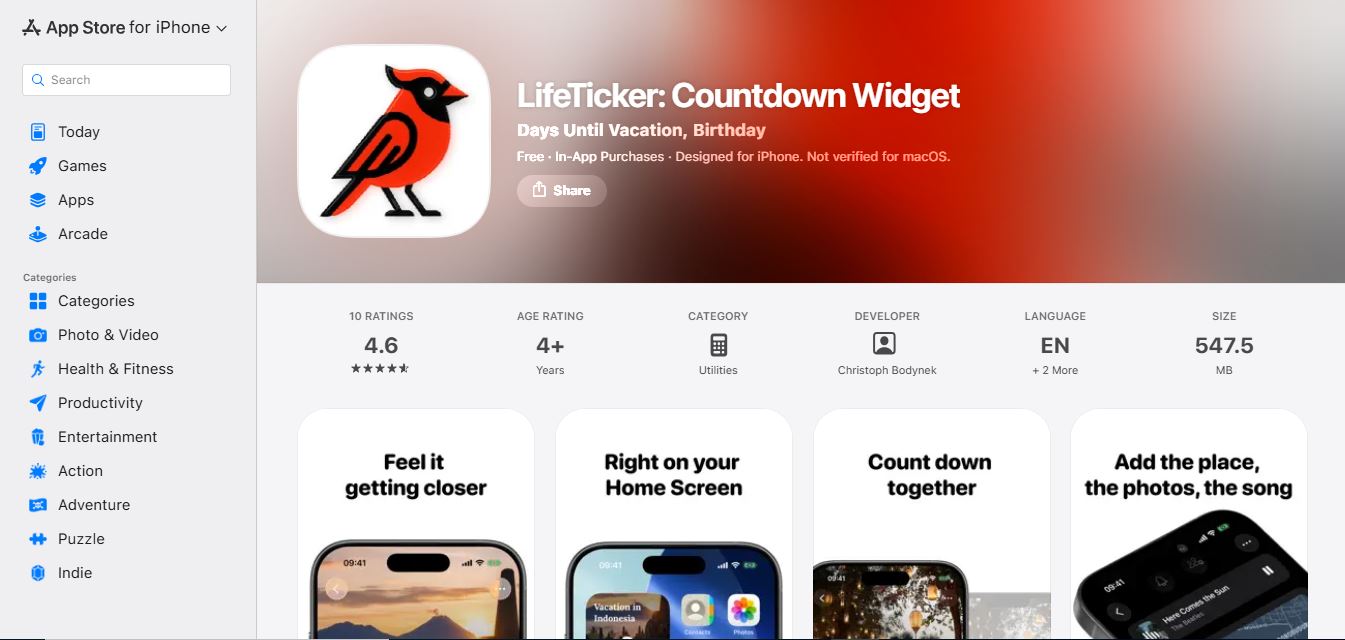
What is LifeTicker: Countdown Widget?
LifeTicker is a simple countdown widget app that helps you track important dates and moments that matter most. It lets you create personalized countdowns for events like birthdays, goals, or deadlines and view them directly on your home screen. With a clean interface and easy setup, LifeTicker keeps you focused on what’s ahead and reminds you to make the most of your time every day.
Designed to help users keep track of important milestones, trips, and occasions, LifeTicker provides home and lock screen widgets featuring personalized templates, fonts, colors, and photo crops. The app supports shared events via iCloud, interactive event checklists, flexible single or recurring event tracking, Apple Watch support, and advanced search filters.
- Platform Role: iOS Event Countdown Widget, Habit & Occasion Tracker Companion
- Core Capabilities: Customizable Widgets, iCloud Shared Countdowns, Event Tasks, and Apple Watch Sync
- Ecosystem Accessibility: iPhone, iPad, and Apple Watch App Store Applications
Use Cases:
- Tracking upcoming birthdays, holidays, vacations, and important project deadlines on your home screen
- Collaborating on shared trip planning with friends and family using live iCloud event syncing
- Managing packing lists and preparation errands directly inside event checklists
- Monitoring single dates, recurring occasions, and events with defined end times like weekend trips
- Checking countdowns instantly from your wrist using the Apple Watch companion app
Technology:
- Native iOS WidgetKit integration supporting interactive home and lock screen display templates
- iCloud synchronization framework sharing real-time event updates and guest checklist progress
- WatchOS companion architecture rendering optimized countdown views on Apple Watch faces
Target Users:
- iPhone and Apple Watch users looking to track personal milestones and holidays
- Groups and families coordinating shared events, trips, and collaborative checklists
- Design-conscious individuals wanting customized aesthetic countdown widgets on their home screens
Acquisition: iOS Application available on the Apple App Store (LifeTicker)

What are the key features of LifeTicker?
LifeTicker's key platform features are
- Home & Lock Screen Widgets: Keep upcoming events in view with customizable templates, fonts, colors, and photo crops.
- Shared Events via iCloud: Invite friends and family to shared countdowns that stay in sync live.
- Event Tasks & Checklists: Add packing lists and preparation errands directly onto events for guests to track progress.
- Flexible Tracking: Support for single dates, recurring occasions, and events with defined end times.
- Apple Watch Companion: Track countdowns and events directly from your wrist.
- Search & Organization: Easily search through events by place, category, note, or song.
How much does LifeTicker cost?
LifeTicker is available on the Apple App Store, operating with standard mobile app pricing tiers.
Pricing Structure:
- Free Download: Includes core widget features and basic countdown tracking.
- In-App Purchases / Premium Upgrades: Unlocks advanced customization templates, extended widget styles, and expanded sharing options.
Disclaimer: Pricing and subscription options are managed directly through the Apple App Store. For current details, view the app store listing at apps.apple.com.
Who should use LifeTicker?
LifeTicker is designed for mobile users and planners, including
- Individuals wanting aesthetic, personalized home screen widgets for important dates
- Apple Watch wearers wanting quick access to upcoming life milestones
What are the best alternatives to LifeTicker?
Some of the strongest LifeTicker alternatives include
- Countdown Star
- Days Matter
- Countdown++
- Time Until
- AI Toolbox
What are the pros and cons of LifeTicker?
What are the pros of LifeTicker?
- Highly customizable home and lock screen widgets with personal photo crops and font styling
- Seamless iCloud sharing keeps group countdowns and event checklists in sync
- Built-in Apple Watch support allows checking countdowns from your wrist
- Comprehensive search filters make organizing events by place, category, or note effortless
What are the cons of LifeTicker?
- Available exclusively for Apple ecosystem devices (iOS and watchOS)
- Advanced customization features may require in-app purchases
Why should you choose LifeTicker?
Static calendar apps make it difficult to visualize upcoming milestones at a glance. LifeTicker transforms how you track special moments by delivering beautiful, customizable countdown widgets directly to your iPhone home screen and Apple Watch.
- Keep your most anticipated events front and center on your lock screen
- Collaborate easily on group trips using shared iCloud event checklists
- Personalize every widget with your own photos, fonts, and colors
- Never lose track of important occasions with robust search and categorization
How does LifeTicker compare to competitors?
The main difference between LifeTicker, Days Matter, and Countdown Star lies in collaborative event checklists and advanced Apple Watch integration. While traditional countdown apps focus solely on static number displays on a mobile screen, LifeTicker combines highly styled photo-cropped widgets with shared iCloud event task lists and seamless watchOS synchronization.
| Feature / Platform | LifeTicker | Days Matter | Countdown Star | Time Until |
|---|---|---|---|---|
| Core Focus | Custom Widgets, Shared iCloud & Checklists | Anniversary & Holiday Countdowns | Basic Event Countdown Timers | Minimalist Event Tracking |
| Shared Event Tasks | Yes (Interactive packing lists & errands) | Limited sharing | No | No |
| Apple Watch Support | Yes (Dedicated companion app) | Basic app | Limited | Yes |
| Widget Customization | Templates, fonts, colors & photo crops | Standard themes | Basic styles | Clean dark/light modes |
| Best For | iOS users wanting aesthetic widgets & shared lists | Tracking relationship milestones | Simple event countdowns | Clean, clutter-free timers |
How do we rate LifeTicker?
| Parameter | Rating (out of 5) |
|---|---|
| Widget Design & Customization Options | 4.9 |
| iCloud Sharing & Event Checklists | 4.8 |
| Apple Watch Integration | 4.8 |
| Search & Organization Utility | 4.7 |
| Value for Money | 4.7 |
| Overall Score | 4.78 |
What is our review and verdict on LifeTicker?
LifeTicker: Countdown Widget offers an exceptionally polished and visually striking way to track life's most anticipated moments on iOS and watchOS. By combining customizable home and lock screen widgets with shared iCloud event checklists and robust search tools, it goes far beyond basic countdown clocks. Whether you are coordinating a group trip or counting down to a personal milestone, LifeTicker is a delightful addition to your device.
Conclusion
LifeTicker turns anticipation into an organized, beautiful experience. With its flexible event tracking, shared collaborative checklists, and stunning widget designs, LifeTicker equips Apple users with everything needed to celebrate upcoming moments.
FAQ
What is LifeTicker and what does it actually do?
LifeTicker Countdown Widget is a countdown and event tracking app that helps you track important upcoming moments like trips, birthdays, and deadlines directly from your home screen. It uses customizable widgets to display countdowns in real time, turning future events into something you can visually follow every day.
How is LifeTicker different from other countdown apps?
LifeTicker focuses heavily on personalization and shared experiences rather than just counting days. You can customize each countdown with photos, music, and themes, and even share events with others so everyone sees the same synced countdown, which makes it more interactive than basic timer apps.
LifeTicker focuses heavily on personalization and shared experiences rather than just counting days. You can customize each countdown with photos, music, and themes, and even share events with others
LifeTicker includes features like home and lock screen widgets, calendar integration, reminders, and event pinning so you can prioritize what matters most. It also supports recurring events, multi-stage events, and a full calendar view, helping users manage both short-term and long-term plans efficiently.
Can you share countdowns with friends or family?
Yes, LifeTicker allows shared events where multiple users can join the same countdown. These shared countdowns stay synced through iCloud, so everyone involved sees the same timeline and updates, making it useful for planning trips, weddings, or group events.
Does LifeTicker support widgets and customization?
LifeTicker is built around widgets, allowing users to place countdowns directly on their home or lock screen in different sizes and styles. You can customize fonts, colors, layouts, and images, making each countdown visually unique and aligned with your preferences.
Can LifeTicker help with event planning and organization?
Yes, beyond countdowns, LifeTicker includes task lists within events, such as packing lists or preparation steps. These tasks can be tracked and completed inside the app, making it useful not just for tracking time but also for organizing everything leading up to an event.
Is LifeTicker free or does it require a subscription?
LifeTicker is free to download with basic features, but advanced functionality like unlimited events and premium customization options requires a paid subscription or one-time purchase. This flexible pricing makes it accessible for casual users while offering more power for frequent planners.
User Reviews
No reviews yet for LifeTicker: Countdown Widget.
Featured Tools
Featured AI tools from TechShark

Melody Genie
MelodyGenie is an AI-powered music generator that creates original songs from simple text prompts. Users can choose styles, moods, and genres, then instantly generate melodies and full tracks, making it easy for creators, marketers, and hobbyists to produce custom music without musical expertise.
Freemium

Kimi AI
Kimi AI is an advanced AI assistant developed by Moonshot AI that helps you chat, research, write, code, and automate tasks in one place. It supports web search, file analysis, and multimodal inputs, and can even run autonomous “agent” workflows to complete complex tasks end-to-end.
Freemium

Fashion Diffusion AI
Fashion Diffusion is an AI-powered fashion design platform that helps brands and designers create clothing designs, virtual try-ons, AI models, product photos, and marketing visuals faster and cost-effectively.
Paid

Veo 4
Veo 4 AI is an AI video creation platform that generates dramatic videos from text, images, audio, and video prompts using realistic motion and synchronized sound.
Paid
Alternatives
Alternatives to LifeTicker: Countdown Widget
The best LifeTicker alternatives include Countdown Star, Days Matter, Countdown++, Time Until, and <a href="https://techshark.io/tools/ai-toolbox/" target="_blank">AI Toolbox</a>. These event apps provide countdown timers and reminders. While LifeTicker specializes in customizable iOS home and lock screen widgets with photo crops, shared iCloud event coordination, interactive packing checklists, and Apple Watch synchronization, alternative apps focus primarily on basic static countdown clocks.
 4.7
4.7Quinvio AI
Productivity
Quinvio AI helps you turn ideas, scripts, blogs, or web content into polished video presentations. You can refine messaging, choose branded templates, add AI avatars and voiceovers, and produce shareable visual content without traditional recording or editing workflows. It is especially useful for marketers, educators, trainers, creators, and business teams.
 4.9
4.9HubSpot
Marketing
HubSpot is an AI-powered customer platform that helps businesses manage marketing, sales, customer service, and content in one place. It offers a free CRM, automation tools, analytics, and AI features, enabling teams to attract leads, close deals, and deliver better customer experiences at scale.
 4.9
4.9TestSprite
Testing
TestSprite is an AI-powered software testing agent that helps developers automatically generate, run, and fix end-to-end tests for web apps. It simulates real user behavior, detects issues, and provides root-cause insights with suggested fixes, enabling faster releases and more reliable software without manual QA effort.
 4.8
4.8Microsoft Copilot
Productivity
Microsoft Copilot is an AI-powered assistant that helps users write, research, analyze data, and automate tasks across apps like Word, Excel, Outlook, and Teams. It combines large language models with real-time data to generate content, answer questions, and improve productivity across personal and professional workflows.
 4.9
4.9Casablanca AI
Productivity
Casablanca AI is an AI-powered virtual camera that corrects your gaze in real time during video calls, making it appear like you’re maintaining natural eye contact. It works with tools like Zoom and Teams, improving trust, engagement, and communication without needing extra hardware.
 4.9
4.9Granola
Productivity
Granola is an AI-powered meeting assistant that helps you capture, organize, and act on conversations without losing focus. It listens to meetings, turns notes into structured summaries, and generates action items and follow-ups automatically—so you stay present while everything important is documented and ready to use.
 4.8
4.8AI Submit
Productivity
AI Submit is an automated directory submission and SEO distribution platform that allows AI startup founders and developers to submit their artificial intelligence tools to dozens of top AI directories simultaneously for backlink building and traffic growth.
 4.8
4.8AI Perfect Assistant
Productivity
AI Perfect Assistant brings AI assistance directly into everyday work applications. It helps users write emails, improve documents, summarize content, translate text, create presentations, generate SEO content, explain Excel formulas, and handle repetitive tasks through 60+ specialized tools and multiple integrations for everyday professional and business workflows with less effort.
 4.9
4.9Kroolo
Project Management
Kroolo is an AI-powered productivity and project management platform that helps teams plan tasks, track progress, and collaborate in one place. It combines project tracking, document management, and AI assistance to streamline workflows, automate routine work, and improve team efficiency across projects.