
Imgkits
Imgkits is an online collection of image, video, and creative AI tools for generating, editing, enhancing, and transforming visual content. It supports tasks such as background removal, photo restoration, image upscaling, object removal, artistic effects, image generation, and video creation, making everyday visual workflows faster without requiring specialized editing software.
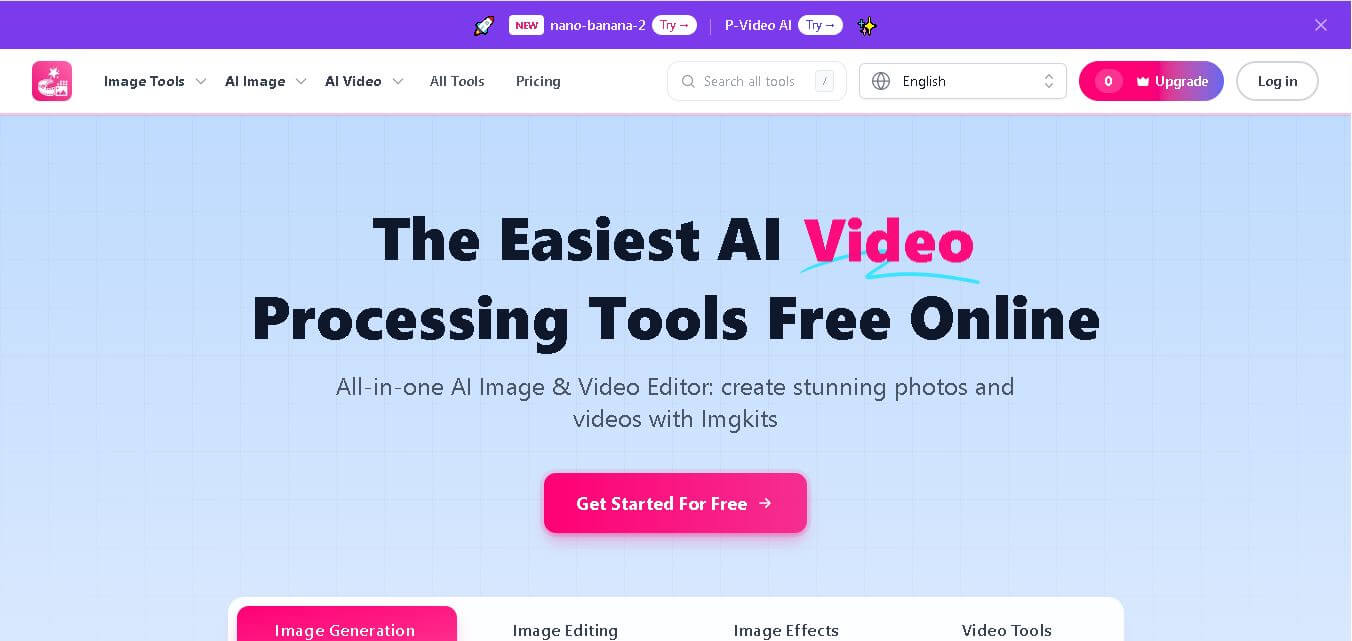
What is Imgkits?
Imgkits is a browser-based creative toolkit that combines image generation, photo editing, enhancement, style transformation, and video creation in one workspace. Users can remove backgrounds, restore photos, upscale images, generate visuals, create videos, and apply artistic effects without installing desktop software. It is designed for creators, businesses, marketers, photographers, and everyday users. Its browser-first workflow keeps common creative tasks accessible without specialized technical skills.
Imgkits currently lists about 143 tools across 7 categories, including 38 Edit & Enhance tools, 40 Generate Images tools, 9 Portrait & People tools, 13 Styles & Effects tools, 18 Video & Audio tools, 18 Text & Utilities tools, and 7 AI Models. The platform says it serves 10,000+ professionals. Popular capabilities include image generation, background removal, photo restoration, image upscaling, image-to-video, and text-to-video. Paid options include $5 for 10 credits, plus monthly and yearly Pro plans for creators and businesses.
- Platform Role: Online AI Image & Video Editor, Creative Content Generator & Photo Restoration Tool
- Developer & Organization: Need You, LLC
- Cross-Platform Access: Web Browser (zero-install on Chrome, Safari, Edge, and Firefox) and mobile web browsers
Use Cases:
- Removing backgrounds and isolated objects from product photography for e-commerce storefronts (Amazon, Shopify, Etsy)
- Restoring, unblurring, and colorizing old or low-resolution family photographs
- Generating custom graphics, logos, posters, flyers, and fantasy maps from text prompts
- Animating still photographs into short AI-generated videos and generating video clips from text prompts
- Transforming portrait photos into stylized avatars, anime filters, cartoons, professional headshots, and digital art
Technology:
- Advanced diffusion and generative AI models for text-to-image, text-to-video, and image-to-video creation
- AI inpainting and computer vision algorithms for object replacement, watermark removal, and background replacement
- Deep learning super-resolution neural networks for image upscaling, deblurring, and automatic colorization
- Cloud-based batch processing engine capable of editing multiple high-definition images simultaneously
Target Users:
- E-commerce sellers needing quick product photo retouching, background removal, and studio staging
- Social media managers and digital marketers creating eye-catching visual content, flyers, and short videos
- Graphic designers, illustrators, and game designers generating concept art, textures, and fantasy maps
- Everyday consumers wanting to restore old photos, create custom stickers, or apply creative filters
Acquisition: Web service owned and operated by Need You, LLC (imgkits.com)

What are the key features of Imgkits?
Imgkits' key platform features are
- AI Background & Object Removal: Automatically detects the primary subject, removes unwanted backgrounds, or erases intrusive objects and watermarks without leaving edit marks.
- Image Upscaler & Photo Enhancer: Increases photo resolution, sharpens blurry details, reduces noise, and restores vintage or damaged black-and-white photos in seconds.
- Generative AI Creation Suite: Generates images, logos, flyers, posters, wallpapers, and fantasy maps from natural language text prompts.
- Image to Video & Text to Video: Animates static images or generates short video clips and sound effects driven by AI prompts.
- Portrait & Style Transformation: Converts photos into cartoons, anime, sketches, professional headshots, or alternative outfits and hairstyles.
- Batch Image Processing: Allows users to process and edit multiple high-definition files simultaneously to save operational time.
How much does Imgkits cost?
Imgkits offers limited free trial access with credit-based pay-as-you-go packs and recurring monthly or annual Pro subscription options.
Free Access:
- Limited Free Trial: Provides free trial credits to test core editing features and AI generations online.
Subscription & Pay-As-You-Go Tiers:
- Pay-As-You-Go Credits: Starting at $5.00 USD for 10 credits up to $59.00 USD for 500 credits ($0.50/credit baseline). Pay-as-you-go credits do not expire.
- Pro Monthly ($12.00/month): Includes 100 monthly credits for AI image/video tools, faster generation speeds, workflow presets, and priority support.
- Pro Yearly ($6.00/month - Billed $72 annually): Save 50% on annual billing, providing 100 monthly credits along with priority processing and full workflow access.
Disclaimer: Unused subscription credits do not roll over into subsequent billing cycles. Additional credit top-ups are available via non-expiring pay-as-you-go credit packs.
Who should use Imgkits?
Imgkits is designed for creators, business owners, and visual editors, including
- E-Commerce Merchants: Online store managers needing fast background removal and product staging for platforms like Amazon or Shopify.
- Content Creators & Marketers: Social media managers looking to quickly generate promotional flyers, AI videos, and stylized graphic assets.
- Photographers & Archivists: Individuals looking to upscale low-res photos, fix blurry images, or restore historical family pictures.
What are the best alternatives to Imgkits?
Some of the strongest Imgkits alternatives include
- Photoroom
- Canva AI
- Clipdrop
- Cutout.pro
- Fotor
- iLoveIMG
What are the pros and cons of Imgkits?
What are the pros of Imgkits?
- Completely browser-based experience with zero installation requirements
- Wide catalog of over 100 specialized image, video, and design editing utilities
- Flexible pricing structure offering both monthly subscriptions and non-expiring pay-as-you-go credit options
- Intuitive interface suitable for beginners without prior photo editing experience
What are the cons of Imgkits?
- Subscription credits do not roll over to the next billing cycle
- High-volume video generations and complex edits consume credits quickly
- Lacks advanced manual layer and raster editing capabilities found in software like Photoshop
Why should you choose Imgkits?
Traditional image editing software requires extensive technical knowledge, steep learning curves, and manual labor for tasks like background isolation or photo restoration. Imgkits simplifies this process by hosting over 100 dedicated AI-driven utilities in a single web interface. Whether you need to fix a blurry image, erase an unwanted object, create a marketing flyer, or animate a photo into a short video, Imgkits delivers fast, high-quality results directly in your browser.
How does Imgkits compare to competitors?
The primary distinction between Imgkits, Photoroom, Cutout.pro, and Fotor lies in tool diversity and platform focus. While Photoroom focuses heavily on mobile e-commerce photography and Fotor serves as a general graphic design suite, Imgkits offers an expansive directory of single-purpose AI image, video, and utility tools alongside flexible credit-based pricing.
| Feature / Platform | Imgkits | Photoroom | Cutout.pro | Fotor |
|---|---|---|---|---|
| Core Focus | All-in-One AI Image & Video Suite | E-Commerce Product Photography | AI Visual Processing & Restoration | Graphic Design & Photo Editing |
| Installation Barrier | None (100% web browser) | Mobile App / Web Editor | Web Browser / API | Web / Mobile / Desktop App |
| Video Capabilities | Text-to-Video & Image-to-Video Generation | Limited video backgrounds | Video Background Removal & Enhancers | Basic video editing features |
| Pricing Model | Freemium / Credits / Subscription ($6-$12/mo) | Freemium / Subscription ($12.99/mo) | Credit System / Subscription | Freemium / Subscription ($8.99/mo) |
| Best For | Users needing quick, browser-native access to 100+ specialized AI tools | E-commerce sellers focusing on mobile product photos | Developers and users needing batch background/restoration processing | Casual creators looking for design templates and standard photo filters |
How do we rate Imgkits?
| Parameter | Rating (out of 5) |
|---|---|
| Ease of Use & Accessibility | 4.8 |
| AI Tool Variety & Functionality | 4.7 |
| Image & Video Processing Quality | 4.5 |
| Processing Speed | 4.6 |
| Value for Money | 4.4 |
| Overall Score | 4.60 |
What is our review and verdict on Imgkits?
Imgkits is an exceptionally versatile and accessible platform for automated image and video editing. By offering more than 100 specialized tools directly in the browser—spanning object removal, resolution upscaling, and AI video generation—it removes software friction for creators and business owners. While heavy video users should monitor credit consumption, its flexibility makes it a powerful asset for online visual content production.
Conclusion
Imgkits brings image generation, editing, enhancement, creative effects, and video tools together in one browser-based workspace. Its large tool collection makes it suitable for creators, marketers, photographers, e-commerce businesses, and users who need quick visual content workflows. With free trial access, pay-as-you-go credits, and Pro plans, Imgkits offers flexible ways to explore its features. Its broad range of image and video utilities also makes it useful for handling different creative requirements without relying on multiple separate editing platforms.
FAQ
What is Imgkits used for?
Imgkits helps you handle many visual tasks from one browser-based workspace. You can generate images, remove backgrounds, restore old photos, upscale images, edit objects, create artistic effects, and produce videos. It is useful for social media creators, marketers, photographers, e-commerce sellers, designers, and anyone needing quick and practical visual edits.
Is Imgkits free to use?
Yes, Imgkits provides limited free trial access and free credits for new accounts, depending on the current offering. If you need more usage, higher limits, HD exports, or priority processing, you can choose a paid option. The pricing page currently lists pay-as-you-go credits and Pro subscription plans for additional usage.
How many tools does Imgkits offer?
Imgkits currently lists about 143 tools covering image generation, editing, enhancement, portraits, styles, video, audio, utilities, and AI models. The collection includes tools for background removal, image generation, photo restoration, object removal, image-to-video, text-to-video, and many other creative tasks for everyday projects and professional workflows, across different visual needs.
What image formats does Imgkits support?
Imgkits supports common image formats such as JPG, JPEG, PNG, and WebP, although exact requirements can vary by individual tool. Before uploading a file, check that tool’s instructions for current format and size limits. Video tools support standard formats such as MP4, and processed results can be downloaded easily in high resolution.
Do I need to install Imgkits software?
No. Imgkits works directly through a web browser, so you do not need to install desktop software or a dedicated application. You can access its tools from supported desktop, tablet, or mobile browsers. This makes it convenient when you want to edit, generate, enhance, or transform visual content from different devices.
Can Imgkits be used for commercial projects?
Yes. According to Imgkits, content created or edited with its tools can be used for personal and commercial projects. Potential applications include e-commerce product images, marketing materials, social media graphics, and other business content. You should still review the specific terms, model restrictions, and third-party rights relevant to your project.
User Reviews
No reviews yet for Imgkits.
Featured Tools
Featured AI tools from TechShark

Melody Genie
MelodyGenie is an AI-powered music generator that creates original songs from simple text prompts. Users can choose styles, moods, and genres, then instantly generate melodies and full tracks, making it easy for creators, marketers, and hobbyists to produce custom music without musical expertise.
Freemium

Kimi AI
Kimi AI is an advanced AI assistant developed by Moonshot AI that helps you chat, research, write, code, and automate tasks in one place. It supports web search, file analysis, and multimodal inputs, and can even run autonomous “agent” workflows to complete complex tasks end-to-end.
Freemium

Fashion Diffusion AI
Fashion Diffusion is an AI-powered fashion design platform that helps brands and designers create clothing designs, virtual try-ons, AI models, product photos, and marketing visuals faster and cost-effectively.
Paid

Veo 4
Veo 4 AI is an AI video creation platform that generates dramatic videos from text, images, audio, and video prompts using realistic motion and synchronized sound.
Paid
Alternatives
Alternatives to Imgkits
The best Imgkits alternatives include Photoroom, Cutout.pro, Fotor, and Canva AI. While Imgkits provides an extensive web-based directory of over 100 specialized AI tools for image background removal, photo restoration, and AI video generation, alternatives like Photoroom offer dedicated mobile app experiences for e-commerce photography and Fotor offers comprehensive desktop graphic design suites.
 4.7
4.7ImgCreator AI
Image
ImgCreator AI is an AI-powered image generation tool that helps users create visuals from text prompts and reference images. It supports creative artwork, realistic portraits, product visuals, and image editing, making it useful for designers, marketers, content creators, and businesses seeking faster visual content production.
Neural.love
AI Image Enhancer
Neural.love is an AI-powered creative platform for generating images, editing photos, enhancing videos, restoring old media, and animating pictures. It combines multiple AI tools in a browser-based workspace, helping content creators, marketers, photographers, designers, and businesses improve visual content without relying entirely on traditional editing software.
 4.8
4.8Prisma AI
Image
Prisma AI turns everyday photos into artistic images with stylized filters and creative effects. It offers hundreds of art and portrait styles inspired by famous artists, allowing beginners to create distinctive visuals quickly. Users can capture or upload photos, apply a chosen style, and save or share the finished result.
 4.9
4.9Bria AI
Image
Bria helps businesses and teams generate and edit visual content using controllable generative AI. Its capabilities cover image generation, product visuals, background editing, video workflows, and developer integrations. With licensed training data, attribution, provenance, and enterprise deployment options, Bria is positioned for businesses that need scalable, commercially focused visual AI.
 4.7
4.7Unwatermark
Image
Unwatermark.ai helps creators, marketers, photographers, and businesses remove watermarks, logos, text, people, and unwanted objects from images and videos. Its automatic detection handles quick edits, while the manual brush provides precise control over difficult areas. With browser-based processing, format support, previews, and free usage, it simplifies everyday visual cleanup.
 4.9
4.9invideo Nano Banana
Image
Nano Banana is an AI image generation and editing model by Google (Gemini family) that helps users create, modify, and refine visuals using natural language prompts. It supports 4K outputs, consistent characters, accurate text rendering, and real-time editing, enabling fast, production-ready creative workflows.
 4.8
4.8Banana Nano
Image
BananaNano (Nano Banana AI) is an AI-powered image generation and editing platform that lets users create visuals from text or edit photos using natural language. It supports multi-image fusion, character consistency, and up to 4K output, enabling fast, flexible visual creation without complex design tools.
 4.8
4.8Vheer
Image
Vheer is a free AI image and video generator that helps users create visuals from text or photos instantly. It includes tools for image editing, background removal, and image-to-video conversion, offering unlimited generations without signup, making it ideal for quick, creative content production.
 4.9
4.9QOVES
Image
QOVES is an AI-powered facial analysis and beauty consulting platform that helps users understand their facial features and improve appearance through personalized, science-backed recommendations. It analyzes hundreds of facial markers and provides a non-surgical transformation plan, enabling informed decisions about aesthetics, skincare, and overall self-improvement.