
AI Character Generator
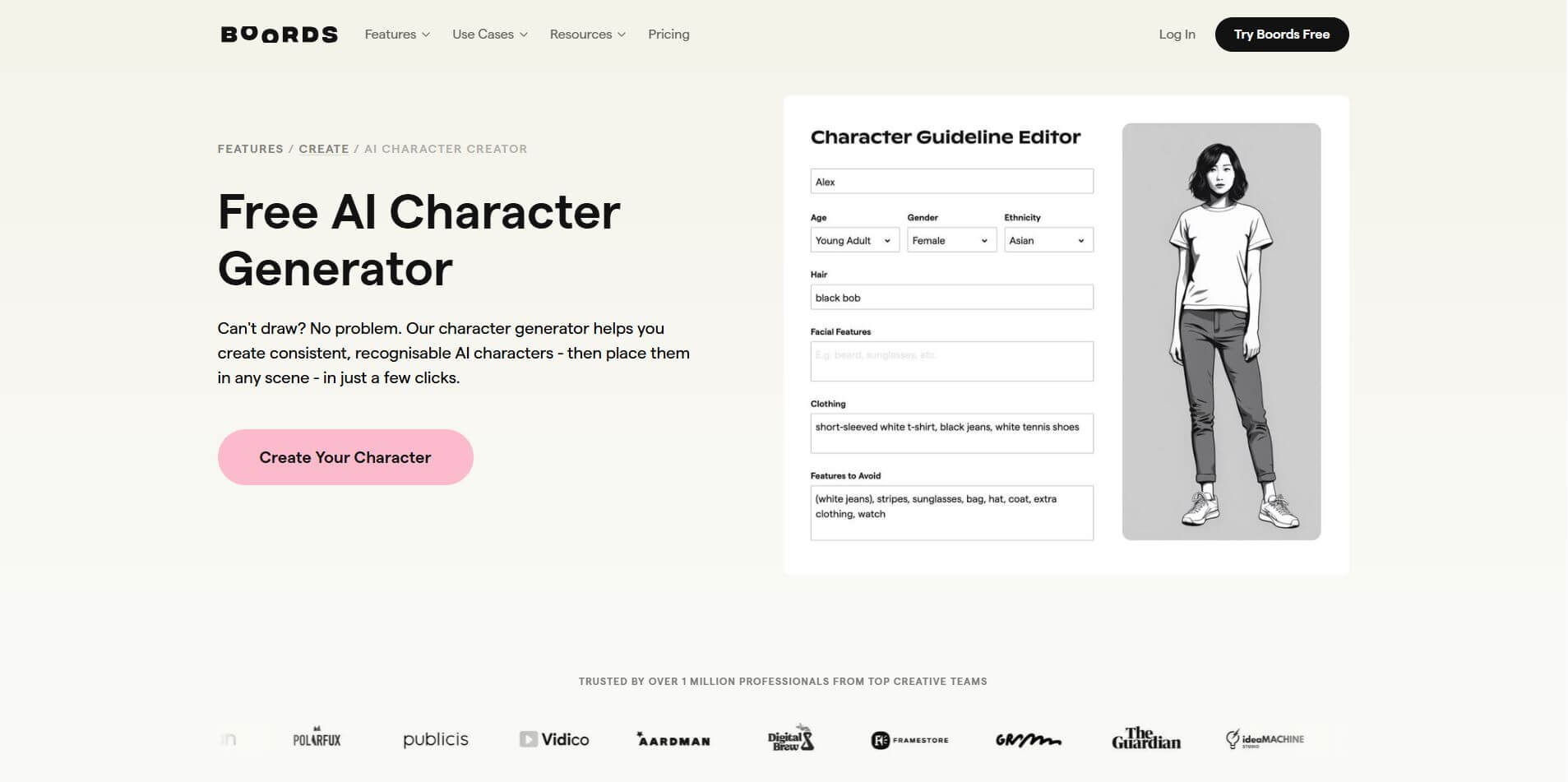
Boords AI Character Generator is a tool that lets you create consistent, customizable characters using simple text prompts. It helps teams design, refine, and reuse characters across storyboard scenes without needing drawing skills.
What is AI Character Generator?
The AI Character Generator by Boords is a web-based design tool that empowers users to effortlessly craft consistent, recognizable characters for storyboards—even without drawing skills. Through its intuitive Character Editor, you can refine facial features, expressions, clothing, and more, then seamlessly place your characters into AI-generated storyboard scenes with just a few clicks. The tool enables quick variations—alter outfits or facial expressions—and generates simple image sequences by using a preferred image as a "seed" for similar frames. Ideal for animators, filmmakers, and content creators, it streamlines the pre-production workflow, allowing professionals to build dynamic, character-driven narratives efficiently.
- Founders: James Chambers and Tom Judd
- Launch: 2023
- Technology: Proprietary generative AI for character creation + Character Guidelines to keep looks consistent across frames; works alongside Boards’ AI Storyboard Generator
- Use Cases: Storyboarding for ads, film/animation, explainer videos, education, and pitching; geared to studio founders and students as well.
AI Character Generator Key Features
AI Character Generator's key features are
- Prompt-Based Character Creation: Generate characters instantly using simple text descriptions tailored to your story or script
- Consistent Characters Across Scenes: Maintain the same character appearance throughout storyboard frames using reference images
- Custom Character Library: Save, reuse, and manage characters for different projects or team use
- Style Customization: Choose different visual styles or apply brand-specific colors to match your project
- Multi-Character Scenes: Add and control multiple characters in a single frame with defined interactions
- Reference Image Support: Upload or reuse images to ensure visual consistency and accuracy
- Scene Integration: Directly use generated characters inside storyboard frames for storytelling workflows
- Variation & Iteration: Create multiple versions of a character to refine design, pose, or expression
- Browser-Based Tool: Works online with no installation required, making it easy to start quickly
- Team Collaboration: Share characters and assets across teams for consistent creative output
AI Character Generator Pricing
AI Character Generator offers various pricing plans.
Standard Plan:
- The plan starts at $49 per month
- Allows for the generation of 1000 images per month
- Allows version control
- Offers animation
- Allows exporting in all formats
- Offers story-sharing links
Workflow Plan:
- The plan starts at $99 per month
- Allows unlimited image generation
- Offers customized templates
- Offers project sharing links
- Allows two-factor authentication
Disclaimer: Please visit the official AI Character Generator website for the latest and most accurate pricing information.
Who is Using AI Character Generators?
A diverse range of users and organizations utilize AI Character Generator
- Storyboard artists
- Animators
- Filmmakers
- Video production teams
- Content Creators
- Marketers
Boords AI Character Generator Alternatives
Some alternatives are:
- Storyboarder: Free, open-source tool for creating storyboards with drawing and export features
- StoryboardThat: Easy drag-and-drop storyboard creator with pre-made characters
- Milanote: Visual planning tool for organizing storyboards, ideas, and references
- Katalist AI: AI-powered storyboard generator with consistent characters and scene creation
- Storyflow: AI-driven storyboard platform that connects scripts, scenes, and visuals
- Midjourney: High-quality AI image generator for creating detailed characters
- Leonardo AI: Advanced AI tool for scalable and consistent character generation
- Canva: General design tool with AI image generation for character creation
Boords AI Character Generator Pros and Cons
Pros
- Easy Character Creation: Generate characters quickly using simple prompts
- Consistency Across Scenes: Maintains the same character look throughout storyboards
- No Design Skills Needed: Beginner-friendly, no drawing required
- Storyboard Integration: Works directly within Boords for seamless workflows
- Customizable Styles: Adjust styles, poses, and expressions easily
- Team Collaboration: Share and reuse characters across projects
Cons
- Limited Control: Not as detailed as advanced design tools like Photoshop
- Subscription-Based: Most features require a paid plan
- Dependent on Prompts: Output quality depends on how well prompts are written
- Less Flexibility: Not ideal for highly complex or unique character designs
- Internet Required: Fully browser-based, no offline access
Why Choose Boords AI Character Generator?
If you want to create characters quickly without getting into complex design tools, Boords AI Character Generator is a practical choice—especially for storytelling and planning.
- Fast Character Creation: Turn simple ideas into visual characters in seconds
- Consistency Across Scenes: Keep the same character look throughout your storyboard
- No Design Skills Needed: Perfect for beginners and non-designers
- Built for Storyboards: Works directly inside Boords, saving time in workflow
- Easy Iteration: Quickly generate variations and refine characters
- Team-Friendly: Share and reuse characters across projects
How Does Boords AI Character Generator Work?
Boords AI Character Generator works by turning your ideas into visual characters using simple inputs.
- Step 1: Enter a Prompt
Describe your character (e.g., “young superhero with red suit”) - Step 2: Generate Character
The AI creates a visual character based on your description. - Step 3: Customize & Refine
Adjust style, pose, expressions, or regenerate variations. - Step 4: Save to Library
Store characters for reuse across different scenes. - Step 5: Use in Storyboards
Add characters directly into storyboard frames and scenes. - Step 6: Maintain Consistency
Reuse the same character across multiple frames for uniform visuals
Boords AI Character Generator vs Competitors
| Feature / Tool | Boords AI Character Generator | Canva | Midjourney | Storyflow | Katalist AI |
|---|---|---|---|---|---|
| Core Focus | Storyboarding + character consistency | General design + AI images | High-quality AI art | Connected storyboard + script | AI storyboard generation |
| Best For | Storyboards & visual planning | Social/design content | Artistic character creation | Full film workflow | Fast AI storyboard visuals |
| Ease of Use | Very Easy | Very Easy | Moderate | Moderate | Easy |
| Character Consistency | Strong (built-in system) | Limited | Manual effort needed | Good | Good |
| Image Quality | Good | Good | Very High | Good | Good |
| Workflow Integration | Built-in storyboard tool | No storyboard system | No workflow | Full production canvas | Partial workflow |
| Collaboration | Strong | Moderate | Limited | Moderate | Limited |
How We Rated the AI Character Generator?
When I rate Boords AI Character Generator, I focus on how well it performs in real storyboard workflows, not just image generation. It’s more about consistency and usability than pure creativity.
| Parameter | Rating (Out of 5) |
|---|---|
| Ease of Use | 4.7 |
| Character Consistency | 4.8 |
| Customization | 4.2 |
| Image Quality | 4.3 |
| Workflow Integration | 4.6 |
| Collaboration | 4.5 |
| Pricing Value | 4.1 |
| Overall Rating | 4.5 |
Boords AI Character Generator Review
If I had to describe Boords AI Character Generator in real terms, it feels like a tool made specifically for storytellers, not designers. The biggest strength is how smoothly it turns a script into a visual storyboard with consistent characters across every frame, which is usually one of the hardest parts of pre-production.
What really stands out is the workflow simplicity. You can go from script → scenes → characters → storyboard without switching tools. Many users highlight how it saves hours of manual work and keeps everything organized in one place. The interface is clean, beginner-friendly, and works well even if you don’t have design experience.
Another strong point is character consistency. The tool generates a character preview first and locks the design across scenes, which solves a major problem seen in most AI image tools. This makes it especially useful for video teams, agencies, and creators working on narrative content.
However, it’s not perfect. The creative control is limited, especially compared to tools like Midjourney. You can’t fully customize every detail, and the style options are somewhat restricted. Also, it’s more of a pre-visualization tool, meaning it’s not ideal for final production-level artwork.
Conclusion
AI Character Generator is a powerful and user-friendly platform for generating consistent, stylish characters and integrating them into storyboard sections. It allows creative teams to focus on storytelling rather than design complexity by offering straightforward editing, quick variation capabilities, and robust collaborative workflow tools. The free tier makes it available from the beginning, while professional and team plans provide full collaborative capabilities.
People are also reading:
FAQ
What is Boords AI Character Generator used for?
It is used to create consistent characters for storyboards and visual storytelling. You can generate characters and reuse them across multiple scenes without redesigning each time.
Do I need design skills to use it?
No, you don’t need any design skills. You just describe your character, and the AI generates it for you.
Can I use the same character in multiple scenes?
Yes, that’s one of its biggest strengths. It maintains character consistency across all storyboard frames.
Is Boords AI Character Generator free?
Boords provides limited free access, while advanced features are available through paid plans.
How is Boords different from Midjourney?
Boords focuses on storyboarding and character consistency, while Midjourney focuses on high-quality artistic image generation.
Who should use Boords AI Character Generator?
Ideal users include video creators, marketers, agencies, and storytellers who need fast visual planning.
User Reviews
No reviews yet for AI Character Generator.
Featured Tools
Featured AI tools from TechShark

Melody Genie
MelodyGenie is an AI-powered music generator that creates original songs from simple text prompts. Users can choose styles, moods, and genres, then instantly generate melodies and full tracks, making it easy for creators, marketers, and hobbyists to produce custom music without musical expertise.
Freemium

Kimi AI
Kimi AI is an advanced AI assistant developed by Moonshot AI that helps you chat, research, write, code, and automate tasks in one place. It supports web search, file analysis, and multimodal inputs, and can even run autonomous “agent” workflows to complete complex tasks end-to-end.
Freemium

Fashion Diffusion AI
Fashion Diffusion is an AI-powered fashion design platform that helps brands and designers create clothing designs, virtual try-ons, AI models, product photos, and marketing visuals faster and cost-effectively.
Paid

Veo 4
Veo 4 AI is an AI video creation platform that generates dramatic videos from text, images, audio, and video prompts using realistic motion and synchronized sound.
Paid
Alternatives
Alternatives to AI Character Generator
Boords AI Character Generator alternatives include tools like Storyflow, Storyboarder, StoryboardThat, Milanote, and Katalist AI. These platforms offer a mix of AI-powered storyboarding, manual scene creation, and visual planning features. Some focus on structured workflows, while others provide flexible design environments or automated character and scene generation for faster creative production.
 4.7
4.7ImgCreator AI
Image
ImgCreator AI is an AI-powered image generation tool that helps users create visuals from text prompts and reference images. It supports creative artwork, realistic portraits, product visuals, and image editing, making it useful for designers, marketers, content creators, and businesses seeking faster visual content production.
Neural.love
AI Image Enhancer
Neural.love is an AI-powered creative platform for generating images, editing photos, enhancing videos, restoring old media, and animating pictures. It combines multiple AI tools in a browser-based workspace, helping content creators, marketers, photographers, designers, and businesses improve visual content without relying entirely on traditional editing software.
 4.8
4.8Prisma AI
Image
Prisma AI turns everyday photos into artistic images with stylized filters and creative effects. It offers hundreds of art and portrait styles inspired by famous artists, allowing beginners to create distinctive visuals quickly. Users can capture or upload photos, apply a chosen style, and save or share the finished result.
 4.9
4.9Bria AI
Image
Bria helps businesses and teams generate and edit visual content using controllable generative AI. Its capabilities cover image generation, product visuals, background editing, video workflows, and developer integrations. With licensed training data, attribution, provenance, and enterprise deployment options, Bria is positioned for businesses that need scalable, commercially focused visual AI.
 4.7
4.7Unwatermark
Image
Unwatermark.ai helps creators, marketers, photographers, and businesses remove watermarks, logos, text, people, and unwanted objects from images and videos. Its automatic detection handles quick edits, while the manual brush provides precise control over difficult areas. With browser-based processing, format support, previews, and free usage, it simplifies everyday visual cleanup.
 4.9
4.9invideo Nano Banana
Image
Nano Banana is an AI image generation and editing model by Google (Gemini family) that helps users create, modify, and refine visuals using natural language prompts. It supports 4K outputs, consistent characters, accurate text rendering, and real-time editing, enabling fast, production-ready creative workflows.
 4.8
4.8Banana Nano
Image
BananaNano (Nano Banana AI) is an AI-powered image generation and editing platform that lets users create visuals from text or edit photos using natural language. It supports multi-image fusion, character consistency, and up to 4K output, enabling fast, flexible visual creation without complex design tools.
 4.8
4.8Vheer
Image
Vheer is a free AI image and video generator that helps users create visuals from text or photos instantly. It includes tools for image editing, background removal, and image-to-video conversion, offering unlimited generations without signup, making it ideal for quick, creative content production.
 4.9
4.9QOVES
Image
QOVES is an AI-powered facial analysis and beauty consulting platform that helps users understand their facial features and improve appearance through personalized, science-backed recommendations. It analyzes hundreds of facial markers and provides a non-surgical transformation plan, enabling informed decisions about aesthetics, skincare, and overall self-improvement.