
Tucky
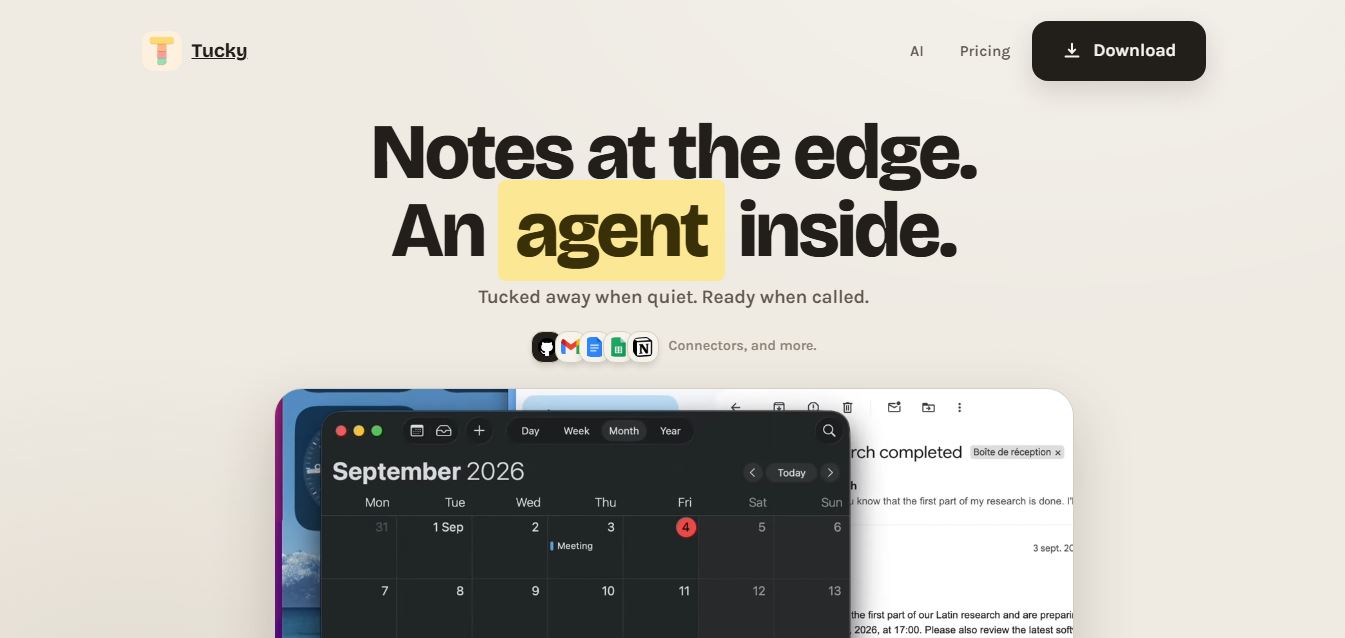
Tucky is a native macOS productivity and note-taking app that docks to the screen edge, featuring an embedded AI agent, local encryption, calendar and task actions, and voice dictation to capture passing thoughts without breaking focus.
What is Tucky?
Tucky is a native macOS note-taking application and AI desktop companion developed by founder Mehdi Harzallah. Designed specifically for founders, developers, and fast-moving operators, Tucky reimagines desktop notes by sleeping as a subtle, thin stripe docked directly to the edge of the Mac screen, ensuring thoughts and tasks can be captured instantly without tab-switching or interrupting deep-work focus.
Built around the vision to be “The quiet assistant every founder wishes they had,” Tucky pairs minimal edge-docked notes with an autonomous embedded AI agent. Rather than requiring users to manually manage separate apps for writing, reminders, and scheduling, Tucky turns raw thoughts into scheduled calendar events, actionable tasks, and message drafts right from your screen edge.
- Platform Role: Native macOS Screen-Edge Notes App, AI Desktop Companion & Founder Task Operator
- Founder & Creator: Mehdi Harzallah
- Platform Availability: macOS native app (Universal binary for Apple Silicon and Intel Macs)
Use Cases:
- Capturing fleeting thoughts, meeting follow-ups, and sudden ideas without opening full-screen windows or breaking focus
- Turning casual text notes (e.g., “follow up with that investor next Tuesday”) automatically into dated calendar tasks and reminders
- Drafting quick email replies, project notes, and outreach messages directly through natural language agent commands
- Dictating notes hands-free using integrated voice recognition and text-to-speech audio feedback
- Maintaining a secure, locally encrypted repository of personal notes, daily logs, and launch checklists on your Mac
Technology:
- Native Swift architecture optimized for macOS, living as a minimal notch or screen-edge overlay with zero CPU bloat
- Local-first design with on-device encryption ensuring private thoughts stay on your personal Mac
- Cloud AI agent integration connecting to frontier LLMs for intelligent task extraction and action execution
- Speech-to-text and voice playback layer powered by macOS dictation and Soniox integration
- Independent release deployment utilizing notarized DMG builds and Sparkle automated updates
Target Users:
- Startup founders and entrepreneurs juggling multi-threaded projects, investor calls, and launch checklists
- Software developers and power users wanting a lightweight scratchpad that stays accessible without stealing desktop real estate
- Executives and managers needing quick capture for action items and calendar commitments during meetings
- Writers and creators who think rapidly and need a distraction-free digital capture surface
Acquisition: Independent desktop software product created by Mehdi Harzallah

What are the key features of Tucky?
Tucky's key platform features are
- Screen-Edge Docked UI: Sleeps quietly as a thin stripe on the Mac display border, expanding instantly with a hover or keystroke.
- Embedded AI Agent: Reads and acts on your notes—automatically extracting tasks, scheduling calendar meetings, and drafting replies.
- Local-First & Encrypted: Keeps your core notes stored and encrypted locally on your own machine for high privacy and zero data leakage.
- One-Command Action Execution: Converts casual statements into dated calendar events and to-do lists without jumping between multiple apps.
- Voice & Audio Dictation: Hold-to-talk voice recording with real-time transcription and voice feedback support.
- External Connectors: Syncs cleanly with Apple Calendar and workflow tools to prevent notes from remaining stranded.
- Lightweight Native Performance: Built purely in Swift to ensure minimal RAM and battery consumption compared to Electron-based competitors.
How much does Tucky cost?
Tucky operates on a freemium desktop model offering a free tier for local note-taking alongside affordable Plus subscriptions for hosted AI intelligence and voice features.
Standard / Free Tier:
- $0 / Free: Native macOS screen-edge notes, unlimited local notes, on-device encryption, and built-in Apple dictation support.
Tucky Plus Tier:
- $4 / month: Unlocks hosted frontier LLM models for the built-in AI agent, cloud voice dictation (Soniox), calendar sync, and external app connectors.
Disclaimer: Pricing and feature allocations reflect current public launch specifications. Visit tucky.io for the latest download and subscription details.
Who should use Tucky?
Tucky is designed for high-velocity Mac users and knowledge workers, including
- Product Founders & Operators: Preventing crucial ideas, investor notes, and marketing tweaks from vanishing amidst context switching.
- Engineers & Designers: Keeping reference code snippets, hex colors, and quick reminders visible on the display perimeter while building.
- Busy Professionals: Delegating administrative meeting follow-ups to a discreet AI agent without leaving the active window.
- Minimalists: Users tired of bulky, slow-loading workspace tools who prefer an always-accessible native utility.
What are the best alternatives to Tucky?
Some of the strongest Tucky alternatives include
- Bear
- Reflect Notes
- Granola
- Craft.do
- Lazy
- Apple Notes
What are the pros and cons of Tucky?
What are the pros of Tucky?
- The edge-docked stripe prevents context switching and avoids cluttering your desktop with floating windows
- Turns raw notes into actionable calendar items and structured tasks automatically
- Native Swift build ensures instant responsiveness and negligible battery/memory consumption
- High data privacy with local-first encrypted storage for private thoughts and notes
- Very competitive Plus pricing ($4/month) compared to typical $15-$20 AI productivity tools
What are the cons of Tucky?
- Exclusively built for macOS, with no native Windows, Linux, or web client available
- Advanced cloud AI reasoning and voice models require upgrading to the Plus tier
- Focused on rapid scratchpad capture rather than long-form hierarchical knowledge databases
Why should you choose Tucky?
Most note-taking applications demand your full attention—forcing you to open another tab, switch virtual desktops, or wait for heavy Electron apps to load. By the time the window opens, the original thought has often dissipated. Tucky eliminates this friction by docking unobtrusively to the edge of your screen. With an embedded AI agent capable of scheduling tasks and organizing action items on demand, Tucky serves as an effortless second brain that keeps up with the way you think.
- Capture passing thoughts instantly without losing focus on your primary work window
- Delegate calendar scheduling and task creation directly to an embedded AI agent
- Keep your personal notes securely encrypted on your local Mac
- Enjoy native macOS Swift speed and minimal resource overhead
How does Tucky compare to competitors?
The key differences between Tucky, Bear, Reflect, and Granola center on interface placement, system footprint, and agentic autonomy. While Bear provides a dedicated Markdown writing canvas and Granola specializes in meeting transcripts, Tucky lives as an edge-docked macOS strip engineered to convert stray thoughts into immediate actions.
| Feature / Platform | Tucky | Bear | Reflect | Granola |
|---|---|---|---|---|
| Core Focus | Screen-Edge Notes & Embedded AI Agent | Minimalist Markdown Writing & Organization | Networked Thought & Daily Journaling | AI-Powered Meeting Notepad & Summaries |
| UI Form Factor | Edge-docked stripe / Notch overlay | Standard desktop window | Standard desktop/web app | Meeting companion overlay |
| Embedded AI Agency | Yes (Turns notes into calendar tasks & replies) | No AI features built-in | AI chat & transcript integration | AI meeting transcription & templates |
| Local-First Privacy | Yes (Encrypted local storage) | Yes (iCloud sync) | End-to-end encrypted cloud | Cloud-synced |
| Starting Price | Free / $4/month (Plus) | Free / $2.99/month (Pro) | $10/month | Free tier / $10/month |
| Best For | Frictionless scratchpad note capture and task automation | Distraction-free Markdown writing and prose | Knowledge graphs and backlinked personal wikis | Professionals in back-to-back video meetings |
How do we rate Tucky?
| Parameter | Rating (out of 5) |
|---|---|
| Speed & Frictionless UX | 4.9 |
| Screen-Edge Form Factor & Design | 4.8 |
| AI Agent & Action Automation | 4.7 |
| Local Privacy & Security | 4.9 |
| Value for Money | 4.8 |
| Overall Score | 4.82 |
What is our review and verdict on Tucky?
Tucky delivers an elegant answer to one of modern computing's biggest challenges: digital distraction. By resting unobtrusively along the perimeter of your Mac screen, it allows you to record thoughts without opening yet another disruptive window. Paired with local encryption and an intelligent AI agent that turns stray text into concrete calendar events, Tucky offers an exceptionally smart, lightweight utility for busy professionals.
Conclusion
Tucky demonstrates that productivity tools don't need to be heavy or complex to be transformative. With its sleek native macOS design, zero-friction edge docking, and autonomous AI task delegation, Tucky is an ideal desktop companion for anyone looking to capture thoughts rapidly and keep their daily workflow moving forward.
FAQ
What is Tucky and what does it actually do?
Tucky is a native macOS productivity app that works as an always-visible note-taking tool docked to the edge of your screen. It lets you capture ideas, manage notes, and interact with an integrated AI agent without switching between apps, making it ideal for fast workflows and minimal interruptions.
How is Tucky different from tools like Notion or Evernote?
Unlike traditional note apps that require opening a full workspace, Tucky stays as a thin strip on your screen and expands only when needed. This reduces context switching and keeps notes instantly accessible, while its built-in AI can act on your notes directly instead of requiring copy-paste into external tools.
What makes Tucky’s AI feature unique?
Tucky’s AI is deeply integrated into your workflow and can interact with your notes in a context-aware way. It allows controlled access to your data, meaning you decide what the AI can read, and it can help with tasks like summarizing notes, generating content, or turning ideas into structured outputs like tasks or drafts.
Does Tucky work offline or require internet?
Tucky is designed as a local-first application, meaning all core note-taking features work offline and your data is stored directly on your device. Internet is only required for AI features or external integrations, ensuring both performance and privacy for everyday use.
Is Tucky secure and private to use?
Yes, Tucky stores data locally on your device and encrypts note content using strong encryption standards. It does not rely on cloud storage for core functionality, which makes it a privacy-focused alternative to many cloud-based note-taking tools.
What features does Tucky offer for productivity?
Tucky includes features like edge-docked notes, quick capture shortcuts, voice dictation, AI-powered queries, and integrations with tools like Google Calendar and GitHub. These features help users capture ideas quickly, organize information, and turn notes into actionable tasks.
Who should use Tucky?
Tucky is ideal for developers, founders, researchers, and knowledge workers who constantly switch between tasks and need instant access to notes. It’s especially useful for people who want a lightweight, always-available workspace combined with AI assistance for faster thinking and execution.
User Reviews
No reviews yet for Tucky.
Featured Tools
Featured AI tools from TechShark

Melody Genie
MelodyGenie is an AI-powered music generator that creates original songs from simple text prompts. Users can choose styles, moods, and genres, then instantly generate melodies and full tracks, making it easy for creators, marketers, and hobbyists to produce custom music without musical expertise.
Freemium

Kimi AI
Kimi AI is an advanced AI assistant developed by Moonshot AI that helps you chat, research, write, code, and automate tasks in one place. It supports web search, file analysis, and multimodal inputs, and can even run autonomous “agent” workflows to complete complex tasks end-to-end.
Freemium

Fashion Diffusion AI
Fashion Diffusion is an AI-powered fashion design platform that helps brands and designers create clothing designs, virtual try-ons, AI models, product photos, and marketing visuals faster and cost-effectively.
Paid

Veo 4
Veo 4 AI is an AI video creation platform that generates dramatic videos from text, images, audio, and video prompts using realistic motion and synchronized sound.
Paid
Alternatives
Alternatives to Tucky
The best Tucky alternatives include Bear, Reflect Notes, Granola, Craft.do, and Apple Notes. While Tucky uniquely docks as a thin, unobtrusive stripe on the edge of your Mac screen with an embedded AI agent that converts notes into calendar events and tasks, alternatives like Bear focus on traditional Markdown writing, and Granola concentrates on meeting transcription.
 4.7
4.7Quinvio AI
Productivity
Quinvio AI helps you turn ideas, scripts, blogs, or web content into polished video presentations. You can refine messaging, choose branded templates, add AI avatars and voiceovers, and produce shareable visual content without traditional recording or editing workflows. It is especially useful for marketers, educators, trainers, creators, and business teams.
 4.9
4.9HubSpot
Marketing
HubSpot is an AI-powered customer platform that helps businesses manage marketing, sales, customer service, and content in one place. It offers a free CRM, automation tools, analytics, and AI features, enabling teams to attract leads, close deals, and deliver better customer experiences at scale.
 4.9
4.9TestSprite
Testing
TestSprite is an AI-powered software testing agent that helps developers automatically generate, run, and fix end-to-end tests for web apps. It simulates real user behavior, detects issues, and provides root-cause insights with suggested fixes, enabling faster releases and more reliable software without manual QA effort.
 4.8
4.8Microsoft Copilot
Productivity
Microsoft Copilot is an AI-powered assistant that helps users write, research, analyze data, and automate tasks across apps like Word, Excel, Outlook, and Teams. It combines large language models with real-time data to generate content, answer questions, and improve productivity across personal and professional workflows.
 4.9
4.9Casablanca AI
Productivity
Casablanca AI is an AI-powered virtual camera that corrects your gaze in real time during video calls, making it appear like you’re maintaining natural eye contact. It works with tools like Zoom and Teams, improving trust, engagement, and communication without needing extra hardware.
 4.9
4.9Granola
Productivity
Granola is an AI-powered meeting assistant that helps you capture, organize, and act on conversations without losing focus. It listens to meetings, turns notes into structured summaries, and generates action items and follow-ups automatically—so you stay present while everything important is documented and ready to use.
 4.8
4.8AI Submit
Productivity
AI Submit is an automated directory submission and SEO distribution platform that allows AI startup founders and developers to submit their artificial intelligence tools to dozens of top AI directories simultaneously for backlink building and traffic growth.
 4.8
4.8AI Perfect Assistant
Productivity
AI Perfect Assistant brings AI assistance directly into everyday work applications. It helps users write emails, improve documents, summarize content, translate text, create presentations, generate SEO content, explain Excel formulas, and handle repetitive tasks through 60+ specialized tools and multiple integrations for everyday professional and business workflows with less effort.
 4.9
4.9Kroolo
Project Management
Kroolo is an AI-powered productivity and project management platform that helps teams plan tasks, track progress, and collaborate in one place. It combines project tracking, document management, and AI assistance to streamline workflows, automate routine work, and improve team efficiency across projects.