Stable WarpFusion
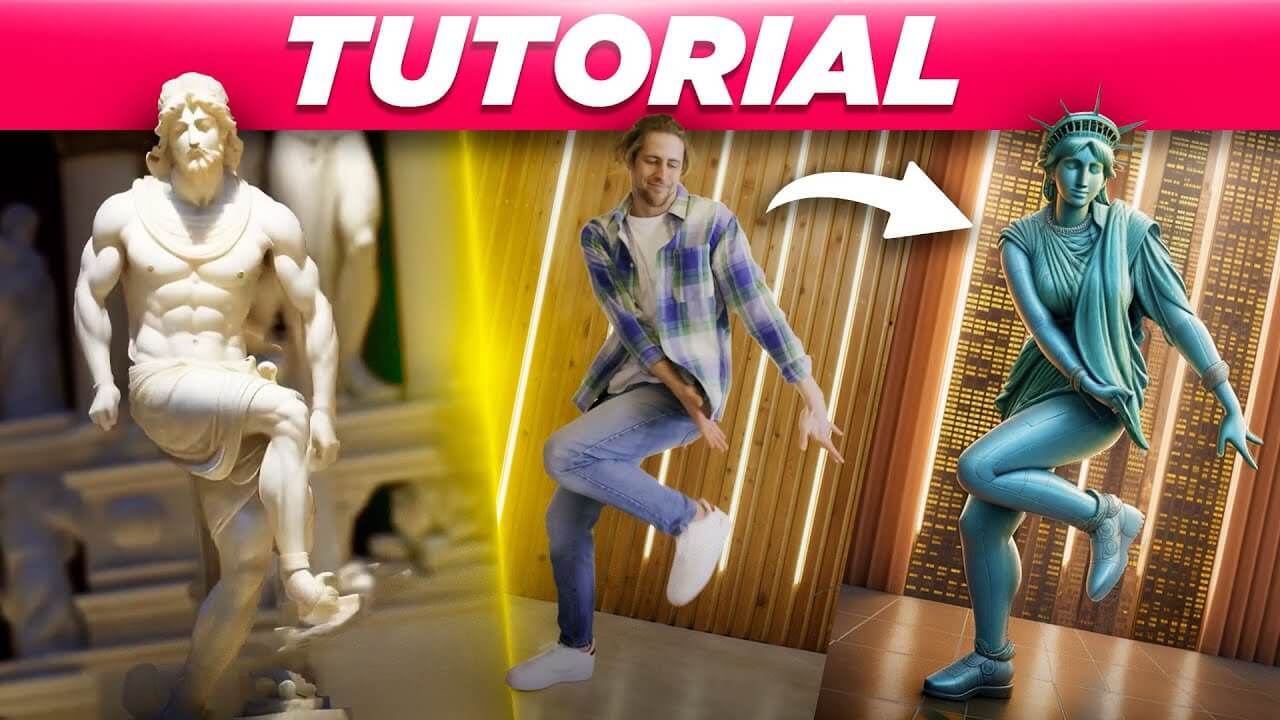
Stable WarpFusion is an AI video tool that transforms videos into stylized animations using diffusion models for smooth, artistic effects.
What is Stable WarpFusion?
Stable WarpFusion is an AI-powered video editing platform that uses advanced diffusion algorithms to convert ordinary videos into styled animations. Developed by'sxela', it uses alpha-masked diffusion to apply artistic styles frame by frame, ensuring temporal consistency and realistic visual effects. Tiled VAE provides high-resolution outputs, Face ControlNet improves facial detail, and TemporalNet provides smooth motion across frames. Users can edit animations using prompts and parameters, selecting from a variety of AI models to get the desired look. While it requires an NVIDIA GPU with at least 8GB VRAM or access to Google Colab Pro, Stable WarpFusion is a strong alternative for creators seeking to create unique, AI-driven video content.
Key Features
Stable WrapFusion key features are
- Alpha-Masked Diffusion: Stable WarpFusion uses alpha masks to precisely control diffusion processes, resulting in detailed and realistic graphics.
- Advanced AI Models: Stable WarpFusion integrates models like Protogen for realistic animations, with support for several styles, including anime and Disney-inspired themes.
- Customization Options: Stable WarpFusion customizable settings include style strength, CFG scale, and prompt inputs to customize animations to individual imaginative ideas.
- Integration with Google Colab: Stable WarpFusion provides courses and support for running the tool through Google Colab, allowing access without the need for local installations.
Stable WarpFusion Pricing
Stable WarpFusion offers various pricing plans
Disclaimer: For the latest and most accurate pricing information, please visit the official Stable WarpFusion website.
Who Is Using Stable WarpFusion?
A diverse range of users and organizations utilize Stable WarpFusion
- Digital Artists
- Animators
- Content Creators
- Educators
- Researchers
- Marketing Professionals
Stable WarpFusion Alternatives
Some Stable WarpFusion alternatives are
- Deforum
- Runway ML
- DeepMotion
- Kaiber
Stable WrapFusion Video
Conclusion
Stable WarpFusion is an advanced AI animation tool that makes it easy to create high-quality, styled videos. Its combination of advanced capabilities, customization choices, and affordable pricing makes it a top choice for creators looking to improve their visual material. Whether you're an artist, educator, or marketer, Stable WarpFusion provides tools to bring your original ideas to life through AI-powered animation.
Also Check:
User Reviews
No reviews yet for Stable WarpFusion.
Featured Tools
Featured AI tools from TechShark

Melody Genie
MelodyGenie is an AI-powered music generator that creates original songs from simple text prompts. Users can choose styles, moods, and genres, then instantly generate melodies and full tracks, making it easy for creators, marketers, and hobbyists to produce custom music without musical expertise.
Freemium

Kimi AI
Kimi AI is an advanced AI assistant developed by Moonshot AI that helps you chat, research, write, code, and automate tasks in one place. It supports web search, file analysis, and multimodal inputs, and can even run autonomous “agent” workflows to complete complex tasks end-to-end.
Freemium

Fashion Diffusion AI
Fashion Diffusion is an AI-powered fashion design platform that helps brands and designers create clothing designs, virtual try-ons, AI models, product photos, and marketing visuals faster and cost-effectively.
Paid

Veo 4
Veo 4 AI is an AI video creation platform that generates dramatic videos from text, images, audio, and video prompts using realistic motion and synchronized sound.
Paid
Alternatives
Alternatives to Stable WarpFusion
Stable WarpFusion is an AI-powered video editing platform that transforms ordinary videos into high-quality, stylistic animations using advanced diffusion, facial control, and smooth temporal consistency
Neural.love
AI Image Enhancer
Neural.love is an AI-powered creative platform for generating images, editing photos, enhancing videos, restoring old media, and animating pictures. It combines multiple AI tools in a browser-based workspace, helping content creators, marketers, photographers, designers, and businesses improve visual content without relying entirely on traditional editing software.
 4.8
4.8Shuffll
Video Editing
Shuffll goes beyond traditional video creation by connecting personalized video directly to enterprise data and workflows. Its API-first infrastructure, 40+ AI models, automated production, and built-in brand governance make it suitable for organizations that need video at scale. For businesses seeking higher engagement without building large production teams, Shuffll offers a practical way to turn existing data into personalized, on-brand video experiences.
 4.8
4.8Opus Clip (Opus Pro)
Video Editing
OpusClip helps creators transform long-form videos into short, social-ready clips. It can identify engaging moments, generate captions, reframe footage, add B-roll, enhance audio, and support publishing across major social platforms. It is designed for creators, marketers, podcasters, businesses, and teams that want to scale video content production.
 4.8
4.8Dubbah
Video Editing
Dubbah helps Mac users translate and dub videos into 14 languages while preserving a familiar speaker voice. The app processes media locally, supports editing translated lines, and works offline after setup. With no account, subscription, or per-minute fee, it offers a simple, straightforward option for creators producing multilingual video content.
 4.9
4.9Clipchamp
Video Generator
Clipchamp is an AI-powered online video editor by Microsoft that helps users record, edit, and share videos directly from the browser. It offers templates, stock media, and AI tools like subtitles, voiceovers, and noise removal, enabling fast, professional video creation without advanced editing skills.
 4.9
4.9CapCut
Video Editing
CapCut is a popular video editing tool that helps creators produce engaging videos with effects, transitions, filters, templates, subtitles, and AI-powered features. Available on multiple platforms, CapCut makes it easy to edit videos for TikTok, Instagram Reels, YouTube Shorts, and other social media channels.
 4.9
4.9Media.io
Video Editing
Media.io is an AI-powered creative platform that helps users generate, edit, and enhance videos, images, audio, and ads from simple prompts or assets. It combines AI generation, editing, and workflows in one place, enabling creators to turn ideas into polished content quickly without switching tools.
 4.9
4.9Video Candy
Video Editing
Video Candy is a free online video editing platform that helps users trim, merge, compress, convert, and enhance videos directly in the browser. It offers 70+ tools with a simple drag-and-drop interface, making video editing fast, accessible, and efficient without installing complex software.
 4.8
4.8Vheer
Image
Vheer is a free AI image and video generator that helps users create visuals from text or photos instantly. It includes tools for image editing, background removal, and image-to-video conversion, offering unlimited generations without signup, making it ideal for quick, creative content production.