
Side Copilot
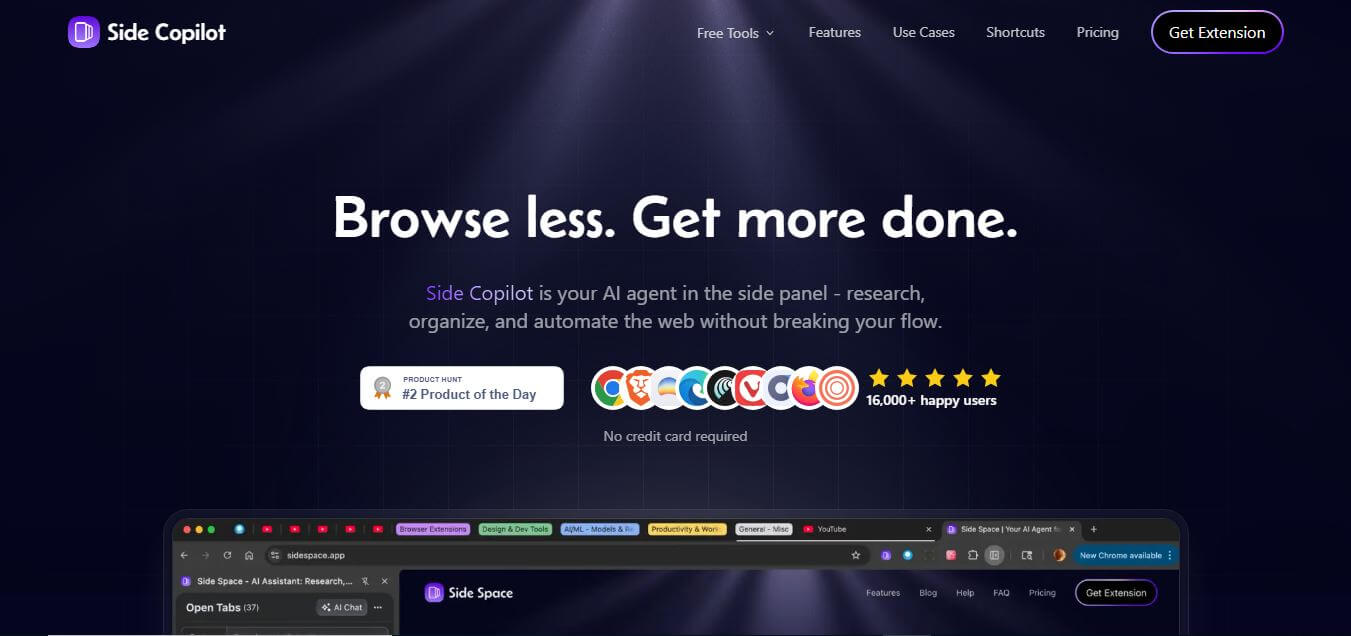
Side Copilot is an AI-powered browser extension and vertical tabs sidebar for Google Chrome that organizes open tabs into Spaces, suspends inactive memory, and deploys autonomous AI agents to research, summarize, and automate web workflows without breaking focus.
What is Side Copilot?
Side Copilot is an AI-powered browser assistant designed to enhance your everyday web experience by bringing intelligent support directly into your browsing workflow. Instead of switching between tabs or tools, it sits conveniently in a side panel, allowing you to interact with web content in real time. You can summarize articles, ask questions about pages, organize tabs, and automate repetitive tasks without leaving your current screen. This makes it especially useful for students, researchers, and professionals who spend a lot of time online. Its clean interface and seamless integration make it easy to use, even for beginners. By reducing distractions and improving efficiency, Side Copilot helps users stay focused, work faster, and make better use of the information they encounter online.
Side Copilot helps heavy tab users reduce browser RAM consumption by up to 60 percent using intelligent background tab suspension. The extension allows users to organize hundreds of open URLs into structured Spaces with sub-second fuzzy search retrieval. By automating web research, multi-tab summarization, and window management, professionals report saving over 5 hours per week on manual browsing workflows. Side Copilot offers cross-device cloud sync and BYOK (Bring Your Own Key) model support across major AI providers.
- Founder: Developed by the Side Copilot software engineering team
- Launch Year: 2025
- Use Cases:
- Vertical tab organization and browser clutter reduction
- Multi-tab research synthesis, comparison, and summarization
- Background tab memory suspension and RAM optimization
- Automated browser window grouping and history discovery
- Technology:
- Chrome Side Panel API and native extension architecture
- Multi-tab context evaluation and Large Language Model orchestration
- Cloud-synchronized session and space persistence engine
- Target Users:
- Software engineers, technical leads, and web developers
- Academic researchers, educators, and university students
- Digital marketers, SEO analysts, and content creators
- Heavy multitaskers and former Arc Browser users
- Acquisition: Operates as an independent browser productivity software company

Key features of Side Copilot
Side Copilot's key features are
- Arc-Style Vertical Tabs Sidebar: Displays all open tabs, groups, and pinned bookmarks in a clean, easily scannable vertical panel inside Chrome.
- Contextual Spaces & Cloud Sync: Organizes browsing sessions into distinct Spaces (e.g., Work, Research, Personal) that sync seamlessly across devices.
- Interactive AI Agent Mode: Empowers autonomous AI agents to take action on your behalf, including grouping tabs by topic, organizing windows, and searching history.
- Multi-Tab AI Chat & Compare: Evaluates multiple open tabs at once to cross-reference data, summarize complex articles, and generate comparison tables.
- Intelligent Tab Memory Suspension: Frees up system RAM by putting inactive tabs to sleep without losing their scroll positions or session states.
- Chat with PDFs and Web Files: Allows users to upload and query local documents, PDFs, and images directly within the side panel interface.
- Instant Fuzzy Search: Quickly locates specific tabs, domain groups, or saved spaces using fast keyboard shortcuts and keyword search.
- Bring Your Own Key (BYOK) Flexibility: Allows power users to connect their own OpenAI, Anthropic, or Gemini API keys for customized, unlimited AI model usage.
Side Copilot Pricing
Side Copilot offers a generous free tier alongside affordable subscription and BYOK plans.
Free Plan:
- $0/month
- Up to 5 spaces with cloud sync
- Up to 1,000 URLs with AI grouping
- Single-tab AI chat and 2 daily AI Agent Mode trials
Pro Plan (BYOK):
- Starts at approximately $2.90 – $4.90/month
- Unlimited spaces and unlimited URLs
- Full Bring Your Own Key (BYOK) AI model integration
- Mind map generation, YouTube video chatting, and custom shortcuts
Pro+ Plan:
- Starts at approximately $7.90 – $8.90/month
- All Pro features included
- Unlimited built-in Side Copilot AI Agent access
- Multi-tab chat comparison and priority cloud sync
Disclaimer: For the latest and most accurate pricing information, please visit the official Side Copilot website.
Who is using Side Copilot?
Side Copilot is designed for a broad range of multitasking digital professionals, including
- Software Engineers: Managing dozens of documentation tabs, pull requests, and Stack Overflow discussions
- Academic Researchers: Synthesizing information across scientific papers, articles, and lecture notes
- Content Marketers: Using writing tools to extract talking points and stats from online publications
- Project Managers: Organizing client workflows, tickets, and dashboards into dedicated spaces
- eCommerce Shoppers: Comparing product specs and prices across multiple store tabs
- Power Browsers: Migrating from Arc Browser seeking native vertical tabs in Chrome
Best Side Copilot Alternatives
Some of the strongest Side Copilot alternatives include
Pros and Cons of Side Copilot
Pros
- Brings Arc-style vertical tabs and Spaces to Google Chrome without migrating browsers
- Dual AI modes provide both passive page summaries and active agent workflow automation
- Inactive tab suspension significantly cuts Chrome's high RAM consumption
- Transparent pricing with flexible Bring Your Own Key (BYOK) options
- Cross-device cloud sync keeps your workspace organized on multiple computers
Cons
- Currently designed primarily as a Google Chrome / Chromium extension
- Free plan limits Agent Mode tasks to 2 trials per day
- Multi-tab chat synthesis requires a Pro+ subscription or custom API keys
- Initial layout shift from horizontal to vertical tabs requires a brief learning curve
Why Choose Side Copilot?
Side Copilot is the ideal choice for heavy tab hoarders and researchers who want to declutter their Chrome browser and supercharge daily research. It combines visual organization with actionable AI automation.
- Turns Chrome's messy horizontal tabs into clean, organized vertical spaces
- Deploys AI agents that actually organize tabs and execute browsing tasks for you
- Summarizes and compares multiple open tabs simultaneously to save research time
- Lowers memory usage by suspending inactive tabs automatically
- Offers flexible pricing starting at under $3 per month with BYOK options
Side Copilot vs. Competitors
The main difference between Side Copilot, Sider AI, Harpa AI, and Arc Browser is that Side Copilot combines Arc-style vertical tab spaces with an autonomous AI browser agent directly inside Chrome, while Sider AI focuses on multi-model chatbot widgets, Harpa AI specializes in complex web-scraping automations, and Arc Browser is a separate standalone web browser. Side Copilot stands out for providing vertical tab management and multi-tab AI synthesis within the familiar Chrome ecosystem.
| Feature / Tool | Side Copilot | Sider AI | Harpa AI | Arc Browser |
|---|---|---|---|---|
| Core Focus | Vertical Tabs & AI Agent | AI Sidebar Chatbot | Web Automator & Scraper | Standalone Web Browser |
| Chrome Vertical Tabs | Yes (Native Side Panel) | No (Floating Widget) | No | Built-in App |
| Tab Spaces & Suspension | Yes (Cloud Synced) | No | No | Built-in App |
| Agent Action Mode | Yes (Tab/Window Tools) | Limited (Claw Actions) | Yes (Custom Automations) | Limited |
| BYOK Support | Yes | Limited | Yes | No |
| Best For | Tab Organization & Research | Multi-Model Sidebar Chat | Web Scraping & Monitoring | All-New Browser Experience |
How do we rate Side Copilot?
| Parameter | Rating (out of 5) |
|---|---|
| Tab Organization & Spaces | 4.9 |
| AI Agent & Research Capabilities | 4.8 |
| Memory & Performance Optimization | 4.9 |
| Ease of Setup & UI Design | 4.8 |
| Value for Money | 4.9 |
| Overall Score | 4.86 |
Side Copilot Review
Side Copilot is a highly useful browser extension for people who spend a lot of time online and manage multiple tabs. It stands out with its AI-powered side panel that can summarize pages, automate research, and organize tabs efficiently. The vertical tab system and “Spaces” feature make multitasking much smoother. However, it may take some time to get used to, and advanced automation features are limited to paid plans. Overall, Side Copilot serves as a robust productivity tool, particularly for researchers, students, and professionals who aim to enhance their browsing workflow.
Conclusion
Side Copilot is a practical and efficient tool for anyone looking to enhance their browsing experience with the help of AI. By integrating directly into the browser as a side panel, it simplifies tasks like research, summarization, and tab management without interrupting workflow. Its ability to keep everything organized and accessible in one place makes it especially valuable for students, professionals, and heavy internet users. While there may be a slight learning curve and some advanced features behind paid plans, the overall benefits are clear. Side Copilot improves productivity, reduces distractions, and helps users work smarter, making it a strong addition to modern digital workflows.
FAQ
What exactly is Side Copilot, and how can Side Copilot help me?
Side Copilot is an AI-powered browser extension that adds an intelligent assistant directly to your browser’s side panel. Side Copilot helps you research, summarize, organize tabs, and automate tasks without leaving the page you’re on. Instead of switching between tools, Side Copilot lets you work faster within your existing browser workflow.
How does Side Copilot actually work?
Side Copilot lives inside your browser sidebar and interacts with your current tabs. Side Copilot can read page content, understand your open tabs, and respond to prompts in real time. Side Copilot also includes an “Agent Mode” that can perform multi-step actions like opening tabs, researching topics, and organizing information automatically.
What makes Side Copilot different from AI browsers like Arc or Comet?
Side Copilot works as an extension, not a full browser. Side Copilot allows you to keep using Chrome, Edge, or Brave while adding AI features on top. This means you don’t need to switch your setup, bookmarks, or workflow—Side Copilot simply enhances your existing browser.
Can Side Copilot automate tasks in my browser?
Yes, Side Copilot includes an AI agent that can automate browser tasks. Side Copilot can group tabs, manage windows, search browsing history, and even perform research across multiple pages. This makes Side Copilot useful for repetitive workflows and multitasking.
Can Side Copilot summarize web pages and content?
Yes, Side Copilot can summarize articles, PDFs, YouTube videos, and other content directly inside your browser. Side Copilot understands the full context of the page, so summaries are more relevant and accurate compared to copy-paste tools.
Does Side Copilot support different AI models?
Yes, Side Copilot supports a “Bring Your Own Key” (BYOK) feature. Side Copilot allows you to connect models like OpenAI, Anthropic, or others using your own API keys, giving you flexibility and control over how AI is used.
Is Side Copilot free to use?
Side Copilot offers a free plan with basic features like limited spaces and chat functionality. Paid plans unlock advanced features such as unlimited spaces, full agent automation, and deeper integrations.
User Reviews
No reviews yet for Side Copilot.
Featured Tools
Featured AI tools from TechShark

Melody Genie
MelodyGenie is an AI-powered music generator that creates original songs from simple text prompts. Users can choose styles, moods, and genres, then instantly generate melodies and full tracks, making it easy for creators, marketers, and hobbyists to produce custom music without musical expertise.
Freemium

Kimi AI
Kimi AI is an advanced AI assistant developed by Moonshot AI that helps you chat, research, write, code, and automate tasks in one place. It supports web search, file analysis, and multimodal inputs, and can even run autonomous “agent” workflows to complete complex tasks end-to-end.
Freemium

Fashion Diffusion AI
Fashion Diffusion is an AI-powered fashion design platform that helps brands and designers create clothing designs, virtual try-ons, AI models, product photos, and marketing visuals faster and cost-effectively.
Paid

Veo 4
Veo 4 AI is an AI video creation platform that generates dramatic videos from text, images, audio, and video prompts using realistic motion and synchronized sound.
Paid
Alternatives
Alternatives to Side Copilot
The best Side Copilot alternatives includes Sider AI, Harpa AI, MaxAI.me, Arc Browser, Monica AI, and Side Space. These tools provide AI browser sidebars, vertical tab management, and automated web research assistants. While Side Copilot specializes in Arc-style vertical tabs, tab suspension, and autonomous browser agent actions inside Chrome, alternatives like Sider AI focus on multi-model chat widgets, and Harpa AI emphasizes custom web scraping. Choosing the ideal tool depends on whether you need dedicated vertical tab organization or standalone AI chat assistance.
 4.7
4.7Quinvio AI
Productivity
Quinvio AI helps you turn ideas, scripts, blogs, or web content into polished video presentations. You can refine messaging, choose branded templates, add AI avatars and voiceovers, and produce shareable visual content without traditional recording or editing workflows. It is especially useful for marketers, educators, trainers, creators, and business teams.
 4.9
4.9HubSpot
Marketing
HubSpot is an AI-powered customer platform that helps businesses manage marketing, sales, customer service, and content in one place. It offers a free CRM, automation tools, analytics, and AI features, enabling teams to attract leads, close deals, and deliver better customer experiences at scale.
 4.9
4.9TestSprite
Testing
TestSprite is an AI-powered software testing agent that helps developers automatically generate, run, and fix end-to-end tests for web apps. It simulates real user behavior, detects issues, and provides root-cause insights with suggested fixes, enabling faster releases and more reliable software without manual QA effort.
 4.8
4.8Microsoft Copilot
Productivity
Microsoft Copilot is an AI-powered assistant that helps users write, research, analyze data, and automate tasks across apps like Word, Excel, Outlook, and Teams. It combines large language models with real-time data to generate content, answer questions, and improve productivity across personal and professional workflows.
 4.9
4.9Casablanca AI
Productivity
Casablanca AI is an AI-powered virtual camera that corrects your gaze in real time during video calls, making it appear like you’re maintaining natural eye contact. It works with tools like Zoom and Teams, improving trust, engagement, and communication without needing extra hardware.
 4.9
4.9Granola
Productivity
Granola is an AI-powered meeting assistant that helps you capture, organize, and act on conversations without losing focus. It listens to meetings, turns notes into structured summaries, and generates action items and follow-ups automatically—so you stay present while everything important is documented and ready to use.
 4.8
4.8AI Perfect Assistant
Productivity
AI Perfect Assistant brings AI assistance directly into everyday work applications. It helps users write emails, improve documents, summarize content, translate text, create presentations, generate SEO content, explain Excel formulas, and handle repetitive tasks through 60+ specialized tools and multiple integrations for everyday professional and business workflows with less effort.
 4.8
4.8AI Submit
Productivity
AI Submit is an automated directory submission and SEO distribution platform that allows AI startup founders and developers to submit their artificial intelligence tools to dozens of top AI directories simultaneously for backlink building and traffic growth.
 4.9
4.9Kroolo
Project Management
Kroolo is an AI-powered productivity and project management platform that helps teams plan tasks, track progress, and collaborate in one place. It combines project tracking, document management, and AI assistance to streamline workflows, automate routine work, and improve team efficiency across projects.