
ImgToImg.ai
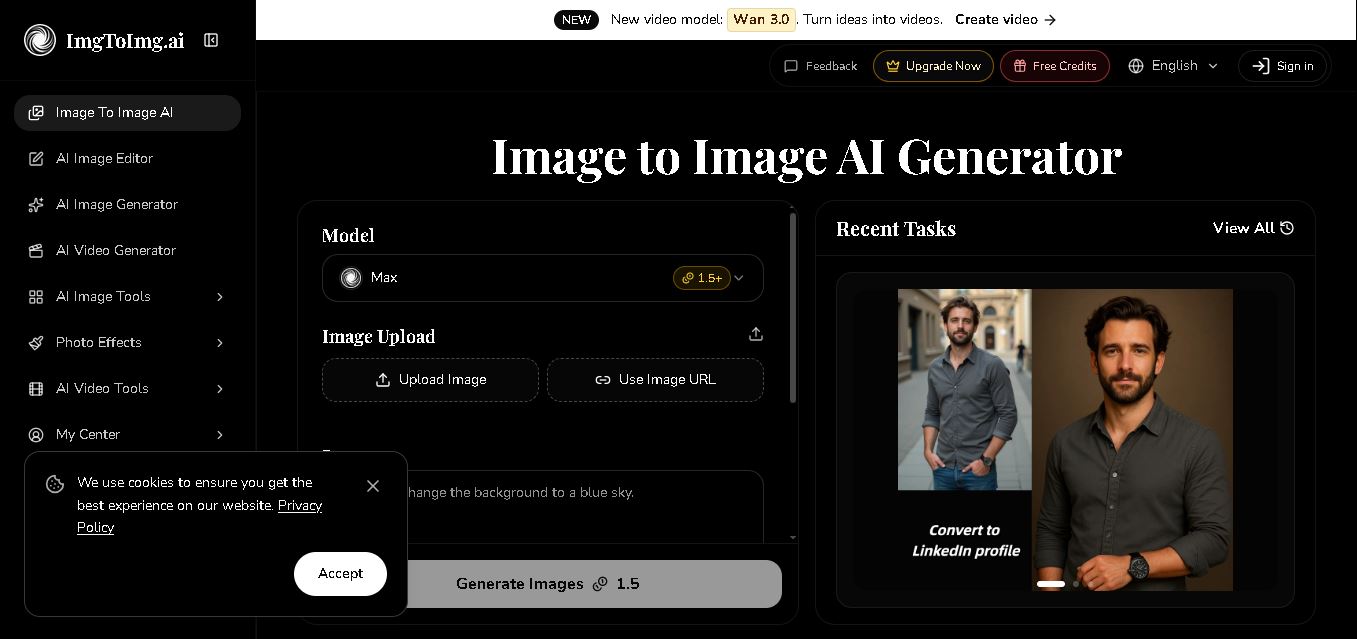
ImgToImg.ai is an image-to-image AI generator that transforms existing photos using text prompts. You can change styles, colors, backgrounds, environments, and visual elements while preserving the original composition. It supports JPEG, PNG, and WEBP files up to 24MB, making it useful for designers, marketers, creators, photographers, and businesses.
What is ImgToImg.ai?
ImgToImg.ai is an image transformation and editing tool that turns existing images into new visual variations using text prompts. It preserves important elements of the original image while allowing users to change styles, colors, backgrounds, environments, and other visual details. Users can upload JPEG, PNG, or WEBP images, adjust settings such as aspect ratio and transformation strength, and generate multiple variations. It is designed for designers, marketers, photographers, content creators, and anyone who wants to transform images without advanced editing skills.
ImgToImg.ai supports JPEG, PNG, and WEBP uploads up to 24 MB and resolutions reaching 4096 × 4096 pixels. Most image transformations are completed within seconds, while complex requests can take up to 1 minute. Users can control transformation strength, aspect ratio, output count, and prompts. Paid plans provide commercial usage rights. Flex credits include options from 200 to 3,000 base credits, with packages reaching 4,200 credits after bonuses.
- Platform Role: AI Image-to-Image Generator, Photo Restyling & Upscaling Suite, AI Video Generation Tool
- Developer & Organization: ImgToImg.ai Team
- Cross-Platform Access: Web Browser (Responsive desktop and mobile web interface)
Use Cases:
- Converting real-world photos into anime, cartoon, vector, or Ghibli-style digital illustrations
- Modifying backgrounds, lighting, and environments of product shots or personal portraits
- Upscaling low-resolution images to crisp 2K or 4K quality while restoring fine details
- Generating dynamic short video animations from static reference photos using models like Wan 3.0
- Restoring and colorizing old, scratched, or faded vintage photographs
Technology:
- Multi-model neural engine supporting high-precision generation (Max 1.5+, Banana, GPT Image, Wan 3.0 Video)
- Structure-aware diffusion models designed to retain original spatial geometry and subject poses
- Automated optical character recognition and segmentation algorithms for background removal and photo restoration
- API endpoints for developer integration and batch asset generation
Target Users:
- Digital marketers and content creators looking to generate multiple campaign variations quickly
- E-commerce sellers needing clean background removal and product visual enhancements
- Graphic designers and visual artists seeking image-guided conceptual inspiration
- Casual users wanting to create custom avatars, cartoon transformations, or restored family photos
Acquisition: Self-serve cloud platform operated at imgtoimg.ai

What are the key features of ImgToImg.ai?
ImgToImg.ai's key platform features are
- Image to Image Transformation: Upload any reference image and guide the AI with text prompts to change style, color palette, or setting while maintaining structural layout.
- AI Image Upscaler (2K & 4K): Enhance image clarity, sharpness, and resolution up to 4K output.
- AI Background Remover & Changer: Isolate subjects instantly and replace surroundings with customized AI-generated environments.
- Ghibli & Cartoon Generator: Convert portraits and landscapes into distinct artistic themes like Studio Ghibli, 3D render, or anime.
- Old Photo Restoration: Repair scratches, fix visual artifacts, and re-colorize damaged vintage photos.
- AI Video Tools (Image to Video & Text to Video): Animate static uploaded images into short video clips using advanced video models like Wan 3.0.
- Multiple Model Options: Choose between speed-optimized and quality-focused AI model presets (Max 1.5+, Banana Pro, GPT Image).
How much does ImgToImg.ai cost?
ImgToImg.ai operates on a freemium credit system, granting daily or monthly free generation credits, with optional paid upgrades for higher resolutions and commercial usage.
Pricing Tiers:
- Free Tier ($0 / Free Plan): Free initial credits upon sign-in, standard generation speeds, and access to core image-to-image editing tools.
- Paid Pro / Subscription Plans: Monthly credit allocations, faster generation times, 4K resolution output, watermark removal, commercial licensing rights, and priority video generation.
Disclaimer: Advanced features such as 4K upscaling, watermark-free downloads, and commercial licensing require an active paid subscription or credit pack purchase.
Who should use ImgToImg.ai?
ImgToImg.ai is designed for creators, marketers, and everyday users, including
- Social Media Creators: Users looking to convert selfies and photos into trending cartoon or Ghibli avatars.
- E-Commerce & Product Vendors: Businesses needing fast background swaps and clean visual assets for marketing catalogs.
- Designers & Illustrators: Creative professionals testing style variations based on existing sketches or compositions.
What are the best alternatives to ImgToImg.ai?
Some of the strongest ImgToImg.ai alternatives include
- Midjourney
- Leonardo. AI
- Krea AI
- RunwayML
- Magnific AI
- Canva AI Photo Editor
What are the pros and cons of ImgToImg.ai?
What are the pros of ImgToImg.ai?
- Completely browser-based with simple drag-and-drop workflow
- Strong spatial consistency between original input and transformed AI output
- All-in-one suite covering image transformation, upscaling, restoration, and video synthesis
- Offers free credits to test core features without upfront payment
What are the cons of ImgToImg.ai?
- High-resolution outputs (4K) and watermark removal require paid plans
- Complex prompt transformations may occasionally alter smaller facial features
- Heavy video generation tasks can consume credits rapidly
Why should you choose ImgToImg.ai?
Text-only AI generators often struggle to match exact compositions or pose constraints. ImgToImg.ai solves this challenge by letting your starting photo dictate the structure while AI handles the artistic execution. Whether you need a quick cartoon transformation, clean product background, or 4K upscale, the platform delivers high-quality visual edits within seconds.
How does ImgToImg.ai compare to competitors?
The primary difference between ImgToImg.ai and Leonardo. The primary difference between ImgToImg.ai and its competitors, including Leonardo AI, Midjourney, and Krea AI, is accessibility and ease of use. While Midjourney requires Discord and complex prompt parameters, ImgToImg.ai provides a streamlined web workspace focused specifically on image-guided transformations, background editing, and video generation.
| Feature / Platform | ImgToImg.ai | Leonardo.AI | Midjourney | Krea AI |
|---|---|---|---|---|
| Core Focus | Image-to-Image & Photo Restyling | Game Art & Multi-Model Generation | High-Fidelity Text-to-Image | Real-Time Enhancement & Upscaling |
| User Interface | Simple Web Studio Dashboard | Feature-rich Web Dashboard | Discord Bot / Web Alpha | Interactive Real-Time Canvas |
| Image-to-Video Support | Yes (Wan 3.0 & AI Video Models) | Yes (Motion Tool) | No (Image/Video exports limited) | Yes (real-time video interpolation) |
| Free Access Tier | Free daily/trial credits | Daily renewable credits | Paid only | Limited free tier |
| Best For | Quick photo restyling, cartoonizing, upscaling & background edits | Concept artists and game designers needing fine control | Photorealistic artistic renders from text prompts | Real-time enhancement and creative canvas work |
How do we rate ImgToImg.ai?
| Parameter | Rating (out of 5) |
|---|---|
| Ease of Use & Interface Design | 4.8 |
| Image Transformation & Fidelity | 4.7 |
| Tool Variety (Upscaling, Effects, Video) | 4.6 |
| Processing Speed & Performance | 4.5 |
| Value for Money | 4.4 |
| Overall Score | 4.60 |
What is our review and verdict on ImgToImg.ai?
ImgToImg.ai provides a versatile and accessible set of tools for anyone wanting to transform existing photographs without complex software skills. Its strong emphasis on structure preservation, combined with quick upscaling, background edits, and video generation, makes it an efficient creative workspace for quick photo transformations.
Conclusion
ImgToImg.ai provides a practical way to transform existing images through natural-language prompts while retaining important elements of the original visual. Its support for multiple image formats, high-resolution uploads, adjustable transformation strength, style changes, and commercial licensing on paid plans makes it suitable for creative and business workflows. With free usage and flexible one-time credit options, users can experiment with image transformations before committing to larger-scale production needs.
FAQ
What is ImgToImg.ai used for?
ImgToImg.ai is used to transform existing images into new variations through text prompts. You can change an image’s artistic style, colors, environment, background, or other visual elements while retaining important parts of the original composition. It can support creative projects, marketing materials, product visuals, social media content, and design experimentation.
How does ImgToImg.ai work?
ImgToImg.ai starts with an uploaded image and a written description of the changes you want. Its system analyzes the source image and prompt before generating a transformed version. You can adjust settings such as transformation strength, aspect ratio, and output count to influence how closely the generated result follows your original image.
What image formats does ImgToImg.ai support?
ImgToImg.ai supports three common image formats: JPEG, PNG, and WEBP. Uploaded files can be up to 24MB, with supported image dimensions reaching 4096 × 4096 pixels. For better results, the website recommends using clear, well-lit images with defined subjects and an aspect ratio appropriate for your intended output.
Can I use ImgToImg.ai for image style transformations?
Yes, ImgToImg.ai can transform the visual style of an existing image through prompts. Users can experiment with artistic directions such as oil-painting effects, cyberpunk aesthetics, and other styles. The tool is designed to retain important structural elements from the source image while applying the requested creative transformation to its appearance.
Can ImgToImg.ai change the background of an image?
Yes, background and surrounding environments can be modified through image transformation prompts. You can describe the environment or background you want and allow the system to apply the requested change while maintaining important elements of the original image. ImgToImg.ai also provides a dedicated AI background changer among its related image tools.
How long does ImgToImg.ai take to generate images?
Most image transformations on ImgToImg.ai are completed within seconds, according to the website. More complex transformations can take up to approximately 1 minute. Processing time can vary depending on the complexity of your request and selected settings. Users can also generate multiple outputs to explore different versions of the same creative idea.
User Reviews
No reviews yet for ImgToImg.ai.
Featured Tools
Featured AI tools from TechShark

Melody Genie
MelodyGenie is an AI-powered music generator that creates original songs from simple text prompts. Users can choose styles, moods, and genres, then instantly generate melodies and full tracks, making it easy for creators, marketers, and hobbyists to produce custom music without musical expertise.
Freemium

Kimi AI
Kimi AI is an advanced AI assistant developed by Moonshot AI that helps you chat, research, write, code, and automate tasks in one place. It supports web search, file analysis, and multimodal inputs, and can even run autonomous “agent” workflows to complete complex tasks end-to-end.
Freemium

Fashion Diffusion AI
Fashion Diffusion is an AI-powered fashion design platform that helps brands and designers create clothing designs, virtual try-ons, AI models, product photos, and marketing visuals faster and cost-effectively.
Paid

Veo 4
Veo 4 AI is an AI video creation platform that generates dramatic videos from text, images, audio, and video prompts using realistic motion and synchronized sound.
Paid
Alternatives
Alternatives to ImgToImg.ai
The best ImgToImg.ai alternatives include Leonardo.AI, Midjourney, Krea AI, and RunwayML. While ImgToImg.ai offers an easy web-based image-to-image restyling tool with upscaling and cartoon transformations, alternatives like Leonardo.AI provide advanced asset customization for concept art, and Krea AI offers real-time image enhancement.
 4.7
4.7ImgCreator AI
Image
ImgCreator AI is an AI-powered image generation tool that helps users create visuals from text prompts and reference images. It supports creative artwork, realistic portraits, product visuals, and image editing, making it useful for designers, marketers, content creators, and businesses seeking faster visual content production.
Neural.love
AI Image Enhancer
Neural.love is an AI-powered creative platform for generating images, editing photos, enhancing videos, restoring old media, and animating pictures. It combines multiple AI tools in a browser-based workspace, helping content creators, marketers, photographers, designers, and businesses improve visual content without relying entirely on traditional editing software.
 4.8
4.8Prisma AI
Image
Prisma AI turns everyday photos into artistic images with stylized filters and creative effects. It offers hundreds of art and portrait styles inspired by famous artists, allowing beginners to create distinctive visuals quickly. Users can capture or upload photos, apply a chosen style, and save or share the finished result.
 4.9
4.9Bria AI
Image
Bria helps businesses and teams generate and edit visual content using controllable generative AI. Its capabilities cover image generation, product visuals, background editing, video workflows, and developer integrations. With licensed training data, attribution, provenance, and enterprise deployment options, Bria is positioned for businesses that need scalable, commercially focused visual AI.
 4.7
4.7Unwatermark
Image
Unwatermark.ai helps creators, marketers, photographers, and businesses remove watermarks, logos, text, people, and unwanted objects from images and videos. Its automatic detection handles quick edits, while the manual brush provides precise control over difficult areas. With browser-based processing, format support, previews, and free usage, it simplifies everyday visual cleanup.
 4.9
4.9invideo Nano Banana
Image
Nano Banana is an AI image generation and editing model by Google (Gemini family) that helps users create, modify, and refine visuals using natural language prompts. It supports 4K outputs, consistent characters, accurate text rendering, and real-time editing, enabling fast, production-ready creative workflows.
 4.8
4.8Banana Nano
Image
BananaNano (Nano Banana AI) is an AI-powered image generation and editing platform that lets users create visuals from text or edit photos using natural language. It supports multi-image fusion, character consistency, and up to 4K output, enabling fast, flexible visual creation without complex design tools.
 4.8
4.8Vheer
Image
Vheer is a free AI image and video generator that helps users create visuals from text or photos instantly. It includes tools for image editing, background removal, and image-to-video conversion, offering unlimited generations without signup, making it ideal for quick, creative content production.
 4.9
4.9QOVES
Image
QOVES is an AI-powered facial analysis and beauty consulting platform that helps users understand their facial features and improve appearance through personalized, science-backed recommendations. It analyzes hundreds of facial markers and provides a non-surgical transformation plan, enabling informed decisions about aesthetics, skincare, and overall self-improvement.