
Clipnote
Clipnote is an AI-integrated note-taking and publishing platform that connects seamlessly with Claude and ChatGPT via Model Context Protocol (MCP), allowing users to save, organize, update, and publicly share Plain Text, Markdown, and interactive HTML clips directly from AI conversations.
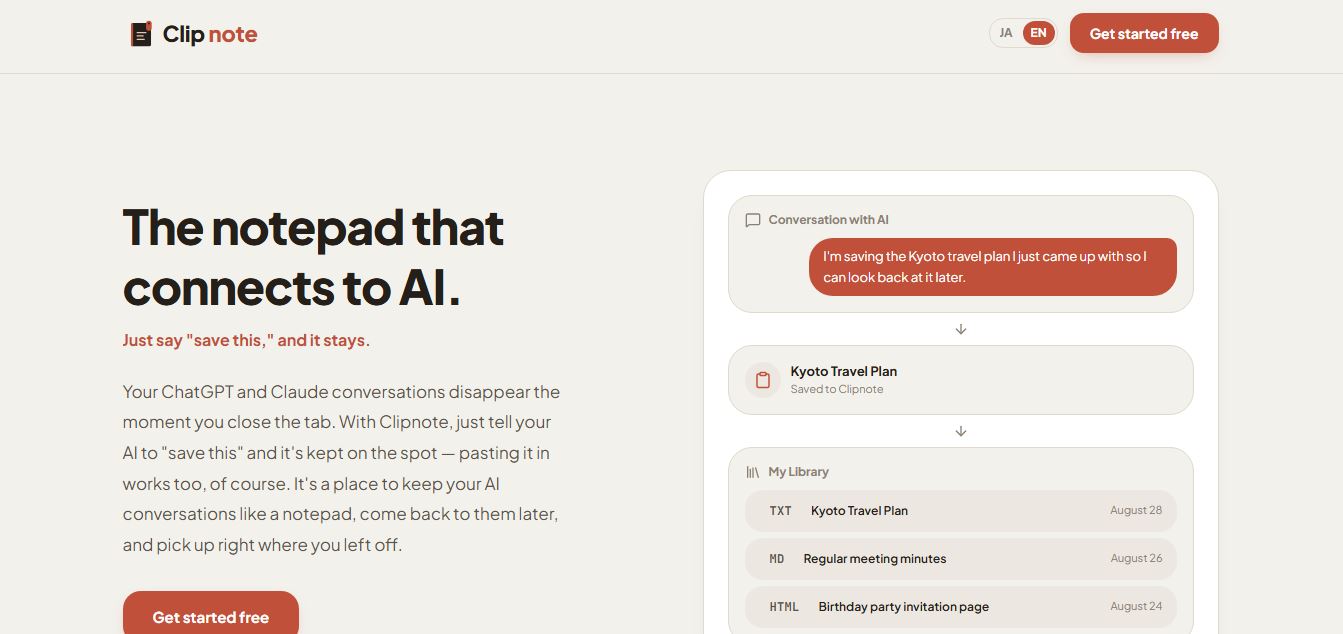
What is Clipnote?
Clipnote is an AI-connected digital notebook and instant web publishing workspace engineered by developer studio Paritto. Built to eliminate the friction of lost conversation threads and forgotten outputs in generative AI tools, Clipnote allows users to save, manage, recall, and share their AI-generated outputs—from basic notes to live HTML web tools—directly through chat prompts or a clean management console.
Built around the concept of “A notepad directly connected to AI,” Clipnote solves the transient nature of modern LLM chats. Instead of letting valuable meeting minutes, travel itineraries, or generated mini-apps disappear once a chat window closes, users simply instruct Claude or ChatGPT to “save this to Clipnote.” The platform automatically organizes these insights into searchable, version-controlled clips that can be reopened, updated in subsequent AI sessions, or shared publicly via a clean, web-ready URL.
- Platform Role: AI Notepad Workspace, Generative Output Repository & Instant Web Publishing Tool
- Developer & Organization: Paritto (paritto.dev)
- Ecosystem Integration: Direct MCP (Model Context Protocol) connector for Claude (Web/Desktop) and ChatGPT (Developer Mode / Custom Connectors), plus web browser access
Use Cases:
- Preserving ChatGPT and Claude outputs—such as meeting minutes, study summaries, and travel plans—directly without manual copy-pasting
- Publishing interactive, functional mini-apps, calculators, and event landing pages generated in HTML/CSS/JS via instant shareable web URLs
- Referencing past project notes and clips in new AI sessions to give LLMs persistent context for follow-up questions and iterative editing
- Updating existing documents conversationally through natural language commands with automated version history backups
- Organizing related project clips into cohesive collections and public portfolios for team members or external clients
Technology:
- Model Context Protocol (MCP) server architecture enabling zero-friction, one-click authorization without manual API key handling
- Triple-format rendering engine natively supporting Plain Text (.txt), rich Markdown (.md), and live executable HTML/CSS/JavaScript
- Automated document versioning system preserving complete revision histories every time an AI agent updates an existing clip
- Granular privacy and publishing routing (Private vs. Public) providing instant web URL generation for zero-build web deployment
Target Users:
- Active Claude and ChatGPT power users wanting a persistent repository for their most valuable prompts, research, and outputs
- Project managers and team leads capturing and publishing structured meeting notes, task checklists, and summaries
- No-code builders and hobbyists having LLMs generate interactive tools (split-bill calculators, mini-games, landing pages) that require instant hosting
- Writers, students, and researchers building a structured personal knowledge base directly from conversational AI sessions
Acquisition: Cloud-based web application and MCP service developed by Paritto

What are the key features of Clipnote?
Clipnote's key platform features are
- One-Click MCP Integration: Connects to Claude and ChatGPT seamlessly without requiring manual API keys or complex environment setups.
- Triple-Format Flexibility: Supports Plain Text for quick raw thoughts, structured Markdown for documents/tables, and full HTML for live interactive web widgets.
- Conversational Read & Update: Instruct your AI assistant to search your library, read specific clips as context, or update existing records directly inside the chat.
- Instant One-URL Publishing: Toggle clip visibility from Private to Public with a single click, instantly generating a public URL that renders formatted Markdown or live HTML.
- Automated Version History: Every programmatic or manual update automatically archives previous iterations, allowing one-click revision rollbacks.
- Collection Packaging: Group multiple clips, notes, and documentation pages into organized collections accessible via a single index URL.
- Manual Dashboard Management: Full web dashboard support for users to manually create, paste, pin, archive, search, and manage clips with a 30-day trash recovery window.
How much does Clipnote cost?
Clipnote operates on an accessible freemium model with free introductory access for individual users alongside scalable tiers for power creators.
Free Access Tier:
- $0 / Free Plan: Full access to basic clip creation, manual copy-pasting, core MCP connection with Claude and ChatGPT, private note storage, and public URL sharing.
Premium & Creator Tiers:
- Pro / Extended Usage Plans: Expands active clip capacity, unlocks higher MCP request throughput, enables advanced collection branding, and extends retention storage.
Disclaimer: Core features including MCP integration, Markdown rendering, and HTML publishing are available for free upon sign-up at clipnote.paritto.dev.
Who should use Clipnote?
Clipnote is designed for conversational AI enthusiasts, creators, and professionals, including
- Daily ChatGPT & Claude Users: People tired of losing valuable insights and workflows when refreshing or closing chat threads.
- Prototypers & Creative Builders: Makers who prompt AI to build interactive widgets, games, or landing pages and need an immediate place to view and share them.
- Knowledge Workers & Analysts: Professionals needing a lightweight, persistent bridge between conversational AI ideation and structured documentation.
- Educators & Students: Compiling study guides, lecture summaries, and reading notes directly from AI tutoring sessions.
What are the best alternatives to Clipnote?
Some of the strongest Clipnote alternatives include
- Notion
- Obsidian
- Tucky
- Craft.do
- Mem.ai
- GitHub Gist / Pastebin
What are the pros and cons of Clipnote?
What are the pros of Clipnote?
- Direct MCP protocol integration allows hands-free saving and retrieval inside Claude and ChatGPT dialogues
- Native support for interactive HTML allows users to deploy and share working mini-tools, calculators, and pages with zero hosting setup
- Automatic version history ensures AI revisions never overwrite or destroy previous drafting progress
- Instant private/public toggle creates clean, readable web pages without exposing raw code to the recipient
- Minimalist, fast-loading interface with bilingual support (English and Japanese)
What are the cons of Clipnote?
- ChatGPT integration requires Developer Mode enabled on paid plans (Plus/Pro/Enterprise) to connect external MCP endpoints
- Focused on discrete clip management rather than deeply nested, multi-relational database structures found in tools like Notion
- Relatively young product ecosystem compared to legacy note-taking incumbents
Why should you choose Clipnote?
Generative AI chats are inherently disposable: once you start a new conversation, your earlier work is buried under endless history tabs. Clipnote transforms fleeting chats into permanent, actionable assets. Instead of juggling multiple browser extensions or manually copying text back and forth, Clipnote lets you command your AI assistant to store, update, and deploy formatted documents and interactive applications right from the chat box.
- Say “save this” inside Claude or ChatGPT to catalog your work immediately
- Host and share interactive HTML tools, games, and forms with a single public URL
- Iterate on existing documentation conversationally without risking data loss thanks to automatic version history
- Access and read past research in new chats to give your AI instant long-term context
How does Clipnote compare to competitors?
The primary difference between Clipnote, Notion, Obsidian, and Tucky lies in protocol-level MCP integration and instant web artifact hosting. While Notion and Obsidian are expansive, full-scale workspace suites requiring complex manual organization, Clipnote acts as a streamlined capture and deployment bridge specifically designed to let conversational AI assistants read, write, and publicly host rich Markdown and interactive HTML directly.
| Feature / Platform | Clipnote | Notion | Obsidian | Tucky |
|---|---|---|---|---|
| Core Focus | AI-Connected Notepad & Instant Web Publishing | All-In-One Team Workspace & Wiki | Local-First Networked Markdown Knowledge Base | Native macOS Screen-Edge Quick AI Notes |
| Native AI MCP Bridge | Native (1-click Claude & ChatGPT MCP) | Requires custom API / webhook configuration | Requires community plugins | Embedded local AI agent |
| Interactive HTML Hosting | Yes (Runs live JS/HTML mini-apps via URL) | Code blocks or embeds only | Rendered previews only | Plain text / task actions |
| Version Tracking | Automatic per-clip version history | Page history on paid plans | File recovery / Git integration | Local encrypted storage |
| Pricing Structure | Free / Freemium | Free tier / Plus ($10/mo) | Free / Sync ($4/mo) | Free / Plus ($4/mo) |
| Best For | Seamless AI chat preservation and instant sharing of HTML/MD clips | Enterprise databases, project boards, and wikis | Privacy purists and complex offline interlinked vaults | Mac power users capturing ideas from their screen perimeter |
How do we rate Clipnote?
| Parameter | Rating (out of 5) |
|---|---|
| AI Integration & MCP Connectivity | 4.9 |
| Ease of Use & Conversational Capture | 4.9 |
| Multi-Format Support (MD, HTML, TXT) | 4.8 |
| Sharing, Versioning & Publishing | 4.8 |
| Value for Money | 4.8 |
| Overall Score | 4.84 |
What is our review and verdict on Clipnote?
Clipnote introduces an intuitive, desperately needed solution to the ephemeral nature of generative AI. By leveraging the Model Context Protocol to create a two-way bridge between conversational chatbots and a persistent, versioned notebook, it completely eliminates copy-paste friction. Its standout ability to host live, interactive HTML applications alongside standard Markdown documentation makes it a versatile companion for modern AI workflows.
Conclusion
Clipnote successfully bridges the gap between conversational AI sessions and lasting digital assets. With its seamless MCP integration, zero-setup public sharing, automatic versioning, and support for interactive HTML tools, Clipnote is an exceptional tool for anyone seeking to build an organized, reusable second brain from their AI interactions.
FAQ
What is Clipnote and what does it actually do?
Clipnote is a tool designed to save and manage AI-generated content and conversations so they don’t get lost after closing tabs. Instead of copying and pasting outputs into different apps, you can store entire responses, documents, or even interactive HTML outputs in one place and revisit them anytime.
How is Clipnote different from Notion or basic note apps?
Unlike traditional note-taking tools, Clipnote is built specifically for AI workflows. It preserves content exactly as generated—including formatting and functional elements—so you don’t lose structure when saving. This makes it more useful for saving things like code snippets, generated tools, or structured AI outputs.
How do you save content in Clipnote?
Clipnote simplifies saving by allowing users to store content directly during AI conversations—often with simple commands like “save this” or by pasting content. This removes the need for manual copying, file naming, and organizing, making the process much faster and frictionless.
Can Clipnote store more than just text?
Yes, Clipnote supports multiple formats including plain text, Markdown, and even HTML. This means you can save not just notes, but also functional outputs like small web tools or interactive pages generated by AI, which can be reopened and used later.
Does Clipnote allow sharing saved content?
Clipnote allows you to share saved clips using a simple URL. You can control visibility by setting content as private or public, making it easy to collaborate or send AI-generated work like reports, plans, or tools without extra formatting.
Who should use Clipnote?
Clipnote is ideal for developers, creators, researchers, and power users who rely heavily on AI tools and don’t want to lose valuable outputs. It’s especially useful for people generating content, code, plans, or experiments that need to be saved, reused, and improved over time.
User Reviews
No reviews yet for Clipnote.
Featured Tools
Featured AI tools from TechShark

Melody Genie
MelodyGenie is an AI-powered music generator that creates original songs from simple text prompts. Users can choose styles, moods, and genres, then instantly generate melodies and full tracks, making it easy for creators, marketers, and hobbyists to produce custom music without musical expertise.
Freemium

Kimi AI
Kimi AI is an advanced AI assistant developed by Moonshot AI that helps you chat, research, write, code, and automate tasks in one place. It supports web search, file analysis, and multimodal inputs, and can even run autonomous “agent” workflows to complete complex tasks end-to-end.
Freemium

Fashion Diffusion AI
Fashion Diffusion is an AI-powered fashion design platform that helps brands and designers create clothing designs, virtual try-ons, AI models, product photos, and marketing visuals faster and cost-effectively.
Paid

Veo 4
Veo 4 AI is an AI video creation platform that generates dramatic videos from text, images, audio, and video prompts using realistic motion and synchronized sound.
Paid
Alternatives
Alternatives to Clipnote
The best Clipnote alternatives include Notion (with AI/MCP), Obsidian, Tucky, Craft.do, and Mem.ai. While Clipnote offers a specialized, two-way MCP bridge for Claude and ChatGPT to save, update, version, and instantly host live Markdown and interactive HTML tools via public URLs, alternatives like Notion and Obsidian provide larger, complex team databases and personal offline knowledge vaults.
 4.7
4.7Quinvio AI
Productivity
Quinvio AI helps you turn ideas, scripts, blogs, or web content into polished video presentations. You can refine messaging, choose branded templates, add AI avatars and voiceovers, and produce shareable visual content without traditional recording or editing workflows. It is especially useful for marketers, educators, trainers, creators, and business teams.
 4.9
4.9HubSpot
Marketing
HubSpot is an AI-powered customer platform that helps businesses manage marketing, sales, customer service, and content in one place. It offers a free CRM, automation tools, analytics, and AI features, enabling teams to attract leads, close deals, and deliver better customer experiences at scale.
 4.9
4.9TestSprite
Testing
TestSprite is an AI-powered software testing agent that helps developers automatically generate, run, and fix end-to-end tests for web apps. It simulates real user behavior, detects issues, and provides root-cause insights with suggested fixes, enabling faster releases and more reliable software without manual QA effort.
 4.8
4.8Microsoft Copilot
Productivity
Microsoft Copilot is an AI-powered assistant that helps users write, research, analyze data, and automate tasks across apps like Word, Excel, Outlook, and Teams. It combines large language models with real-time data to generate content, answer questions, and improve productivity across personal and professional workflows.
 4.9
4.9Casablanca AI
Productivity
Casablanca AI is an AI-powered virtual camera that corrects your gaze in real time during video calls, making it appear like you’re maintaining natural eye contact. It works with tools like Zoom and Teams, improving trust, engagement, and communication without needing extra hardware.
 4.9
4.9Granola
Productivity
Granola is an AI-powered meeting assistant that helps you capture, organize, and act on conversations without losing focus. It listens to meetings, turns notes into structured summaries, and generates action items and follow-ups automatically—so you stay present while everything important is documented and ready to use.
 4.8
4.8AI Submit
Productivity
AI Submit is an automated directory submission and SEO distribution platform that allows AI startup founders and developers to submit their artificial intelligence tools to dozens of top AI directories simultaneously for backlink building and traffic growth.
 4.8
4.8AI Perfect Assistant
Productivity
AI Perfect Assistant brings AI assistance directly into everyday work applications. It helps users write emails, improve documents, summarize content, translate text, create presentations, generate SEO content, explain Excel formulas, and handle repetitive tasks through 60+ specialized tools and multiple integrations for everyday professional and business workflows with less effort.
 4.9
4.9Kroolo
Project Management
Kroolo is an AI-powered productivity and project management platform that helps teams plan tasks, track progress, and collaborate in one place. It combines project tracking, document management, and AI assistance to streamline workflows, automate routine work, and improve team efficiency across projects.