BeFunky
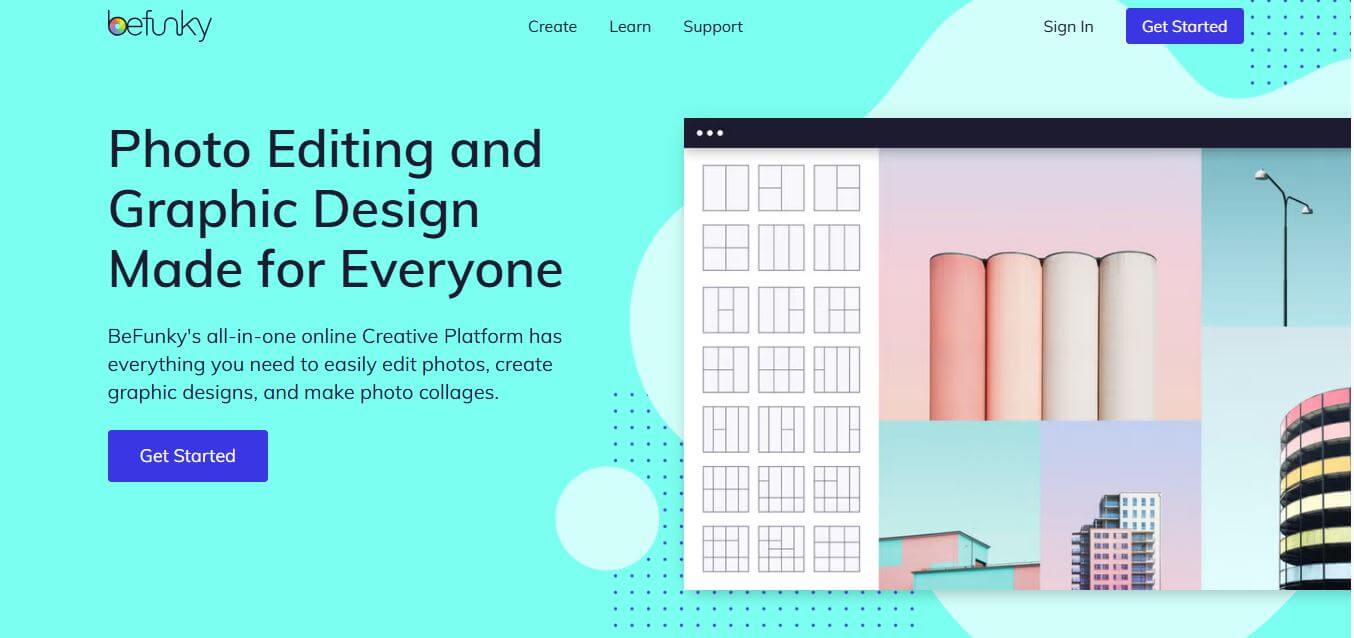
BeFunky is an intuitive, all-in-one creative platform combining an AI photo editor, graphic designer, and collage maker that enables creators, marketers, and small businesses to edit photos and design visual assets without complex software.
What is BeFunky?
BeFunky (befunky.com) is an online visual design and image editing platform that combines an AI photo editor, customizable collage maker, and template-driven graphic designer. It provides a full spectrum of creative capabilities, including automated background removal, AI image enhancement, portrait retouching, one-click Artsy filters, batch image processing, and social media template design across web browsers and mobile apps.
BeFunky was founded in 2007 by Tekin Tatar and Kemal Sanli and has grown into a globally recognized creative platform used by millions of users worldwide across 100+ countries. The platform features thousands of professionally designed graphic templates, hundreds of customizable collage layouts, and advanced AI editing tools that process image transformations in seconds. By streamlining photo enhancement and graphic layout into a unified browser tab, users report reducing routine marketing design timelines by over 70 percent without requiring dedicated graphic design software.
- Founder / Leadership: Tekin Tatar (CEO & Co-founder) and Kemal Sanli (Co-founder)
- Launch Year: 2007
- Use Cases:
- Editing and enhancing eCommerce product photos with one-click background removal
- Designing social media graphics, YouTube thumbnails, promotional flyers, and posters
- Transforming regular photographs into digital paintings, sketches, and cartoon art
- Assembling customized photo collages for digital storytelling and marketing campaigns
- Technology:
- Computer vision algorithms for automated subject isolation and edge segmentation
- Neural style transfer pipelines powering proprietary Artsy and Cartoonizer filters
- Cloud-accelerated image rendering and multi-tool web canvas architecture
- Target Users:
- Small business owners, Etsy sellers, and DTC brand marketers
- Social media managers, content creators, and digital influencers
- Bloggers, digital publishers, and visual storytellers
- Educators, students, craft hobbyists, and casual photo editors
- Acquisition: Operates as an independent digital imaging and graphic technology company (BeFunky Inc.)

Key features of BeFunky
BeFunky's key features are
- All-in-One Creative Trio: Seamlessly switch between the Photo Editor, Collage Maker, and Graphic Designer within the same workspace.
- AI One-Click Image Enhancer: Automatically balances exposure, adjusts contrast, enhances colors, and sharpens details in a single click.
- AI Background & Object Remover: Instantly isolates subjects and erases unwanted photobombers, power lines, or background clutter cleanly.
- Iconic Artsy & Cartoonizer Filters: Transform standard photographs into digital oil paintings, sketches, comic book art, and watercolors using neural style transfer.
- Touch-Up & Portrait Retouching: Smooth skin, fix blemishes, whiten teeth, reshape features, and correct red-eye with dedicated portrait tools.
- Customizable Collage Maker: Arrange photos into hundreds of grid configurations with automated layout filling, spacing controls, and background patterns.
- Professional Graphic Design Templates: Access thousands of customizable layouts for posters, social media banners, YouTube thumbnails, and business cards.
- Batch Image Processing: Resize, crop, water-mark, and apply automated enhancements across dozens of photos simultaneously to speed up catalog production.
BeFunky Pricing
BeFunky operates on a freemium pricing structure offering a capable free editor alongside the feature-packed BeFunky Plus subscription.
Free Basic Plan:
- $0/month
- Access to core photo editing essentials, basic crop/resize tools, and standard filters
- Selected collage grid templates with no account sign-up required
BeFunky Plus (Monthly):
- Starts at approximately $11.99 – $14.99/month
- Full access to AI background remover, object eraser, and portrait touch-up tools
- Unlimited access to Artsy filters, batch image processing, and premium design templates
BeFunky Plus (Annual):
- Approximately $6.99 – $7.99/month (billed annually around $83.88 – $95.88/year)
- Full premium feature access on desktop web and mobile apps with significant savings
Disclaimer: For the latest feature rollouts and pricing updates, please visit the official BeFunky website at befunky.com.
Who is using BeFunky?
BeFunky is designed for a broad range of creative individuals and business teams, including
- eCommerce Sellers: Editing product images and designing promotional sale graphics for storefronts
- Social Media Marketers: Creating branded Instagram posts, Pinterest pins, and YouTube thumbnails
- Bloggers & Publishers: Designing custom editorial headers, infocards, and photo collages
- Digital Artists & Hobbyists: Applying Artsy effects to turn personal photography into digital paintings
- Educators & Students: Designing classroom posters, visual lesson aids, and student certificates
Best BeFunky Alternatives
Some of the strongest BeFunky alternatives include
Pros and Cons of BeFunky
Pros
- Unified interface combines full photo editing, collage building, and graphic layout design
- High-quality Artsy filters turn photos into digital artwork and cartoons with realistic textures
- One-click AI background removal and image enhancement tools streamline tedious tasks
- Batch processing saves significant time when editing multi-photo collections
- Clean, intuitive user experience that requires zero prior design or editing experience
Cons
- Essential modern AI features (like background removal and Artsy effects) require BeFunky Plus
- Does not support advanced multi-layer vector path editing like Adobe Illustrator or Figma
- Free version contains banner advertisements and restricts access to premium templates
- High-resolution printing formats (CMYK) are more limited compared to dedicated print suites
Why Choose BeFunky?
BeFunky is the ideal choice for creators, marketers, and everyday users who want a versatile, easy-to-use creative toolkit without the steep learning curve of professional desktop suites.
- Combines a photo editor, collage maker, and graphic design suite in one browser tab
- Delivers famous one-click Artsy filters that transform photos into digital art
- Automates background removal and photo touch-ups using AI
- Speeds up repetitive work with robust batch photo processing
- Offers an affordable annual plan that provides premium creative tools on desktop and mobile
BeFunky vs. Competitors
The main difference between BeFunky, Canva, Fotor, and Pixlr is that BeFunky balances dedicated raster photo editing, artistic style filters, and template-based layout design, while Canva focuses on collaborative marketing templates, Fotor specializes in quick AI portrait retouching, and Pixlr works as an in-browser Photoshop-style layer editor. BeFunky stands out for its legendary Artsy effects, collage flexibility, and seamless three-in-one workflow.
| Feature / Tool | BeFunky (befunky.com) | Canva | Fotor | Pixlr |
|---|---|---|---|---|
| Core Focus | Photo Editor, Collage & Design | Team Marketing & Templates | AI Photo Retouching & Design | Browser-Based Layer Editing |
| Artistic / Artsy Filters | Yes (Industry-Leading) | Basic Filter Presets | Yes (AI Art Effects) | Standard Filters |
| Integrated Collage Maker | Yes (Dedicated Module) | Grid Templates | Yes (Collage Tool) | Basic Collage |
| AI Background Removal | Yes (BeFunky Plus) | Yes (Canva Pro) | Yes (Fotor Pro) | Yes (Pixlr Plus) |
| Batch Photo Editing | Yes (Built-In) | Limited / App Addon | Yes | Yes (Batch Tool) |
| Best For | Solo Creators, Marketers & Artists | Teams & Social Templates | Quick Photo Retouching | Layer-Based Photo Retouching |
How do we rate BeFunky?
| Parameter | Rating (out of 5) |
|---|---|
| Photo Editing & AI Tools | 4.9 |
| Artistic Effects & Cartoonizer | 5.0 |
| Collage & Graphic Design Tools | 4.8 |
| Interface Simplicity & Speed | 4.9 |
| Value for Money | 4.8 |
| Overall Score | 4.88 |
BeFunky Review
BeFunky remains one of the most reliable and user-friendly creative suites on the web. By maintaining a clear focus on the three pillars of everyday visual creation—photo retouching, collage layouts, and graphic design templates—it provides an all-in-one solution that avoids the complexity of enterprise software. Its signature Artsy filters continue to be among the best in the industry, while its modern AI background removal and image enhancement tools keep it competitive and fast. For solo entrepreneurs, content creators, and small business marketers seeking a simple, powerful visual workspace, BeFunky is an outstanding platform.
Conclusion
BeFunky is a versatile and user-friendly creative platform that brings photo editing, graphic design, and collage making into one seamless workspace. Its biggest strength lies in simplicity—anyone can enhance images, remove backgrounds, apply effects, or create designs without needing advanced skills. With AI-powered tools, ready-made templates, and a wide range of editing features, it helps users save time while still producing professional-looking results. Whether you’re a beginner, content creator, or small business owner, it offers enough flexibility to handle everyday creative tasks efficiently. While advanced designers may still prefer specialized software, BeFunky excels in accessibility and speed. It is a reliable and practical solution for creating and editing visuals quickly, easily, and effectively.
FAQ
What is BeFunky and how can BeFunky help me?
BeFunky is an all-in-one online creative platform that combines a photo editor, collage maker, and graphic design tool in one place. BeFunky helps you edit images, design social media graphics, and create collages without needing professional skills. It’s designed for beginners and creators who want fast, high-quality results with minimal effort.
How does BeFunky actually work?
BeFunky works directly in your browser. You upload an image, choose editing tools like crop, resize, or effects, and apply changes instantly. BeFunky also offers drag-and-drop design templates and AI-powered tools that automate tasks like enhancing photos or removing backgrounds.
What makes BeFunky different from other editing tools?
BeFunky stands out because it combines photo editing, collage creation, and graphic design into a single platform. Instead of switching between tools like Photoshop, Canva, or collage apps, BeFunky gives you everything in one place with a simple interface.
What features does BeFunky offer?
BeFunky offers a wide range of features including photo editing, filters, retouching tools, text overlays, collage maker, and graphic design templates. It also includes AI features like background removal, object erasing, image upscaling, and photo enhancement, making editing faster and easier.
Does BeFunky use AI for editing?
Yes, BeFunky includes AI-powered tools that automate complex edits. For example, BeFunky can remove backgrounds, enhance image quality, upscale photos, and even apply edits using text prompts through its Smart Edit feature.
Is BeFunky free to use?
Yes, BeFunky offers a free version with basic features and effects. However, advanced tools like AI editing, premium templates, and batch processing are available through paid plans like BeFunky Plus or Pro.
Who should use BeFunky?
BeFunky is ideal for content creators, marketers, bloggers, students, and small businesses. Anyone who wants to create visuals quickly without learning complex tools can benefit from BeFunky.
User Reviews
No reviews yet for BeFunky.
Featured Tools
Featured AI tools from TechShark

Melody Genie
MelodyGenie is an AI-powered music generator that creates original songs from simple text prompts. Users can choose styles, moods, and genres, then instantly generate melodies and full tracks, making it easy for creators, marketers, and hobbyists to produce custom music without musical expertise.
Freemium

Kimi AI
Kimi AI is an advanced AI assistant developed by Moonshot AI that helps you chat, research, write, code, and automate tasks in one place. It supports web search, file analysis, and multimodal inputs, and can even run autonomous “agent” workflows to complete complex tasks end-to-end.
Freemium

Fashion Diffusion AI
Fashion Diffusion is an AI-powered fashion design platform that helps brands and designers create clothing designs, virtual try-ons, AI models, product photos, and marketing visuals faster and cost-effectively.
Paid

Veo 4
Veo 4 AI is an AI video creation platform that generates dramatic videos from text, images, audio, and video prompts using realistic motion and synchronized sound.
Paid
Alternatives
Alternatives to BeFunky
The best BeFunky alternatives include Canva, Fotor, Pixlr, PicMonkey, Photopea, and Adobe Express. These platforms provide online photo editing, graphic design templates, and collage generation tools. While BeFunky specializes in a balanced trio of photo editing, unique Artsy filters, and collage layouts, alternatives like Canva focus on collaborative team marketing, and Pixlr provides traditional layer-based raster editing. Choosing the right platform depends on whether you require artistic photo transformations, team graphic templates, or advanced layer-based photo editing.
 4.7
4.7ImgCreator AI
Image
ImgCreator AI is an AI-powered image generation tool that helps users create visuals from text prompts and reference images. It supports creative artwork, realistic portraits, product visuals, and image editing, making it useful for designers, marketers, content creators, and businesses seeking faster visual content production.
Neural.love
AI Image Enhancer
Neural.love is an AI-powered creative platform for generating images, editing photos, enhancing videos, restoring old media, and animating pictures. It combines multiple AI tools in a browser-based workspace, helping content creators, marketers, photographers, designers, and businesses improve visual content without relying entirely on traditional editing software.
 4.8
4.8Prisma AI
Image
Prisma AI turns everyday photos into artistic images with stylized filters and creative effects. It offers hundreds of art and portrait styles inspired by famous artists, allowing beginners to create distinctive visuals quickly. Users can capture or upload photos, apply a chosen style, and save or share the finished result.
 4.9
4.9Bria AI
Image
Bria helps businesses and teams generate and edit visual content using controllable generative AI. Its capabilities cover image generation, product visuals, background editing, video workflows, and developer integrations. With licensed training data, attribution, provenance, and enterprise deployment options, Bria is positioned for businesses that need scalable, commercially focused visual AI.
 4.7
4.7Unwatermark
Image
Unwatermark.ai helps creators, marketers, photographers, and businesses remove watermarks, logos, text, people, and unwanted objects from images and videos. Its automatic detection handles quick edits, while the manual brush provides precise control over difficult areas. With browser-based processing, format support, previews, and free usage, it simplifies everyday visual cleanup.
 4.9
4.9invideo Nano Banana
Image
Nano Banana is an AI image generation and editing model by Google (Gemini family) that helps users create, modify, and refine visuals using natural language prompts. It supports 4K outputs, consistent characters, accurate text rendering, and real-time editing, enabling fast, production-ready creative workflows.
 4.8
4.8Banana Nano
Image
BananaNano (Nano Banana AI) is an AI-powered image generation and editing platform that lets users create visuals from text or edit photos using natural language. It supports multi-image fusion, character consistency, and up to 4K output, enabling fast, flexible visual creation without complex design tools.
 4.8
4.8Vheer
Image
Vheer is a free AI image and video generator that helps users create visuals from text or photos instantly. It includes tools for image editing, background removal, and image-to-video conversion, offering unlimited generations without signup, making it ideal for quick, creative content production.
 4.9
4.9QOVES
Image
QOVES is an AI-powered facial analysis and beauty consulting platform that helps users understand their facial features and improve appearance through personalized, science-backed recommendations. It analyzes hundreds of facial markers and provides a non-surgical transformation plan, enabling informed decisions about aesthetics, skincare, and overall self-improvement.