
AI EASE
AI Ease is an AI-powered photo editing platform that helps users enhance images, remove backgrounds, generate professional headshots, restore old photographs, and create visual content. Its browser-based tools simplify common editing tasks for content creators, e-commerce sellers, marketers, photographers, and individuals seeking quick image improvements without advanced editing skills.
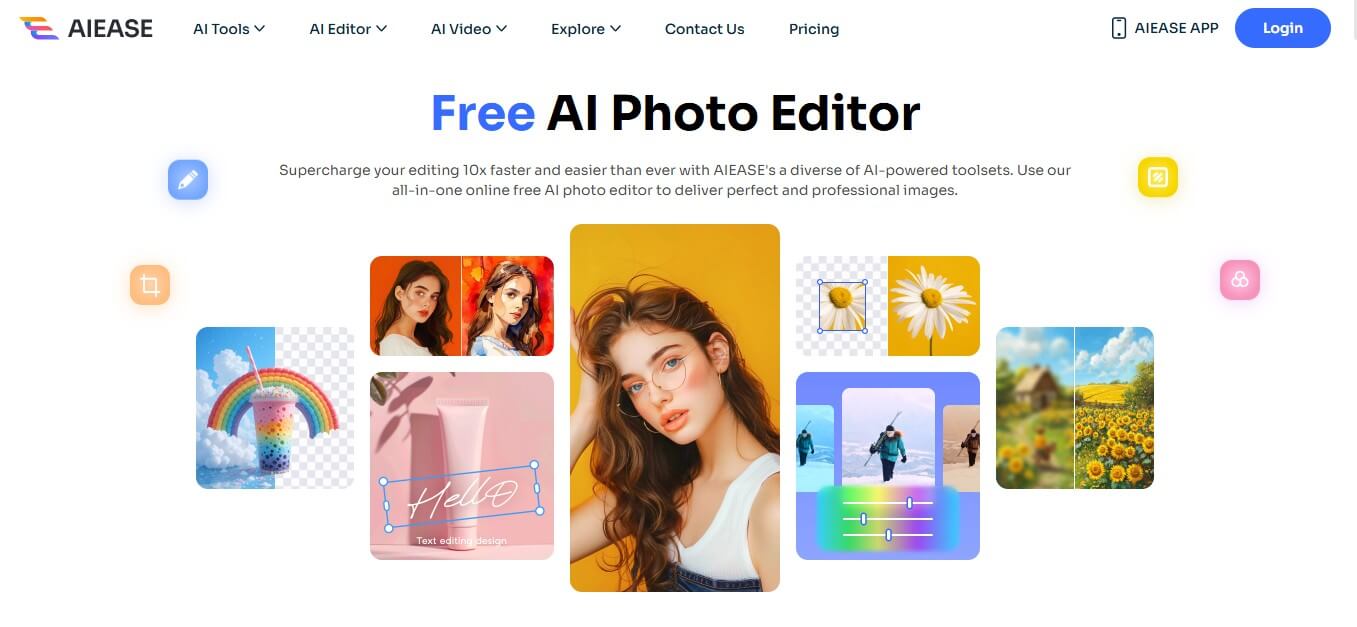
What is AIEASE?
AI EASE is an AI-powered image editing platform that helps users enhance image quality, remove backgrounds, generate professional headshots, restore old photos, and create AI-generated visuals. It combines multiple browser-based editing tools in one place, making it useful for e-commerce sellers, content creators, marketers, photographers, and individuals who want to edit images quickly without advanced design skills. AI Ease offers free access to selected tools, with premium memberships and credits available for additional features and usage.
AI Ease is particularly useful for people who want quick image improvements without learning complex editing software. However, users should review generated results before publishing them, especially when accuracy, identity preservation, or official photo requirements matter.
AI Ease: Key Facts and Statistics
| Category | Details |
|---|---|
| Product Name | AI Ease |
| Product Type | AI photo editor and image creation platform |
| Main Capabilities | Photo enhancement, background removal, AI headshots, image enlargement, and restoration |
| AI Editing | Image enhancement, object removal, background replacement, and portrait editing |
| Creative Tools | AI image generation and selected video features |
| Platform | Web-based tools |
| Pricing Model | Freemium, paid membership, and purchased credits |
| Supported Image Formats | JPG, JPEG, PNG, and WEBP are listed in its FAQ |
| API Availability | The published FAQ states that API key access is not currently offered |
| Target Users | Creators, e-commerce sellers, marketers, photographers, and individuals |
| Official Website | https://www.aiease.ai/ |
| Pricing Page | https://www.aiease.ai/app/pricing/ |
Key Features of AI Ease
AIEASE AI key features are
- AI Photo Enhancer: AI Ease offers AI-powered image enhancement to improve the clarity and appearance of photos. This feature can help sharpen portraits, improve product images, and prepare visuals for websites, social media, and digital marketing campaigns. It is useful when an image needs improvement before publication. However, enhancement results depend on the original image's resolution, lighting, and level of detail.
- AI Background Remover: The AI background remover separates a subject from its background. Users can create transparent images or prepare product photos for e-commerce listings, advertisements, presentations, and promotional materials. This feature can save time compared with manually selecting and removing backgrounds in traditional image editors.
- AI Headshot Generator: The AI headshot generator transforms uploaded photos into professional-style portraits. It can help users prepare profile images for LinkedIn, resumes, company websites, and professional portfolios. Users should review the results carefully to ensure that facial features and personal appearance remain sufficiently accurate.
- AI Image Enlarger: The AI image enlarger increases image dimensions and attempts to preserve or improve visual detail. It can be useful when preparing images for larger displays, websites, and creative projects. AI enlargement cannot guarantee the recovery of details that are completely absent from the original image.
- AI Photo Restoration: AI Ease offers tools for improving older or damaged photographs. Depending on the tool, users can enhance faded images, address visible imperfections, and colorize certain black-and-white photos. This feature can be useful for family archives, historical photographs, and personal collections.
- AI Passport Photo Maker: The passport photo maker helps users prepare portrait images for passport or ID applications. It can simplify tasks such as adjusting image dimensions and preparing a suitable background. Before submitting an image, users must confirm that it meets the official requirements of the relevant country or issuing authority. AI-generated editing does not guarantee acceptance.
- AI Object Remover: The object remover helps eliminate unwanted objects or distractions from photos. AI processing fills the edited area using surrounding visual information. It is useful for cleaning up product photos, travel images, portraits, and social media visuals. Complex backgrounds may require additional editing.
- AI Background Generator: The AI background generator allows users to replace existing backgrounds with generated scenes. This can help create product photography, promotional graphics, portrait backgrounds, and social media content without arranging a physical photoshoot. The quality of the result depends on the original image, the generated background, and the accuracy of subject separation.
- AI Image and Video Tools: AI Ease also offers image-generation and selected video-related tools, including text-to-video and image-to-video features in its broader product offering. These tools can help users experiment with AI-generated visuals for social media, storytelling, and promotional content. Available models, usage limits, and output quality may vary.
How to Use AI Ease
Follow these steps to edit an image with AI Ease:
- Visit the website: Open https://www.aiease.ai/.
- Choose a tool: Select an option such as AI Photo Enhancer, Background Remover, AI Headshot Generator, or Photo Restoration.
- Upload your image: Choose a supported file format and follow the upload requirements.
- Select your settings: Configure the available editing options, style, or generation instructions.
- Start processing: Allow the AI tool to generate the result.
- Review the output: Check image quality, edges, facial details, and other important elements.
- Make adjustments: Try alternative settings or tools if the first result is unsatisfactory.
- Download the image: Export the result where supported by the selected tool and plan.
- Check usage rights: Review the current terms before publishing or using the output commercially.
AI Ease Pricing and Plans
AI Ease uses a freemium model, allowing users to try supported tools for free while offering paid membership and credit options for additional access.
| Plan Type | Price | Best For |
|---|---|---|
| Free | $0 | Trying available tools within free limits |
| Premium Membership | Check official pricing | Regular image editing and member features |
| Purchased Credits | Check current rates | Additional usage for supported tools |
| Advanced Image and Video Features | Depends on feature and plan | Users needing specialized processing |
Free Plan
The free option lets users try supported image-editing tools within the available usage limits. It is suitable for occasional photo enhancement, basic background removal, and testing the platform before subscribing.
Free availability does not necessarily mean every tool, output resolution, or advanced feature is included.
Premium Membership
The premium membership provides additional access to supported features. AI Ease's FAQ states that most image-related features are unlimited for members, with exceptions that include advanced watermark removal, Headshot Pro, and video features.
Users should review the current plan details to confirm which features are included.
Purchased Credits
AI Ease also offers purchased credits for supported features. Its FAQ states that purchased credits expire one year after purchase.
Credit requirements and consumption can vary by feature, so users should check the applicable terms before buying additional credits.
Is AI Ease Worth Paying For?
AI Ease may be worth paying for if you regularly enhance images, create professional-style headshots, remove backgrounds, or restore old photographs. Users who only edit a few images occasionally may find the free tier sufficient.
Disclaimer: For the latest and most accurate pricing information, please visit the official AIEASE AI website.
Who Should Use AI Ease?
AI Ease is suitable for several types of users:
- E-commerce sellers: Remove backgrounds and improve product images.
- Social media creators: Prepare profile pictures, promotional images, and visual content.
- Job seekers: Create professional-style headshots for career profiles.
- Photographers: Enhance images and restore older photographs.
- Digital marketers: Create visuals for ads, campaigns, and landing pages.
- Small businesses: Improve product and brand images without complex editing software.
- Students: Prepare images for presentations and personal projects.
- Families: Restore old photographs and improve personal images.
- Design beginners: Perform routine edits without advanced editing skills.
- Content creators: Experiment with AI-generated images and supported video effects.
AIEASE AI Alternatives
Some AIEASE alternatives are
- Cutout Pro
- Headshotly AI
- Autoenhance AI
- Let’s Enhance
- Remini
AI Ease Pros and Cons
Pros
- Combines multiple AI photo-editing tools in one platform.
- Offers free access within usage limits.
- Includes background removal, image enhancement, and restoration.
- Provides AI headshot and passport photo tools.
- Supports creative image-generation and selected video features.
- Uses a browser-based interface.
- Can reduce manual editing time for routine tasks.
- Offers paid membership and credit options for different usage needs.
Cons
- Free access has usage limits.
- Some advanced features require a paid plan or credits.
- Output quality can vary depending on the source image.
- AI headshots may alter facial characteristics.
- Fine edges and complicated backgrounds may need manual correction.
- Official document photos still require compliance checks.
- The published FAQ states that API key access is not currently available.
- Users need to review current pricing and commercial-use terms.
Why Choose AI Ease?
AI Ease can be a good option if you want to:
- Edit photos without learning complicated software.
- Remove backgrounds from product and portrait images.
- Generate professional-style profile pictures.
- Improve image clarity and enlarge images.
- Restore old or damaged photographs.
- Create new backgrounds and experiment with AI image tools.
- Test several editing tools before purchasing a subscription.
Its value depends on your editing frequency, image-quality requirements, budget, and need for manual control.
AI Ease vs. Other AI Photo Editors
| Feature | AI Ease | Canva | Photoshop | Fotor | Photoroom |
|---|---|---|---|---|---|
| Background Removal | Yes | Available | Available | Available | Core feature |
| AI Photo Enhancement | Yes | Available features vary | Available | Yes | Available features vary |
| AI Headshots | Yes | Available features vary | Possible through editing and AI workflows | Available features vary | Check current offering |
| Photo Restoration | Yes | Check current offering | Available tools and workflows | Available features vary | Not its main focus |
| Graphic Design | Creative editing tools | Core feature | Advanced image editing | Available | Product-focused design |
| Free Access | Limited free use | Free tier | Plan-dependent | Free tier | Plan-dependent |
| Best For | General AI photo editing | Design and marketing | Professional retouching | General photo editing | E-commerce product images |
AIEASE AI Video
AI Ease Review: Is It Worth Using?
AI Ease is a practical option for users who want multiple photo-editing features in one browser-based platform. Its collection of tools covers common tasks such as background removal, image enhancement, professional-style headshots, object removal, and photo restoration. The platform is particularly useful for content creators, e-commerce sellers, marketers, and individuals who want quick results without learning advanced editing software. Its free access also allows users to test supported tools before deciding whether a paid membership is worthwhile.
However, AI-generated results should be checked carefully. Image enhancement can introduce artificial details, headshot generation may change a person's appearance, and background removal can struggle with fine hair or complex edges. Official document photos also require compliance checks.
Verdict: AI Ease is worth trying if you need accessible AI photo editing, headshot creation, background removal, and photo restoration in one place. Users who need precise manual control may prefer Photoshop, while businesses focused on product images should compare Photoroom.
Conclusion
I Ease is an AI photo-editing platform for users who want to enhance images, remove backgrounds, generate headshots, restore old photographs, and create digital visuals without advanced editing skills. Its range of tools makes it useful for social media creators, e-commerce sellers, marketers, and individuals who need quick image edits. Free access is a practical way to evaluate the platform, while paid memberships and credits can support more frequent usage.
Before subscribing, test the tools you plan to use most often and confirm current usage limits, pricing, privacy terms, and licensing conditions. For users seeking an accessible AI image editor with multiple tools in one place, AI Ease is worth considering alongside Canva, Photoshop, Fotor, Pixlr, and Photoroom.
Also Check:
FAQ
What is AI Ease?
AI Ease is an AI-powered photo-editing platform offering image enhancement, background removal, AI headshots, image enlargement, photo restoration, passport photo creation, and other creative tools.
Is AI Ease free?
Yes. AI Ease provides free access to supported features within usage limits. Additional generations and advanced features may require a subscription or purchased credits.
How much does AI Ease cost?
AI Ease offers free access, paid memberships, and purchased credits. Current subscription prices and credit costs should be checked on the official pricing page.
Can AI Ease remove image backgrounds?
Yes. Its background remover separates subjects from their backgrounds, making it useful for product images, portraits, advertisements, and social media content.
Can AI Ease create professional headshots?
Yes. Its AI headshot generator transforms uploaded photos into professional-style portraits. Review the output to ensure the person's identity and facial characteristics remain accurate.
Is AI Ease suitable for e-commerce?
Yes. E-commerce sellers can use AI Ease to remove backgrounds, improve product images, and create consistent visuals for online listings and advertising.
Can AI Ease restore old photographs?
Yes. AI Ease offers photo restoration tools that can improve the appearance of older or damaged images. Results depend on the condition and quality of the original photograph.
What are the best AI Ease alternatives?
Canva, Adobe Photoshop, Fotor, Pixlr, and Photoroom are alternatives worth comparing. The right choice depends on whether you prioritize graphic design, advanced retouching, general photo editing, or product photography.
Is AI Ease safe for personal photos?
AI Ease's published FAQ states that original images and edited results are not stored after the editing session ends. Users should still review the current privacy policy and avoid uploading sensitive images unless they are comfortable with the platform's data-handling practices.
User Reviews
No reviews yet for AI EASE.
Featured Tools
Featured AI tools from TechShark

Melody Genie
MelodyGenie is an AI-powered music generator that creates original songs from simple text prompts. Users can choose styles, moods, and genres, then instantly generate melodies and full tracks, making it easy for creators, marketers, and hobbyists to produce custom music without musical expertise.
Freemium

Kimi AI
Kimi AI is an advanced AI assistant developed by Moonshot AI that helps you chat, research, write, code, and automate tasks in one place. It supports web search, file analysis, and multimodal inputs, and can even run autonomous “agent” workflows to complete complex tasks end-to-end.
Freemium

Fashion Diffusion AI
Fashion Diffusion is an AI-powered fashion design platform that helps brands and designers create clothing designs, virtual try-ons, AI models, product photos, and marketing visuals faster and cost-effectively.
Paid

Veo 4
Veo 4 AI is an AI video creation platform that generates dramatic videos from text, images, audio, and video prompts using realistic motion and synchronized sound.
Paid
Alternatives
Alternatives to AI EASE
AIEASE AI is an AI-powered image editing, image, and background remover tool that streamlines content creation, boosts productivity, and automates writing workflows for marketers, creators, and businesses. Alternatives include Jasper, Copy.ai, Writesonic, Rytr, and Notion AI, offering diverse features for personalized, efficient content generation.
 4.7
4.7ImgCreator AI
Image
ImgCreator AI is an AI-powered image generation tool that helps users create visuals from text prompts and reference images. It supports creative artwork, realistic portraits, product visuals, and image editing, making it useful for designers, marketers, content creators, and businesses seeking faster visual content production.
Neural.love
AI Image Enhancer
Neural.love is an AI-powered creative platform for generating images, editing photos, enhancing videos, restoring old media, and animating pictures. It combines multiple AI tools in a browser-based workspace, helping content creators, marketers, photographers, designers, and businesses improve visual content without relying entirely on traditional editing software.
 4.8
4.8Prisma AI
Image
Prisma AI turns everyday photos into artistic images with stylized filters and creative effects. It offers hundreds of art and portrait styles inspired by famous artists, allowing beginners to create distinctive visuals quickly. Users can capture or upload photos, apply a chosen style, and save or share the finished result.
 4.9
4.9Bria AI
Image
Bria helps businesses and teams generate and edit visual content using controllable generative AI. Its capabilities cover image generation, product visuals, background editing, video workflows, and developer integrations. With licensed training data, attribution, provenance, and enterprise deployment options, Bria is positioned for businesses that need scalable, commercially focused visual AI.
 4.7
4.7Unwatermark
Image
Unwatermark.ai helps creators, marketers, photographers, and businesses remove watermarks, logos, text, people, and unwanted objects from images and videos. Its automatic detection handles quick edits, while the manual brush provides precise control over difficult areas. With browser-based processing, format support, previews, and free usage, it simplifies everyday visual cleanup.
 4.9
4.9invideo Nano Banana
Image
Nano Banana is an AI image generation and editing model by Google (Gemini family) that helps users create, modify, and refine visuals using natural language prompts. It supports 4K outputs, consistent characters, accurate text rendering, and real-time editing, enabling fast, production-ready creative workflows.
 4.8
4.8Banana Nano
Image
BananaNano (Nano Banana AI) is an AI-powered image generation and editing platform that lets users create visuals from text or edit photos using natural language. It supports multi-image fusion, character consistency, and up to 4K output, enabling fast, flexible visual creation without complex design tools.
 4.8
4.8Vheer
Image
Vheer is a free AI image and video generator that helps users create visuals from text or photos instantly. It includes tools for image editing, background removal, and image-to-video conversion, offering unlimited generations without signup, making it ideal for quick, creative content production.
 4.9
4.9QOVES
Image
QOVES is an AI-powered facial analysis and beauty consulting platform that helps users understand their facial features and improve appearance through personalized, science-backed recommendations. It analyzes hundreds of facial markers and provides a non-surgical transformation plan, enabling informed decisions about aesthetics, skincare, and overall self-improvement.