
Subtitles.app
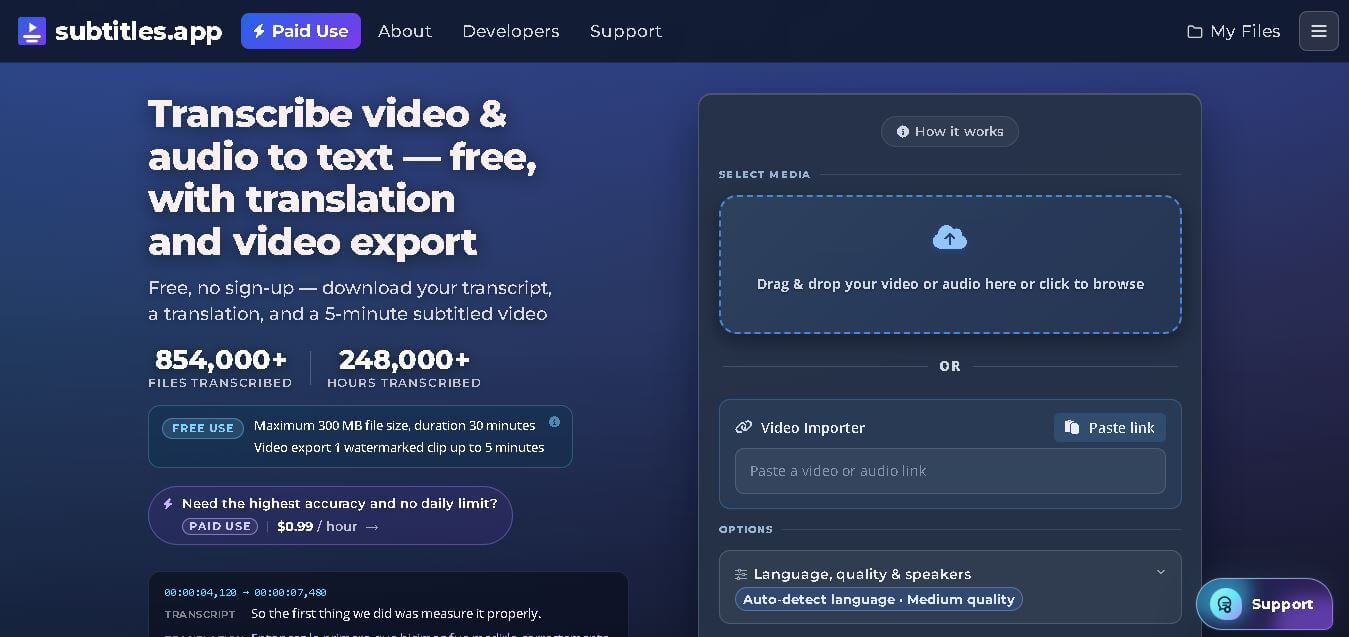
Subtitles.app is a web-based transcription and subtitle generation tool that converts audio and video into editable text and subtitle files. It supports multilingual translation, video exports with captions, and downloadable SRT, VTT, and TXT formats. The platform is designed for creators, educators, businesses, and professionals seeking fast, affordable subtitle creation.
What is Subtitles.app?
Subtitles.app is an online transcription and subtitle creation service that transforms spoken content from audio and video files into accurate, editable text. It enables users to generate subtitles, translate transcripts into more than 120 languages, edit captions directly in the browser, and export files in popular formats such as SRT, VTT, and TXT. The platform also supports video exports with embedded subtitles, making it useful for content publishing across multiple channels. Since it works directly in a web browser without requiring software installation or mandatory account registration for free usage, it offers a simple and accessible solution for individuals and organizations.
Subtitles.app has processed more than 854,000 transcription files and supports transcription in 100+ languages with translation into 120+ languages. The free plan allows uploads of up to 300 MB and 30-minute media files, while paid users can upload files as large as 10 GB and 30 hours in length. Pricing starts at just $0.99 per hour with no subscription required, making it an affordable choice for creators and businesses worldwide.
- Core Focus: AI Audio & Video Transcription, Subtitle Generation, and API Access
- Launch Year: 2023
Use Cases:
- Generating SRT and VTT subtitle files for YouTube, Vimeo, and social media videos
- Transcribing long podcasts, lectures, and interviews into searchable text
- Translating subtitles across multiple languages to reach international audiences
- Automating speech-to-text transcription within third-party apps via developer API
Technology:
- Advanced speech-to-text AI models with multi-speaker diarization capabilities
- Natural language processing engine for punctuation and timecode alignment
- RESTful API integration for automated batch media processing
Target Users:
- Video editors and social media managers adding captions to Reels, TikToks, and Shorts
- Podcasters and journalists creating downloadable episode transcripts
- Developers looking for a budget-friendly pay-as-you-go transcription API
Ecosystem: Features a web browser upload portal, inline transcript editor, "Ask this video" interactive AI tool, and developer API credentials.

Key features of Subtitles.app
Subtitles. app's key features are
- Automatic Speech-to-Text: Instantly transcribes video and audio files into synchronized captions using high-accuracy AI speech models.
- Multiple Subtitle Export Formats: Download final captions in SRT, VTT, ASS, or TXT formats compatible with major video editing tools.
- "Ask This Video" AI Chat: Chat directly with your transcribed media to query specific topics, summarize sections, or locate exact timestamps.
- Speaker Identification: Automatically detects and labels different speakers throughout the audio track for clean transcript formatting.
- Multi-Language Translation: Translates transcriptions into multiple global languages for international audience reach.
- Developer API Access: Provides developer API keys for integrating automatic video captioning and transcription into custom platforms.
Subtitles.app Pricing
Subtitles.app operates on a flexible model combining a free usage tier with pay-as-you-go pricing, avoiding recurring subscription commitments.
Free Tier:
- $0/month
- Includes free transcriptions for files up to 300 MB and 30 minutes (anonymous) or 60 minutes (with a free account) with a standard processing queue.
Pro Pay-As-You-Go Tier:
- $0.99 per hour of media
- Supports large files up to 10 GB and 30 hours per file, priority server processing, speaker identification, batch processing, multi-language translation, API access, and "Ask this video" functionality.
Disclaimer: For the latest and most accurate pricing information, please visit the official Subtitles.app AI website.
Is Subtitles.app Worth It?
Subtitles.app is exceptionally worth it for creators, agencies, and developers who need high-quality transcription without being tied down by monthly software subscriptions. At just $0.99 per hour of media, it provides enterprise-level features like API access, speaker diarization, and massive 10 GB file handling at a fraction of traditional SaaS costs.
Real-World Use Cases
- Social Media Captioning: Creators convert MP4 videos to SRT files to upload hard-coded or soft captions on YouTube, LinkedIn, and Facebook.
- Podcast Transcripts: Show hosts transcribe 1-hour podcast episodes for $0.99 to improve website SEO and offer readable show notes.
- Academic & Meeting Notes: Students and professionals convert recorded lectures and Zoom calls into searchable text documents.
- App Developer Integrations: Software teams connect to the subtitles. app API to automate transcript generation within video processing pipelines.
Who is using Subtitles.app?
Subtitles.app is designed for a wide range of content creators and professionals, including
- Video Editors & Filmmakers: Creators needing clean SRT/VTT caption files for Premiere Pro, Final Cut, or DaVinci Resolve
- Podcasters & Broadcasters: Audio creators making accessible transcripts for listeners
- Educators & Students: Academics converting long lecture recordings into indexed study notes
- Software Engineers: Developers seeking simple REST API integration for pay-as-you-go speech transcription
Best Subtitles.app Alternatives
Some of the strongest Subtitles.app alternatives include
- Sonix
- Transkriptor
- Happy Scribe
- Descript
- Kapwing
Pros and Cons of Subtitles.app
Pros
- Transparent $0.99/hour pay-as-you-go pricing with no monthly subscription trap
- Generous free tier allowing anonymous uploads up to 300 MB
- Exports to all major subtitle formats (SRT, VTT, ASS, TXT)
- Supports huge file sizes (up to 10 GB) and long durations (up to 30 hours)
- Includes developer API key access for workflow automation
Cons
- Free plan queues files with standard processing priority during peak traffic
- Advanced styling/burned-in video caption animations require external video editors
- Very noisy or background-heavy audio may require manual editing tweaks
Why Choose Subtitles.app?
Subtitles.app stands out by combining accurate AI transcription with pay-as-you-go pricing and high file capacity. Instead of charging high monthly subscriptions for occasional video projects, it allows creators to pay only for the exact media hours they process.
- Eliminates monthly SaaS recurring costs through fair $0.99/hr pay-as-you-go rates
- Handles massive high-resolution video files up to 10 GB without crashing
- Provides instant downloads in universal formats like SRT, VTT, and ASS
- Enables intelligent search and Q&A inside media via "Ask this video"
How Subtitles.app Works
- 1. Upload Media File: Drag and drop your audio or video file (MP4, MP3, WAV, MOV) into the web app interface.
- 2. Select Plan & Options: Choose free processing or Pro pay-as-you-go ($0.99/hr) for speaker identification and translation.
- 3. AI Processing: The AI engine transcribes the audio, detects languages, and aligns precise timecodes.
- 4. Edit & Download: Review your text transcript, make inline adjustments if needed, and export in SRT, VTT, ASS, or TXT format.
Subtitles.app vs. Competitors
The main difference between Subtitles.app, Sonix, and Transkriptor is that Subtitles.app offers a pay-as-you-go structure with no monthly minimums alongside massive file size allowances (10 GB). While Sonix and Transkriptor require recurring monthly plans for premium access, Subtitles.app allows users to convert audio to subtitles on demand for just $0.99 per hour.
| Feature | Subtitles.app | Sonix | Transkriptor |
|---|---|---|---|
| Primary Model | Pay-As-You-Go / Free Tier | Monthly Subscription + Hourly | Monthly Subscription |
| Starting Price | $0.99 / hour (No sub) | $22 / month | $8.33 / month |
| Max File Size | Up to 10 GB | Standard Web Upload | Standard Web Upload |
| Export Formats | SRT, VTT, ASS, TXT | SRT, VTT, DOCX, TXT | SRT, VTT, TXT |
| Developer API Access | Yes (Included in Pro) | Yes (Enterprise Plan) | Yes |
How do we rate Subtitles.app?
| Parameter | Rating (out of 5) |
|---|---|
| Ease of Use | 4.8 |
| Transcription Accuracy | 4.7 |
| Processing Speed | 4.8 |
| Value for Money | 4.9 |
| API & Integration | 4.7 |
| Overall Score | 4.7 |
Subtitles.app Review
Subtitles.app delivers a fast, cost-effective solution for anyone who needs accurate video captioning and transcription. By offering a true pay-as-you-go model at $0.99 per hour alongside an open API and support for huge 10 GB files, it provides an unbeatable combination of flexibility and affordability. Its ability to export standard SRT and VTT formats makes it a seamless addition to any video production workflow.
Conclusion
Subtitles.app offers a practical and budget-friendly solution for anyone who needs fast transcription, subtitle generation, and multilingual translation. Whether you create YouTube videos, online courses, podcasts, interviews, or business presentations, the platform simplifies the entire workflow from upload to subtitle export. Its browser-based experience, flexible pay-as-you-go pricing, support for over 120 languages, and downloadable subtitle formats make it suitable for both beginners and professionals. With privacy-focused file handling, editable transcripts, and affordable premium features, Subtitles.app stands out as a reliable choice for producing accurate subtitles and improving the accessibility of digital content.
FAQ
What is Subtitles.app used for?
Subtitles.app helps you convert spoken audio into written text and subtitles within minutes. You can upload audio or video files, generate transcripts, translate them into multiple languages, edit subtitles, and export them in formats like SRT, VTT, or TXT. It is suitable for content creators, educators, marketers, journalists, students, and businesses that need accurate subtitles for videos and presentations.
Is Subtitles.app free to use?
Yes, Subtitles.app offers a free version that lets you upload media files up to 300 MB or 30 minutes long. Users can generate subtitles without creating an account. Those needing larger uploads, higher transcription quality, API access, or advanced editing can switch to the pay-as-you-go plan starting at $0.99 per processing hour without any subscription commitment.
Which subtitle formats can I download?
After your transcription is complete, you can download subtitles in widely supported formats, including SRT, VTT, and TXT. These formats work with YouTube, Vimeo, online learning platforms, media players, and professional video editing software. Paid users can also export captioned videos with higher-quality output and watermark-free options for longer projects.
How accurate are the transcriptions?
The transcription quality depends on factors such as audio clarity, speaker accents, background noise, and technical terminology. Subtitles.app continuously improves its speech recognition pipeline to increase accuracy. For the best results, upload high-quality recordings with minimal noise. Users can also edit transcripts manually before downloading or exporting subtitles.
Does Subtitles.app support multiple languages?
Yes. Subtitles.app supports transcription in more than 100 languages and translation into over 120 languages. This allows creators and businesses to make their videos accessible to international audiences without relying on multiple tools. Users can easily generate multilingual subtitles and download translated subtitle files directly from the browser.
Is my uploaded data secure on Subtitles.app?
Yes. Uploaded files are protected using SSL encryption during transfer. Free uploads are automatically deleted after processing based on the platform's retention policy, while paid users receive longer storage for convenience. Users can also manually delete files whenever needed, making privacy and data security an important part of the service.
User Reviews
No reviews yet for Subtitles.app.
Featured Tools
Featured AI tools from TechShark

Melody Genie
MelodyGenie is an AI-powered music generator that creates original songs from simple text prompts. Users can choose styles, moods, and genres, then instantly generate melodies and full tracks, making it easy for creators, marketers, and hobbyists to produce custom music without musical expertise.
Freemium

Kimi AI
Kimi AI is an advanced AI assistant developed by Moonshot AI that helps you chat, research, write, code, and automate tasks in one place. It supports web search, file analysis, and multimodal inputs, and can even run autonomous “agent” workflows to complete complex tasks end-to-end.
Freemium

Fashion Diffusion AI
Fashion Diffusion is an AI-powered fashion design platform that helps brands and designers create clothing designs, virtual try-ons, AI models, product photos, and marketing visuals faster and cost-effectively.
Paid

Veo 4
Veo 4 AI is an AI video creation platform that generates dramatic videos from text, images, audio, and video prompts using realistic motion and synchronized sound.
Paid
Alternatives
Alternatives to Subtitles.app
The best Subtitles.app alternatives include Sonix, Transkriptor, Happy Scribe, Descript, and Kapwing. Sonix provides enterprise-grade AI automated transcription and translation. Transkriptor offers easy audio-to-text conversion for meetings and interviews. Happy Scribe combines AI transcription with human proofreading options. Descript excels at script-based video editing and automatic captions, while Kapwing offers quick web-based video editing with burned-in subtitle styling.
 4.7
4.7Kaiber
Video Generator
Kaiber is an AI-powered creative suite for generating videos, images, and audio. It helps musicians, content creators, and marketers turn text prompts, images, and music into engaging visuals. Its tools support image animation, beat-synced video creation, lip-sync, visual restyling, and timeline editing for social media and music videos.
Neural.love
AI Image Enhancer
Neural.love is an AI-powered creative platform for generating images, editing photos, enhancing videos, restoring old media, and animating pictures. It combines multiple AI tools in a browser-based workspace, helping content creators, marketers, photographers, designers, and businesses improve visual content without relying entirely on traditional editing software.
 4.8
4.8Shuffll
Video Editing
Shuffll goes beyond traditional video creation by connecting personalized video directly to enterprise data and workflows. Its API-first infrastructure, 40+ AI models, automated production, and built-in brand governance make it suitable for organizations that need video at scale. For businesses seeking higher engagement without building large production teams, Shuffll offers a practical way to turn existing data into personalized, on-brand video experiences.
 4.8
4.8Opus Clip (Opus Pro)
Video Editing
OpusClip helps creators transform long-form videos into short, social-ready clips. It can identify engaging moments, generate captions, reframe footage, add B-roll, enhance audio, and support publishing across major social platforms. It is designed for creators, marketers, podcasters, businesses, and teams that want to scale video content production.
 4.8
4.8Dubbah
Video Editing
Dubbah helps Mac users translate and dub videos into 14 languages while preserving a familiar speaker voice. The app processes media locally, supports editing translated lines, and works offline after setup. With no account, subscription, or per-minute fee, it offers a simple, straightforward option for creators producing multilingual video content.
 4.9
4.9Clipchamp
Video Generator
Clipchamp is an AI-powered online video editor by Microsoft that helps users record, edit, and share videos directly from the browser. It offers templates, stock media, and AI tools like subtitles, voiceovers, and noise removal, enabling fast, professional video creation without advanced editing skills.
 4.9
4.9CapCut
Video Editing
CapCut is a popular video editing tool that helps creators produce engaging videos with effects, transitions, filters, templates, subtitles, and AI-powered features. Available on multiple platforms, CapCut makes it easy to edit videos for TikTok, Instagram Reels, YouTube Shorts, and other social media channels.
 4.9
4.9Media.io
Video Editing
Media.io is an AI-powered creative platform that helps users generate, edit, and enhance videos, images, audio, and ads from simple prompts or assets. It combines AI generation, editing, and workflows in one place, enabling creators to turn ideas into polished content quickly without switching tools.
 4.9
4.9Video Candy
Video Editing
Video Candy is a free online video editing platform that helps users trim, merge, compress, convert, and enhance videos directly in the browser. It offers 70+ tools with a simple drag-and-drop interface, making video editing fast, accessible, and efficient without installing complex software.