
Shakker AI
Shakker AI helps creators generate stunning visuals using advanced AI models, offering tools for design, editing, and artistic workflows in one platform.
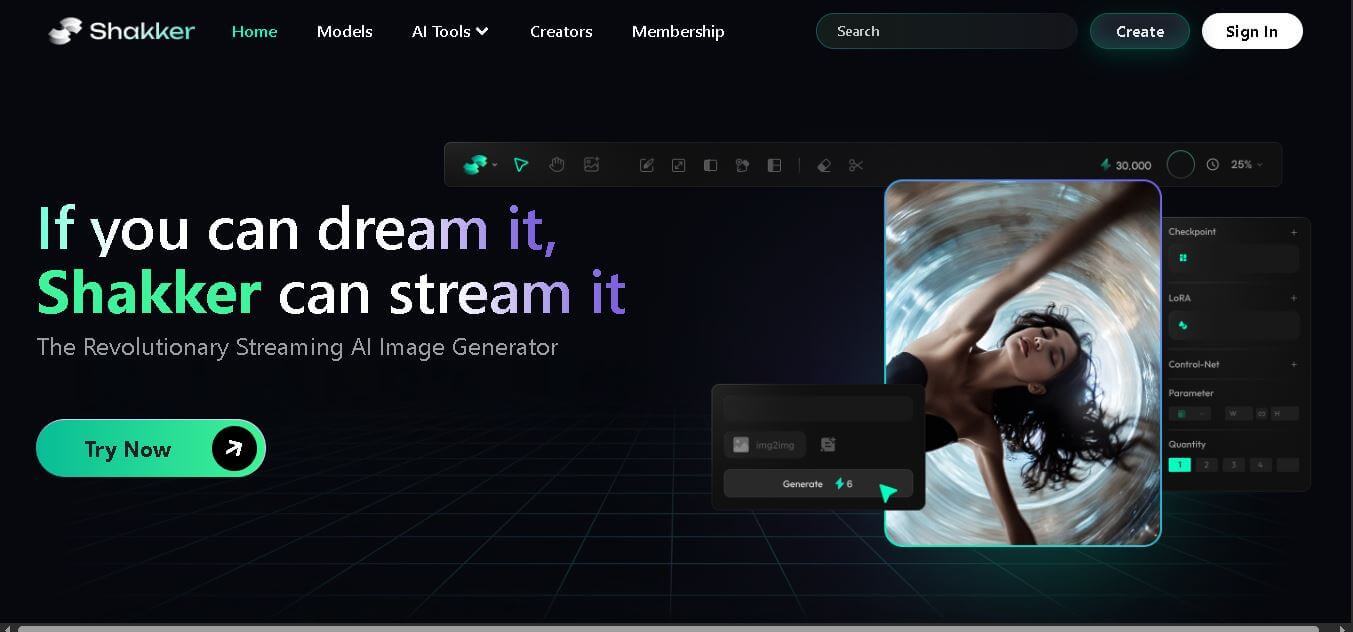
What is Shakker AI?
Shakker AI is a generative design platform that enables users to create images and visual content using diverse AI models and creative tools. It provides capabilities such as style transfer, face swap, inpainting, and spatial control, allowing users to craft customized visuals with precision. The platform combines multiple model types, including LoRA and FLUX-based models, to deliver high-quality artistic outputs. Designed for creators of all skill levels, Shakker AI offers an intuitive interface along with advanced editing controls. It supports a wide range of design categories, including photography, illustration, architecture, and product design, making it a versatile solution for creative workflows.
Shakker AI offers 7+ core AI design features, including style transfer, inpainting, outpainting, face swap, spatial control, and color palette control. It supports multiple model types, such as FLUX.1 and LoRA variants, enabling diverse outputs across 5+ design categories, including illustration, photography, architecture, logo, and product design. The platform also includes 4 major tools, such as WebUI, ComfyUI, a generator, and training modules, making it suitable for creators at all levels.
- Founder: Not mentioned in the official document (no verified founder data available)
- Launch: Not explicitly stated in the source (platform presented as an active generative AI design tool)
-
Use Cases:
- AI image generation for creative projects
- Digital art, illustration, and concept design
- Product design and architecture visualization
- Photography enhancement and realistic portrait creation
- Logo and icon creation across industries
-
Technology:
- Generative AI models, including FLUX and LoRA variants
- Advanced tools like style transfer, inpainting, outpainting, and face swap
- Integration with WebUI, ComfyUI, and training modules for model customization
- Infinite canvas for design workflows
-
Target Users:
- Digital artists and designers
- Content creators and AI enthusiasts
- Creative studios and freelancers
- Beginners to advanced users (supports all skill levels)
-
Acquisition:
- No acquisition or funding information available in the official source

Key Features of Shakker AI
Shakker AI key features are
- Color Palette Control: Customize and fine-tune color schemes to create visually consistent and brand-aligned designs across different image outputs.
- Entity Control: Precisely manage objects and elements within images, allowing users to control composition and maintain design accuracy.
- Style Transfer: Apply different artistic styles to images, transforming visuals into unique creative outputs with various design aesthetics.
- Spatial Control: Adjust positioning, layout, and structure within generated images for better composition and visual balance.
- Inpainting: Edit specific parts of an image by replacing or modifying selected areas without affecting the entire design.
- Outpainting: Extend images beyond their original boundaries, enabling the creation of larger and more detailed visuals.
- Face Swap: Replace faces in images with realistic results, useful for creative projects and personalized content generation.
- Diverse AI Models: Access multiple models like FLUX and LoRA variants for different styles such as photography, illustration, and architecture.
- Infinite Canvas: Create designs on an expandable workspace that allows more flexibility for complex and detailed projects.
- Integrated Tools (WebUI & ComfyUI): Use built-in tools like A1111 WebUI and ComfyUI for advanced generation and customization workflows.
OpenRouter Pricing
- Free Access:
Users can explore basic tools like AI generators, style transfer, and face swaps without upfront cost. -
Membership Model:
Shakker offers a membership system for creators and advanced users, which likely unlocks:- Premium AI models (FLUX, LoRA variants)
- Advanced tools (ComfyUI, A1111 WebUI, training tools)
- Creator ecosystem access
-
Credit / Usage-Based Elements:
While not explicitly mentioned, AI generation tools typically use compute-based usage, especially for high-quality outputs. - Creator Economy Integration:
The platform emphasizes supporting creators and models, suggesting monetization or paid access to premium assets.
Disclaimer: For the latest and most accurate pricing information, please visit the official Shakker AI website.
Who is using Shakker AI?
Shakker AI is designed for a broad range of presentation-heavy users, including
- AI Creators & Digital Artists: Individuals creating illustrations, concept art, and realistic visuals using tools like style transfer, inpainting, and face swap
- Designers & Creative Professionals: Graphic designers working on logo design, product design, and architecture visuals using diverse AI models
- Community Creators: Active users like 7WhiteFire7, Samael1976, Lykon, DucHaiten, and others contributing models and designs within the platform ecosystem
- AI Enthusiasts & Hobbyists: Users exploring creative possibilities and experimenting with AI-generated art and design workflows
- Content Creators & Marketers: Individuals generating visual content for social media, branding, and campaigns
- Developers & Advanced Users: Users leveraging tools like WebUI, ComfyUI, and training modules for deeper customization and model control
Best Shakker AI Alternatives
Some of the strongest Shakker AI alternatives include
- Midjourney
- DALL·E
- Stable Diffusion
- Leonardo AI
- Runway ML
- Adobe Firefly
- Canva AI
Pros and Cons
Pros
- Wide range of creative AI tools
- Supports multiple artistic styles and models
- Suitable for beginners and professionals
- Advanced editing features like inpainting
- Diverse creative categories
Cons
- Pricing not clearly defined
- Requires a learning curve for advanced tools
- Limited public company information
Why Choose Shakker AI?
Shakker AI is a strong choice for creators who want flexibility, creative control, and diverse AI models in one place. Unlike basic image generators, it combines advanced tools with multiple artistic styles, making it suitable for both beginners and professionals. The platform focuses on giving users full control over design elements like color, layout, and style while maintaining high-quality outputs.
- All-in-One Creative Toolkit: Combines multiple AI tools like style transfer, face swap, and inpainting in a single platform for complete design workflows.
- Diverse Model Library: Access to FLUX and LoRA-based models for photography, illustrations, product design, and more.
- Advanced Creative Control: Features like color palette and spatial control allow precise customization of outputs.
- Infinite Canvas Experience: Enables users to design freely without limitations, improving creative flexibility.
- Beginner to Pro Friendly: Includes tools like WebUI, ComfyUI, and training modules for all skill levels.
Shakker AI vs. Competitors
The main difference between Shakker AI, Midjourney, DALL·E, and Stable Diffusion is that Shakker AI focuses on combining multiple advanced tools and models into one unified creative platform. While Midjourney and DALL·E primarily generate images, and Stable Diffusion offers flexibility through open-source setups, Shaker provides built-in tools like inpainting, face swap, spatial control, and training workflows, making it more suitable for complete design pipelines.
| Feature | Shakker AI | Midjourney | DALL·E | Stable Diffusion |
|---|---|---|---|---|
| Model Variety | High (FLUX + LoRA models) | Medium | Medium | High |
| Editing Tools | Advanced (inpainting, face swap, spatial control) | Limited | Moderate | Advanced |
| Customization | High | Medium | Medium | Very High |
| Ease of Use | Medium | Easy | Easy | Medium |
| Creative Control | Very High | Medium | Medium | Very High |
| Built-in Tools | WebUI, ComfyUI, training modules | No | No | External setup |
| Use Case Coverage | Multi-category (design, photography, architecture) | Art-focused | General | Developer-focused |
How Do We Rate Shakker AI?
| Parameter | Rating (Out of 5) |
|---|---|
| Features | 5 |
| Ease of Use | 4 |
| Pricing | 3.5 |
| Performance | 4.5 |
| Support | 4 |
Shakker AI Review
Shakker AI is a powerful and flexible AI design platform that stands out for its combination of multiple models and advanced creative tools. It provides users with deep control over image generation, making it suitable for professional workflows. The inclusion of features like infinite canvas and diverse model support enhances its usability. However, unclear pricing and a learning curve may be challenges for beginners. Overall, it stands out as a strong choice for AI-driven design and visual creation.
Conclusion
Shakker AI offers a comprehensive platform for AI-powered design and image generation. With its diverse models, advanced editing tools, and flexible workflows, it enables creators to produce high-quality visuals efficiently. The platform supports a wide range of creative use cases, from photography to concept art. While pricing details are limited, its feature-rich environment and customization capabilities make it a valuable tool for designers and artists looking to leverage AI in their workflows.
FAQ
What is Shakker AI used for?
Shakker AI is used for generating and editing images using AI models for creative and design purposes.
Is Shakker AI free?
Pricing is not clearly defined, but it may offer free and paid options.
What models does Shakker AI support?
It supports FLUX and LoRA models along with other generative AI systems.
Can beginners use Shakker AI?
Yes, it is designed for creators of all skill levels.
Does Shakker AI support image editing?
Yes, it includes tools like inpainting, outpainting, and face swap.
User Reviews
No reviews yet for Shakker AI.
Featured Tools
Featured AI tools from TechShark

Melody Genie
MelodyGenie is an AI-powered music generator that creates original songs from simple text prompts. Users can choose styles, moods, and genres, then instantly generate melodies and full tracks, making it easy for creators, marketers, and hobbyists to produce custom music without musical expertise.
Freemium

Kimi AI
Kimi AI is an advanced AI assistant developed by Moonshot AI that helps you chat, research, write, code, and automate tasks in one place. It supports web search, file analysis, and multimodal inputs, and can even run autonomous “agent” workflows to complete complex tasks end-to-end.
Freemium

Fashion Diffusion AI
Fashion Diffusion is an AI-powered fashion design platform that helps brands and designers create clothing designs, virtual try-ons, AI models, product photos, and marketing visuals faster and cost-effectively.
Paid

Veo 4
Veo 4 AI is an AI video creation platform that generates dramatic videos from text, images, audio, and video prompts using realistic motion and synchronized sound.
Paid
Alternatives
Alternatives to Shakker AI
The best Shakker AI alternatives include Midjourney, DALL·E, Stable Diffusion, Leonardo AI, and Runway ML. These tools offer strong AI image generation capabilities but differ in customization and editing features. While Midjourney excels in artistic outputs and DALL·E focuses on simplicity, Stable Diffusion provides open-source flexibility. Leonardo AI and Runway ML offer additional creative workflows. However, Shakker AI stands out by combining multiple models and advanced editing tools in one platform.
 4.7
4.7ImgCreator AI
Image
ImgCreator AI is an AI-powered image generation tool that helps users create visuals from text prompts and reference images. It supports creative artwork, realistic portraits, product visuals, and image editing, making it useful for designers, marketers, content creators, and businesses seeking faster visual content production.
Neural.love
AI Image Enhancer
Neural.love is an AI-powered creative platform for generating images, editing photos, enhancing videos, restoring old media, and animating pictures. It combines multiple AI tools in a browser-based workspace, helping content creators, marketers, photographers, designers, and businesses improve visual content without relying entirely on traditional editing software.
 4.8
4.8Prisma AI
Image
Prisma AI turns everyday photos into artistic images with stylized filters and creative effects. It offers hundreds of art and portrait styles inspired by famous artists, allowing beginners to create distinctive visuals quickly. Users can capture or upload photos, apply a chosen style, and save or share the finished result.
 4.9
4.9Bria AI
Image
Bria helps businesses and teams generate and edit visual content using controllable generative AI. Its capabilities cover image generation, product visuals, background editing, video workflows, and developer integrations. With licensed training data, attribution, provenance, and enterprise deployment options, Bria is positioned for businesses that need scalable, commercially focused visual AI.
 4.7
4.7Unwatermark
Image
Unwatermark.ai helps creators, marketers, photographers, and businesses remove watermarks, logos, text, people, and unwanted objects from images and videos. Its automatic detection handles quick edits, while the manual brush provides precise control over difficult areas. With browser-based processing, format support, previews, and free usage, it simplifies everyday visual cleanup.
 4.9
4.9invideo Nano Banana
Image
Nano Banana is an AI image generation and editing model by Google (Gemini family) that helps users create, modify, and refine visuals using natural language prompts. It supports 4K outputs, consistent characters, accurate text rendering, and real-time editing, enabling fast, production-ready creative workflows.
 4.8
4.8Banana Nano
Image
BananaNano (Nano Banana AI) is an AI-powered image generation and editing platform that lets users create visuals from text or edit photos using natural language. It supports multi-image fusion, character consistency, and up to 4K output, enabling fast, flexible visual creation without complex design tools.
 4.8
4.8Vheer
Image
Vheer is a free AI image and video generator that helps users create visuals from text or photos instantly. It includes tools for image editing, background removal, and image-to-video conversion, offering unlimited generations without signup, making it ideal for quick, creative content production.
 4.9
4.9QOVES
Image
QOVES is an AI-powered facial analysis and beauty consulting platform that helps users understand their facial features and improve appearance through personalized, science-backed recommendations. It analyzes hundreds of facial markers and provides a non-surgical transformation plan, enabling informed decisions about aesthetics, skincare, and overall self-improvement.