
Imgupscaler AI
ImgUpscaler is an online image enhancement tool that increases resolution, sharpens details, reduces noise, and improves photos without requiring software installation.
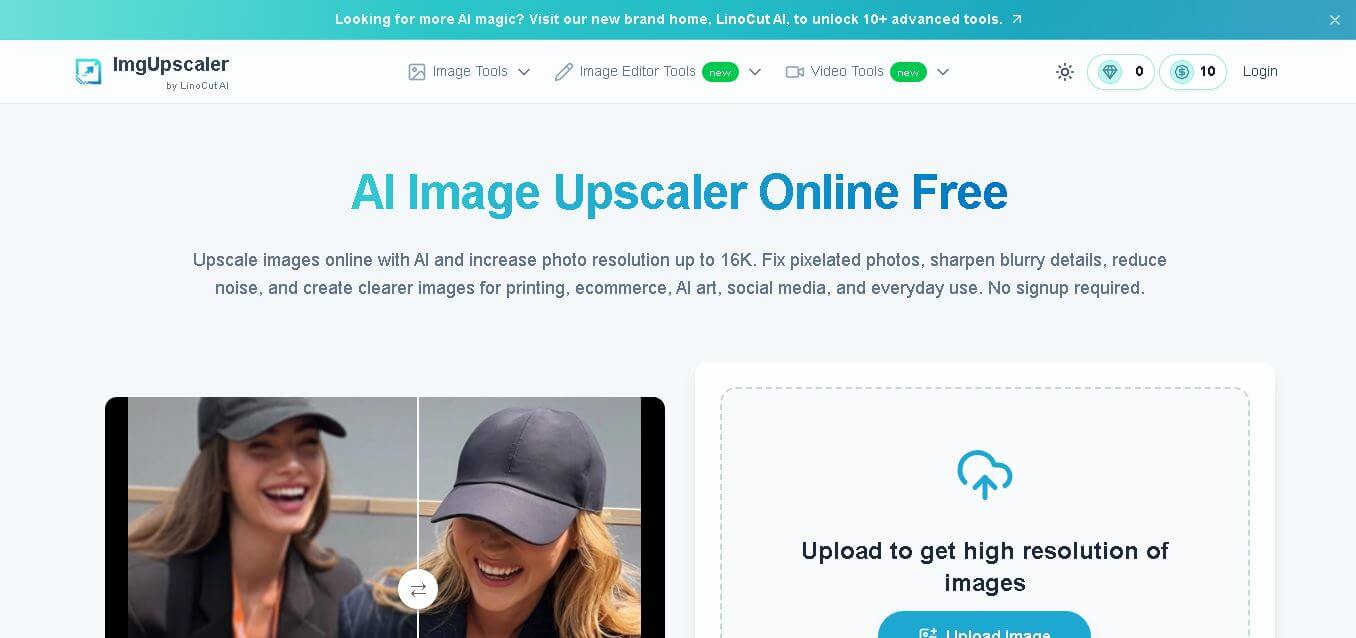
What is Imgupscaler AI?
ImgUpscaler is an online AI image upscaling and enhancement tool designed to turn low-resolution, blurry, or pixelated images into clearer, higher-resolution visuals. It can upscale images to resolutions including 2K, 4K, 8K, and up to 16K, depending on the workflow. The platform analyzes image structures, edges, colors, textures, and fine details rather than simply stretching pixels. It is designed for photographs, portraits, product images, graphics, screenshots, AI artwork, social media visuals, and images prepared for printing. ImgUpscaler also provides related tools for photo enhancement, sharpening, image editing, old-photo restoration, video enhancement, and image-to-image generation.
ImgUpscaler supports image enhancement up to 16K resolution and provides 30 free credits daily, according to its official website and official blog. The main image upscaler supports common formats including JPG, PNG, WebP, and HEIC, while some related tools support images up to 24 MB. The website promotes a no-sign-up workflow, and its current product pages highlight free access, high-quality output, and no watermark. ImgUpscaler is powered by LinoCut AI and also offers related image and video enhancement products.
- Founder: ImgUpscaler's official website does not publicly identify an individual founder.
- Company: The current website identifies ImgUpscaler as a product by LinoCut AI.
- Launch: The available official sources reviewed for this page do not provide a specific original launch date.
- Technology: ImgUpscaler uses proprietary AI image-enhancement technology to analyze image structures and reconstruct missing visual information. Its related image-to-image tool also identifies models such as Flux, SeeDream, Qwen, and Nano Banana Pro.
- Use Cases: Photo upscaling, old-photo enhancement, e-commerce images, AI artwork, social media visuals, printing, presentations, product photography, screenshots, and graphics.
- Target Users: Photographers, designers, e-commerce sellers, marketers, content creators, bloggers, AI artists, and everyday users.
- Acquisition: No acquisition is disclosed on the official ImgUpscaler website.

What Are the Key Features of ImgUpscaler?
ImgUpscaler AI key features are
- AI Image Upscaling: Increase image resolution while improving sharpness, clarity, textures, and fine details instead of simply enlarging the original pixels.
- 16K Image Upscaling: ImgUpscaler supports output resolutions up to 16K, making it suitable for large displays, posters, banners, high-resolution artwork, and other large-format applications.
- Image Quality Enhancement: The platform can improve overall image clarity by enhancing details, reducing noise, and addressing pixelation and compression artifacts.
- Face and Detail Enhancement: ImgUpscaler focuses on recovering details such as facial features, hair, skin textures, fabric patterns, product surfaces, and architectural elements while maintaining visual consistency.
- Noise and Artifact Reduction: The enhancement workflow can reduce digital noise, graininess, JPEG artifacts, and other quality problems found in compressed or low-resolution images.
- Image Resolution Presets: Users can select output levels such as 2K, 4K, 8K, and 16K depending on the image and intended use.
- AI Photo Enhancer: The dedicated photo enhancer can improve images to 2K, 4K, 8K, or 16K while focusing on natural-looking detail and clarity.
- Image-to-Image AI: ImgUpscaler also provides an image-to-image workflow where users can upload a reference image, describe changes, select styles, and generate a new visual.
- AI Photo Editor: The platform includes prompt-based image editing features such as background replacement, hair-color changes, object removal, style transfer, old-photo restoration, and image merging.
- Batch Processing: Several ImgUpscaler enhancement workflows support processing multiple images, including up to three images at once on the photo enhancer and image-to-image tools.
ImgUpscaler Pricing
ImgUpscaler offers a free usage option alongside paid credit-based plans. Its current official pricing page lists both subscription and one-time credit packages.
| Plan | Price | Credits |
|---|---|---|
| Free | $0 | Free credits refresh periodically. |
| Subscription | $3.90/month | 50 credits |
| Subscription | $8.90/month | 200 credits |
| Subscription | $12.90/month | 500 credits |
| Subscription | $16.90/month | 1,000 credits |
| One-Time | $4.99 | 50 credits |
| One-Time | $14.99 | 200 credits |
| One-Time | $30 | 500 credits |
| One-Time | $70 | 2,000 credits |
| One-Time | $90 | 5,000 credits |
| One-Time | $120 | 10,000 credits |
| One-Time | $330 | 30,000 credits |
The official pricing page also lists a 500-credit subscription option at $0.026 per credit.
Disclaimer: For the latest and most accurate pricing information, please visit the official ImgUpscaler AI website.
Who is using ImgUpscaler?
Dokie AI is designed for a broad range of presentation-heavy users, including
- Photographers enhancing portraits and photography
- E-commerce sellers improving product images
- Graphic designers preparing visual assets
- Marketers creating sharper campaign materials
- Social media creators improving uploaded visuals
- Bloggers and publishers upgrading website images
- AI artists upscaling generated artwork
- Businesses preparing images for print
- Users restoring or improving older photographs
- People who need quick browser-based image enhancement
What Are the Best ImgUpscaler Alternatives?
Some of the strongest ImgUpscaler AI alternatives include
- LinoCut AI
- Let’s Enhance
- UpscalePics
- Gigapixel AI
- Enhance. Pho.to
- Google Whisk
ImgUpscaler Pros and Cons
Pros
- Supports image upscaling up to 16K.
- Offers free image enhancement.
- Provides daily free credits.
- No sign-up is required for the online workflow.
- No watermark is highlighted on the website.
- Supports multiple common image formats.
- Includes noise and artifact reduction.
- Can improve facial and fine details.
- Supports e-commerce and product images.
- Includes related AI editing tools.
- Offers image-to-image generation.
- Provides both subscription and one-time credit options.
Cons
- Advanced workflows consume credits.
- Higher-volume users may need a paid plan.
- AI enhancement cannot recover every detail perfectly from severely damaged originals.
- Different ImgUpscaler tools have different credit requirements.
- Results can vary depending on the quality and type of the source image.
- Some advanced creative workflows are separate from the core upscaler.
Why Choose ImgUpscaler?
ImgUpscaler is a strong choice when the primary goal is improving image resolution without using complicated desktop software.
- Upscale images online to as high as 16K.
- Start without creating an account.
- Use free credits before purchasing.
- Improve blurry and pixelated images.
- Reduce noise and compression artifacts.
- Enhance portraits and facial details.
- Prepare product photos for e-commerce.
- Improve visuals for printing.
- Enhance AI-generated artwork.
- Use related AI editing and restoration tools.
- Choose between subscription and one-time credit packages.
ImgUpscaler vs. Competitors
The main difference between ImgUpscaler, LinoCut AI, Let's Enhance, UpscalePics, and Gigapixel AI is that ImgUpscaler focuses on accessible online image enhancement with output options up to 16K and free daily usage. Its official comparison article positions competing products around different strengths such as multiple enhancement models, printing, noise reduction, batch processing, and professional-grade restoration. The comparison below follows capabilities described in ImgUpscaler's official content.
| Feature | ImgUpscaler | LinoCut AI | Let's Enhance | Upscale Pics | Gigapixel AI |
|---|---|---|---|---|---|
| Online upscaling | Yes | Yes | Yes | Yes | Desktop-focused |
| 16K output | Yes | No, official comparison lists 8K | Not specified | Not specified | Not specified |
| Free option | Yes | Yes | Yes | Yes | No free full version stated |
| AI enhancement | Yes | Yes | Yes | Yes | Yes |
| Batch processing | Yes, on supported tools | Yes | Yes | Not highlighted | Yes |
| Noise reduction | Yes | Yes | Yes | Yes | Yes |
| Old photo restoration | Yes | Yes | Not primary focus | Limited | Yes |
| Print-focused workflow | Yes | Yes | Yes | Limited | Yes |
| One-time purchase | Yes | Not specified | Not specified | Not specified | Yes |
| Browser-based | Yes | Yes | Yes | Yes | Not the primary workflow |
How Do We Rate ImgUpscaler?
| Rating Factor | Score |
|---|---|
| Image Upscaling | 4.7/5 |
| Image Quality | 4.6/5 |
| Maximum Resolution | 5/5 |
| Ease of Use | 4.8/5 |
| Processing Speed | 4.6/5 |
| Detail Enhancement | 4.6/5 |
| Format Support | 4.6/5 |
| Free Usage | 4.8/5 |
| Additional AI Tools | 4.5/5 |
| Overall | 4.7/5 |
ImgUpscaler Review
ImgUpscaler is a focused image enhancement platform that makes the process of improving low-resolution images straightforward. Its core strength is resolution enhancement, with support for output levels from 2K through 16K depending on the tool and workflow. The platform goes beyond simply making an image larger. Its official materials describe improvements to sharpness, fine details, textures, colors, noise, compression artifacts, brightness, contrast, and white balance. It also emphasizes maintaining face, object, and scene consistency during enhancement.
Another advantage is accessibility. The main website promotes a browser-based workflow without requiring registration, and the supplied page capture highlights free use, no sign-up, high quality, and no watermark. ImgUpscaler has also expanded beyond traditional upscaling. Its current product ecosystem includes a photo enhancer, image editor, image-to-image generator, old-photo restoration, video enhancer, and related AI image tools.
For casual users, creators, marketers, and e-commerce sellers, the combination of free access and high-resolution output makes ImgUpscaler particularly attractive. Users with heavy production requirements, however, may need to evaluate credit consumption and paid plans.
Conclusion
ImgUpscaler is a practical online image enhancement tool for users who need to improve resolution, sharpness, clarity, and detail without installing professional editing software. Its standout capability is support for image enhancement up to 16K, while free daily credits make it accessible for casual use. The platform also includes photo enhancement, image editing, image-to-image generation, old-photo restoration, and video enhancement tools. For photographers, designers, marketers, e-commerce sellers, creators, and everyday users, ImgUpscaler offers a flexible browser-based workflow for improving image quality.
FAQ
What is ImgUpscaler?
ImgUpscaler is an online image upscaling and enhancement tool that increases image resolution while improving clarity, sharpness, textures, and fine details.
Is ImgUpscaler free?
Yes. ImgUpscaler provides free usage, and its official blog says users receive 30 free credits daily. The current pricing page also lists a $0 free option with periodically refreshed free credits.
Can ImgUpscaler upscale images to 16K?
Yes. ImgUpscaler supports image enhancement and upscaling up to 16K on its current website.
Does ImgUpscaler require signup?
The main website states that users can access the image upscaler without signing up. The supplied website capture also highlights "No Sign-up."
Does ImgUpscaler add a watermark?
The official website currently highlights "No Watermark" as one of its product benefits.
What image formats does ImgUpscaler support?
The main image-upscaling workflow supports formats including JPG, PNG, WebP, and HEIC. Some related ImgUpscaler tools specify JPG, PNG, and WebP support.
User Reviews
No reviews yet for Imgupscaler AI.
Featured Tools
Featured AI tools from TechShark

Melody Genie
MelodyGenie is an AI-powered music generator that creates original songs from simple text prompts. Users can choose styles, moods, and genres, then instantly generate melodies and full tracks, making it easy for creators, marketers, and hobbyists to produce custom music without musical expertise.
Freemium

Kimi AI
Kimi AI is an advanced AI assistant developed by Moonshot AI that helps you chat, research, write, code, and automate tasks in one place. It supports web search, file analysis, and multimodal inputs, and can even run autonomous “agent” workflows to complete complex tasks end-to-end.
Freemium

Fashion Diffusion AI
Fashion Diffusion is an AI-powered fashion design platform that helps brands and designers create clothing designs, virtual try-ons, AI models, product photos, and marketing visuals faster and cost-effectively.
Paid

Veo 4
Veo 4 AI is an AI video creation platform that generates dramatic videos from text, images, audio, and video prompts using realistic motion and synchronized sound.
Paid
Alternatives
Alternatives to Imgupscaler AI
The best ImgUpscaler alternatives mentioned in ImgUpscaler's own official comparison content include LinoCut AI, Let's Enhance, UpscalePics, Gigapixel AI, and Enhance.Pho.to. LinoCut AI is presented around multiple AI enhancement models and 8K output, while Let's Enhance focuses on high-resolution printing and batch processing. UpscalePics emphasizes online enlargement and noise reduction, and Gigapixel AI targets professional-grade image enhancement. The right alternative depends on resolution, restoration, printing, batch processing, and workflow requirements.
 4.7
4.7ImgCreator AI
Image
ImgCreator AI is an AI-powered image generation tool that helps users create visuals from text prompts and reference images. It supports creative artwork, realistic portraits, product visuals, and image editing, making it useful for designers, marketers, content creators, and businesses seeking faster visual content production.
Neural.love
AI Image Enhancer
Neural.love is an AI-powered creative platform for generating images, editing photos, enhancing videos, restoring old media, and animating pictures. It combines multiple AI tools in a browser-based workspace, helping content creators, marketers, photographers, designers, and businesses improve visual content without relying entirely on traditional editing software.
 4.8
4.8Prisma AI
Image
Prisma AI turns everyday photos into artistic images with stylized filters and creative effects. It offers hundreds of art and portrait styles inspired by famous artists, allowing beginners to create distinctive visuals quickly. Users can capture or upload photos, apply a chosen style, and save or share the finished result.
 4.9
4.9Bria AI
Image
Bria helps businesses and teams generate and edit visual content using controllable generative AI. Its capabilities cover image generation, product visuals, background editing, video workflows, and developer integrations. With licensed training data, attribution, provenance, and enterprise deployment options, Bria is positioned for businesses that need scalable, commercially focused visual AI.
 4.7
4.7Unwatermark
Image
Unwatermark.ai helps creators, marketers, photographers, and businesses remove watermarks, logos, text, people, and unwanted objects from images and videos. Its automatic detection handles quick edits, while the manual brush provides precise control over difficult areas. With browser-based processing, format support, previews, and free usage, it simplifies everyday visual cleanup.
 4.9
4.9invideo Nano Banana
Image
Nano Banana is an AI image generation and editing model by Google (Gemini family) that helps users create, modify, and refine visuals using natural language prompts. It supports 4K outputs, consistent characters, accurate text rendering, and real-time editing, enabling fast, production-ready creative workflows.
 4.8
4.8Banana Nano
Image
BananaNano (Nano Banana AI) is an AI-powered image generation and editing platform that lets users create visuals from text or edit photos using natural language. It supports multi-image fusion, character consistency, and up to 4K output, enabling fast, flexible visual creation without complex design tools.
 4.8
4.8Vheer
Image
Vheer is a free AI image and video generator that helps users create visuals from text or photos instantly. It includes tools for image editing, background removal, and image-to-video conversion, offering unlimited generations without signup, making it ideal for quick, creative content production.
 4.9
4.9QOVES
Image
QOVES is an AI-powered facial analysis and beauty consulting platform that helps users understand their facial features and improve appearance through personalized, science-backed recommendations. It analyzes hundreds of facial markers and provides a non-surgical transformation plan, enabling informed decisions about aesthetics, skincare, and overall self-improvement.