
Cuey
Cuey helps users make AI answers more dependable by comparing responses across multiple language models. It supports cross-checking research, advice, and important decisions while keeping prompts and memory portable. Users can work with ChatGPT, Claude, Gemini, and other AI tools without constantly switching tabs or repeating workflows.
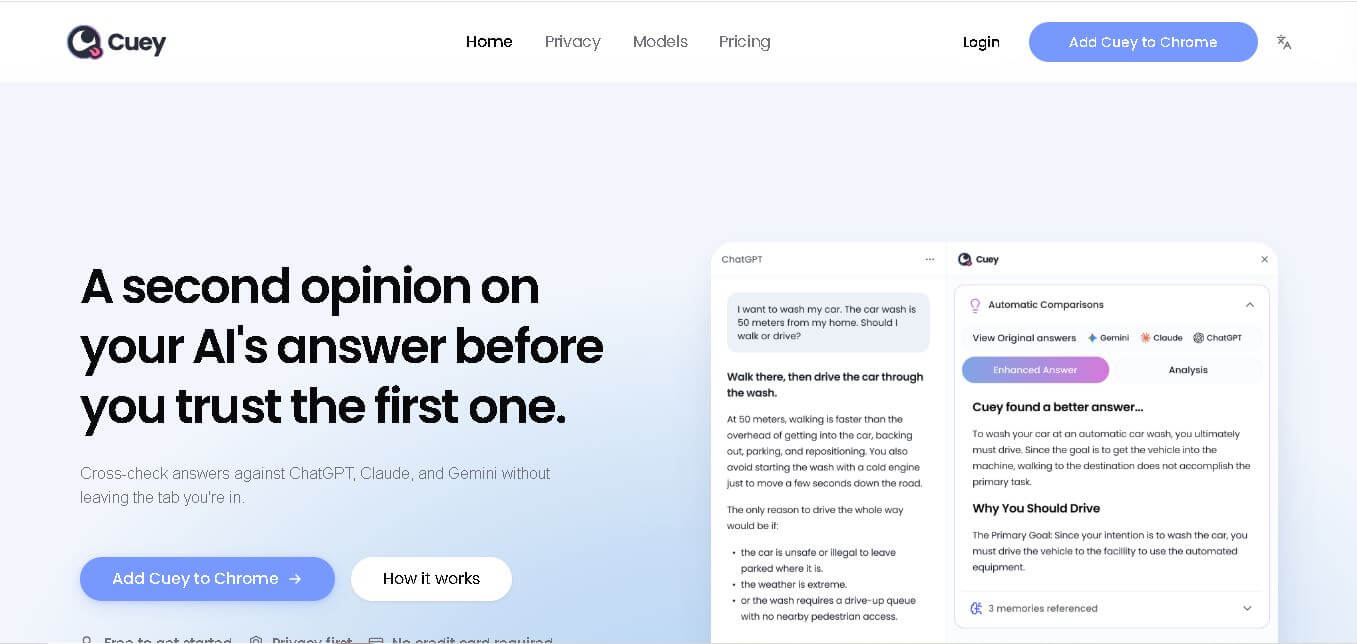
What is Cuey?
Cuey is a cross-model AI workflow tool designed to help users verify and improve AI-generated answers without leaving their preferred AI environment. It lets users compare responses from multiple large language models, cross-check research and advice, and reduce the risk of relying on a single potentially inaccurate answer. Cuey also makes prompts and memory more portable across services such as ChatGPT, Claude, and Gemini.
Cuey focuses on making AI-assisted work more reliable by bringing multiple model responses into one workflow. The service supports comparison across 3 major AI environments highlighted on its website: ChatGPT, Claude, and Gemini. Its core use cases include comparing answers, cross-checking research, reviewing judgment-heavy tasks, and maintaining portable memory and prompts. Cuey is designed to reduce hallucination risk while allowing users to remain within their existing AI tools instead of switching between browser tabs.
- Platform Role: Cross-Model AI Benchmarking Tool, Context Memory Layer & Extension
- Developer & Organization: Cuey Inc.
- Cross-Platform Access: Google Chrome Desktop Extension (Integrating with ChatGPT, Claude, Gemini, Grok, and web-based LLMs)
Use Cases:
- Cross-referencing research, technical code, and strategic advice across multiple LLMs to catch hallucinated information
- Carrying conversation context and user memory seamlessly when switching between ChatGPT, Claude, and Gemini
- Evaluating reasoning differences between frontier models using a single prompt without manual tab switching
- Ensuring zero-data retention and device-level encryption for sensitive research and prompt workflows
- Benchmarking domain-specific performance across 30+ supported AI model endpoints in real time
Technology:
- Privacy-first local architecture featuring on-device prompt encryption and zero server-side prompt storage or training
- Universal memory synchronization layer connecting disparate AI web chat environments
- Multi-model routing gateway supporting simultaneous background querying across 30+ frontier models
- Browser-native UI overlay integrating directly into existing web clients for ChatGPT, Claude, and Gemini
Target Users:
- Researchers, analysts, and decision-makers conducting judgment-heavy inquiry requiring verified sources
- Developers and prompt engineers comparing model reasoning and code execution across multiple engines
- Power users of ChatGPT, Claude, and Gemini looking for unified context without vendor lock-in
Acquisition: Cloud software extension developed and operated by Cuey Inc. (cuey.io)

What are the key features of Cuey?
Cuey's key platform features are
- In-Situ Model Comparison: Query background models like Claude or Gemini directly from your ChatGPT tab to compare outputs instantly.
- Portable Cross-Model Memory: Maintains personal preferences and context across AI platforms so you never start from zero when switching models.
- 30+ Model Integration: Supports major LLM providers, including ChatGPT, Anthropic Claude, Google Gemini, xAI Grok, and Mistral.
- On-Device Privacy Architecture: Encrypts data locally on your device with no prompt logging or model training on user data.
- Zero Workflow Interruption: Works as a Chrome extension over your existing web chat interfaces without requiring new platforms.
How much does Cuey cost?
Cuey provides a freemium pricing structure, offering free basic access to multi-model comparison alongside paid tiers for higher query volumes.
Pricing Tiers:
- Free Plan: Includes core browser extension features and access to supported models with standard daily comparison limits.
- Pro / Premium Plans: Unlocks higher daily, weekly, and monthly comparison quotas, faster multi-query execution, and expanded memory storage.
Disclaimer: Cuey's free tier provides multi-model checking with usage caps. Heavy comparison tasks and expanded daily query limits require a paid subscription upgrade.
Who should use Cuey?
Cuey is designed for power users and researchers who rely heavily on AI accuracy, including
- AI Researchers & Analysts: Professionals needing multi-angle validation to avoid relying on single-model hallucinations.
- Software Developers: Engineers comparing code generation logic across Claude 3.5 Sonnet, GPT-4o, and Gemini Advanced at the same time.
- Content Creators & Strategists: Writers seeking varied creative perspectives and tone checks in a unified workflow.
What are the best alternatives to Cuey?
Some of the strongest Cuey alternatives include
What are the pros and cons of Cuey?
What are the pros of Cuey?
- Eliminates manual copy-pasting between ChatGPT, Claude, and Gemini tabs
- Preserves chat context and preferences across completely different AI providers
- Strong privacy posture with on-device encryption and no data training
- Works seamlessly within the native interfaces users are already familiar with
What are the cons of Cuey?
- Currently limited to desktop Chrome-based browsers
- Requires underlying access or accounts across supported third-party model web clients
- Free tier subject to daily comparison volume limits
Why should you choose Cuey?
Single-model confidence can lead to undetected hallucinations and narrow perspectives. Cuey solves this issue by transforming single-model chats into multi-model validation engines. By embedding second opinions directly into your active browser tab and ensuring your chat context follows you everywhere, Cuey delivers accuracy and speed without changing how you interact with AI.
How does Cuey compare to competitors?
The main difference between Cuey, Poe, ChatHub, and TypingMind lies in workflow integration. While platforms like Poe and TypingMind require using their own centralized dashboards, Cuey operates directly inside official ChatGPT, Claude, and Gemini web interfaces via a browser extension while maintaining portable memory across them.
| Feature / Platform | Cuey | Poe | ChatHub | TypingMind |
|---|---|---|---|---|
| Core Focus | Native Chat Overlay & Context Portability | Centralized Multi-Bot Platform & Ecosystem | Multi-Bot Side-by-Side Browser Extension | Custom Frontend UI for AI APIs |
| Workflow Environment | Native Web Apps (ChatGPT, Claude, Gemini) | Poe Dashboard / App | Split-Screen Extension Tab | Standalone Web App UI |
| Cross-Model Context Memory | Automatic Portable Context Layer | Isolated Per-Chat History | Prompt-Level Multi-Send | Local System Prompts & Memory |
| Data & Privacy Model | On-device local encryption, zero training | Cloud-managed platform history | Local browser storage/API key based | Local storage with bring-your-own API keys |
| Best For | Cross-checking AI answers without leaving native web chats | Discovering custom community bots in one portal | Viewing side-by-side model outputs in split-screen | Power users wanting a custom UI over personal API keys |
How do we rate Cuey?
| Parameter | Rating (out of 5) |
|---|---|
| Integration & Native Workflow Friction | 4.9 |
| Multi-Model Comparison Efficiency | 4.8 |
| Context & Memory Portability | 4.7 |
| Privacy Architecture & Data Security | 4.9 |
| Value for Money | 4.6 |
| Overall Score | 4.78 |
What is our review and verdict on Cuey?
Cuey provides a clever solution to model lock-in and AI hallucinations. By integrating directly into existing web apps like ChatGPT, Claude, and Gemini, it allows users to cross-verify answers instantly without changing how they work. The added benefit of portable memory across models makes it an essential tool for serious AI power users.
Conclusion
Cuey provides a practical workflow for users who want to cross-check AI-generated information instead of relying on one model alone. By supporting comparisons across services such as ChatGPT, Claude, and Gemini, it can help users review research, advice, and judgment-heavy tasks more carefully. Its focus on portable memory and prompts also addresses the challenge of moving between AI services. For people using multiple AI models regularly, Cuey offers a centralized approach to verification and workflow portability.
FAQ
What is Cuey used for?
Cuey is designed for users who want to verify AI-generated answers before relying on them. It allows you to compare responses from multiple language models within one workflow, making it useful for research, advice, writing, analysis, and other tasks where accuracy matters.
How does Cuey help reduce AI hallucinations?
Cuey helps reduce hallucination risk by letting you compare answers from different AI models rather than depending on a single response. You can cross-check information, identify differences between answers, and investigate questionable claims before using the information for research, decisions, or other important tasks.
Which AI tools does Cuey work with?
Cuey is designed to work within existing AI experiences and specifically highlights ChatGPT, Claude, and Gemini. Its purpose is to help users compare model responses and maintain portable workflows across different AI services, rather than requiring them to abandon their preferred AI environment.
Can Cuey compare answers from different AI models?
Yes. Comparing answers across multiple large language models is one of Cuey's primary purposes. Instead of opening several AI services separately and manually comparing their responses, Cuey brings model comparison into a unified workflow, helping users examine different answers before deciding which information to use.
Who should use Cuey?
Cuey can be useful for serious AI users who regularly depend on AI for research, analysis, advice, writing, or judgment-heavy work. It is particularly relevant when you want additional verification and prefer comparing multiple AI responses instead of accepting the first generated answer.
Does Cuey require switching between AI tools?
Cuey is specifically designed to reduce the need for switching between tabs. The website explains that users can compare AI answers while staying inside their existing ChatGPT, Claude, or Gemini experience, helping create a smoother workflow when working across multiple AI services.
User Reviews
No reviews yet for Cuey.
Featured Tools
Featured AI tools from TechShark

Melody Genie
MelodyGenie is an AI-powered music generator that creates original songs from simple text prompts. Users can choose styles, moods, and genres, then instantly generate melodies and full tracks, making it easy for creators, marketers, and hobbyists to produce custom music without musical expertise.
Freemium

Kimi AI
Kimi AI is an advanced AI assistant developed by Moonshot AI that helps you chat, research, write, code, and automate tasks in one place. It supports web search, file analysis, and multimodal inputs, and can even run autonomous “agent” workflows to complete complex tasks end-to-end.
Freemium

Fashion Diffusion AI
Fashion Diffusion is an AI-powered fashion design platform that helps brands and designers create clothing designs, virtual try-ons, AI models, product photos, and marketing visuals faster and cost-effectively.
Paid

Veo 4
Veo 4 AI is an AI video creation platform that generates dramatic videos from text, images, audio, and video prompts using realistic motion and synchronized sound.
Paid
Alternatives
Alternatives to Cuey
The best Cuey alternatives include Poe, ChatHub, OpenRouter, and TypingMind. While Cuey works directly inside native web chat interfaces like ChatGPT, Claude, and Gemini as a browser overlay with portable memory, alternatives like Poe and TypingMind provide independent centralized dashboard environments.
Lemin Captcha
AI Agent
Lemin Captcha (leminnow.com) is a playful, gamified, and brand-customizable CAPTCHA and bot protection platform designed to eliminate user friction, prevent brute-force login attacks, and lower drop rates.
GeeTest
AI Agent
GeeTest (geetest.com/en) is an enterprise-grade bot management, adaptive CAPTCHA, and fraud prevention platform that combines multi-layer behavioral verification, device fingerprinting, and dynamic risk engines to protect web applications, mobile apps, and APIs.
 4.9
4.9Materiom
AI Agent
Materiom helps researchers, designers, and businesses discover and develop sustainable materials using renewable ingredients. Its resources include biomaterial recipes, material datasets, ingredient information, and AI-assisted research. By supporting experimentation and knowledge sharing, Materiom encourages innovation in bio-based packaging, textiles, and other products while helping users explore alternatives to conventional plastic materials.
 4.9
4.9Talkwalker
AI Agent
Talkwalker is a consumer intelligence and social listening solution that helps brands track online mentions, analyze audience sentiment, monitor competitors, and discover emerging trends. It combines social media analytics, media monitoring, customer feedback, and AI-powered insights to support marketing, public relations, reputation management, and data-driven business decisions across global markets.
 5.0
5.0AI4K12
AI Agent
AI4K12 is an educational initiative focused on bringing artificial intelligence into K–12 classrooms. It provides grade-level learning guidelines, curated teaching resources, and the Five Big Ideas framework. Designed for educators and curriculum developers, AI4K12 supports age-appropriate AI instruction and helps students understand how intelligent technologies work and affect society.
Kommunicate
AI Agent
Kommunicate (kommunicate.io) is an AI-powered customer service automation and live chat platform that unites no-code generative AI agents, Kompose chatbot builder, seamless human escalation, voice AI, and omnichannel messaging across WhatsApp, web, and mobile apps.
Text
AI Agent
Text is an AI-powered customer service platform that combines live chat, help desk ticketing, AI agents, and workflow automation. It helps businesses manage customer conversations, automate repetitive support tasks, answer questions, engage website visitors, and turn customer interactions into sales opportunities through a unified communication workspace.
DocsBot AI
AI Agent
DocsBot AI is an AI chatbot and agent platform that turns websites, documents, knowledge bases, and support tickets into conversational assistants. Businesses can use it to automate customer support, answer questions, share internal knowledge, connect workflows, and provide information through website widgets and supported integrations.
SiteGPT AI
AI Agent
SiteGPT is an AI chatbot platform that helps businesses automate customer support using their website content, documents, and knowledge sources. It answers visitor questions, supports lead generation, and integrates into websites, allowing teams to handle repetitive inquiries, improve customer experiences, and provide assistance around the clock.