
Webcam Motion Capture
Webcam Motion Capture is an AI-powered motion tracking software that enables VTubers, 3D animators, and content creators to track full-body, hand, finger, and facial movements using only a standard webcam or smartphone camera.
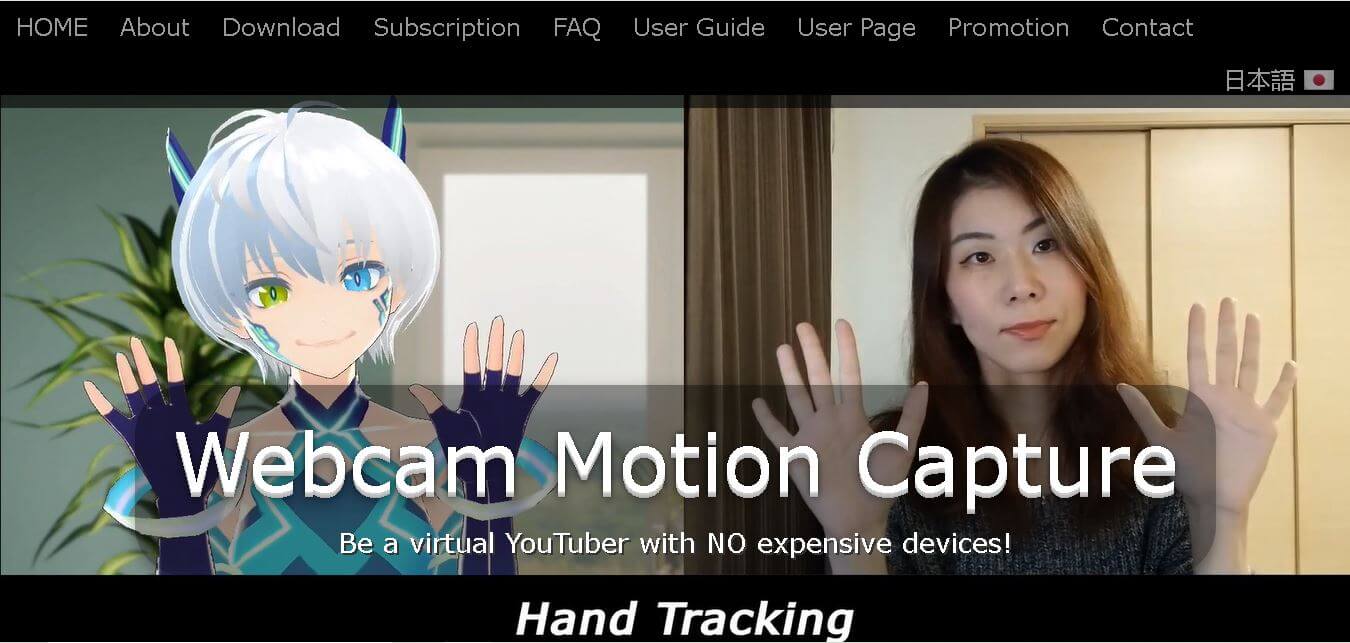
What is Webcam Motion Capture?
Webcam Motion Capture is an AI-powered computer vision software that allows users to animate 3D avatars and record motion capture data using a standard laptop or desktop webcam—without requiring expensive motion capture suits, VR controllers, or depth sensors. Built primarily for VTubers, 3D animators, and indie game developers, the software delivers high-quality hand, finger, face, and upper-body tracking in real time.
Developed by KWCL Inc., Webcam Motion Capture processes standard RGB camera feeds through AI vision models. It translates real-world human motion into virtual skeleton data, exporting movements directly to FBX files or streaming live to 3D software via the VMC (Virtual Motion Capture) protocol.
- Developer / Company: KWCL Inc. (Tokyo, Japan)
- License / Model: Freemium Software (Subscription / One-Time Purchase)
Use Cases:
- Live streaming on YouTube and Twitch as a 3D VTuber avatar
- Exporting hand and finger tracking data to FBX files for Blender, Maya, or 3ds Max
- Animating custom VRM 3D models created in VRoid Studio
- Generating 3D character animations from pre-recorded smartphone videos
Technology:
- AI-based deep learning vision models for single-camera landmark detection
- Support for VRM avatar specs and 3-bone finger hierarchy tracking
- VMC Protocol integration for network transmission to OBS Studio, VSeeFace, and game engines
Target Users:
- VTubers, live streamers, and virtual content creators
- 3D animators, CG artists, and game developers working on budget constraints
- Educators, students, and hobbyists learning digital character animation
Ecosystem: Works across Windows and macOS, connecting with OBS Studio, Unity, Unreal Engine, Blender, and the iOS/Android mobile receiver app.

Key features of Webcam Motion Capture
Webcam Motion Capture's key features are
- High-Quality Hand & Finger Tracking: Accurate tracking of individual fingers and complex hand gestures using only a 2D camera feed.
- Facial Expression & Head Tracking: Real-time mapping of eye blink, gaze direction, mouth shapes (visemes), and head tilt onto 3D avatars.
- FBX Export for CG Software: Save recorded performance data directly into FBX files for keyframe editing in Blender, Maya, or 3ds Max.
- VMC Protocol Streaming: Send tracking data over local Wi-Fi or LAN to external applications like OBS Studio, Unity, or Unreal Engine.
- Pre-Recorded Video Processing: Upload pre-recorded video clips to extract motion data without requiring live camera performance.
- VRM Model Compatibility: Seamlessly load custom avatars created in VRoid Studio or other 3D modeling programs.
Webcam Motion Capture Pricing
Webcam Motion Capture offers a free trial tier alongside flexible subscription and perpetual license options.
Pricing Plans:
- Free Tier ($0 / month): Includes access to all motion tracking features for testing and avatar movement preview (displays UI overlay).
- Monthly Subscription ($1.99 / month): Removes UI overlays for live streaming, enables FBX motion saving, and unlocks external app streaming via VMC protocol.
- Prepaid / Perpetual Plan ($69.80 one-time): Grants lifetime access and all future updates (subscription payments made previously are credited toward the lifetime price).
Disclaimer: For the latest and most accurate pricing information, please visit the official Webcam Motion Capture AI website.
Is Webcam Motion Capture Worth It?
Webcam motion capture is exceptionally worth it for VTubers and animators who want realistic finger and upper-body tracking without spending hundreds or thousands of dollars on specialized hardware. At just $1.99 per month, it delivers one of the highest cost-to-performance ratios in the virtual production market.
Real-World Use Cases
- VTuber Streaming: Creators use the software with OBS Studio and VSeeFace to host live interactive streams as custom 3D anime avatars.
- Indie Game Development: Solo developers record character animations directly into FBX format to import into Unity or Unreal Engine projects.
- Social Media Content Creation: Animators generate quick character skits for TikTok and YouTube Shorts using pre-recorded smartphone videos.
Who is using Webcam Motion Capture?
Webcam motion capture is used by creators across the virtual production space, including
- Indie VTubers: Streamers needing high-fidelity hand tracking without buying VR headsets or controllers
- 3D Animators: Artists using AI motion capture to speed up character keyframing in Blender
- Game Designers: Developers creating cost-effective character movement assets
Best Webcam Motion Capture Alternatives
Some of the strongest webcam motion capture alternatives include
- VSeeFace
- Kalidoface
- Luppet
- Rokoko Vision
- ThreeDPoseTracker
- DeepMotion
Pros and Cons of Webcam Motion Capture
Pros
- Incredibly affordable ($1.99/mo or $69.80 lifetime license)
- Exceptional finger and hand tracking precision from a standard 2D webcam
- Supports FBX file export and VMC protocol network streaming
- Optimized software engine with low CPU/GPU resource usage
Cons
- Tracking quality is sensitive to room lighting and camera angle adjustments
- Free mode contains an on-screen UI overlay during tracking
- Requires VRM models to strictly follow required finger bone structures
Why Choose Webcam Motion Capture?
Webcam motion capture bridges the gap between basic facial tracking and expensive hardware suit mocap. By focusing heavily on precise finger movement recognition via consumer webcams, it allows creators to express nuanced body language without hardware friction.
How Webcam Motion Capture Works
- 1. Download Software: Download the Webcam Motion Capture desktop app for Windows or macOS.
- 2. Setup Avatar: Load your custom VRM file (such as an avatar created in VRoid Studio).
- 3. Calibrate Tracking: Position your webcam to capture your head and hands, and adjust smoothing sliders.
- 4. Stream or Export: Output tracking data to OBS Studio via VMC Protocol or save motion directly as an FBX file.
Webcam Motion Capture vs. Competitors
While VSeeFace is a widely used free face-tracking tool and Rokoko Vision targets high-end studio video-to-mocap extraction, Webcam Motion Capture offers a specialized middle ground focused on detailed hand and finger tracking at an accessible price point.
| Feature | Webcam Motion Capture | VSeeFace | Rokoko Vision |
|---|---|---|---|
| Finger Tracking | High Precision (Native AI) | Basic / Requires Leap Motion | Full Body AI |
| FBX Export | Yes | No | Yes |
| Pricing | $1.99/mo / $69.80 Lifetime | 100% Free | Freemium / Tiered Plans |
How do we rate Webcam Motion Capture?
| Parameter | Rating (out of 5) |
|---|---|
| Ease of Use | 4.6 |
| Hand & Finger Tracking | 4.8 |
| Value for Money | 4.9 |
| System Resource Efficiency | 4.7 |
| Overall Score | 4.75 |
Webcam Motion Capture Review
Webcam motion capture is an impressive piece of AI vision engineering. By enabling fluid finger and hand tracking using simple hardware, it lowers the barrier to entry for professional VTubing and 3D character animation.
Conclusion
Webcam Motion Capture is an impressive AI-powered motion tracking solution that makes professional avatar animation accessible without expensive hardware. Its accurate hand tracking, facial recognition, eye tracking, lip sync, FBX export, and VMC protocol support make it valuable for VTubers, animators, educators, and game developers. With support for Windows and macOS, a generous free version, and affordable premium options, it offers excellent value for beginners and experienced creators alike. Whether you are streaming live, producing animated videos, or developing virtual characters, Webcam Motion Capture delivers reliable performance while significantly reducing the cost of motion capture technology.
FAQ
Is Webcam Motion Capture free to use?
Yes. Webcam Motion Capture offers a free version that includes all core tracking capabilities, including hand, face, eye, lip-sync, and upper-body tracking. A paid subscription is only required if you want advanced features such as hiding the software interface during live streams or sending tracking data to external applications through the VMC protocol.
Who should use Webcam Motion Capture?
Webcam Motion Capture is designed for VTubers, YouTubers, streamers, animators, game developers, educators, and digital artists. If you need realistic motion tracking without purchasing expensive motion capture hardware, this software offers an affordable and accessible solution for creating engaging virtual content using only a standard webcam.
Can I use Webcam Motion Capture for commercial projects?
Yes. You can use webcam motion capture to create monetized YouTube videos, livestreams, animations, games, and other commercial digital content. However, you cannot redistribute, resell, or bundle the software as part of another commercial product. Commercial content creation is fully supported under the official user agreement.
Does Webcam Motion Capture work without special hardware?
Absolutely. One of the biggest advantages of webcam motion capture is that it only requires a standard webcam to perform AI-powered tracking. You do not need motion capture suits, gloves, or expensive sensors, making it an excellent option for beginners and professional creators with limited budgets.
Which operating systems are supported?
Webcam Motion Capture supports both Windows 10 or later and macOS Catalina or newer. Users can even run Webcam Motion Capture on one operating system while using Webcam Motion Receiver on another device over the same Wi-Fi network, providing greater flexibility for content creation workflows.
Can I export animation data?
Yes. Webcam Motion Capture allows users to export captured motion as FBX files. These files can be imported into popular 3D software, including Blender, Maya, and 3ds Max, making the tool useful for professional animation production, game development, and digital filmmaking projects.
User Reviews
No reviews yet for Webcam Motion Capture.
Featured Tools
Featured AI tools from TechShark

Melody Genie
MelodyGenie is an AI-powered music generator that creates original songs from simple text prompts. Users can choose styles, moods, and genres, then instantly generate melodies and full tracks, making it easy for creators, marketers, and hobbyists to produce custom music without musical expertise.
Freemium

Kimi AI
Kimi AI is an advanced AI assistant developed by Moonshot AI that helps you chat, research, write, code, and automate tasks in one place. It supports web search, file analysis, and multimodal inputs, and can even run autonomous “agent” workflows to complete complex tasks end-to-end.
Freemium

Fashion Diffusion AI
Fashion Diffusion is an AI-powered fashion design platform that helps brands and designers create clothing designs, virtual try-ons, AI models, product photos, and marketing visuals faster and cost-effectively.
Paid

Veo 4
Veo 4 AI is an AI video creation platform that generates dramatic videos from text, images, audio, and video prompts using realistic motion and synchronized sound.
Paid
Alternatives
Alternatives to Webcam Motion Capture
The best Webcam Motion Capture alternatives include VSeeFace, Kalidoface, Luppet, Rokoko Vision, and ThreeDPoseTracker. VSeeFace and Kalidoface offer popular free VTuber tracking solutions, while Rokoko Vision provides advanced AI-driven video-to-mocap extraction for professional animators.
Neural.love
AI Image Enhancer
Neural.love is an AI-powered creative platform for generating images, editing photos, enhancing videos, restoring old media, and animating pictures. It combines multiple AI tools in a browser-based workspace, helping content creators, marketers, photographers, designers, and businesses improve visual content without relying entirely on traditional editing software.
 4.8
4.8Shuffll
Video Editing
Shuffll goes beyond traditional video creation by connecting personalized video directly to enterprise data and workflows. Its API-first infrastructure, 40+ AI models, automated production, and built-in brand governance make it suitable for organizations that need video at scale. For businesses seeking higher engagement without building large production teams, Shuffll offers a practical way to turn existing data into personalized, on-brand video experiences.
 4.8
4.8Opus Clip (Opus Pro)
Video Editing
OpusClip helps creators transform long-form videos into short, social-ready clips. It can identify engaging moments, generate captions, reframe footage, add B-roll, enhance audio, and support publishing across major social platforms. It is designed for creators, marketers, podcasters, businesses, and teams that want to scale video content production.
 4.8
4.8Dubbah
Video Editing
Dubbah helps Mac users translate and dub videos into 14 languages while preserving a familiar speaker voice. The app processes media locally, supports editing translated lines, and works offline after setup. With no account, subscription, or per-minute fee, it offers a simple, straightforward option for creators producing multilingual video content.
 4.9
4.9Clipchamp
Video Generator
Clipchamp is an AI-powered online video editor by Microsoft that helps users record, edit, and share videos directly from the browser. It offers templates, stock media, and AI tools like subtitles, voiceovers, and noise removal, enabling fast, professional video creation without advanced editing skills.
 4.9
4.9CapCut
Video Editing
CapCut is a popular video editing tool that helps creators produce engaging videos with effects, transitions, filters, templates, subtitles, and AI-powered features. Available on multiple platforms, CapCut makes it easy to edit videos for TikTok, Instagram Reels, YouTube Shorts, and other social media channels.
 4.9
4.9Media.io
Video Editing
Media.io is an AI-powered creative platform that helps users generate, edit, and enhance videos, images, audio, and ads from simple prompts or assets. It combines AI generation, editing, and workflows in one place, enabling creators to turn ideas into polished content quickly without switching tools.
 4.9
4.9Video Candy
Video Editing
Video Candy is a free online video editing platform that helps users trim, merge, compress, convert, and enhance videos directly in the browser. It offers 70+ tools with a simple drag-and-drop interface, making video editing fast, accessible, and efficient without installing complex software.
 4.8
4.8Vheer
Image
Vheer is a free AI image and video generator that helps users create visuals from text or photos instantly. It includes tools for image editing, background removal, and image-to-video conversion, offering unlimited generations without signup, making it ideal for quick, creative content production.