
Team9 AI
Team9.ai helps businesses coordinate AI agents like members of a working team. Users can assign tasks, define responsibilities, monitor progress, handle blockers, approve sensitive actions, and reuse successful workflows. Its workspace combines agents, people, tasks, context, tools, and operational information to support repeatable business execution.
What is Team9 AI?
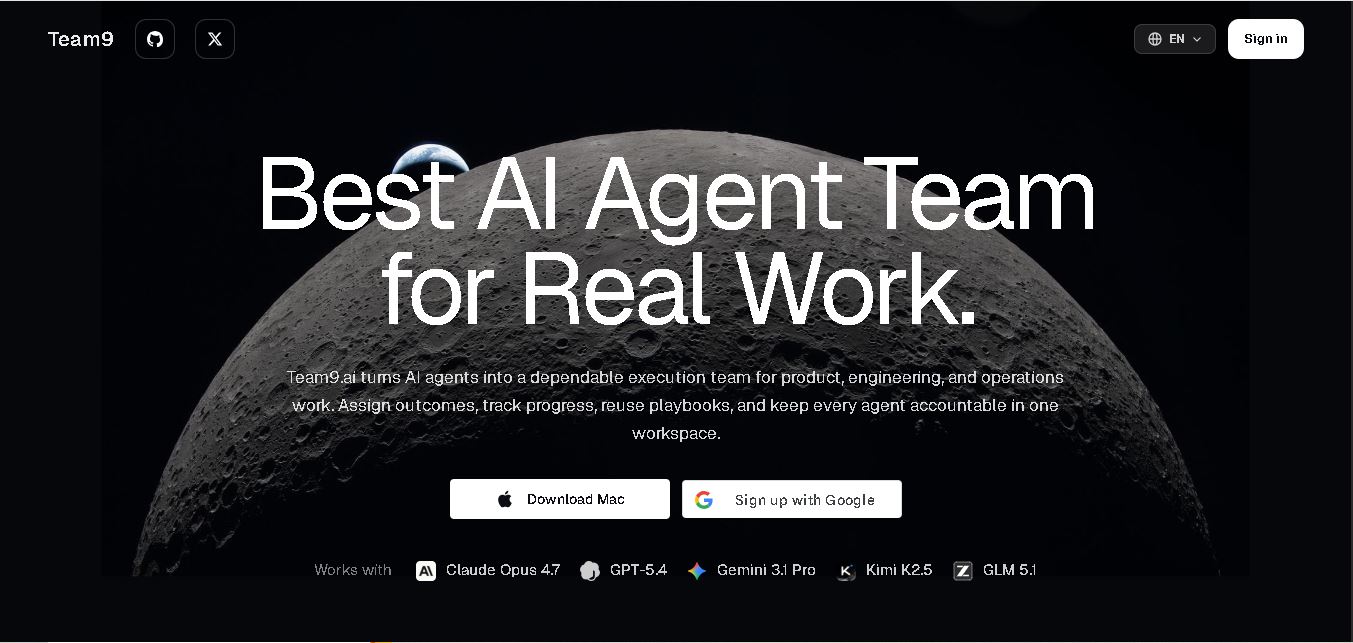
Team9.ai is a workspace for managing AI agents as an execution team for product, engineering, operations, research, support, and other business workflows. It lets teams assign agents specific roles, context, tools, permissions, owners, and measurable outcomes. Tasks can be queued, monitored, reviewed, escalated, and completed with human oversight. Team9.ai also turns successful workflows into reusable playbooks, helping teams standardize recurring work while maintaining visibility into progress, costs, errors, decisions, and agent activity.
Team9.ai supports 5 listed AI models, including Claude Opus 4.7, GPT-5.4, Gemini 3.1 Pro, Kimi K2.5, and GLM 5.1. It provides 6+ role areas, including engineering, growth, support, research, QA, and operations. The platform supports 4 core workflow steps: workspace creation, specialist-agent design, task assignment, and continuous improvement. It also provides shared queues, reusable playbooks, live progress, human approvals, and operational visibility.
- Platform Role: AI Team Workspace, OpenClaw Agent Orchestration Platform & Multi-Agent Command Center
- Developer & Architecture: Built on OpenClaw architecture; open-source framework with native local-first desktop support
- Ecosystem Integrations: Works with major frontier models including Claude Opus, GPT-5, Gemini Pro, Kimi, and GLM, integrating natively into Slack, WeChat, and internal docs
Use Cases:
- Automating complex engineering tasks, including code reviews, pull request triage, bug reproduction, and documentation updates
- Executing long-running market research, competitor analysis, customer sentiment tracking, and reporting routines
- Running background customer support triage, incident response, and cross-channel operations workflows
- Codifying team playbooks, launch checklists, and operational patterns into reusable multi-agent execution rules
- Managing privacy-sensitive workflows locally on hardware without exposing data to third-party cloud environments
Technology:
- OpenClaw AI agent framework backbone for zero-config, local-first background task execution
- Unified task queue and execution board supporting human-in-the-loop approval gates for sensitive actions
- Model-agnostic orchestration engine allowing teams to pair specific LLM backends (Claude, GPT, Gemini) to custom agent roles
- Persistent team memory layer capturing tasks, files, decisions, and outcomes into reusable operational knowledge
Target Users:
- Engineering and product leads wanting accountable AI agents to handle background maintenance, QA, and code reviews
- Operations and customer success teams automating multi-app workflows across Slack, email, and internal databases
- Privacy-conscious organizations requiring local-first AI execution to protect data sovereignty
- Startups and indie teams seeking to scale operational throughput with dedicated AI staff members
Acquisition: Open-source platform accessible via official web application (team9.ai) and native Mac client download

What are the key features of Team9 AI?
Team9 AI's key platform features are
- Role-Based AI Staff: Configure specialized AI teammates for coding, QA, growth, research, and support with explicit operating lanes and context.
- Shared Execution Board: Assign tasks to human or AI workers from one unified queue to maintain clear priorities and operational visibility.
- Human-Grade Accountability: Real-time timeline visibility tracking every agent update, decision, file modification, and handoff.
- Reusable Operating Playbooks: Codify instructions, rules, and decision structures so entire teams can reuse high-performing agent workflows.
- Multi-LLM Model Mixing: Assign different LLM backends to different agents based on task complexity, speed, or cost requirements.
- Local & Cloud Agent Runtimes: Manage local offline execution for sensitive data alongside cloud-hosted compute from one dashboard.
How much does Team9 AI cost?
Team9 AI provides an open-source local framework with freemium tiering and scalable cloud compute options.
Pricing & Access Overview:
- Free / Community Tier ($0): Open-source core workspace software. Run local AI agents with your own API keys or local LLM backends.
- Pro Workspace Plan (~$29/month per seat): Cloud-hosted control room features, shared team memory, expanded model allowances, and integration connectors.
- Enterprise Plan (Custom): Custom deployment, dedicated cloud runtimes, SSO/SAML, advanced security policies, and SLA support.
Disclaimer: Core local features are free. Teams using cloud model APIs (OpenAI, Anthropic, Google) or hosted Team9 infrastructure are responsible for API token consumption and subscription fees.
Who should use Team9 AI?
Team9 AI is designed for modern product teams, engineering groups, and operations managers, including
- Software Engineering Teams: Developers who need autonomous AI teammates for bug triage, code review, and automated testing routines.
- Operations & Support Managers: Leaders looking to automate recurring cross-channel tasks across Slack, email, and SaaS tools.
- Product & Research Leads: Teams requiring long-running background data gathering, market research, and report generation.
What are the best alternatives to Team9 AI?
Some of the strongest Team9 AI alternatives include
- CrewAI
- AutoGPT Workspaces
- Atomic Bot
- OpenClaw
- LlamaIndex Workflows
What are the pros and cons of Team9 AI?
What are the pros of Team9 AI?
- Replaces single-prompt chat windows with structured, outcome-driven agent task delegation
- Open-source and local-first foundation built on OpenClaw for maximum data sovereignty
- Flexible multi-model support allowing teams to mix and match LLMs per agent role
- Transparent execution timelines with built-in human approval gates for risky operations
What are the cons of Team9 AI?
- Initial onboarding requires configuring agent roles, context rules, and workspace playbooks
- Complex long-running workflows can accumulate significant third-party LLM API costs
- Desktop execution features vary depending on local system resource permissions
Why should you choose Team9 AI?
Most AI interfaces treat models as simple conversational search bars, requiring humans to baby-sit every step of an interaction. Team9 AI elevates AI into actual workforce infrastructure by giving each agent a clear role, owner, operating lane, and definition of done. Whether you need an AI developer for bug triage or an AI analyst for weekly research, Team9 AI coordinates humans and agents in a single shared workspace.
How does Team9 AI compare to competitors?
The key distinction between Team9 AI, raw developer frameworks like CrewAI, and basic AI chat tools lies in human-agent coordination and workplace observability. Team9 AI provides a complete UI control room where non-technical teammates and engineers can assign, inspect, and approve real agent work.
| Feature / Platform | Team9 AI | CrewAI | ChatGPT Team Workspace |
|---|---|---|---|
| Core Focus | Outcome-Based AI Agent Team Workspace | Python Multi-Agent Developer Framework | Shared Conversational AI Chat Workspace |
| Primary Interface | Unified Task Board & Agent Dashboard | Code / Python Scripts / Cloud API | Chat Thread Interface |
| Execution Style | Asynchronous Long-Running Task Queues | Programmatic Sequential/Hierarchical Crew Runs | Synchronous Prompt & Response Chat |
| Data Sovereignty | Local-First Runtimes & Open Source | Developer Hosted / Custom Infrastructure | Proprietary Cloud Workspace |
| Best For | Teams wanting an operational workspace for AI staff | Developers building custom agent workflows in code | Knowledge workers seeking conversational help |
How do we rate Team9 AI?
| Parameter | Rating (out of 5) |
|---|---|
| Agent Orchestration & Control | 4.9 |
| Workspace UI & Observability | 4.8 |
| Local Privacy & Data Sovereignty | 5.0 |
| Playbook & Workflow Reuse | 4.7 |
| Value for Money | 4.9 |
| Overall Score | 4.86 |
What is our review and verdict on Team9 AI?
Team9 AI provides an impressive solution to the single biggest challenge in modern AI adoption: moving from unstructured prompts to reliable, structured task execution. By giving agents distinct operational roles, persistent context, and shared task queues alongside human teammates, Team9 AI transforms AI models into real, accountable coworkers.
Conclusion
Team9.ai provides a structured way to organize AI agents around real business work rather than isolated prompts. Its approach combines role-based agents, task queues, shared context, human oversight, reusable playbooks, and operational monitoring in one workspace. With support for multiple leading models and workflows spanning engineering, research, support, QA, and operations, Team9.ai is positioned as a coordination layer for teams building repeatable AI-assisted processes.
FAQ
What does Team9.ai do?
Team9.ai helps you assign real business work to AI agents rather than relying only on individual prompts. You can give agents specific roles, context, tools, permissions, owners, and completion requirements. The platform then helps track tasks, monitor progress, handle blockers, review outputs, and maintain an accountable record throughout execution.
Which AI models does Team9.ai support?
Team9.ai currently lists Claude Opus 4.7, GPT-5.4, Gemini 3.1 Pro, Kimi K2.5, and GLM 5.1 among its supported models. This lets teams use different models for different agent roles instead of depending on one model for every task. Model availability can change as the platform evolves.
How is Team9.ai different from ChatGPT or Claude?
Team9.ai focuses on organizing and executing ongoing work rather than primarily providing conversational responses. It provides queued tasks, long-running workflows, shared context, human review, progress tracking, and reusable playbooks. This structure is designed for teams that want AI agents to participate in repeatable operational processes with defined ownership and accountability.
Can humans review AI agent work in Team9.ai?
Yes. Team9.ai keeps humans involved throughout the execution process. Team members can assign tasks, monitor progress, inspect outputs, pause runs, comment on work, and approve sensitive steps. The platform is designed so agents can continue handling assigned work while people retain control over decisions that require human judgment or authorization.
What types of work can Team9.ai handle?
Team9.ai is designed for several business workflows, including engineering, research, operations, support, QA, documentation, reporting, growth, and back-office processes. It is particularly suited to recurring work where teams benefit from defined ownership, task visibility, progress tracking, clear completion requirements, and repeatable operating procedures across multiple executions.
Does Team9.ai support reusable workflows?
Yes. Team9.ai allows teams to turn repeatable processes into playbooks containing instructions, examples, files, tools, and decision rules. These playbooks can then be reused by agents and teammates. Examples mentioned by Team9.ai include launch checklists, bug triage, PR reviews, customer research, reporting, and handoff workflows.
User Reviews
No reviews yet for Team9 AI.
Featured Tools
Featured AI tools from TechShark

Melody Genie
MelodyGenie is an AI-powered music generator that creates original songs from simple text prompts. Users can choose styles, moods, and genres, then instantly generate melodies and full tracks, making it easy for creators, marketers, and hobbyists to produce custom music without musical expertise.
Freemium

Kimi AI
Kimi AI is an advanced AI assistant developed by Moonshot AI that helps you chat, research, write, code, and automate tasks in one place. It supports web search, file analysis, and multimodal inputs, and can even run autonomous “agent” workflows to complete complex tasks end-to-end.
Freemium

Fashion Diffusion AI
Fashion Diffusion is an AI-powered fashion design platform that helps brands and designers create clothing designs, virtual try-ons, AI models, product photos, and marketing visuals faster and cost-effectively.
Paid

Veo 4
Veo 4 AI is an AI video creation platform that generates dramatic videos from text, images, audio, and video prompts using realistic motion and synchronized sound.
Paid
Alternatives
Alternatives to Team9 AI
The best Team9 AI alternatives include CrewAI, AutoGPT Workspaces, Atomic Bot, and OpenClaw. While Team9 AI provides a structured, UI-driven team workspace for local and cloud AI agents with human-in-the-loop approvals, developer frameworks like CrewAI require writing custom code.
TheInterviews.ai
AI Agent
TheInterviews.ai (theinterviews.ai) is an AI-powered mock interview and career credentialing platform that conducts real-time, voice-based AI interviews, grades performance against published rubrics, and issues a verified recruiter-ready Profile Card.
Equip
AI Agent
Equip (equip.co) is a pay-per-use pre-employment skills assessment and AI-native Applicant Tracking System (ATS) platform offering multi-skill quizzes, proctored coding challenges, CEFR communication tests, psychometric profiling, and one-way or conversational AI video interviews.
 4.7
4.7Spark Hire
AI Agent
Spark Hire helps recruitment teams simplify hiring through one-way video interviews, live interviews, applicant tracking, and candidate evaluations. It enables employers to screen applicants remotely, collaborate with hiring managers, and organize recruitment workflows. Its AI-assisted features support interview transcription, summaries, and candidate review while maintaining human involvement in hiring decisions.
 4.9
4.9Materiom
AI Agent
Materiom helps researchers, designers, and businesses discover and develop sustainable materials using renewable ingredients. Its resources include biomaterial recipes, material datasets, ingredient information, and AI-assisted research. By supporting experimentation and knowledge sharing, Materiom encourages innovation in bio-based packaging, textiles, and other products while helping users explore alternatives to conventional plastic materials.
 4.9
4.9Talkwalker
AI Agent
Talkwalker is a consumer intelligence and social listening solution that helps brands track online mentions, analyze audience sentiment, monitor competitors, and discover emerging trends. It combines social media analytics, media monitoring, customer feedback, and AI-powered insights to support marketing, public relations, reputation management, and data-driven business decisions across global markets.
 5.0
5.0AI4K12
AI Agent
AI4K12 is an educational initiative focused on bringing artificial intelligence into K–12 classrooms. It provides grade-level learning guidelines, curated teaching resources, and the Five Big Ideas framework. Designed for educators and curriculum developers, AI4K12 supports age-appropriate AI instruction and helps students understand how intelligent technologies work and affect society.
Kommunicate
AI Agent
Kommunicate (kommunicate.io) is an AI-powered customer service automation and live chat platform that unites no-code generative AI agents, Kompose chatbot builder, seamless human escalation, voice AI, and omnichannel messaging across WhatsApp, web, and mobile apps.
Text
AI Agent
Text is an AI-powered customer service platform that combines live chat, help desk ticketing, AI agents, and workflow automation. It helps businesses manage customer conversations, automate repetitive support tasks, answer questions, engage website visitors, and turn customer interactions into sales opportunities through a unified communication workspace.
DocsBot AI
AI Agent
DocsBot AI is an AI chatbot and agent platform that turns websites, documents, knowledge bases, and support tickets into conversational assistants. Businesses can use it to automate customer support, answer questions, share internal knowledge, connect workflows, and provide information through website widgets and supported integrations.