
QuickMagic
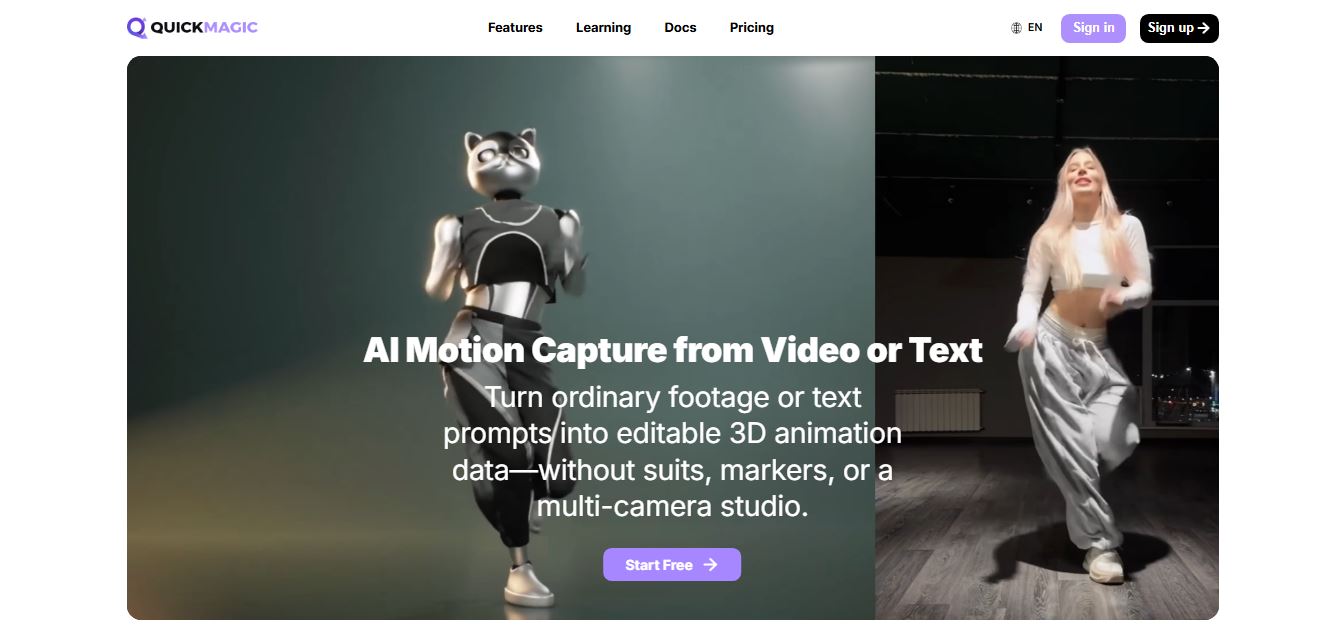
QuickMagic AI is an AI-powered motion capture tool that converts video footage and text prompts into editable 3D character animations. It helps animators, game developers, and content creators capture body, hand, and facial movements without specialized suits, markers, or expensive multi-camera studio setups.
What is QuickMagic?
QuickMagic AI is an AI-powered motion capture platform that helps users turn video footage into 3D character animations. It is designed for animators, game developers, filmmakers, and digital content creators who want to create realistic character movements without relying on traditional motion-capture suits or specialized studio equipment. Instead of recording movement with a dedicated motion-capture system, users can upload compatible video footage and let AI analyze the movement. The resulting animation data can then be used in supported 3D character workflows. QuickMagic AI aims to make motion capture more accessible to independent creators and small production teams. Depending on the available tools and plan, its workflow can support body movement capture, hand animation, facial performance, and exports for compatible 3D software.
QuickMagic AI helps transform human movement captured in a video into digital character animation, reducing the need for expensive motion-capture equipment and manual keyframing. It is worth considering if you want to speed up character animation for games, virtual production, short films, or other 3D projects.
Launched in 2024, QuickMagic eliminates the traditional technical and financial barriers of motion capture. Powered by deep computer vision and generative motion diffusion models, the platform converts single- or multi-subject footage into production-ready 3D motion data in minutes, offering native export presets for Unreal Engine, Blender, Maya, Unity, MikuMikuDance (MMD), and Unitree humanoid robots, with plans starting with a free monthly allowance and paid tiers from $9.90 per month.
QuickMagic AI: Key Facts
|
Category |
Details |
|---|---|
|
Tool name |
QuickMagic AI |
|
Category |
AI motion capture and 3D animation |
|
Primary purpose |
Converting video-recorded movement into animation data |
|
Target users |
Animators, game developers, filmmakers, and 3D artists |
|
Main workflow |
Video-based motion capture |
|
Potential applications |
Character animation, game development, virtual production, digital content |
|
Equipment approach |
Designed to reduce dependence on traditional motion-capture equipment |
|
Output |
Motion data and animation exports, depending on supported formats |
|
Platform |
Online tools and associated software, depending on workflow |
|
Official website |

What Are the Key Features of QuickMagic AI?
QuickMagic's key features are
- Triple-Channel Unified Capture: Extracts full-body skeletal movement, individual finger tracking, and facial expressions simultaneously from a single uploaded video.
- Integrated Text-to-3D Animation: Describe an action in plain natural language (e.g., "a warrior dodging and swinging a sword") to generate an editable 3D motion draft instantly.
- Single & Multi-Subject Support: Tracks solo actor performances or complex two-person interactions across static and moving camera angles.
- Extensive DCC & Game Engine Retargeting: Provides automated skeleton retargeting presets for Unreal Engine (UE4, UE5.5, UE5.6, MetaHuman), Blender, Maya, 3ds Max, MotionBuilder, Cascadeur, Mixamo, and iClone.
- Native MMD & VMD Output: Generates native VMD motion files directly compatible with MikuMikuDance pipelines without requiring third-party converters.
- Humanoid Robotics Presets: Exports motion trajectories tailored for Unitree G1, H1, and H1_2 humanoid robot simulation and physical embodiment training.
- Variable Frame Rate & Physics Smoothing: Supports export rates from 24 FPS up to 120 FPS with automatic foot-contact locking and jitter reduction filters.
- 100% Browser-Based Workflow: Run tracking, review 3D viewport previews, and export assets entirely in your web browser without installing heavy local software.
QuickMagic AI Pricing: How Much Does It Cost?
QuickMagic AI's pricing and credit allowances can change. Before purchasing, check the current plan prices, included processing time, and export restrictions on its official website.
|
Pricing factor |
What to check |
|---|---|
|
Free access or trial |
Whether new users receive free processing credits |
|
Monthly subscription |
Recurring cost and included motion-capture minutes |
|
Credit packages |
Cost per generation or processing unit |
|
Export capabilities |
Whether downloads and preferred formats are included |
|
Advanced capture modes |
Whether hand, facial, or other capture features require a higher plan |
|
Commercial usage |
Licensing terms for games, films, and client projects |
Disclaimer: For the latest feature releases, credit pack top-ups, and annual discount pricing, please visit the official QuickMagic portal at quickmagic.ai.
Is QuickMagic AI free?
Do not assume that all features are available for free. Check the current pricing page to confirm whether a free trial, starter credits, or limited free tier is offered.
Is QuickMagic AI worth paying for?
It may be worth paying for if you regularly create character animations and the tool saves meaningful time compared with manual keyframing or your existing motion-capture setup. Test representative movements and verify export compatibility before committing to a subscription.
Who Should Use QuickMagic AI?
QuickMagic AI is most relevant to creators who need human movement data for digital characters.
- Game developers: Create movement assets for playable characters and non-player characters.
- 3D animators: Turn recorded performances into a starting point for character animation.
- Indie studios: Explore motion capture without investing in a traditional studio setup.
- Filmmakers: Develop character performances for animation and virtual production.
- Digital artists: Experiment with movement and character performance in 3D scenes.
- Virtual production teams: Explore video-based motion capture as part of a broader production workflow.
- Students and hobbyists: Learn about motion capture and animation without starting with specialized hardware.
QuickMagic AI may be less suitable for productions that require highly precise biomechanical tracking, complex multi-person interactions, or guaranteed production-ready animation with no manual cleanup.
Best QuickMagic Alternatives
Some of the strongest QuickMagic alternatives include
- DeepMotion
- Plask AI
- Move.ai
- Rokoko Vision
- Kinetix
- Radical Motion
Pros and Cons of QuickMagic
Pros
- Makes video-based motion capture more accessible.
- Can reduce dependence on specialized motion-capture hardware.
- Helps speed up the creation of human character movements.
- Provides a potential starting point for animation in games and 3D projects.
- Can reduce the amount of repetitive manual keyframing.
- May fit into existing 3D animation workflows through supported exports.
- Useful for independent creators and smaller production teams.
Cons
- Tracking accuracy depends on video quality and recording conditions.
- Complex movements may require manual cleanup.
- Output compatibility depends on supported file formats and character rigs.
- Advanced capture features and processing limits may vary by plan.
- It may not replace professional motion-capture systems for demanding productions.
- Current pricing and usage limits need to be checked before purchasing.
Why Choose QuickMagic AI?
QuickMagic AI is worth considering if you want to speed up character animation without building a dedicated motion-capture studio.
- Reduce manual work: Generate a starting point for character movement from recorded performances.
- Make motion capture more accessible: Explore video-based capture without relying entirely on specialized equipment.
- Support creative projects: Develop animations for games, films, and digital characters.
- Speed up prototyping: Test character movements before investing time in detailed animation.
- Fit into 3D workflows: Use supported animation exports in compatible software and refine the results as needed.
The strongest reason to choose QuickMagic AI is the potential to reduce the time between recording a movement and using it in a 3D project. Test that benefit with your own animation workflow before committing to a paid plan.
QuickMagic vs. Competitors
The main difference between QuickMagic, DeepMotion, Plask, and Move.ai lies in pipeline versatility and ecosystem support. While DeepMotion focuses heavily on manual physics simulation tools and Move.ai caters to high-end studio multi-cam setups, QuickMagic stands out by combining Video-to-3D, Text-to-3D, and triple-channel (body, hand, face) tracking with unique export presets for MMD and humanoid robotics.
| Feature / Tool | QuickMagic (quickmagic.ai) | DeepMotion | Plask AI | Move.ai |
|---|---|---|---|---|
| Core Focus | All-in-One Video & Text Mocap | Physics-Driven Mocap & Roto | Browser Video Animation | High-Fidelity Markerless Mocap |
| Simultaneous Body + Hand + Face | Yes (Triple-channel capture) | Yes (Multi-credit cost) | Body + Hand only | Yes (Move One / Multi-cam) |
| Text-to-3D Motion | Yes (Integrated directly) | Separate App (SayMotion) | No | No |
| MMD / VMD & Robotics Export | Yes (VMD & Unitree presets) | No (Standard formats) | No | No |
| Best For | Indie devs, VTubers, MMD & robotics | Animators needing physics editing | Quick casual browser tests | Studio-grade production pipelines |
How do we rate QuickMagic?
| Parameter | Rating (out of 5) |
|---|---|
| Motion Capture Accuracy & Tracking | 4.8 |
| Triple-Channel (Body, Hand & Face) Integration | 4.9 |
| Export Presets & DCC Compatibility | 4.9 |
| Browser Usability & Setup Speed | 4.8 |
| Value for Money | 4.8 |
| Overall Score | 4.84 |
QuickMagic AI Review: Is It Worth It?
QuickMagic AI addresses a common challenge in 3D animation: capturing believable human movement without investing in a traditional motion-capture setup. By using video-based motion capture, it offers a potentially faster starting point for animators and game developers who need character movement for their projects. Its main appeal is accessibility. Independent creators can explore motion capture using recorded performances instead of manually keyframing every movement. This can be particularly helpful when producing multiple animations for games, short films, virtual environments, or digital characters.
However, AI-generated motion is not always production-ready. Difficult camera angles, occluded limbs, rapid movements, and complex interactions can affect tracking quality. Animators may still need to retarget the motion, correct foot sliding, refine transitions, and adjust the character rig. The most important consideration is how well QuickMagic AI fits your existing workflow. Before purchasing, test a few representative movements and verify the available export formats, processing limits, and compatibility with your preferred animation software.
Verdict: QuickMagic AI is worth exploring for creators who want to make video-based motion capture more accessible. Its value depends on the quality of the generated motion, the amount of cleanup required, and the time it saves compared with alternative animation methods.
Conclusion
QuickMagic AI offers an accessible approach to motion capture by turning recorded movement into digital animation. It can help game developers, animators, and independent creators explore character movement without relying entirely on traditional motion-capture equipment. Its biggest potential benefit is reducing the time needed to produce a usable starting point for animation. However, output quality, supported export formats, and the amount of manual cleanup remain important considerations. For TechShark readers, QuickMagic AI is worth evaluating if the goal is to accelerate 3D character animation through video-based motion capture. Start with a small test project and assess the results before using it in a larger production.
FAQ
What is QuickMagic AI?
QuickMagic AI is a motion capture platform that uses artificial intelligence to turn videos or text prompts into 3D animation data. Instead of using expensive suits or studio setups, it lets you create animations directly from simple footage.
How does QuickMagic AI work?
You upload a video or enter a text prompt, and QuickMagic analyzes the movement using computer vision. It then converts body, hand, and facial motion into editable 3D animation that you can export and use in your projects.
What can you do with QuickMagic AI?
With QuickMagic, you can create 3D animations, generate motion from text, build game character movements, produce VTuber content, and even create motion data for robotics and simulations.
Which software and formats does QuickMagic support?
QuickMagic supports export formats like FBX, BVH, BIP, and more. These files can be used in popular tools such as Blender, Unreal Engine, Unity, Maya, and 3ds Max.
Do you need special equipment to use QuickMagic?
No, QuickMagic is a markerless motion capture tool, meaning you don’t need suits, sensors, or multi-camera setups. A simple video recorded on your phone or camera is enough to generate motion data.
Is QuickMagic AI free to use?
Yes, QuickMagic offers a free plan with limited features like shorter video length, basic processing, and restricted exports. Paid plans unlock more credits, longer videos, and faster processing.
How long does it take to process a video?
Processing time depends on video length, resolution, and system load. Short clips can be processed quickly, while longer or more complex videos may take more time.
Who should use QuickMagic AI?
QuickMagic is ideal for game developers, animators, content creators, VTubers, and studios looking to create 3D motion quickly without expensive motion capture setups.
Can QuickMagic AI generate 3D character animations?
QuickMagic AI is designed to generate motion data for 3D character animation. The available output formats and character compatibility depend on the current product features.
What are the best QuickMagic AI alternatives?
Popular alternatives to evaluate include DeepMotion, Rokoko, Move AI, and Plask. Blender is also useful for refining and editing animation, although it serves a broader purpose than AI motion capture.
How accurate is QuickMagic AI?
Accuracy depends on recording conditions, body visibility, camera perspective, movement complexity, and the selected capture workflow. Test the tool using the kinds of movements and characters you expect to animate.
User Reviews
No reviews yet for QuickMagic.
Featured Tools
Featured AI tools from TechShark

Melody Genie
MelodyGenie is an AI-powered music generator that creates original songs from simple text prompts. Users can choose styles, moods, and genres, then instantly generate melodies and full tracks, making it easy for creators, marketers, and hobbyists to produce custom music without musical expertise.
Freemium

Kimi AI
Kimi AI is an advanced AI assistant developed by Moonshot AI that helps you chat, research, write, code, and automate tasks in one place. It supports web search, file analysis, and multimodal inputs, and can even run autonomous “agent” workflows to complete complex tasks end-to-end.
Freemium

Fashion Diffusion AI
Fashion Diffusion is an AI-powered fashion design platform that helps brands and designers create clothing designs, virtual try-ons, AI models, product photos, and marketing visuals faster and cost-effectively.
Paid

Veo 4
Veo 4 AI is an AI video creation platform that generates dramatic videos from text, images, audio, and video prompts using realistic motion and synchronized sound.
Paid
Alternatives
Alternatives to QuickMagic
The best QuickMagic alternatives include DeepMotion, Plask AI, Move.ai, Rokoko Vision, Kinetix, and Radical Motion. These platforms offer AI markerless motion capture and video-to-animation tools. While QuickMagic stands out by combining video-to-3D, text-to-3D, and triple-channel (body, hand, and face) capture with native MMD and robotics presets, alternatives like DeepMotion emphasize granular physics refinement, and Move.ai caters to high-end studio multi-camera productions.
 4.8
4.8MGAI (Message Game AI)
Gaming
MGAI is an AI wingman for online dating conversations, helping users create better messages, ask engaging questions, develop date ideas, and move conversations forward. Created by dating expert Ice White, it also provides access to The Message Game book, Tinder Profile Checklist, community support, and live coaching through its membership.
AI or Human
Gaming
AI or Human is an interactive browser game that challenges you to identify whether images or text were created by AI or humans. You make your choice for each example, review your performance, and learn why recognizing synthetic media can be difficult. It works without requiring users to upload their own files or use technical detection software for everyday users.
LitRPG Adventures
Gaming
LitRPG Adventures is an AI-powered platform that helps gamers, writers, and creators generate detailed RPG content like character backstories, quests, and worlds. It offers multiple generators and a large content library, making it easy to build immersive tabletop or fantasy stories quickly.
SportBot AI
Gaming
SportBot AI is an advanced AI-powered sports analytics and value-detection platform designed to help sports enthusiasts and bettors understand probabilities, risk, and market inefficiencies. Rather than offering guaranteed tips, it aggregates real-time data across soccer, basketball, American football, hockey, and tennis, using machine learning algorithms to scan bookmaker odds and uncover statistical edges.
Noctie AI
Gaming
Noctie AI is an advanced, human-like AI chess trainer and virtual sparring partner designed to help players of all skill levels improve. Unlike traditional chess engines (such as Stockfish) that rely on brute-force calculation, Noctie is trained on over a billion human games to emulate human intuition, opening choices, and natural mistakes from beginner to super-GM level (~2800 Elo). It features real-time color-coded move evaluations, custom opening practice, and personalized puzzle generation based on your mistakes.
 4.7
4.7Hexagram
Gaming
Hexagram is an interactive development studio and technology platform that leverages artificial intelligence and cloud services to build dynamic, ever-evolving virtual worlds and cross-platform entertainment experiences. Known for pioneering immersive narrative campaigns, augmented reality (AR) activations, and responsive AI characters for major global brands.
RoFT
AI-Detection
RoFT (Real or Fake Text) is an interactive, gamified research project and web application that challenges users to test their ability to distinguish between human-written text and machine-generated content. Featuring diverse content categories like short stories, news articles, recipes, and speeches, the platform focuses on 'Boundary Detection' to help users identify the exact moment an artificial intelligence takes over writing.
AuxWorld
Gaming
AuxWorld is a prompt-to-world generative AI platform developed by Auxuman Inc. that allows users to create, explore, and remix fully interactive 3D multiplayer universes from simple text descriptions in under 30 seconds. Featuring drop-in multiplayer support, custom physics, procedural soundtracks, and a remix economy akin to GitHub forks, it enables anyone to build and share playable virtual spaces.
AI Game Master
Gaming
AI Game Master is an immersive, AI-powered text adventure and Dungeon RPG platform inspired by Dungeons & Dragons. Utilizing advanced generative language models, it acts as an infinite, dynamic Dungeon Master that reacts in real time to player choices, weaving branching storylines, combat encounters, and open-ended fantasy worlds entirely through text.