
Finegrain Image Enhancer
Finegrain Image Enhancer is an AI-powered image upscaling tool available through Hugging Face. It transforms low-resolution images into sharper, higher-resolution visuals by intelligently generating additional details. The tool provides a simple upload-and-enhance workflow, making it useful for creators, designers, photographers, researchers, and anyone who wants to improve image clarity without complex editing software.
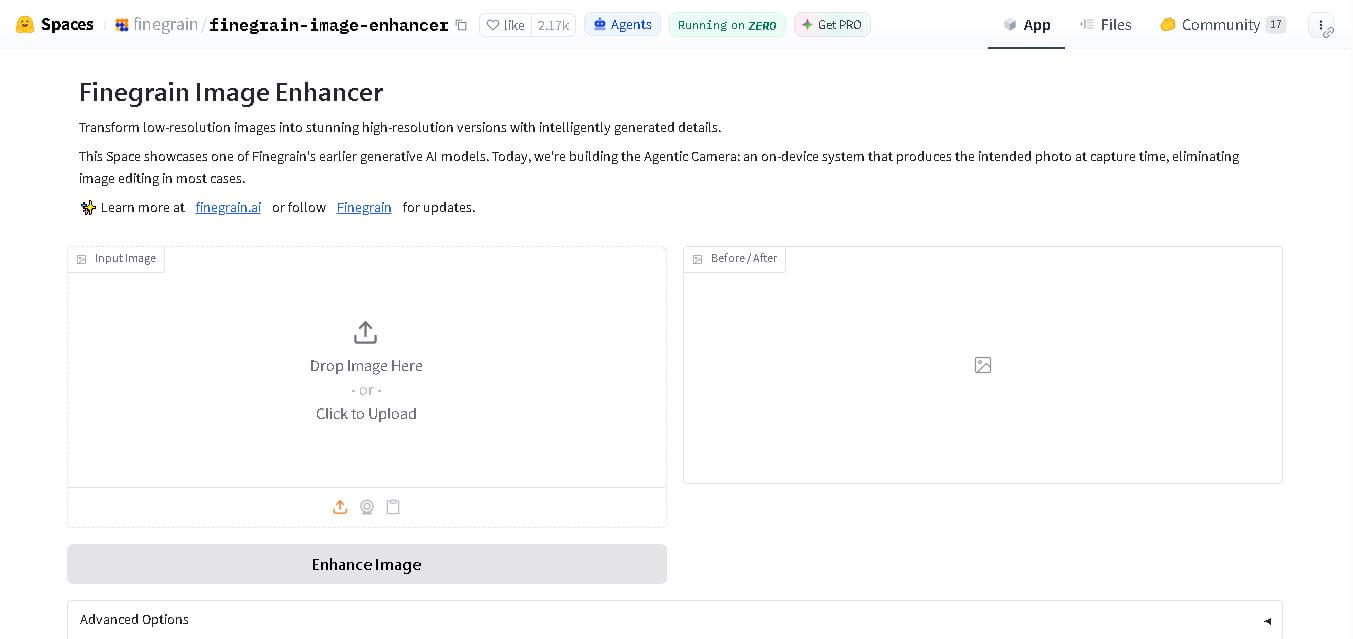
What is Finegrain Image Enhancer?
Finegrain Image Enhancer is an advanced open-source AI image upscaling and restoration tool hosted on Hugging Face Spaces. Developed by Finegrain, the tool acts as an accessible, high-performance alternative to proprietary generative upscalers like Magnific AI and Clarity AI. Finegrain Image Enhancer uses generative diffusion models to turn low-resolution, pixelated, or compressed images into high-definition photos, adding fine, realistic textures and details.
Finegrain Image Enhancer is a Hugging Face Space created by Finegrain for AI-powered image enhancement. The Space currently shows more than 2,100 likes and is running on Zero. Its interface supports image uploading and enhancement, while the underlying project contains 17 files, 4 contributors, and 45 commits. Finegrain describes the demo as an earlier generative AI model focused on transforming low-resolution images into higher-resolution versions with intelligently generated details.
- Developer: Finegrain
- Host Platform: Hugging Face Spaces
Use Cases:
- Upscaling low-res digital art, AI generations, and vintage photographs
- Removing severe JPEG compression artifacts and digital blur
- Adding hyper-realistic surface textures to render outputs and product photos
- Preparing low-resolution assets for high-print or 4K/8K display output
Technology:
- Generative diffusion super-resolution architecture
- Prompt-guided texture generation and noise reduction pipeline
- Hosted on Hugging Face Spaces powered by ZeroGPU hardware acceleration
Target Users:
- Digital artists, 3D illustrators, and AI art enthusiasts
- Photographers restoring legacy low-resolution photos
- Graphic designers and content creators seeking free upscaling tools
Ecosystem: Part of the Finegrain AI suite on Hugging Face, alongside specialized tools like Finegrain Object Eraser and Finegrain Object Cutter.

Key features of Finegrain Image Enhancer
Finegrain Image Enhancer's key features are
- Generative Super-Resolution: Intelligently adds sharp micro-details and texture rather than simply stretching pixels.
- Prompt-Guided Enhancement: Accepts text prompts to steer the AI toward specific details (e.g., skin pores, fabric weave, tree bark) to emphasize.
- JPEG Artifact Removal & Deblurring: Cleans up compressed web images, removing noise and restoring lost clarity.
- Browser-Based ZeroGPU Access: Runs entirely online inside Hugging Face Spaces with rapid inference speeds and zero local software installation.
- Customizable Upscale Controls: Offers adjustable parameters for creativity, similarity, and resolution scaling factors.
- Open-Source Accessibility: Free to use and duplicate, giving developers full visibility into the model's behavior and code logic.
Finegrain Image Enhancer Pricing
Finegrain Image Enhancer is completely free to use via Hugging Face Spaces.
Free / Open-Source Access:
- $0/month
- Unlimited web generations subject to the public Hugging Face queue and GPU availability
- Free option to duplicate the space to a personal Hugging Face account for private GPU usage
Disclaimer: For the latest and most accurate pricing information, please visit the official Finegrain Image Enhancer website.
Is Finegrain Image Enhancer Worth It?
Finegrain Image Enhancer is exceptionally worth trying for anyone seeking studio-grade AI upscaling without paying heavy subscription fees. Because it replicates premium generative upscaling workflows directly in the browser for free, it provides unmatched value for indie creators, artists, and casual users alike.
Real-World Use Cases
- Enhancing Midjourney & SD Art: AI artists upscale low-res generated renders into ultra-detailed, high-res outputs ready for print.
- Restoring Old Family Photos: Users upload scanned, blurry historical photos to clean up noise and reconstruct facial clarity.
- E-Commerce Product Photography: Sellers improve low-quality product snapshots for crisp online store catalog listings.
- Social Media Content Polish: Creators sharpen low-res web downloads and compressed images before posting.
Who is using Finegrain Image Enhancer?
Finegrain Image Enhancer is designed for a variety of creators, including
- AI Art Creators: Artists looking to add micro-level details and high resolution to generated artwork
- Graphic Designers: Professionals preparing low-resolution client assets for digital or print media
- Casual Users & Photographers: Anyone needing to quickly fix blurry or pixelated photos for free
- Open-Source AI Developers: Developers researching generative upscaling pipelines and duplicating Spaces
Best Finegrain Image Enhancer Alternatives
Some of the strongest Finegrain Image Enhancer alternatives include
- Topaz Photo AI
- Magnific AI
- Clarity AI
- Upscayl
- Remini
Pros and Cons of Finegrain Image Enhancer
Pros
- 100% free web access with no login or subscription required
- Generates realistic new textures and sharp detail via text prompt guidance
- Open-source model code transparently hosted on Hugging Face
- Effective JPEG artifact removal and deblurring performance
- Can be duplicated to private Hugging Face hardware for dedicated queue-free processing
Cons
- Public queue wait times can fluctuate during peak server load
- High creativity settings may occasionally introduce unexpected generative hallucinations
- Fewer batch-processing options compared to commercial desktop tools like Topaz
Why Choose Finegrain Image Enhancer?
Finegrain Image Enhancer delivers high-end generative image upscaling without the steep price tag of commercial alternatives. It combines diffusion-based resolution enhancement with prompt guidance, giving users precise control over how image details are synthesized.
- Provides generative detail synthesis comparable to expensive SaaS upscalers for free
- Requires zero installation, running directly inside any modern web browser
- Backed by open-source code for community audit, customization, and self-hosting
- Features intuitive prompt controls to direct detail reconstruction
How Finegrain Image Enhancer Works
- 1. Visit the Hugging Face Space: Access the Finegrain Image Enhancer tool directly in your browser.
- 2. Upload Your Image: Drag and drop any low-resolution, blurry, or compressed JPG/PNG photo.
- 3. Configure Prompts & Settings: (Optional) Add a descriptive text prompt and adjust scale factor or similarity sliders.
- 4. Enhance & Download: Click enhance to run the AI process and download your high-resolution result.
Finegrain Image Enhancer vs. Competitors
The primary difference between Finegrain Image Enhancer, Magnific AI, and Topaz Photo AI is that Finegrain offers an open-source, web-based generative solution for free. While Magnific AI charges premium subscription fees for cloud generative upscaling and Topaz Photo AI relies on a paid desktop application, Finegrain brings prompt-guided diffusion upscaling directly to Hugging Face Spaces at zero cost.
| Feature | Finegrain Image Enhancer | Magnific AI | Topaz Photo AI |
|---|---|---|---|
| Primary Focus | Free Generative AI Upscaling | Premium Cloud Generative Upscaler | Desktop Photo Restoration Suite |
| Open Source Access | Yes (Hugging Face) | No (Proprietary) | No (Proprietary) |
| Prompt Guidance | Yes | Yes | No |
| Deployment | Web Browser / Hugging Face | Web Browser | Desktop Software |
| Starting Price | Free/Open-Source | $39 per month | $199 one-time |
How do we rate Finegrain Image Enhancer?
| Parameter | Rating (out of 5) |
|---|---|
| Ease of Use | 4.8 |
| Enhancement Quality | 4.6 |
| Feature Set | 4.4 |
| Value for Money | 5.0 |
| Accessibility & Open Source | 4.9 |
| Overall Score | 4.6 |
Finegrain Image Enhancer Review
Finegrain Image Enhancer is a standout open-source project that democratizes generative AI image upscaling. By giving users access to high-fidelity resolution expansion, prompt control, and artifact removal right from Hugging Face Spaces, it serves as an effective, zero-cost alternative to commercial upscalers. Its combination of speed, output quality, and open architecture makes it an invaluable resource for digital creators.
Conclusion
Finegrain Image Enhancer offers a simple way to experiment with AI-powered image upscaling and detail generation through Hugging Face. Its main appeal is the ability to transform low-resolution images into higher-resolution visuals without requiring a complicated editing workflow. The tool is particularly useful for creators, photographers, designers, and users exploring generative image enhancement. Finegrain also provides an interesting look at the company’s earlier generative AI work, while its current focus has expanded toward on-device photography through the Agentic Camera. For anyone seeking an accessible AI image enhancer, Finegrain is worth testing and comparing with other modern upscaling tools.
FAQ
What is Finegrain Image Enhancer?
Finegrain Image Enhancer is an AI-powered image enhancement tool available as a Hugging Face Space. It is designed to transform low-resolution images into higher-resolution versions while intelligently generating additional visual details. You can upload an image, run the enhancer, and compare the processed result with your original image through its interface.
How does Finegrain Image Enhancer improve image quality?
Finegrain Image Enhancer uses a generative AI approach to improve low-resolution images by producing additional details during enhancement. Instead of simply enlarging pixels, it aims to create a more visually detailed result. The official Space describes its purpose as transforming low-resolution images into stunning high-resolution versions with intelligently generated details.
Is Finegrain Image Enhancer free to use?
The Finegrain Image Enhancer is available publicly as a Hugging Face Space, where you can access the demonstrated image-enhancement workflow. However, availability and computational resources can depend on the space's current status. The Space currently indicates that it is running on Zero, so users should check the live interface before relying on it.
Can I enhance blurry or low-resolution photos with Finegrain?
Yes, Finegrain Image Enhancer is specifically intended for improving low-resolution images. It can be useful when you want sharper-looking visuals and additional generated detail from an existing image. However, enhancement cannot guarantee recovery of every original detail that was completely missing from the source, so results can vary depending on image quality and content.
Who should use Finegrain Image Enhancer?
Finegrain Image Enhancer can be useful for photographers, designers, content creators, researchers, marketers, and casual users who need to improve image resolution. It is particularly suitable for people who want to experiment with AI-powered enhancement without installing complicated software. Because Hugging Face presents the tool, technically oriented users can also explore its project files.
Does Finegrain Image Enhancer require advanced editing skills?
No, the basic workflow does not require advanced image-editing knowledge. The hosted interface provides an input area where you can upload an image and select the enhancement action. This makes the tool approachable for beginners who simply want to test AI image enhancement. More technically experienced users can also inspect the underlying Space files.
Can Finegrain Image Enhancer be used through Hugging Face?
Yes, Finegrain Image Enhancer is hosted as a Hugging Face Space. The live interface provides an image-upload workflow and an enhancement function, while the project repository exposes its source files and development history. The Space currently has more than 2,100 likes, indicating substantial interest from the Hugging Face community.
User Reviews
No reviews yet for Finegrain Image Enhancer.
Featured Tools
Featured AI tools from TechShark

Melody Genie
MelodyGenie is an AI-powered music generator that creates original songs from simple text prompts. Users can choose styles, moods, and genres, then instantly generate melodies and full tracks, making it easy for creators, marketers, and hobbyists to produce custom music without musical expertise.
Freemium

Kimi AI
Kimi AI is an advanced AI assistant developed by Moonshot AI that helps you chat, research, write, code, and automate tasks in one place. It supports web search, file analysis, and multimodal inputs, and can even run autonomous “agent” workflows to complete complex tasks end-to-end.
Freemium

Fashion Diffusion AI
Fashion Diffusion is an AI-powered fashion design platform that helps brands and designers create clothing designs, virtual try-ons, AI models, product photos, and marketing visuals faster and cost-effectively.
Paid

Veo 4
Veo 4 AI is an AI video creation platform that generates dramatic videos from text, images, audio, and video prompts using realistic motion and synchronized sound.
Paid
Alternatives
Alternatives to Finegrain Image Enhancer
The best Finegrain Image Enhancer alternatives include Topaz Photo AI, Magnific AI, Clarity AI, Upscayl, and Remini. Topaz Photo AI offers desktop-grade photo restoration software. Magnific AI delivers high-fidelity generative upscaling with detailed hallucination controls. Upscayl is an open-source offline upscaler, while Remini focuses on mobile photo and portrait enhancement.
 4.7
4.7ImgCreator AI
Image
ImgCreator AI is an AI-powered image generation tool that helps users create visuals from text prompts and reference images. It supports creative artwork, realistic portraits, product visuals, and image editing, making it useful for designers, marketers, content creators, and businesses seeking faster visual content production.
Neural.love
AI Image Enhancer
Neural.love is an AI-powered creative platform for generating images, editing photos, enhancing videos, restoring old media, and animating pictures. It combines multiple AI tools in a browser-based workspace, helping content creators, marketers, photographers, designers, and businesses improve visual content without relying entirely on traditional editing software.
 4.8
4.8Prisma AI
Image
Prisma AI turns everyday photos into artistic images with stylized filters and creative effects. It offers hundreds of art and portrait styles inspired by famous artists, allowing beginners to create distinctive visuals quickly. Users can capture or upload photos, apply a chosen style, and save or share the finished result.
 4.9
4.9Bria AI
Image
Bria helps businesses and teams generate and edit visual content using controllable generative AI. Its capabilities cover image generation, product visuals, background editing, video workflows, and developer integrations. With licensed training data, attribution, provenance, and enterprise deployment options, Bria is positioned for businesses that need scalable, commercially focused visual AI.
 4.7
4.7Unwatermark
Image
Unwatermark.ai helps creators, marketers, photographers, and businesses remove watermarks, logos, text, people, and unwanted objects from images and videos. Its automatic detection handles quick edits, while the manual brush provides precise control over difficult areas. With browser-based processing, format support, previews, and free usage, it simplifies everyday visual cleanup.
 4.9
4.9invideo Nano Banana
Image
Nano Banana is an AI image generation and editing model by Google (Gemini family) that helps users create, modify, and refine visuals using natural language prompts. It supports 4K outputs, consistent characters, accurate text rendering, and real-time editing, enabling fast, production-ready creative workflows.
 4.8
4.8Banana Nano
Image
BananaNano (Nano Banana AI) is an AI-powered image generation and editing platform that lets users create visuals from text or edit photos using natural language. It supports multi-image fusion, character consistency, and up to 4K output, enabling fast, flexible visual creation without complex design tools.
 4.8
4.8Vheer
Image
Vheer is a free AI image and video generator that helps users create visuals from text or photos instantly. It includes tools for image editing, background removal, and image-to-video conversion, offering unlimited generations without signup, making it ideal for quick, creative content production.
 4.9
4.9QOVES
Image
QOVES is an AI-powered facial analysis and beauty consulting platform that helps users understand their facial features and improve appearance through personalized, science-backed recommendations. It analyzes hundreds of facial markers and provides a non-surgical transformation plan, enabling informed decisions about aesthetics, skincare, and overall self-improvement.