
Cliphi
Cliphi helps creators repurpose long videos and livestreams into engaging short-form content without spending hours editing. It automatically identifies strong moments, adds animated captions, music, speaker-aware framing, and post descriptions. Users can customize results, record reactions, download clips, or publish them directly across major social media platforms from their browser.
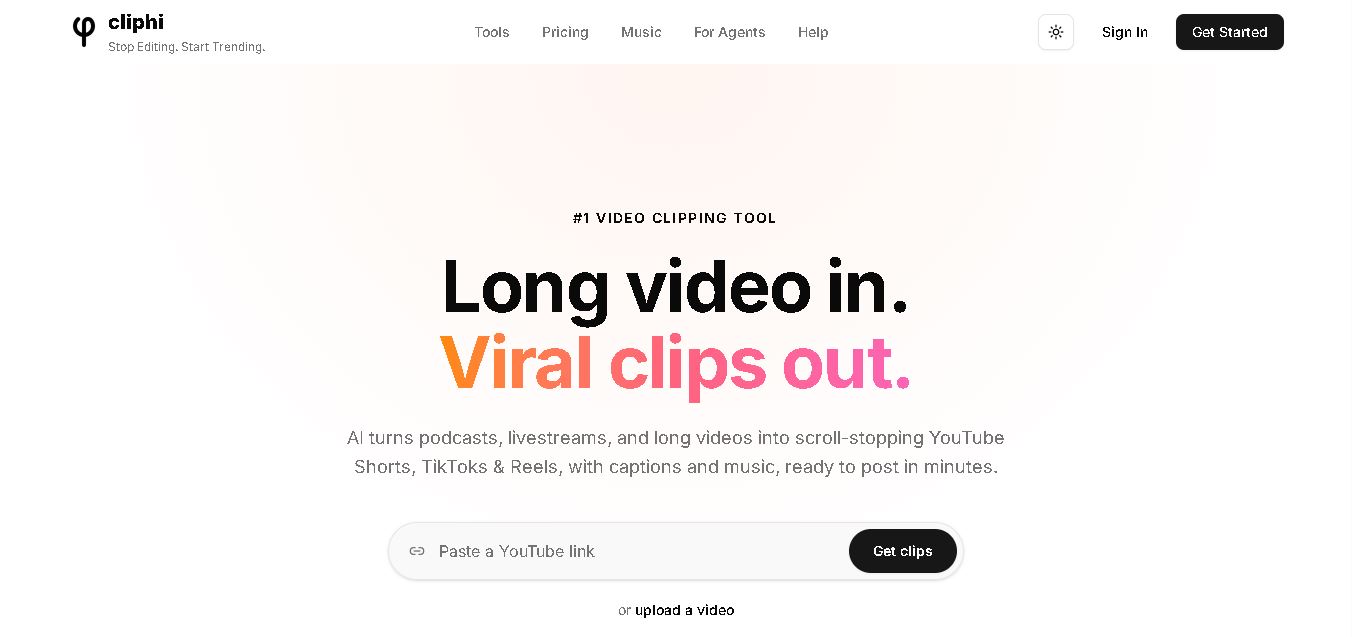
What is Cliphi?
Cliphi is a video repurposing tool that identifies engaging moments in podcasts, livestreams, interviews, tutorials, gaming sessions, and other long videos, then turns them into ready-to-post clips. It automatically adds animated captions, speaker-aware framing, background music, and platform-ready formatting. Users can also customize clips, record reactions, generate descriptions, and publish or schedule content from the same browser-based workspace.
Cliphi is a browser-based video clipping tool designed to transform long videos into short-form content. It supports 9:16, 1:1, and 16:9 formats, captions in 50+ languages, and AI transcription with stated 95%+ accuracy. Processing uses 1 credit per minute of source video, while rendering costs 0.25 credits per output second. Cliphi also offers livestream clipping, speaker tracking, AI music, publishing, scheduling, and watermark-free downloads across its plans. The service also works on phones and computers without requiring an installed application.
- Platform Role: AI Video Clipper, Short-Form Content Generator & Auto-Subtitling Tool
- Developer & Organization: Cliphi Team
- Cross-Platform Access: Web Application
Use Cases:
- Converting long podcasts and interviews into bite-sized clips with dynamic subtitle overlays
- Extracting highlight clips and the funniest moments from Kick, Twitch, and YouTube livestreams
- Repurposing company webinars, keynotes, and product demos for social media marketing
- Generating vertical videos with active speaker tracking for multi-person interviews
- Adding automated, stylized captions and royalty-free background music to video content
Technology:
- Natural language AI hook detection that scores video segments for viral potential
- Computer vision speaker framing algorithms that automatically re-crop landscape footage to 9:16 vertical video
- High-accuracy speech-to-text transcription engine for synchronized animated subtitles
- Cloud-based fast video rendering pipeline for quick multi-clip export
Target Users: Streamers, podcasters, social media managers, digital marketers, YouTube creators, and agency editors.
Acquisition: Direct access online at cliphi.com with free trial credits and flexible subscription tiers.

What are the key features of Cliphi?
Cliphi's core short-form video creation features include
- AI Highlight & Hook Detection: Analyzes speech and narrative structure to automatically extract high-interest video clips.
- Active Speaker Auto-Reframing: Tracks active speakers across widescreen frames and centers them smoothly in vertical layout.
- Animated Dynamic Subtitles: Generates customizable, eye-catching animated captions with color highlights and emoji options.
- Direct Livestream & VOD Import: Paste links directly from Kick, YouTube, or Twitch to import and clip long videos without manual uploads.
- Royalty-Free Audio Sync: Automatically adds atmospheric background music balanced perfectly with spoken speech.
How much does Cliphi cost?
Cliphi operates on a freemium pricing model with paid tiers catering to casual creators and high-volume agencies.
Pricing Overview:
- Free Plan / Trial: Offers introductory processing credits to test clip extraction and auto-subtitling.
- Paid Creator Plans (~$10 - $30/month): Unlocks higher monthly video processing hours, 1080p HD exports, watermark removal, and priority cloud rendering.
Disclaimer: Credit allowances, processing minute limits, and subscription prices are subject to change. Visit Cliphi's official website for current pricing details.
Who should use Cliphi?
Cliphi is designed for content creators and marketers, including
- Livestreamers & Gamers: Turn multi-hour gaming streams into daily Shorts and TikToks without manual editing.
- Podcasters: Extract top conversation hooks to promote full episodes across social channels.
- Social Media Agencies: Scale short-form video production for multiple clients using automated batch clipping.
What are the best alternatives to Cliphi?
Top alternatives to Cliphi include
What are the pros and cons of Cliphi?
What are the pros of Cliphi?
- Fast workflow allows converting hours of long-form video into multiple short clips in minutes
- Direct link import for Kick, YouTube, and Twitch saves local download time
- Automated active speaker tracking maintains clean visual framing in 9:16 format
- High-quality animated caption styles tailored for high viewer retention
What are the cons of Cliphi?
- AI highlight detection may occasionally require manual trimming for perfect pacing
- Requires an active internet connection for processing and cloud rendering
- Full watermark-free exports require a paid subscription
Why should you choose Cliphi?
Cliphi streamlines the labor-intensive process of creating short-form content. By combining viral hook identification, automatic vertical reframing, and animated subtitles into a single web-based dashboard, it allows creators to maximize their social media reach from content they have already recorded.
How does Cliphi compare to competitors?
Cliphi stands out by offering direct integration with streaming platforms like Kick and Twitch along with intuitive auto-framing and stylized captions at a competitive price point.
| Feature / Platform | Cliphi | OpusClip | Munch | CapCut |
|---|---|---|---|---|
| Primary Focus | Automated Short-Form AI Clipping | Viral Hook & Clip Curation | AI Content Repurposing & Analytics | Manual & AI Desktop/Mobile Video Editor |
| Direct URL Import | Kick, YouTube, Twitch | YouTube, Zoom, Vimeo | YouTube Links | Local Uploads Only |
| Speaker Framing | Automated 9:16 Active Tracking | Automated Multi-Speaker Framing | Automated Framing | Manual / Semi-Auto Framing |
| Ease of Use | Extremely High (One-Click) | Very High | High | Moderate (Timeline Editor) |
| Best For | Streamers and podcasters needing quick vertical clips | Professional podcasters and agencies | Brands tracking trending topics and social keywords | Creators who want full manual editing control |
How do we rate Cliphi?
| Parameter | Rating (out of 5) |
|---|---|
| Clip Extraction & Hook Detection | 4.7 |
| Auto-Framing & Speaker Tracking | 4.8 |
| Subtitle Quality & Customization | 4.8 |
| Processing Speed | 4.7 |
| Value for Money | 4.7 |
| Overall Score | 4.7 |
What is our review and verdict on Cliphi?
Cliphi is a highly effective AI video clipping solution that dramatically cuts down post-production time for creators. Its ability to parse long stream VODs, center speakers accurately, and auto-generate eye-catching captions makes it a valuable asset for scaling short-form video presence.
Conclusion
Cliphi brings video discovery, clipping, captions, formatting, editing, and publishing into one workflow. Its support for podcasts, livestreams, interviews, gaming, and tutorials makes it useful for creators producing frequent short-form content. Features such as speaker tracking, animated captions, AI music, reactions, scheduling, and watermark-free exports reduce manual production work. For creators seeking a faster repurposing process, Cliphi provides a practical browser-based approach.
FAQ
What is Cliphi?
Cliphi is an AI-powered video clipping platform that turns long videos such as podcasts, livestreams, interviews, gaming sessions, and tutorials into short, ready-to-post clips. It automatically finds engaging moments, adds captions, background music, speaker framing, and social-media-ready formatting.
How does Cliphi find the best moments in a video?
Cliphi analyzes the video's speech, energy, and engagement signals to identify moments that may work well as short-form content. Each detected moment receives a virality score, and users can also provide custom prompts to look for specific types of moments, such as funny sections or important insights.
Can Cliphi turn YouTube videos and livestreams into Shorts and Reels?
Yes. Users can paste supported YouTube, Twitch, or Kick links, including livestreams, and Cliphi can create short clips from them. It automatically reframes the footage, adds captions and music, and supports formats such as 9:16 for YouTube Shorts, TikTok, and Instagram Reels.
Does Cliphi automatically add captions and speaker tracking?
Yes. Cliphi generates word-by-word animated captions and can automatically track the active speaker so the correct person remains in frame. Users can customize caption styles, fonts, colors, size, and positioning before rendering the final clip
Can Cliphi add AI music and social media descriptions?
Yes. Cliphi can generate background music based on the content and mood of a clip while automatically lowering the music when someone is speaking. It can also generate hooks, titles, descriptions, and hashtags for social posts, which can then be edited or used directly.
Can I use Cliphi to create clips from my own videos and react to existing clips?
Yes. Users can upload their own video files or provide supported video links. Cliphi also includes a reaction and voiceover feature that lets users record their face or voice over a clip, with the original audio automatically adjusted and captions generated for the added speech.
Is Cliphi free to use?
Cliphi uses a credit-based pricing system, with every plan providing access to the platform's features. Credits are used for video processing and final clip rendering, unused credits roll over, and one-time credit packs are also available; current subscription prices vary by region.
User Reviews
No reviews yet for Cliphi.
Featured Tools
Featured AI tools from TechShark

Melody Genie
MelodyGenie is an AI-powered music generator that creates original songs from simple text prompts. Users can choose styles, moods, and genres, then instantly generate melodies and full tracks, making it easy for creators, marketers, and hobbyists to produce custom music without musical expertise.
Freemium

Kimi AI
Kimi AI is an advanced AI assistant developed by Moonshot AI that helps you chat, research, write, code, and automate tasks in one place. It supports web search, file analysis, and multimodal inputs, and can even run autonomous “agent” workflows to complete complex tasks end-to-end.
Freemium

Fashion Diffusion AI
Fashion Diffusion is an AI-powered fashion design platform that helps brands and designers create clothing designs, virtual try-ons, AI models, product photos, and marketing visuals faster and cost-effectively.
Paid

Veo 4
Veo 4 AI is an AI video creation platform that generates dramatic videos from text, images, audio, and video prompts using realistic motion and synchronized sound.
Paid
Alternatives
Alternatives to Cliphi
Top Cliphi alternatives include OpusClip, Klap, Munch, and Vizard AI. While Cliphi excels at fast direct URL imports from streaming platforms like Kick and Twitch with automated speaker tracking, OpusClip offers deeper multi-speaker re-framing and social curation tools.
Neural.love
AI Image Enhancer
Neural.love is an AI-powered creative platform for generating images, editing photos, enhancing videos, restoring old media, and animating pictures. It combines multiple AI tools in a browser-based workspace, helping content creators, marketers, photographers, designers, and businesses improve visual content without relying entirely on traditional editing software.
 4.8
4.8Shuffll
Video Editing
Shuffll goes beyond traditional video creation by connecting personalized video directly to enterprise data and workflows. Its API-first infrastructure, 40+ AI models, automated production, and built-in brand governance make it suitable for organizations that need video at scale. For businesses seeking higher engagement without building large production teams, Shuffll offers a practical way to turn existing data into personalized, on-brand video experiences.
 4.8
4.8Opus Clip (Opus Pro)
Video Editing
OpusClip helps creators transform long-form videos into short, social-ready clips. It can identify engaging moments, generate captions, reframe footage, add B-roll, enhance audio, and support publishing across major social platforms. It is designed for creators, marketers, podcasters, businesses, and teams that want to scale video content production.
 4.8
4.8Dubbah
Video Editing
Dubbah helps Mac users translate and dub videos into 14 languages while preserving a familiar speaker voice. The app processes media locally, supports editing translated lines, and works offline after setup. With no account, subscription, or per-minute fee, it offers a simple, straightforward option for creators producing multilingual video content.
 4.9
4.9Clipchamp
Video Generator
Clipchamp is an AI-powered online video editor by Microsoft that helps users record, edit, and share videos directly from the browser. It offers templates, stock media, and AI tools like subtitles, voiceovers, and noise removal, enabling fast, professional video creation without advanced editing skills.
 4.9
4.9CapCut
Video Editing
CapCut is a popular video editing tool that helps creators produce engaging videos with effects, transitions, filters, templates, subtitles, and AI-powered features. Available on multiple platforms, CapCut makes it easy to edit videos for TikTok, Instagram Reels, YouTube Shorts, and other social media channels.
 4.9
4.9Media.io
Video Editing
Media.io is an AI-powered creative platform that helps users generate, edit, and enhance videos, images, audio, and ads from simple prompts or assets. It combines AI generation, editing, and workflows in one place, enabling creators to turn ideas into polished content quickly without switching tools.
 4.9
4.9Video Candy
Video Editing
Video Candy is a free online video editing platform that helps users trim, merge, compress, convert, and enhance videos directly in the browser. It offers 70+ tools with a simple drag-and-drop interface, making video editing fast, accessible, and efficient without installing complex software.
 4.8
4.8Vheer
Image
Vheer is a free AI image and video generator that helps users create visuals from text or photos instantly. It includes tools for image editing, background removal, and image-to-video conversion, offering unlimited generations without signup, making it ideal for quick, creative content production.