
AI Dubbing
AI Dubbing makes it easy to translate and dub videos into multiple languages with natural voiceovers, helping creators reach a global audience quickly.
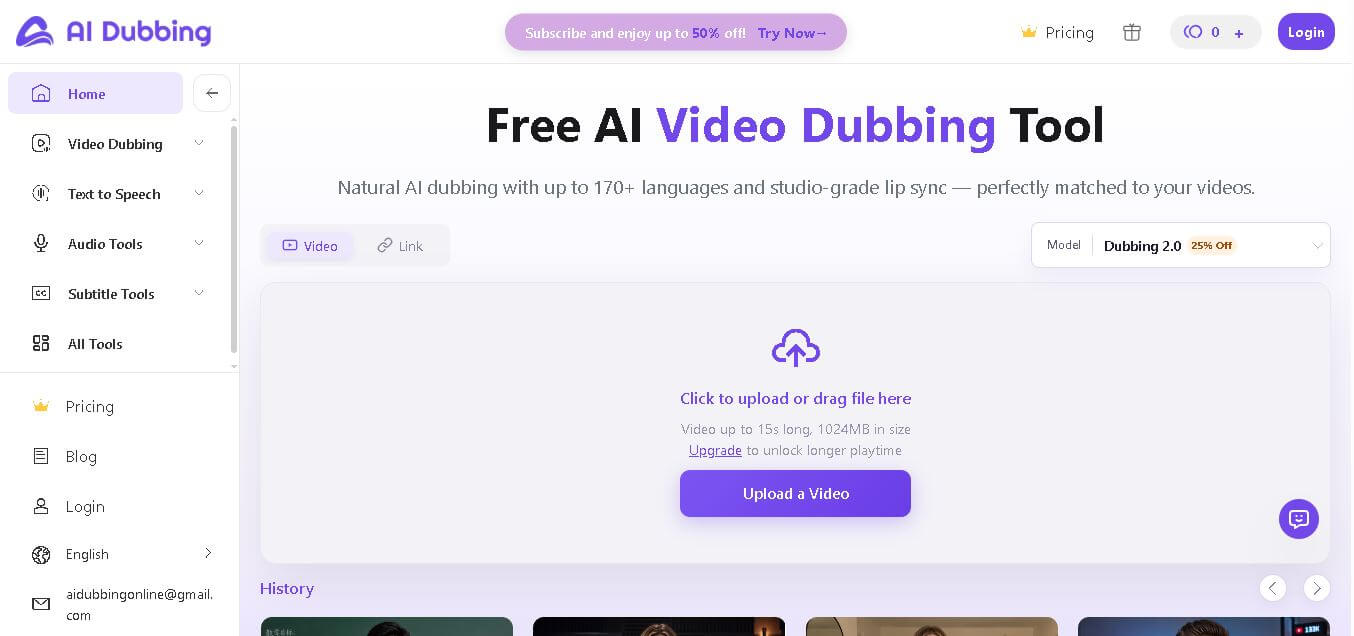
What is Dubbing AI?
AI Dubbing is a video localization tool that converts spoken audio into different languages while preserving tone, emotion, and timing. It replaces the original voice with a synchronized translated voiceover, making videos understandable to global audiences. Users can upload videos and generate dubbed versions in multiple languages without manual editing. The platform focuses on speed, accuracy, and natural voice output. It is commonly used to repurpose content for international viewers, improve accessibility, and expand audience reach across regions through automated dubbing and translation workflows.
AI Dubbing supports translation and dubbing in 20-plus languages with realistic voice synthesis and lip sync capabilities. It can process videos within minutes depending on length, making it faster than traditional dubbing methods. Many platforms report that localizing content for regional audiences boosts engagement by up to 3x. Content creators, marketers, and educators widely use the tool. It reduces production costs by more than 50 percent compared to manual dubbing and helps scale video content globally with minimal effort.
- Founder: Not publicly disclosed
- Launch: The exact launch date is not clearly mentioned, but it is positioned as a modern video dubbing solution.
Use Cases
- Video translation and dubbing for YouTube content
- Localizing courses and educational videos
- Marketing and advertising campaigns
- Social media content repurposing
Technology
- Speech recognition and translation models
- Text-to-speech voice cloning
- Lip sync and audio alignment technology
- Cloud-based video processing
Target User
- Content creators
- Marketing teams
- Educators and course creators
- Media and entertainment professionals

Key Features of AI Dubbing
Dubbing AI's key features are
- Multi-Language Video Dubbing: Translate and dub videos into multiple languages with natural-sounding voiceovers, helping creators reach a global audience without manual effort.
- Realistic AI Voice Generation: Generate human-like voices that match tone and emotion, making dubbed content feel authentic and engaging.
- Fast Processing Speed: Convert and dub videos in minutes, reducing production time compared to traditional dubbing workflows.
- Subtitle and Caption Support: Automatically generate subtitles and captions along with dubbed audio for better accessibility and viewer retention.
- Easy Video Upload and Integration: Upload videos directly or use links from platforms, making the workflow simple and beginner-friendly.
- Voice Customization Options: Adjust voice style, tone, and language preferences to match brand identity or audience expectations.
- Content Repurposing: Reuse existing videos for different regions by translating and dubbing them into multiple languages.
- Creator and Business Friendly: Designed for YouTubers, marketers, educators, and businesses looking to scale multilingual content quickly
Dubbing Pricing
Starter Plan
- Entry-level pricing suited for individuals and beginners
- Includes limited video minutes per month
- Basic dubbing and translation features
Pro or Creator Plan
- Mid-tier plan with higher video processing limits
- Supports faster processing and better quality output
- May include subtitle downloads and multiple language options
Business Plan
- Advanced plan designed for teams and companies
- Higher upload limits and priority processing
- Brand customization and watermark removal options
Custom or Enterprise Plan
- Tailored pricing based on large-scale usage
- Dedicated support and API access
- Scalable solutions for agencies and enterprises
Disclaimer: For the latest and most accurate pricing information, please visit the official Dubbing AI website.
Dubbing Alternatives
Some of the strongest Dubbing AI alternatives include
Why Choose AI Dubbing?
Choosing Aidubbing makes sense if you want rapid, scalable, and accurate video dubbing without complex editing workflows. It focuses on simplifying multilingual content creation while maintaining voice quality and timing.
- Converts videos into multiple languages quickly without manual effort
- Maintains natural voice tone and sync with original content
- Supports creators, educators, and businesses targeting global audiences
- Reduces cost compared to traditional dubbing services
- Easy to use with minimal technical knowledge required
- Helps expand reach across international markets
- Saves time with automated processing and fast output delivery
AI Dubbing vs. Competitors
The main difference between AI Dubbing, HeyGen, Synthesia, D-ID, and ElevenLabs is that AI Dubbing focuses on translating and dubbing videos quickly, while others specialize in avatars, video generation, or voice synthesis. AI Dubbing is best for multilingual content scaling, whereas competitors are better suited for creative video production, AI presenters, or advanced voice customization depending on the use case.
| Feature | AI Dubbing | HeyGen | Synthesia | D-ID | ElevenLabs |
|---|---|---|---|---|---|
| Core Focus | Video dubbing | AI avatars | Video creation | Talking avatars | Voice generation |
| Language Support | High | Medium | Medium | Medium | High |
| Ease of Use | Very easy | Easy | Easy | Moderate | Moderate |
| Voice Quality | Natural | Good | Good | Good | Excellent |
| Best For | Video translation | Marketing videos | Training videos | AI avatars | Voice cloning |
How do we rate AI Dubbing?
| Parameter | Rating out of 5 |
|---|---|
| Ease of Use | 4.5 |
| Features | 4.6 |
| Output Quality | 4.7 |
| Speed and Efficiency | 4.6 |
| Value for Money | 4.4 |
| Overall Score | 4.6 |
AI Dubbing Review
The name AI Dubbing is straightforward and clearly communicates the core functionality of the tool. It instantly tells users that the platform focuses on dubbing content using artificial intelligence. This clarity is particularly beneficial for SEO and search intent. However, it lacks uniqueness and brand identity compared to more creative names. While it performs impressively for keyword relevance, it may not be distinctive enough in a competitive AI tools market.
Conclusion
AI Dubbing is a practical solution for creators and businesses looking to localize video content efficiently. It simplifies the dubbing process by automating voice translation and synchronization, helping users reach global audiences faster. With its balance of quality, speed, and ease of use, it reduces the complexity of traditional dubbing workflows. While it may not offer deep customization like advanced studios, it delivers solid performance for most use cases and stands as a reliable choice for scalable multilingual content creation.
FAQ
What is AI Dubbing used for?
AI Dubbing is used to translate and replace original audio in videos with new voiceovers in different languages.
Does AI Dubbing support multiple languages?
Yes, it supports multiple languages to help creators reach a global audience.
Is AI Dubbing suitable for beginners?
Yes, it offers a simple interface that beginners can use without technical expertise.
Can I use AI Dubbing for YouTube videos?
Yes, it is widely used for YouTube, marketing videos, and educational content.
Does AI Dubbing provide realistic voices?
Yes, it uses AI-generated voices that sound natural and synchronized with video content.
User Reviews
No reviews yet for AI Dubbing.
Featured Tools
Featured AI tools from TechShark

Melody Genie
MelodyGenie is an AI-powered music generator that creates original songs from simple text prompts. Users can choose styles, moods, and genres, then instantly generate melodies and full tracks, making it easy for creators, marketers, and hobbyists to produce custom music without musical expertise.
Freemium

Kimi AI
Kimi AI is an advanced AI assistant developed by Moonshot AI that helps you chat, research, write, code, and automate tasks in one place. It supports web search, file analysis, and multimodal inputs, and can even run autonomous “agent” workflows to complete complex tasks end-to-end.
Freemium

Fashion Diffusion AI
Fashion Diffusion is an AI-powered fashion design platform that helps brands and designers create clothing designs, virtual try-ons, AI models, product photos, and marketing visuals faster and cost-effectively.
Paid

Veo 4
Veo 4 AI is an AI video creation platform that generates dramatic videos from text, images, audio, and video prompts using realistic motion and synchronized sound.
Paid
Alternatives
Alternatives to AI Dubbing
The best AI Dubbing alternatives includes tools like Dubverse, Papercup, Synthesia, HeyGen, and Rask AI. These platforms provide video translation, voice cloning, and multilingual dubbing features. Some tools focus on high-quality voiceovers while others offer automation and scalability. Choosing the right alternative depends on your needs such as language support, voice realism, customization options, and pricing, making it important to compare features before selecting the best solution.
 4.7
4.7Kaiber
Video Generator
Kaiber is an AI-powered creative suite for generating videos, images, and audio. It helps musicians, content creators, and marketers turn text prompts, images, and music into engaging visuals. Its tools support image animation, beat-synced video creation, lip-sync, visual restyling, and timeline editing for social media and music videos.
Neural.love
AI Image Enhancer
Neural.love is an AI-powered creative platform for generating images, editing photos, enhancing videos, restoring old media, and animating pictures. It combines multiple AI tools in a browser-based workspace, helping content creators, marketers, photographers, designers, and businesses improve visual content without relying entirely on traditional editing software.
 4.8
4.8Shuffll
Video Editing
Shuffll goes beyond traditional video creation by connecting personalized video directly to enterprise data and workflows. Its API-first infrastructure, 40+ AI models, automated production, and built-in brand governance make it suitable for organizations that need video at scale. For businesses seeking higher engagement without building large production teams, Shuffll offers a practical way to turn existing data into personalized, on-brand video experiences.
 4.8
4.8Opus Clip (Opus Pro)
Video Editing
OpusClip helps creators transform long-form videos into short, social-ready clips. It can identify engaging moments, generate captions, reframe footage, add B-roll, enhance audio, and support publishing across major social platforms. It is designed for creators, marketers, podcasters, businesses, and teams that want to scale video content production.
 4.8
4.8Dubbah
Video Editing
Dubbah helps Mac users translate and dub videos into 14 languages while preserving a familiar speaker voice. The app processes media locally, supports editing translated lines, and works offline after setup. With no account, subscription, or per-minute fee, it offers a simple, straightforward option for creators producing multilingual video content.
 4.9
4.9Clipchamp
Video Generator
Clipchamp is an AI-powered online video editor by Microsoft that helps users record, edit, and share videos directly from the browser. It offers templates, stock media, and AI tools like subtitles, voiceovers, and noise removal, enabling fast, professional video creation without advanced editing skills.
 4.9
4.9CapCut
Video Editing
CapCut is a popular video editing tool that helps creators produce engaging videos with effects, transitions, filters, templates, subtitles, and AI-powered features. Available on multiple platforms, CapCut makes it easy to edit videos for TikTok, Instagram Reels, YouTube Shorts, and other social media channels.
 4.9
4.9Media.io
Video Editing
Media.io is an AI-powered creative platform that helps users generate, edit, and enhance videos, images, audio, and ads from simple prompts or assets. It combines AI generation, editing, and workflows in one place, enabling creators to turn ideas into polished content quickly without switching tools.
 4.9
4.9Video Candy
Video Editing
Video Candy is a free online video editing platform that helps users trim, merge, compress, convert, and enhance videos directly in the browser. It offers 70+ tools with a simple drag-and-drop interface, making video editing fast, accessible, and efficient without installing complex software.