
Creen AI
Creen AI is an online creative workspace that helps users generate, edit, and enhance images, videos, and audio using multiple AI models from a single interface. It offers free daily access to selected tools without mandatory sign-up, making visual content creation faster, simpler, and accessible for creators, businesses, educators, and marketers.
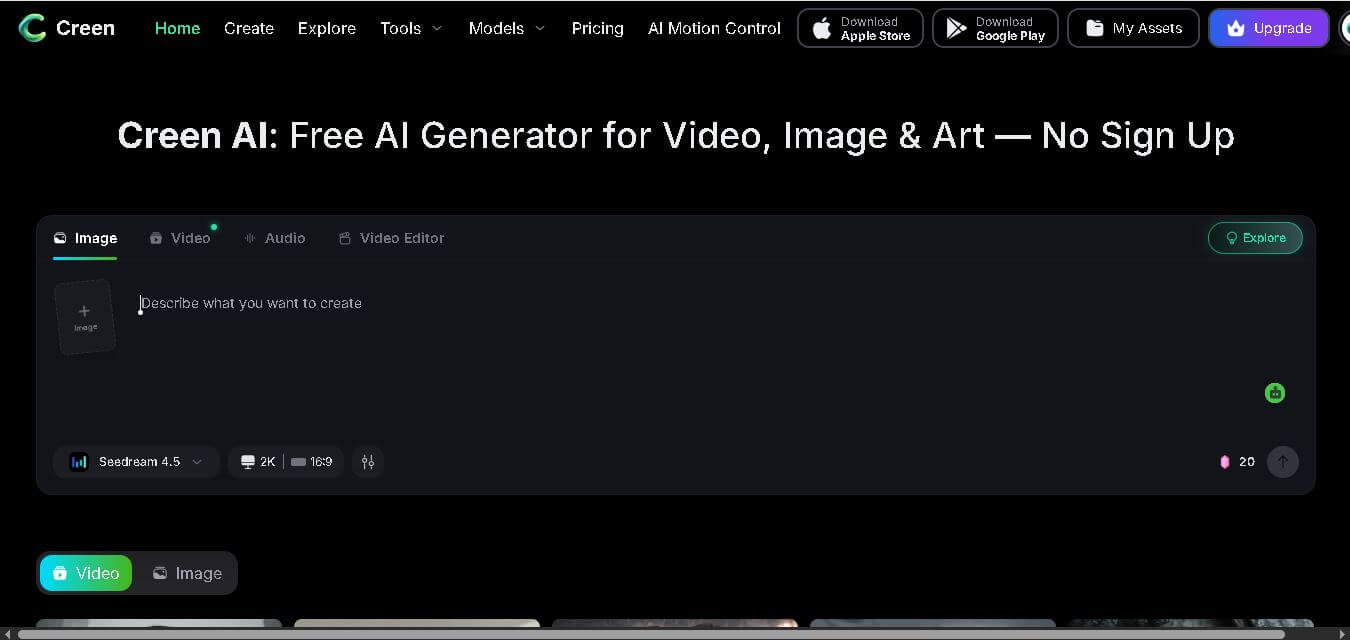
What is Creen AI?
Creen AI is a web-based creative application designed to simplify digital content creation by bringing image generation, video production, audio creation, and editing tools into one workspace. Instead of switching between multiple software applications, users can create visuals, animate images, generate voiceovers, and enhance media from a single platform. It supports a wide range of AI models for different creative tasks while allowing beginners and professionals to experiment with ideas quickly. With free daily usage on selected models and optional premium plans, Creen AI makes advanced content creation more accessible for individuals, businesses, designers, educators, and digital creators.
Creen AI combines more than 40 AI models into one platform, including 28 video models, 11 image models, and 7 audio models. Users can generate 4K AI images, create 1080p videos, convert text into visuals, animate images, and produce AI-generated audio from a single workspace. No sign-up is required for many free features, while premium subscriptions unlock additional credits and advanced models. These numbers make Creen AI a versatile solution for creators seeking multiple AI capabilities in one place.
- Core Focus: All-In-One Generative Media Studio (Text-to-Video, Image-to-Video, Text-to-Image, Audio)
- Launch Year: 2026
Use Cases:
- Creating daily short-form video content for YouTube Shorts, TikTok, and Instagram Reels
- Generating high-resolution e-commerce product photography and real-estate listing videos
- Prototyping storyboards, concept art, and animated scenes for indie films or games
- Transforming personal photos into stylized artwork, outfit swaps, and animated clips
Technology:
- Access to 28 AI video models, 11 AI image models, and 7 audio synthesis engines
- 4K (3840 × 2160) still image rendering and 1080p 24 fps video generation up to 10 seconds
- Advanced controls including seed preservation, multi-reference image weighting, and negative prompts
Target Users:
- Social media creators, YouTubers, and digital marketers shipping high-volume video content
- Indie game developers, self-publishing authors, and digital artists prototyping visual assets
- E-commerce sellers, real estate agents, and educators needing rapid visual content
Ecosystem: Features an instant-access browser studio with multi-engine model selection, prompt weighting, and built-in editing presets.

Key features of Creen AI
Creen AI's key features are
- 40+ Frontier AI Models: Run top-tier engines like Sora 2 Pro, VEO 3.1, Kling V3, Seedance 2.0, and Nano Banana Pro side-by-side in one tab.
- No Sign-Up / No Login Access: Open the workspace and start generating images and videos instantly without creating an account or entering payment details.
- Generous Daily Free Quotas: Offers free daily generation allowances on select engines like Z-Image Turbo and Seedream 5.0 Lite for full iterative workflows.
- Pro Controls & Seed Management: Fine-tune generations with visible seed numbers, prompt weighting (e.g., subject:1.5), multi-reference image uploads, and negative prompts.
- High-Resolution Output: Delivers crisp 4K still image exports and 1080p 24 fps video clips up to 10 seconds long.
- Integrated Audio & Voice Tools: Offers TTS, voice cloning, and audio dubbing models alongside visual generation capabilities.
Creen AI Pricing
Creen AI operates on a freemium model that combines zero-login free daily credits with optional paid tier subscriptions for heavy power users and premium models.
Free Plan (No Registration Required):
- $0
- Generous daily quota on select models (Z-Image Turbo, Seedream Lite, etc.) for text-to-image and AI video generation.
Paid Subscriptions:
- $7.50 to $94.50 per month
- Higher daily processing limits, priority generation queues, longer clip lengths, and full access to resource-intensive models (Sora 2 Pro, VEO 3.1).
Disclaimer: For the latest and most accurate pricing information, please visit the official Creen AI website.
Is Creen AI Worth It?
Creen AI is exceptionally worth trying for creators, indie developers, and marketers who want to experiment with different generative models without buying four or five separate SaaS subscriptions. Its zero-friction, no-sign-up workflow and speed make it one of the most practical generative studios available on the web today.
Real-World Use Cases
- Faceless Social Channels: Video creators generate short-form videos from scripts for YouTube Shorts and TikTok without purchasing stock footage.
- E-Commerce Product Photography: Online store owners upload basic product shots and transform background scenes using AI image-to-image workflows.
- Music Video Visuals: Indie musicians create animated scene backgrounds and cinematic visuals for audio releases.
- Children's Book Illustration: Authors use consistent character seeds and image-to-image tools to illustrate full storybook chapters.
Who is using Creen AI?
Creen AI is designed for a wide range of digital creators, including
- Content Creators & YouTubers: Builders producing daily Reels, Shorts, and explainer clips
- Indie Game Developers & Artists: Designers generating concept art and environmental moodboards
- E-Commerce & Real Estate Marketers: Businesses producing commercial listing videos and promo imagery
- Casual Web Users: Individuals creating custom avatars, Ghibli-style filters, or family keepsake art
Best Creen AI Alternatives
Some of the strongest Creen AI alternatives include
- Krea AI
- Runway ML
- Leonardo AI
- Midjourney
- Luma Dream Machine
Pros and Cons of Creen AI
Pros
- Requires zero account registration or credit card setup to start creating
- Combines 40+ premier image, video, and audio models in a single interface
- Surfaces pro features like explicit seed management and prompt weighting
- Supports up to 4K stills and 1080p 10-second video clip exports
- Fast generation speeds (5–15s for stills, 20–40s for fast video models)
Cons
- Resource-heavy frontier models (e.g., Sora 2 Pro) require paid credits or subscriptions
- A large model library may feel overwhelming for absolute beginners
- Browser-based queue speeds can fluctuate during peak global usage times
Why Choose Creen AI?
Creen AI eliminates the need for separate subscriptions to Midjourney, Runway, and ElevenLabs. By unifying multi-engine generation into an un-gated browser workspace, Creen AI empowers creators to switch engines instantly and pick the best AI model for every specific prompt.
- Saves hundreds of dollars per year on multiple standalone AI tool subscriptions
- Provides a seamless zero-login experience for instant creative experimentation
- Maintains high production quality with 4K resolution exports and detailed seed control
How Creen AI Works
- 1. Open the Studio: Navigate to Creen.ai in your browser—no sign-up or login required.
- 2. Pick Your Modality: Select whether you want to generate text-to-image, text-to-video, image-to-video, or audio.
- 3. Enter Prompt & Media: Type your prompt or upload reference images for face/style matching and weighting.
- 4. Choose Engine & Render: Pick your preferred model (e.g., Sora 2, VEO 3.1, or Kling V3) and hit generate to render and download your assets.
Creen AI vs. Competitors
The primary difference between Creen AI, Runway, and Midjourney is that Creen AI acts as a multi-engine aggregator with no account login requirements. While Runway requires a paid account to access its proprietary video models and Midjourney is restricted to Discord or standalone subscriptions, Creen AI lets users switch between 40+ third-party and frontier models in one web tab.
| Feature | Creen AI | Runway ML | Midjourney |
|---|---|---|---|
| Primary Focus | Multi-Engine Web Studio | AI Video Editing & Gen | Photorealistic Text-to-Image |
| Sign-Up Required | No (Instant Access) | Yes | Yes |
| Model Selection | 40+ Frontier Engines | Proprietary Gen-2 / Gen-3 | Midjourney v5/v6 |
| Max Image Output | 4K (3840 x 2160) | 2K / 4K Upscale | 2K / 4K Upscale |
| Starting Price | Free / $7.50/mo | $12/mo | $10/mo |
How do we rate Creen AI?
| Parameter | Rating (out of 5) |
|---|---|
| Ease of Use | 4.9 |
| Output Quality | 4.8 |
| Model Diversity | 4.9 |
| Value for Money | 4.8 |
| Generation Speed | 4.6 |
| Overall Score | 4.8 |
Creen AI Review
Creen AI is a groundbreaking platform for generative artificial intelligence in 2026. By removing mandatory account registration barriers and bundling over 40 frontier image, video, and audio models into one browser tab, it establishes a new standard for creator accessibility and speed.
Conclusion
Creen AI brings together image generation, video creation, audio production, and media editing in a single browser-based workspace, making AI-assisted creativity easier for users of all experience levels. Its combination of free daily access, multiple AI models, and simple workflow reduces the need for separate creative software while improving productivity. Whether you are creating marketing materials, social media content, educational resources, concept art, or promotional videos, the platform offers flexible tools to support various creative projects. With regular model updates and scalable paid plans, Creen AI is a practical choice for modern digital content creation.
FAQ
What is Creen AI used for?
Creen AI is designed to help users create professional-quality digital content without requiring advanced editing skills. You can generate AI images, produce videos, convert text into visuals, create voiceovers, edit existing media, and enhance images or videos. It serves marketers, content creators, educators, designers, businesses, and social media users looking to produce creative content efficiently from one browser-based platform.
Is Creen AI free to use?
Yes. Creen AI offers free daily access to several AI image, video, and audio generation models. Users can explore many creative features without paying or even creating an account. However, users who need higher-quality outputs or more usage can get advanced AI models, extra credits, faster generation, and premium capabilities through paid subscription plans.
Do I need to create an account before using Creen AI?
No. One of Creen AI's biggest advantages is that you can use many tools immediately without registration. You can begin generating images and videos directly from the website. Creating an account becomes useful if you want to save projects, manage your content, purchase subscriptions, or access additional premium features available to registered users.
Who should use Creen AI?
Creen AI is suitable for beginners, professional designers, digital marketers, educators, YouTubers, social media managers, agencies, entrepreneurs, and businesses. Anyone who regularly creates visual or multimedia content can benefit from its all-in-one workspace, reducing the need to purchase and learn multiple creative software applications while improving overall productivity.
What makes Creen AI different from other AI content creation tools?
Creen AI stands out by offering numerous image, video, and audio generation models within one browser-based platform. Instead of subscribing to several AI tools separately, users can access multiple creative capabilities from a unified interface. The platform also provides free daily usage on selected models and supports both beginners and experienced creators with a streamlined workflow.
Can Creen AI generate both images and videos?
Yes. Creen AI supports text-to-image, image-to-image, text-to-video, image-to-video, AI animation, video enhancement, background removal, and several additional creative workflows. Users can transform simple prompts into high-quality visuals, animate existing images, or create complete multimedia projects without switching between different editing platforms.
User Reviews
No reviews yet for Creen AI.
Featured Tools
Featured AI tools from TechShark

Melody Genie
MelodyGenie is an AI-powered music generator that creates original songs from simple text prompts. Users can choose styles, moods, and genres, then instantly generate melodies and full tracks, making it easy for creators, marketers, and hobbyists to produce custom music without musical expertise.
Freemium

Kimi AI
Kimi AI is an advanced AI assistant developed by Moonshot AI that helps you chat, research, write, code, and automate tasks in one place. It supports web search, file analysis, and multimodal inputs, and can even run autonomous “agent” workflows to complete complex tasks end-to-end.
Freemium

Fashion Diffusion AI
Fashion Diffusion is an AI-powered fashion design platform that helps brands and designers create clothing designs, virtual try-ons, AI models, product photos, and marketing visuals faster and cost-effectively.
Paid

Veo 4
Veo 4 AI is an AI video creation platform that generates dramatic videos from text, images, audio, and video prompts using realistic motion and synchronized sound.
Paid
Alternatives
Alternatives to Creen AI
The best Creen AI alternatives include Krea AI, Runway ML, Leonardo AI, Midjourney, and Luma Dream Machine. Krea AI provides real-time canvas editing and image enhancement tools. Runway offers industry-standard AI video generation and studio editing features. Midjourney remains a top choice for photorealistic AI art generation, while Leonardo AI offers granular prompt controls and trained custom models.
 4.7
4.7ImgCreator AI
Image
ImgCreator AI is an AI-powered image generation tool that helps users create visuals from text prompts and reference images. It supports creative artwork, realistic portraits, product visuals, and image editing, making it useful for designers, marketers, content creators, and businesses seeking faster visual content production.
Neural.love
AI Image Enhancer
Neural.love is an AI-powered creative platform for generating images, editing photos, enhancing videos, restoring old media, and animating pictures. It combines multiple AI tools in a browser-based workspace, helping content creators, marketers, photographers, designers, and businesses improve visual content without relying entirely on traditional editing software.
 4.8
4.8Prisma AI
Image
Prisma AI turns everyday photos into artistic images with stylized filters and creative effects. It offers hundreds of art and portrait styles inspired by famous artists, allowing beginners to create distinctive visuals quickly. Users can capture or upload photos, apply a chosen style, and save or share the finished result.
 4.9
4.9Bria AI
Image
Bria helps businesses and teams generate and edit visual content using controllable generative AI. Its capabilities cover image generation, product visuals, background editing, video workflows, and developer integrations. With licensed training data, attribution, provenance, and enterprise deployment options, Bria is positioned for businesses that need scalable, commercially focused visual AI.
 4.7
4.7Unwatermark
Image
Unwatermark.ai helps creators, marketers, photographers, and businesses remove watermarks, logos, text, people, and unwanted objects from images and videos. Its automatic detection handles quick edits, while the manual brush provides precise control over difficult areas. With browser-based processing, format support, previews, and free usage, it simplifies everyday visual cleanup.
 4.9
4.9invideo Nano Banana
Image
Nano Banana is an AI image generation and editing model by Google (Gemini family) that helps users create, modify, and refine visuals using natural language prompts. It supports 4K outputs, consistent characters, accurate text rendering, and real-time editing, enabling fast, production-ready creative workflows.
 4.8
4.8Banana Nano
Image
BananaNano (Nano Banana AI) is an AI-powered image generation and editing platform that lets users create visuals from text or edit photos using natural language. It supports multi-image fusion, character consistency, and up to 4K output, enabling fast, flexible visual creation without complex design tools.
 4.8
4.8Vheer
Image
Vheer is a free AI image and video generator that helps users create visuals from text or photos instantly. It includes tools for image editing, background removal, and image-to-video conversion, offering unlimited generations without signup, making it ideal for quick, creative content production.
 4.9
4.9QOVES
Image
QOVES is an AI-powered facial analysis and beauty consulting platform that helps users understand their facial features and improve appearance through personalized, science-backed recommendations. It analyzes hundreds of facial markers and provides a non-surgical transformation plan, enabling informed decisions about aesthetics, skincare, and overall self-improvement.