
Lapu AI
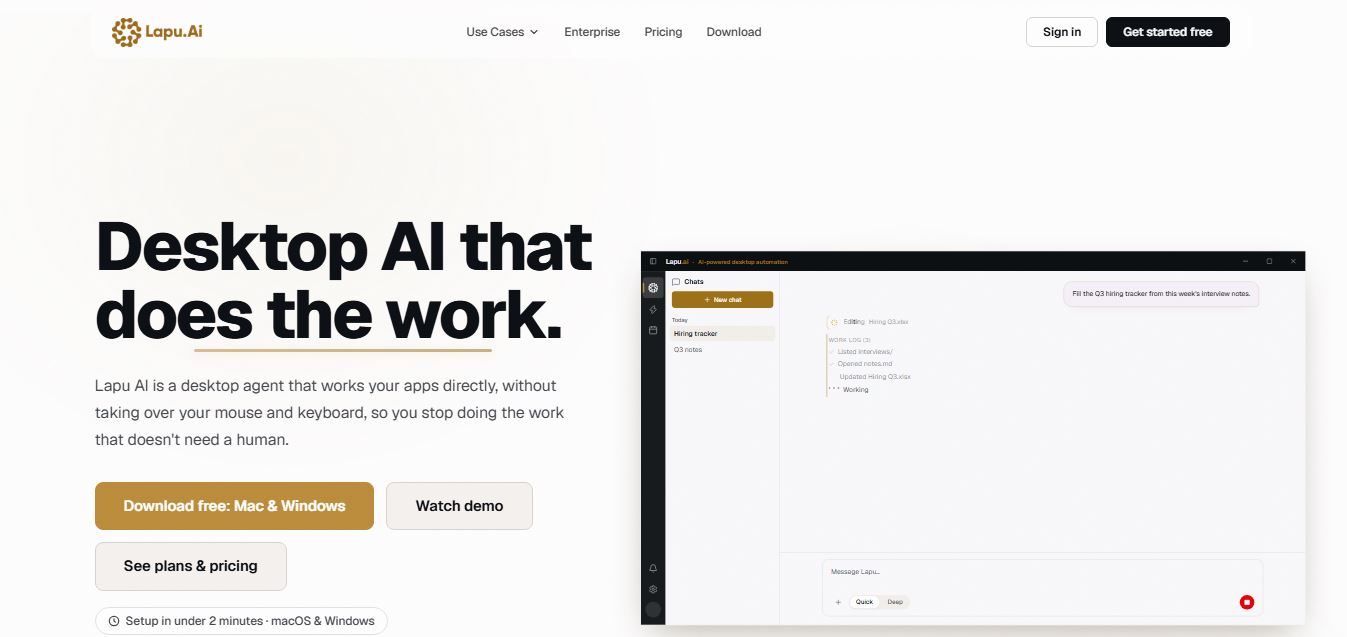
Lapu AI is a desktop AI agent that automates real work on your computer by interacting with files, apps, and the terminal. It executes multi-step tasks with built-in AI while keeping data local and secure.
What is Lapu AI?
Lapu AI is a native desktop AI agent designed for macOS and Windows that executes multi-step workflows directly on your computer. Rather than functioning merely as a browser extension or a chat window, Lapu AI works across your local applications, files, and terminal environment.
Built around the mission to “Drive your apps, not your mouse,” Lapu AI operates via operating system controls rather than seizing cursor input, allowing workflows to run reliably without breaking when windows move. The platform features a floating Mini Chat interface, intelligent task planning, cross-application data orchestration, and automated workflow scheduling. Operating on a freemium model, Lapu AI offers a free starter tier alongside individual subscription plans starting at $20 per month (Premium), $60 per month (Pro), and $100 per month (Max), alongside custom Teams and Enterprise options.
- Platform Role: Desktop AI Agent, Workflow Automation Suite & Operating System Assistant
- Core Capabilities: Direct App Control, File Management, Terminal Command Execution, and Cross-App Workflows
- Ecosystem Accessibility: Native Desktop Application for macOS and Windows with Floating Mini Chat
Use Cases:
- Pulling data from one native desktop or web app and pushing it directly into another without tedious tab-switching
- Organizing, renaming, and searching thousands of local files in seconds by type, date, or content
- Running terminal commands, installing dependencies, and chaining development operations seamlessly
- Packaging complex multi-step processes into reusable skills and scheduling them to run automatically
- Brainstorming, summarizing complex documents, and breaking down ideas into structured action plans
Technology:
- Local-first architecture ensuring workspace files and documents remain stored securely on your machine
- OS-level direct app control utilizing standard macOS and Windows application programming interfaces
- Permissioned execution engine requiring explicit user approval before performing sensitive file writes or shell commands
Target Users:
- Software engineers and developers managing local files, git repositories, and terminal workflows
- Founders, operators, and knowledge workers juggling multi-app desktop tasks
- Privacy-conscious professionals requiring local-first file processing without cloud storage lock-in
Acquisition: Independent desktop AI software platform

What are the key features of Lapu AI?
Lapu AI's key platform features are
- Direct App Control: Works your apps directly through native OS controls without hijacking your mouse or cursor.
- Floating Mini Chat: A lightweight chat assistant that stays on top and follows you across all desktop applications.
- Intelligent Task Planning: Breaks down plain-language goals into sequential steps, utilizing local tools automatically.
- File & Terminal Integration: Reads local files, executes shell commands, and manages directories securely.
- Reusable Skills & Scheduling: Package custom workflows into repeatable recipes and schedule them to run automatically.
- Permissioned Security Sandbox: Requires your explicit approval for sensitive actions like file writes and shell commands.
How much does Lapu AI cost?
Lapu AI operates on a freemium model with a free starter tier alongside tiered monthly subscriptions for individual power users and custom enterprise contracts.
Pricing Plans:
- Free Plan ($0): Includes core desktop agent capabilities, file/terminal tools, and limited usage with no credit card required.
- Premium Plan ($20 / month): Unlocks increased usage limits, workflow scheduling, priority execution, and email support.
- Pro Plan ($60 / month): Delivers 5x the usage of Premium, advanced workflow features, and faster support.
- Max Plan ($100 / month): Provides maximum operational headroom, 12x Premium usage, top-priority execution, and dedicated support.
- Teams & Enterprise (Custom): Tailored plans offering shared workspace usage, unlimited seats, SSO/SAML, custom SLAs, and dedicated account management.
Disclaimer: Self-serve individual plans are billed monthly. For complete enterprise tier details, visit lapu.ai/pricing.
Who should use Lapu AI?
Lapu AI is designed for desktop power users and developers, including
- Engineers and technical professionals automating terminal commands and local file management
- Knowledge workers executing repetitive data-entry and cross-application workflows
- Privacy-focused users who want an AI agent running locally without sending documents to cloud storage
What are the best alternatives to Lapu AI?
Some of the strongest Lapu AI alternatives include
- Anthropic Computer Use / Claude Operator
- OpenAI Operator
- MultiOn
- Keyboard Maestro
What are the pros and cons of Lapu AI?
What are the pros of Lapu AI?
- Local-first architecture ensures your personal files and documents remain on your machine
- Does not hijack your mouse or cursor, allowing you to multitask while the agent works
- Combines file manipulation, terminal execution, and cross-app workflows into a single interface
- Permissioned execution requires human approval for sensitive actions
What are the cons of Lapu AI?
- Currently limited to native desktop application environments (macOS and Windows)
- Heavy power users may exhaust lower-tier usage allowances quickly without upgrading to Pro or Max
Why should you choose Lapu AI?
Traditional AI chat assistants are restricted to browser tabs and text boxes, forcing you to manually copy and paste data across your computer. Lapu AI bridges this gap by embedding an intelligent desktop agent directly into your operating system.
- Automate multi-step workflows across native desktop apps with a single prompt
- Maintain absolute data privacy with a local-first file storage architecture
- Execute terminal commands and organize files instantly without remembering complex syntax
- Keep your cursor free while the agent completes background tasks securely
How does Lapu AI compare to competitors?
The main difference between Lapu AI and browser-bound AI agents like OpenAI Operator lies in its native desktop integration and local file execution. While web-based browser agents operate inside isolated cloud browser tabs, Lapu AI runs directly on your macOS or Windows machine with direct access to local files, terminal commands, and desktop applications without taking over your mouse.
| Feature / Platform | Lapu AI | OpenAI Operator | MultiOn | Keyboard Maestro |
|---|---|---|---|---|
| Core Focus | Native Desktop AI Agent & OS Workflow Automation | Browser-Based AI Research & Task Agent | AI Web Browser Automation Extension | Traditional Mac Macro Automation Utility |
| Execution Environment | Native macOS & Windows desktop app | Cloud browser sandbox | Cloud & browser extension | Local macOS macro engine |
| Local File & Terminal Access | Yes (Deep local file & shell integration) | Limited / Browser restricted | Browser oriented | Local scripting only |
| Pricing Model | Free / Premium ($20/mo) to Max ($100/mo) | ChatGPT Plus / Pro bundle | Subscription tiers | One-time purchase (~$36) |
| Best For | Executing cross-app desktop & terminal workflows | Automating web-based browser tasks | Navigating websites via natural language | Advanced Mac keyboard shortcuts & macros |
How do we rate Lapu AI?
| Parameter | Rating (out of 5) |
|---|---|
| Desktop App & Terminal Integration | 4.9 |
| Local Privacy & Permissioned Security | 5.0 |
| Multi-Step Task Planning & Execution | 4.8 |
| Mini Chat Usability & Workflow Scheduling | 4.8 |
| Value for Money | 4.7 |
| Overall Score | 4.84 |
What is our review and verdict on Lapu AI?
Lapu AI represents an impressive leap forward in desktop automation, shifting AI from passive chat suggestions to active, local execution. By providing direct control over local files, terminal commands, and desktop applications without taking over your cursor, it solves major workflow friction for developers and power users. Backed by a strict local-first privacy architecture and permissioned safeguards, Lapu AI is an exceptional productivity upgrade.
Conclusion
Lapu AI turns repetitive computer chores into automated background processes. With its native desktop reach, robust security model, and seamless multi-app orchestration, Lapu AI gives modern professionals complete command over their digital workflows.
FAQ
What is Lapu AI and what does it actually do?
Lapu AI is a desktop AI agent that runs directly on your computer and performs real tasks across your files, apps, and system tools. Unlike browser-based AI tools, it can read files, run commands, and automate workflows end-to-end, turning simple instructions into completed work instead of just giving suggestions.
How is Lapu AI different from ChatGPT or other AI assistants?
Most AI assistants generate answers inside a chat interface, but Lapu AI is built to execute tasks. It operates at the operating system level with access to your files, terminal, and applications, allowing it to complete multi-step workflows instead of asking you to manually follow instructions.
What kind of tasks can Lapu AI automate?
Lapu AI can handle a wide range of desktop tasks such as organizing files, extracting and processing data, generating reports, running terminal commands, updating apps, and managing cross-app workflows. It can pull data from one tool and push it into another, making it useful for repetitive operational work.
Does Lapu AI run locally or in the cloud?
Lapu AI follows a local-first approach, meaning the agent runs directly on your computer and executes tasks locally. Your files and data stay on your machine, and only the minimal context required for AI reasoning is sent externally when needed.
Is Lapu AI safe to use with sensitive data?
Yes, Lapu AI is designed with security in mind, including permission-based execution where every sensitive action—like editing files or running commands—requires your approval. It also maintains an audit trail of all actions, so you can review exactly what the agent did at any time.
Who should use Lapu AI?
Lapu AI is ideal for professionals, teams, and power users who want to automate repetitive computer work and reduce manual effort. It’s especially valuable for people working across multiple tools—like operations, sales, or admin—where tasks involve switching between apps and managing large amounts of data.
User Reviews
No reviews yet for Lapu AI.
Featured Tools
Featured AI tools from TechShark

Melody Genie
MelodyGenie is an AI-powered music generator that creates original songs from simple text prompts. Users can choose styles, moods, and genres, then instantly generate melodies and full tracks, making it easy for creators, marketers, and hobbyists to produce custom music without musical expertise.
Freemium

Kimi AI
Kimi AI is an advanced AI assistant developed by Moonshot AI that helps you chat, research, write, code, and automate tasks in one place. It supports web search, file analysis, and multimodal inputs, and can even run autonomous “agent” workflows to complete complex tasks end-to-end.
Freemium

Fashion Diffusion AI
Fashion Diffusion is an AI-powered fashion design platform that helps brands and designers create clothing designs, virtual try-ons, AI models, product photos, and marketing visuals faster and cost-effectively.
Paid

Veo 4
Veo 4 AI is an AI video creation platform that generates dramatic videos from text, images, audio, and video prompts using realistic motion and synchronized sound.
Paid
Alternatives
Alternatives to Lapu AI
The best Lapu AI alternatives include Anthropic Computer Use, OpenAI Operator, MultiOn, Keyboard Maestro, and <a href="https://techshark.io/tools/ai-toolbox/" target="_blank">AI Toolbox</a>. These tools provide task execution and workflow automation. While Lapu AI specializes in a native desktop agent for macOS and Windows that executes multi-step workflows across local files, terminal commands, and apps without taking over your mouse, alternatives focus primarily on cloud browser sandboxes or browser extension automation.
TubeBuddy
AI Agent
TubeBuddy (tubebuddy.com) is a popular browser extension and channel management platform that helps YouTube creators optimize videos for search, conduct keyword research, automate bulk channel tasks, run thumbnail A/B testing, and leverage AI creation agents.
Peachly AI
AI Agent
Peachly AI (peachlyai.xyz) is an AI-powered advertising and campaign management platform designed for direct-to-consumer brands, marketers, and businesses to create, target, and optimize multi-platform ad campaigns across Facebook, Instagram, and Google Ads in minutes.
Iridea AI
AI Agent
Iridea AI (iridea.ai) is an AI-powered spatial design and interior visualization platform designed for interior designers, architects, real estate developers, and homeowners to convert 2D floor plans, sketches, and room photos into photorealistic 3D interior renders and virtual staging concepts in seconds.
CrawlQ AI
AI Agent
CrawlQ AI (crawlq.ai) is an AI-powered audience research, market intelligence, and semantic content generation platform designed for growth marketers, copywriters, agencies, and founders to map ideal customer personas, discover buyer intent, and generate conversion-focused content.
Replai
AI Agent
Replai (replai.so) is an AI-powered social media reply and engagement growth tool designed for creators, founders, and community managers to generate context-aware, viral, and engaging replies across X (Twitter) and LinkedIn to boost profile visibility and audience growth.
KeyAPI AI
AI Agent
KeyAPI AI (keyapi.ai) is an AI-powered API key management, gateway security, and monetization platform designed for developers, SaaS founders, and engineering teams to securely route, rate-limit, authenticate, and monetize custom AI models and API services.
Dealism AI
AI Agent
Dealism AI (dealism.ai) is an AI-powered B2B sales intelligence and deal execution platform designed for sales development reps, account executives, and revenue operations teams to automate deal discovery, prospect research, outreach personalizations, and CRM pipeline tracking.
Didoo AI
AI Agent
Didoo AI (didoo.ai) is an AI-powered content generation and marketing automation platform designed for creators, digital agencies, and e-commerce brands to generate social media posts, ad copy, blog articles, and visual assets from simple prompts.
Enso
AI Agent
Enso (enso.bot) is an AI-powered conversational search and research automation platform designed for knowledge workers, analysts, researchers, and students to aggregate, synthesize, and analyze multi-source intelligence using intelligent agent workflows.