DBeaver
DBeaver is a free, open-source database management tool that helps developers and analysts connect, query, and manage data across multiple databases from one interface. It supports SQL and NoSQL systems, offers a powerful SQL editor, data visualization, and migration tools for efficient data workflows.
What is DBeaver?
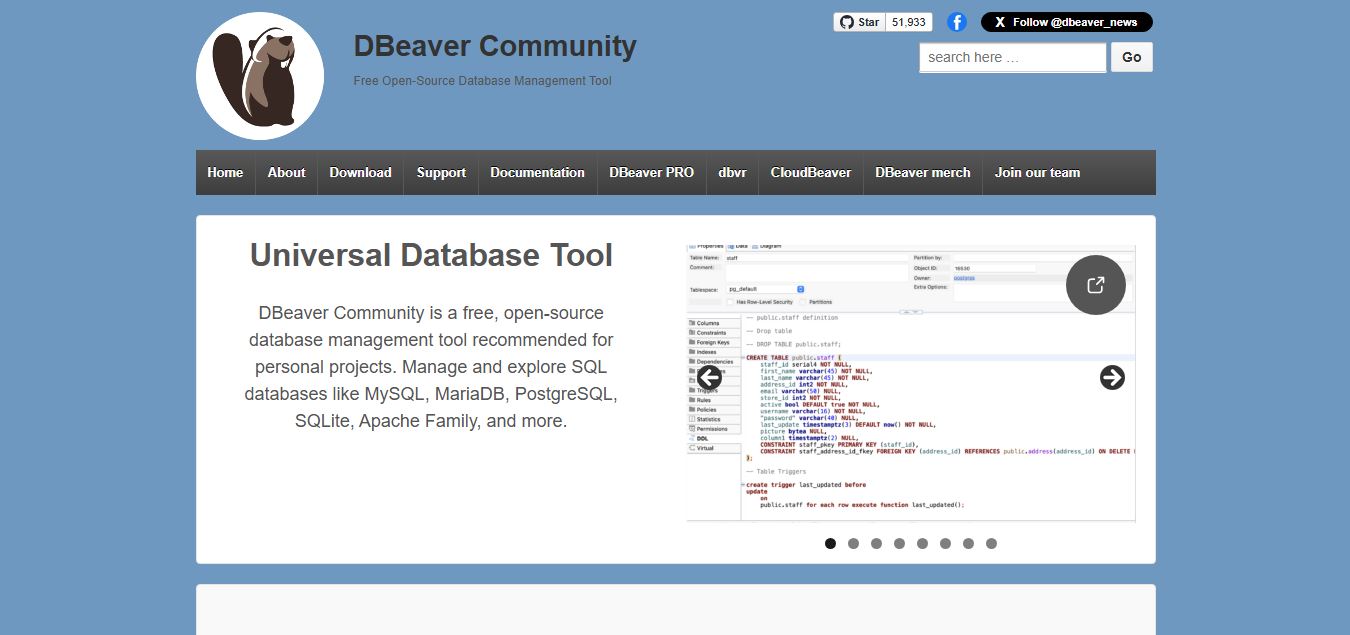
DBeaver is a free and open-source database management tool that allows users to connect to, manage, and analyze data across a wide range of databases like MySQL, PostgreSQL, Oracle, SQL Server, and more. It provides a user-friendly interface for writing SQL queries, visualizing data, managing schemas, and performing database administration tasks. With features like ER diagrams, data editing, and cross-database support, it is widely used by developers, analysts, and database administrators to simplify data management and improve productivity.
Founded in 2010 by Serge Rider, DBeaver has grown into one of the most widely adopted developer tools in the world, serving millions of users across open-source Community Edition (CE) and commercial PRO editions. Built on a modular Eclipse architecture (with cross-platform standalone installers and an Eclipse IDE plugin), DBeaver supports over 100 database engines—including MySQL, PostgreSQL, SQLite, Oracle, SQL Server, DB2, ClickHouse, Snowflake, Redshift, MongoDB, and Redis. It pairs robust schema management with modern AI-powered SQL assistants, ER diagram visualizers, and secure SSH tunneling.
- Founder / Leadership: Serge Rider (Founder & Lead Architect)
- Launch Year: 2010 (Expanded with DBeaver PRO editions, CloudBeaver team web servers, AI SQL assistants, and advanced data migration tools through 2024–2026)
Use Cases:
- Managing multi-database developer environments across relational, NoSQL, graph, and cloud data warehouses within a single desktop application
- Writing, debugging, and executing complex SQL queries with syntax highlighting, auto-completion, and multi-result-set grids
- Generating interactive Entity-Relationship (ER) diagrams automatically from live database schemas to document system architecture
- Migrating tables, schemas, and millions of rows between completely different database engines (e.g., MySQL to PostgreSQL or Oracle to Snowflake)
Technology:
- Universal JDBC driver and native driver abstraction architecture connecting to 100+ database engines
- Automated ER diagram layout generator rendering visual table relationships and foreign key dependencies
- Cross-platform desktop engine (macOS, Windows, Linux) built on Java/Eclipse SWT with secure SSH/SSL tunneling and bastion host support
Target Users:
- Software engineers and backend developers building application data layers across diverse tech stacks
- Database administrators (DBAs) monitoring server health, managing user privileges, and auditing slow queries
- Data analysts and business intelligence teams writing ad-hoc SQL reports and exporting data to CSV, JSON, or Excel
- Content creators using writing tools to draft database documentation, schema migration briefs, and technical architecture specifications
Corporate Entity: Operates as DBeaver Corp (Delaware, USA & Global)

Key features of DBeaver
DBeaver's key features are
- 100+ Database Engine Support: Connects to virtually any database using JDBC drivers or native client libraries, covering SQL, NoSQL, time-series, and cloud data warehouses.
- Advanced SQL Editor & Assistant: Intelligent auto-completion, syntax highlighting, query execution plans (EXPLAIN), and AI-powered natural language Text-to-SQL generation.
- Automated ER Diagrams: Instantly generate and export Entity-Relationship diagrams visualizing database tables, columns, and foreign key relationships.
- Data Migration & Transfer: Easily copy tables, schemas, and rows between disparate database engines with built-in mapping tools.
- Secure Tunneling & Authentication: Connect securely to production servers using SSH tunnels, SOCKS proxies, SSL/TLS certificates, and cloud IAM authentication.
- Data Editor & Custom Filters: Edit grid cells directly, apply custom sorting and filtering, and export data in CSV, JSON, XML, SQL insert scripts, or Excel formats.
- Mock Data Generator (PRO): Generate thousands of realistic fake test rows (names, emails, numbers, dates) to populate empty database tables for testing.
- CloudBeaver Team Web Edition: Web-based server deployment allowing teams to access shared database connections securely via browser.
DBeaver Pricing
DBeaver offers a free open-source Community Edition alongside paid PRO subscriptions tailored for professional developers, DBAs, and enterprise teams.
DBeaver Community Edition (CE):
- $0 / Free open-source forever (GPL license)
- Includes universal database client functionality, 100+ database connections, SQL editor, data grid, ER diagrams, and community support
DBeaver PRO (Individual Editions - Lite / Enterprise / Ultimate):
- Lite Edition: ~$15.00 / month (~$150/year) – adds NoSQL support, cloud extensions, and advanced SQL templates
- Enterprise Edition: ~$25.00 / month (~$250/year) – adds mock data generation, advanced data migration tools, security compliance features, and full PRO extensions
- Ultimate Edition: ~$40.00 / month (~$400/year) – combines all database drivers, advanced security, and enterprise support
Team & CloudBeaver Plans:
- Custom team seat pricing for shared enterprise web management
- Includes centralized team connection management, web-based access, and role-based access control
Disclaimer: Prices are listed in USD. The open-source DBeaver Community Edition is free for commercial and personal use. Visit dbeaver.io/download for active PRO pricing tiers.
Who is using DBeaver?
DBeaver is designed for software engineers, database administrators, and data teams, including
- Software Developers: Managing application databases across PostgreSQL, MySQL, and Redis during full-stack development
- Database Administrators (DBAs): Monitoring server performance, reviewing execution plans, and executing data migrations across enterprise servers
- Data Analysts & BI Engineers: Writing ad-hoc queries, exploring unfamiliar schemas, and exporting dataset reports
- Content Creators: Using writing tools to draft database documentation, schema migration briefs, and technical architecture specifications
- Enterprise IT Teams: Deploying CloudBeaver web servers to provide controlled, browser-based database access for internal departments
- Computer Science Students: Learning SQL syntax and database design using a universal, industry-standard client
Best DBeaver Alternatives
Some of the strongest DBeaver alternatives include
- Chat2DB
- TablePlus
- DataGrip (JetBrains)
- Beekeeper Studio
- Navicat Premium
- Azure Data Studio
Pros and Cons of DBeaver
Pros
- Unmatched versatility with native JDBC support for over 100 database engines in a single application
- Generous free open-source Community Edition provides full core database management without artificial limits
- Automated ER diagram generation simplifies database schema documentation and relationship mapping
- Robust data migration and table copy tools make moving data between different database types straightforward
- Secure SSH tunneling and SSL certificate management ensure safe connections to production servers
Cons
- Built on Java/Eclipse, DBeaver has a heavier RAM memory footprint than ultra-lightweight native clients like TablePlus
- User interface can feel cluttered and feature-dense for beginners accustomed to minimalist design
- Advanced features like mock data generation and NoSQL document viewers are locked behind paid PRO editions
- Initial startup time can be slightly slower than native desktop applications
Why Choose DBeaver?
DBeaver is the premier choice for developers and DBAs who need a universal, battle-tested database management client that handles over 100 database engines with powerful schema tools and open-source availability.
- Manage 100+ database engines using a single universal interface
- Generate clear Entity-Relationship (ER) diagrams from live schemas automatically
- Migrate tables and data seamlessly across different database systems
- Connect securely to remote servers via SSH tunnels and SSL encryption
- Benefit from a free, open-source Community Edition trusted by millions worldwide
DBeaver vs. Competitors
The main difference between DBeaver, Chat2DB, TablePlus, and DataGrip is that DBeaver is the definitive universal open-source database client with massive 100+ engine JDBC breadth and robust schema tools, whereas Chat2DB focuses heavily on conversational AI Text-to-SQL and local-first AI privacy, TablePlus is an ultra-fast native GUI client emphasizing minimal RAM usage, and DataGrip is JetBrains' professional IDE with advanced static code analysis. DBeaver stands out for its universal driver breadth, open-source community edition, and enterprise migration tooling.
| Feature / Tool | DBeaver (dbeaver.io) | Chat2DB | TablePlus | DataGrip |
|---|---|---|---|---|
| Core Focus | Universal Open-Source Database Manager | AI-Driven Database Client & Text-to-SQL | Native Lightweight Database GUI | Professional Developer SQL IDE |
| Engines Supported | 100+ (Extensive JDBC drivers) | 40+ (SQL, NoSQL, Analytical) | 20+ (Major relational & NoSQL) | 30+ (Major relational engines) |
| Automated ER Diagrams | Yes (Full visual ER schema designer) | Basic Schema Diagrams | Basic Schema Views | Yes (Advanced Diagramming) |
| Open-Source Availability | Yes (Free Community Edition) | Open-Source Desktop Client | Proprietary Native App | Proprietary JetBrains IDE |
| Starting Paid Price | Free CE / PRO from ~$15–$25/mo | Free CE / Pro from ~$8–$10/mo | Free tier / License from $89.00 | $22.90/mo ($229/yr) |
| Best For | Universal DBA Management & Migrations | Developers Wanting AI Querying & Charting | Developers Wanting Ultra-Fast Native RAM | Enterprise Engineers Writing Heavy SQL |
How do we rate DBeaver?
| Parameter | Rating (out of 5) |
|---|---|
| Database Connectivity & Driver Breadth (100+) | 5.0 |
| Schema Tools & ER Diagrams | 4.9 |
| Data Migration & Transfer Capabilities | 4.9 |
| Community Edition Value & Open-Source Access | 5.0 |
| Value for Money | 4.9 |
| Overall Score | 4.94 |
DBeaver Review
DBeaver remains the gold standard for universal database management. In an engineering landscape where developers frequently switch between MySQL, PostgreSQL, Redis, Snowflake, and SQLite across different projects, having a single tool that connects to all of them is invaluable. DBeaver’s free open-source Community Edition provides robust core functionality without artificial paywalls, offering advanced SQL editing, data grid filtering, SSH tunneling, and automated ER diagram generation. While its Java/Eclipse foundation gives it a slightly heavier RAM footprint than native tools like TablePlus, its unmatched driver breadth, reliable data migration tools, and mature feature set make it an essential desktop application for developers and DBAs worldwide.
Conclusion
DBeaver is an industry-leading universal database client and database administration suite that simplifies multi-engine data management. By combining support for over 100 database engines, automated ER schema diagrams, seamless data migration tools, secure SSH tunneling, and a robust free open-source Community Edition, it delivers an indispensable tool for technical professionals. While developers seeking lightweight native speed or conversational AI Text-to-SQL may pair it with tools like TablePlus or Chat2DB, DBeaver’s universal reach and reliability make it a cornerstone developer utility.
FAQ
What is DBeaver and how does it work?
DBeaver is a multi-platform database management tool and SQL client that lets you connect to, query, and manage databases through a graphical interface. It works by connecting to databases via JDBC or native drivers, allowing you to write SQL queries, browse tables, edit data, and manage schemas—all in one place.
What problem does DBeaver solve?
DBeaver solves the problem of managing multiple databases and writing complex SQL efficiently. Instead of switching between different tools for MySQL, PostgreSQL, MongoDB, etc., it provides a single interface for 100+ data sources, saving time and reducing workflow complexity.
What are the key features of DBeaver?
DBeaver includes features like SQL editor with autocomplete, data viewer/editor, ER diagrams, data import/export, schema comparison, query builder, and metadata browser. It also supports advanced capabilities like SSH tunneling, security integrations, and mock data generation for testing.
Does DBeaver support multiple databases?
Yes, DBeaver supports 100+ databases, including MySQL, PostgreSQL, Oracle, SQL Server, MongoDB, Snowflake, and many more. It can also connect to almost any database using JDBC/ODBC drivers, making it one of the most versatile database tools available.
Is DBeaver free to use?
Yes, DBeaver offers a free, open-source Community Edition, which is ideal for individual developers and basic database tasks. It includes core features like SQL editing, data browsing, and database management tools.
What is the difference between DBeaver Community and Pro versions?
The Community version is free and open-source, while Pro versions (Lite, Enterprise, Ultimate) add advanced features like NoSQL support, cloud integrations, AI tools, team collaboration, and enterprise-grade security.
User Reviews
No reviews yet for DBeaver.
Featured Tools
Featured AI tools from TechShark

Melody Genie
MelodyGenie is an AI-powered music generator that creates original songs from simple text prompts. Users can choose styles, moods, and genres, then instantly generate melodies and full tracks, making it easy for creators, marketers, and hobbyists to produce custom music without musical expertise.
Freemium

Kimi AI
Kimi AI is an advanced AI assistant developed by Moonshot AI that helps you chat, research, write, code, and automate tasks in one place. It supports web search, file analysis, and multimodal inputs, and can even run autonomous “agent” workflows to complete complex tasks end-to-end.
Freemium

Fashion Diffusion AI
Fashion Diffusion is an AI-powered fashion design platform that helps brands and designers create clothing designs, virtual try-ons, AI models, product photos, and marketing visuals faster and cost-effectively.
Paid

Veo 4
Veo 4 AI is an AI video creation platform that generates dramatic videos from text, images, audio, and video prompts using realistic motion and synchronized sound.
Paid
Alternatives
Alternatives to DBeaver
The best DBeaver alternatives include Chat2DB, TablePlus, DataGrip (JetBrains), Beekeeper Studio, Navicat Premium, and Azure Data Studio. These platforms provide database management, SQL editing, and schema visualization. While DBeaver is the definitive universal open-source database manager supporting 100+ database engines with automated ER diagrams and robust data migration tools, alternatives like Chat2DB specialize in conversational AI Text-to-SQL and local-first privacy, TablePlus provides an ultra-lightweight native GUI with minimal RAM usage, and DataGrip delivers deep IDE-grade code inspections. Choosing the right tool depends on whether you require universal driver breadth and free open-source flexibility, AI conversational querying, or ultra-fast native desktop performance.