
Kinovi
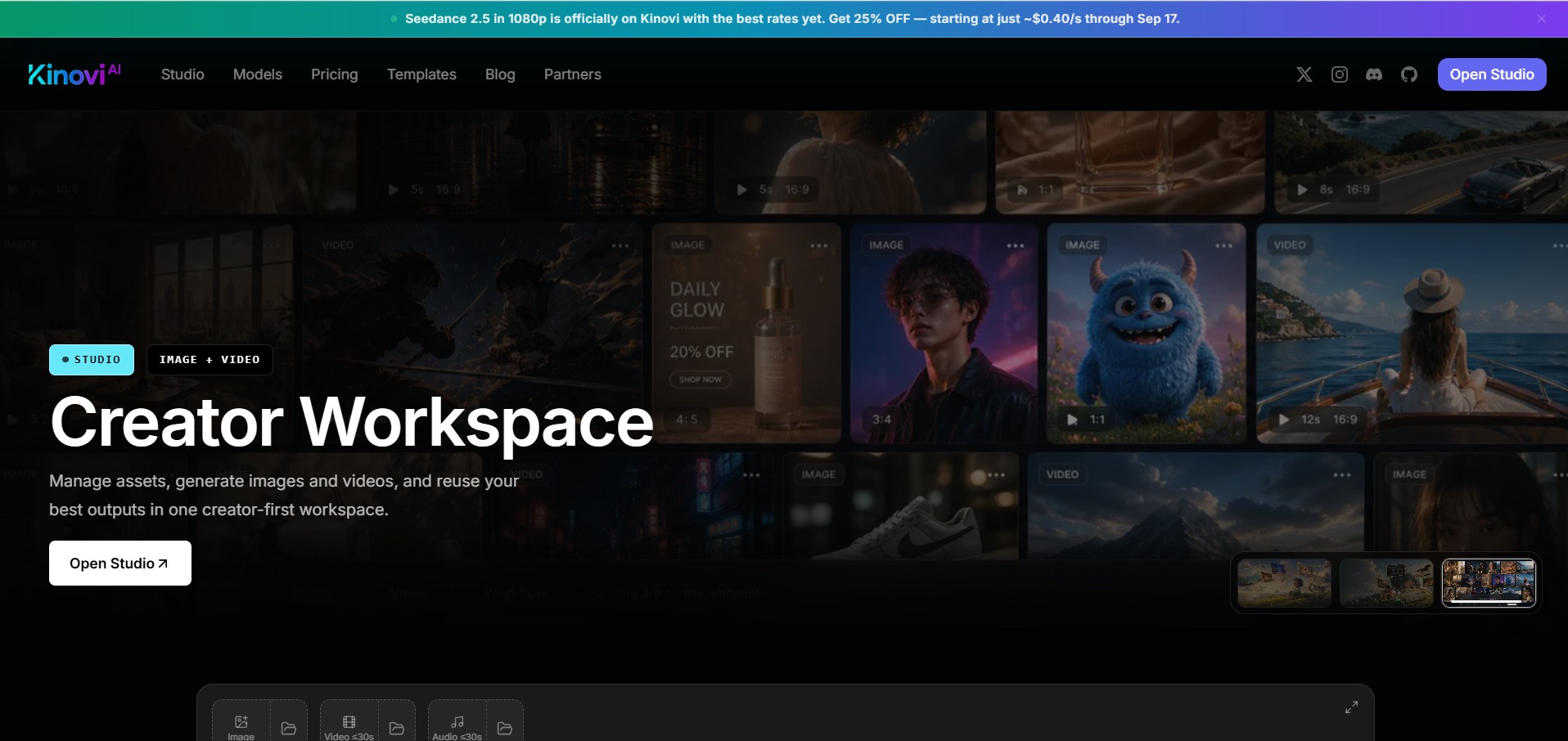
Kinovi is an AI video studio that transforms short prompts and visual references into directed, cinematic clips. Built on Seedance 2.0, it offers multimodal, reference-driven creation with @-tag shot direction, giving filmmakers and creators granular control over style, motion, and composition.
What is Kinovi?
Kinovi is an AI video studio designed for creators who want to direct their AI-generated content, not just hope for a good result. Instead of relying on a single text prompt, Kinovi allows you to combine text, images, video clips, and audio to guide the AI, giving you far more control over the final cinematic output.
Built on the Seedance 2.0 model, Kinovi treats video generation as a directing task. You can upload up to 9 images, 3 video clips, and 3 audio tracks, then use natural language and special @-tags to assign specific roles to each reference—like setting a first frame, dictating a camera move, or choosing a soundtrack. This approach makes it feel less like a magic generator and more like a lightweight virtual camera crew.
- Core Focus: Reference-Driven AI Video Generation, Cinematic Clip Creation, Director-Grade Control
- Pricing Model: Freemium, with one-time credit packs starting at $14.99
Use Cases:
- Indie filmmakers blocking out shots, experimenting with camera moves, and generating previsualization for pitches
- Marketing and creative agencies producing short product spots, social hooks, and animated explainers
- Content creators generating stylized B-roll, intros, and transitions for TikTok, YouTube, and Instagram
- Game, VFX, and animation teams sketching cinematic ideas and motion tests before full production
- Educators demonstrating framing and camera language in film or media courses
Technology:
- Powered by Seedance 2.0 Pro and over 10 underlying AI models
- Multimodal input: accepts text, images (up to 9), video clips (up to 3), and audio tracks (up to 3)
- @-Tag shot direction for granular control over how each reference shapes the final clip
- Generates 4–15 second clips at 16:9 aspect ratio
- Offers First & Last Frame and Multi-Ref modes for advanced composition
- Integrated AI image generation with credits shared across video and image creation
Target Users:
- Filmmakers, directors, and video editors
- Marketing and creative agencies
- Content creators and social media influencers
- Game developers, VFX artists, and animation teams
- Educators and students in film and media studies
Acquisition: Freemium with one-time credit purchases (non-expiring credits)

Key features of Kinovi
Kinovi's core features include
- Multimodal, Reference-Driven Workflow: Accepts images, video clips, audio, and text to guide style, motion, rhythm, and composition
- @-Tag Shot Direction: File names can be tagged with @ in the prompt to assign specific roles (e.g., first frame, camera move, soundtrack)
- Short-Form AI Video Generation: Produces 4–15 second cinematic clips at 16:9, ideal for shots, ads, and B-roll
- Iterative Editing Tools: Shots can be extended, regenerated, or refined with new instructions
- Integrated Image Creator: Credits can also be used for still image generation (approx. $0.06 per image)
- Credit-Based Studio Economics: Pay-per-second video (roughly $0.20–$0.40/second) with non-expiring credits
- Commercial-Ready Output: No watermark on paid generations with full commercial license on higher credit packs
Kinovi Pricing
Kinovi operates on a freemium model with one-time credit pack purchases. Credits are used for both video generation (per second) and image creation, providing flexibility for different project needs.
Free:
- $0
- Includes 200 credits on sign-up
- All AI generation features
- No watermark
- Commercial use allowed
Starter Pack:
- $14.99 one-time
- Includes 3,000 credits
- All AI generation features
- No watermark
- Commercial use allowed
- Credits never expire
XL Pack:
- $99.99 one-time
- Includes 22,000 credits (best value per credit)
- All AI generation features
- No watermark
- Full commercial license
- Credits never expire
Disclaimer: Please note that pricing information may not be up to date. For the most accurate and current pricing details, refer to the official Kinovi website.
Who is using Kinovi?
Kinovi is used by a variety of creative professionals, including
- Indie Filmmakers and Directors: For blocking shots, experimenting with camera moves, and generating previsualization for pitches
- Marketing and Creative Agencies: Producing short product spots, social hooks, and animated explainers without live-action crews
- Content Creators and Influencers: Generating stylized B-roll, intros, and transitions for social platforms
- Game, VFX, and Animation Teams: Rapidly sketching cinematic ideas, mood pieces, and motion tests
- Educators: Demonstrating framing and camera language in film or media courses
Best Kinovi Alternatives
Some of the strongest Kinovi alternatives include
- Runway Gen-2/Gen-3 — Advanced AI video generation with text-to-video and image-to-video
- Pika Labs — AI video platform with style control and editing features
- Sora (OpenAI) — High-quality text-to-video generation (limited availability)
- Kaiber AI — AI video generation with artistic styles and animation
- Synthesia — AI video creation platform for professional and business videos
Pros and Cons of Kinovi
Pros
- Fine-grained creative control through multimodal references and @-tagging
- Production-friendly 4–15 second clip lengths, ideal for shots, ads, and B-roll
- Commercial-ready output with no watermark on paid generations
- One-time, non-expiring credit purchases suit burst workflows
- Fast generation for short clips, enabling rapid ideation and A/B testing
- Integrated image and video generation under a single credit system
Cons
- Credit-based pricing can become expensive for heavy experimentation or long clips
- Focused on short clips only—longer sequences require external stitching
- Some learning curve with @-tag workflow and reference management
- Not a casual "one-button" tool; designed for those who want to direct
Why Choose Kinovi?
If you're tired of leaving your AI video results to chance, Kinovi puts you back in the director's chair. It's built for creators who want to guide every aspect of their AI-generated clips—from composition and motion to rhythm and style. With its reference-driven workflow and non-expiring credits, Kinovi is a powerful and practical tool for professionals who need control, speed, and commercial rights.
- Unique @-tag system for granular shot direction
- Combines multiple references (images, video, audio, text) for precise control
- No watermark and full commercial licensing available
- Credit packs never expire, offering flexibility for irregular work patterns
Kinovi vs. Competitors
The main difference between Kinovi and other AI video tools like Runway Gen-2 or Pika Labs is the level of directorial control. While many tools are prompt-only, Kinovi's multimodal reference system and @-tagging allow you to actively direct the AI, making it feel more like a virtual camera crew. However, this comes with a steeper learning curve and a per-second credit cost that may not suit casual users.
| Feature / Tool | Kinovi | Runway Gen-2/3 | Pika Labs | Sora (OpenAI) |
|---|---|---|---|---|
| Core Focus | Reference-driven cinematic clips | Text-to-video & image-to-video | AI video with style control | High-quality text-to-video |
| Multimodal Input | Yes (images, video, audio, text) | Limited | Limited | Text only (currently) |
| @-Tag Direction | Yes | No | No | No |
| Pricing Model | One-time credit packs | Subscription | Subscription | Not yet publicly priced |
| Best For | Directors & serious creators | Versatile video generation | Quick, stylized video clips | High-fidelity video generation |
How do we rate Kinovi?
| Parameter | Rating (out of 5) |
|---|---|
| Accuracy and Reliability | 4.2 |
| Ease of Use | 4.0 |
| Functionality and Features | 4.5 |
| Performance and Speed | 4.1 |
| Customization and Flexibility | 4.3 |
| Data Privacy and Security | 3.8 |
| Support and Resources | 3.9 |
| Cost-Efficiency | 4.0 |
| Integration Capabilities | 3.8 |
| Overall Score | 4.1 |
Kinovi Review
Kinovi is a breath of fresh air for creators who have felt limited by prompt-only AI video tools. Its reference-driven workflow, combined with the unique @-tag system, gives users a level of directorial control that is rare in this space. The ability to guide the AI with images, video clips, and audio makes it a powerful tool for previsualization and quick shot generation. While the credit-based pricing and short clip focus may not suit everyone, serious creators, filmmakers, and agencies will find it a valuable addition to their production toolkit.
Conclusion
Kinovi successfully bridges the gap between AI generation and professional video production. By putting control back in the hands of the creator, it offers a compelling alternative to more random, prompt-based tools. With its non-expiring credits, commercial licensing, and director-focused workflow, Kinovi is an excellent choice for anyone who wants to treat AI video as a genuine part of their creative process.
FAQ
What is Kinovi?
Kinovi is an AI video and image generation platform that lets users create cinematic content from text prompts, images, videos, and other visual references. It is designed for creators who want more control over the composition, movement, style, and direction of generated clips.
What can Kinovi be used for?
Kinovi can be used to create short-form videos, cinematic shots, social media content, advertisements, product visuals, B-roll, storyboards, and creative concepts. It can also support previsualization for filmmakers, agencies, animation teams, and other visual creators.
How does Kinovi create AI videos?
Users can combine natural-language prompts with visual and audio references to guide video generation. Kinovi supports multimodal inputs and lets creators use reference images, video clips, and audio to influence the resulting shot.
Does Kinovi support multiple AI models?
Yes. Kinovi provides access to multiple AI image and video models through its Studio and API. Its current model catalog includes options such as Seedance, Kling, GPT Image, and Midjourney, with available models and rates shown directly on the platform.
Can Kinovi be used without coding?
Yes. Kinovi Studio allows creators to generate images and videos directly through a browser without writing code. Developers can also use Kinovi's public REST API when they want to automate or integrate AI generation into their own applications and workflows.
Is Kinovi free to use?
Kinovi uses a credit-based, pay-as-you-go model. Futurepedia lists a free option with 200 signup credits, while the current Kinovi platform offers paid credit packages that can be used across Studio and API generation. Purchased credits do not expire.
How much does Kinovi cost?
Kinovi's current pricing starts with a Starter package at $9.99 for 2,150 credits, while the XL package costs $99.90 for 21,500 credits. A larger Studio package costs $999.90 for 215,000 credits, and custom Enterprise plans are also available.
User Reviews
No reviews yet for Kinovi.
Featured Tools
Featured AI tools from TechShark

Melody Genie
MelodyGenie is an AI-powered music generator that creates original songs from simple text prompts. Users can choose styles, moods, and genres, then instantly generate melodies and full tracks, making it easy for creators, marketers, and hobbyists to produce custom music without musical expertise.
Freemium

Kimi AI
Kimi AI is an advanced AI assistant developed by Moonshot AI that helps you chat, research, write, code, and automate tasks in one place. It supports web search, file analysis, and multimodal inputs, and can even run autonomous “agent” workflows to complete complex tasks end-to-end.
Freemium

Fashion Diffusion AI
Fashion Diffusion is an AI-powered fashion design platform that helps brands and designers create clothing designs, virtual try-ons, AI models, product photos, and marketing visuals faster and cost-effectively.
Paid

Veo 4
Veo 4 AI is an AI video creation platform that generates dramatic videos from text, images, audio, and video prompts using realistic motion and synchronized sound.
Paid
Alternatives
Alternatives to Kinovi
The top Kinovi alternatives include Runway Gen-2/Gen-3, Pika Labs, Sora (OpenAI), Kaiber AI, and Synthesia. While Kinovi offers a unique reference-driven workflow with @-tag shot direction and multimodal input for granular control, Runway and Pika Labs provide more general-purpose AI video generation with subscription-based pricing. Sora represents the cutting edge of text-to-video quality, but lacks Kinovi's directorial control. The right choice depends on whether you prioritize creative control and a director-focused workflow or prefer a more straightforward, prompt-based approach.
 4.8
4.8MGAI (Message Game AI)
Gaming
MGAI is an AI wingman for online dating conversations, helping users create better messages, ask engaging questions, develop date ideas, and move conversations forward. Created by dating expert Ice White, it also provides access to The Message Game book, Tinder Profile Checklist, community support, and live coaching through its membership.
AI or Human
Gaming
AI or Human is an interactive browser game that challenges you to identify whether images or text were created by AI or humans. You make your choice for each example, review your performance, and learn why recognizing synthetic media can be difficult. It works without requiring users to upload their own files or use technical detection software for everyday users.
LitRPG Adventures
Gaming
LitRPG Adventures is an AI-powered platform that helps gamers, writers, and creators generate detailed RPG content like character backstories, quests, and worlds. It offers multiple generators and a large content library, making it easy to build immersive tabletop or fantasy stories quickly.
SportBot AI
Gaming
SportBot AI is an advanced AI-powered sports analytics and value-detection platform designed to help sports enthusiasts and bettors understand probabilities, risk, and market inefficiencies. Rather than offering guaranteed tips, it aggregates real-time data across soccer, basketball, American football, hockey, and tennis, using machine learning algorithms to scan bookmaker odds and uncover statistical edges.
Noctie AI
Gaming
Noctie AI is an advanced, human-like AI chess trainer and virtual sparring partner designed to help players of all skill levels improve. Unlike traditional chess engines (such as Stockfish) that rely on brute-force calculation, Noctie is trained on over a billion human games to emulate human intuition, opening choices, and natural mistakes from beginner to super-GM level (~2800 Elo). It features real-time color-coded move evaluations, custom opening practice, and personalized puzzle generation based on your mistakes.
 4.7
4.7Hexagram
Gaming
Hexagram is an interactive development studio and technology platform that leverages artificial intelligence and cloud services to build dynamic, ever-evolving virtual worlds and cross-platform entertainment experiences. Known for pioneering immersive narrative campaigns, augmented reality (AR) activations, and responsive AI characters for major global brands.
RoFT
AI-Detection
RoFT (Real or Fake Text) is an interactive, gamified research project and web application that challenges users to test their ability to distinguish between human-written text and machine-generated content. Featuring diverse content categories like short stories, news articles, recipes, and speeches, the platform focuses on 'Boundary Detection' to help users identify the exact moment an artificial intelligence takes over writing.
AuxWorld
Gaming
AuxWorld is a prompt-to-world generative AI platform developed by Auxuman Inc. that allows users to create, explore, and remix fully interactive 3D multiplayer universes from simple text descriptions in under 30 seconds. Featuring drop-in multiplayer support, custom physics, procedural soundtracks, and a remix economy akin to GitHub forks, it enables anyone to build and share playable virtual spaces.
AI Game Master
Gaming
AI Game Master is an immersive, AI-powered text adventure and Dungeon RPG platform inspired by Dungeons & Dragons. Utilizing advanced generative language models, it acts as an infinite, dynamic Dungeon Master that reacts in real time to player choices, weaving branching storylines, combat encounters, and open-ended fantasy worlds entirely through text.